[Plugin] TextureTools
-
I must have missed this one before, but thanks again for another immensely useful and generous plugin!
-
TIG, I have a request.
Would it be possible to add a "rotate, scale and match UVs" tool?
It would work this way:First, you select all the faces you want to edit the texture on.
Second, you click on the tool and select one face you want to use as a reference.
Third, the script matches scale and rotation, AND if possible, offset of UVs from the reference faces UVs compared to the vertices of the faces in the initial selection. (Does this make sense?) -
@pixero said:
TIG, I have a request.
Would it be possible to add a "rotate, scale and match UVs" tool?
It would work this way:First, you select all the faces you want to edit the texture on.
Second, you click on the tool and select one face you want to use as a reference.
Third, the script matches scale and rotation, AND if possible, offset of UVs from the reference faces UVs compared to the vertices of the faces in the initial selection. (Does this make sense?)It's possible to 'batch process' textures on faces by passing arguments as explained elsewhere in the thread... The complication is gleaning the scale/rotation of the selected face's texture... I'll sleep on it [for a day or two...]

-
I'm not sure I understand the word "gleaning"?
Would it be possible to compare the vertices position/distance from the "reference" face and the others and get the UVs from that? Just a thought... -
Sorry, my slightly 'old' English slipped in there... by 'gleaning' I mean gathering up small bits from a larger amount... 'to glean' the wheat from the chaff when threshing corn, is to collect the small grains of wheat and leave the rest of the straw etc behind... SO by metaphor - we need to collect the important small bits of data from the larger amount that is available - by some yet unspecified process...
We would need to take the UV-mapping of one face and apply it to others - that's straightforward... however, using relative rotations etc gets more complex...

I'm thinking about it... -
Missed this
Any chance you could add a scale feature?
-

-
I have been happily using Texture Tools for a few weeks, but seem to have borked them with the addition of other plugins. I have been backtracking to disable / remove some of the unexplored/less useful items, but wonder...are there any known plugin conflicts to avoid with TT V. 1.5? I reeeeely like it.
-
There shouldn't be any clashes with other tools - they are self-contained in there own Module and there are no added/changed built-in methods ??
Can you post any messages from the Ruby Console [which needs to be open before you run anything] when you test its tools... or other tools that seem to 'clash'.
Script 'clashes' are very rare and usually arise from rewritten shared methods or observer glitches - but I'd be surprised if it were the case here -
good
-
Thanks Bro for creating such wonderful plugin...
-
hi dear TIG ...
this plugin is grate .. it installs with no problem .. and it runs well when I install this codes in a blank plugin folder with SU's default rubies ... but ... when I try to run it whit my own plugins folder with many rubies installed , it doesn't run in the way ... no start up problems .. but when I click to a Icon in your toolbar anything happens ...
help me ... I thing your plugin intersects with another plugins .. because when I turn them off the plugin works well again ...i'm not a developer but I sometimes read the developers section .. I have seen a topic that say developer should use unique classes and unique names ...
so please change your code names .. if it's need ... I don't know about it .. you are a SU ruby genius .. and you know it better than me ...
but .. there is a bug that happens when I load my outher plugins ( include VRAY , and lots of other rubies ) .. loading theme disables plugin's function
-
I am surprised that it clashes with any other scripts.
It is written within its own class/module/methods etc.
There are a few 'rogue scripts' that mess with base class method - often to do with groups - or have ill-configure observers; although these tools have little that I can think of that might clash with anything, let alone a 'rogue script'
Can you open the Ruy Console before trying my tools and pass on any error messages that might appear...
It's currently a mystery
-
here is the screen shots ...

... I have run commands from the "menu" section of plugins code ( cmd1=UI::Command.new("TextureRotate"){TextureTools::Rotate.new()} ) ...
I have copied and pasted commands ...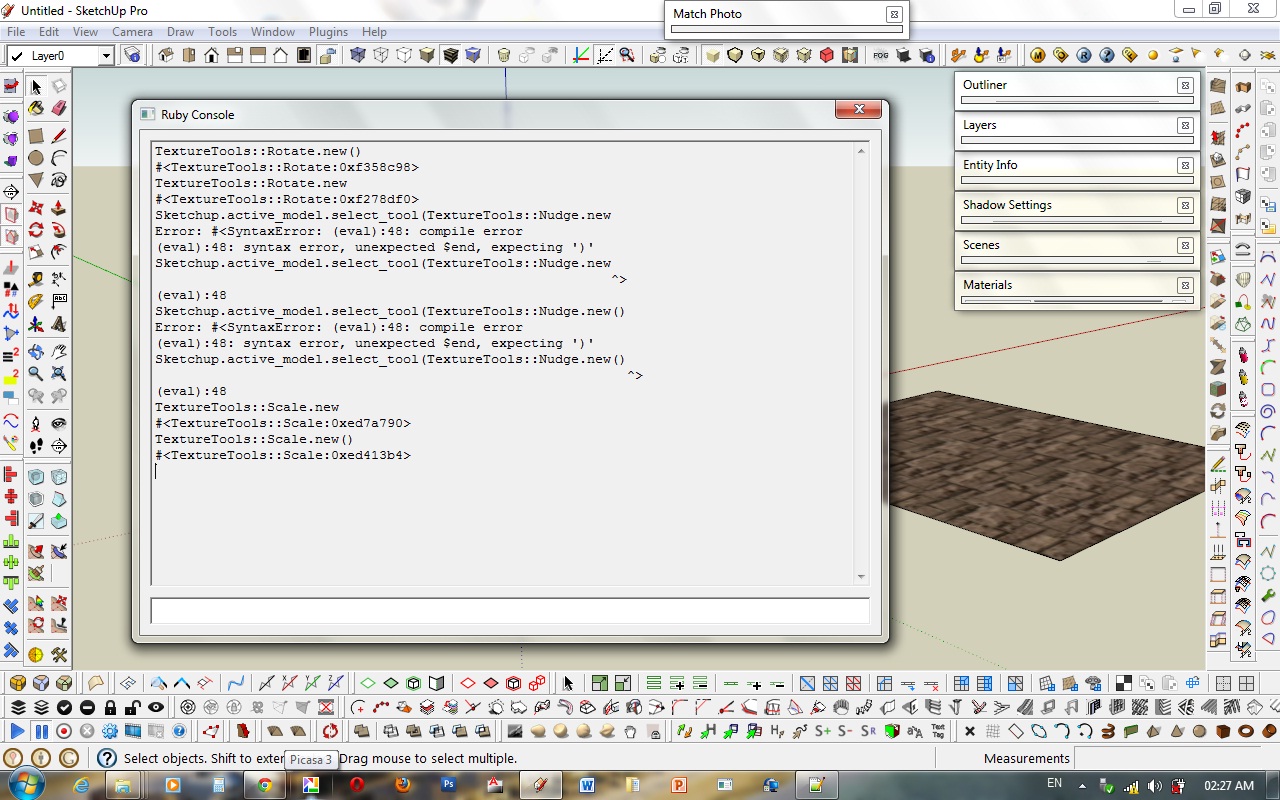
-
Why are you pasting commands ?
These are not complete??
TextureTools::Rotate.new()is all you need... BUT why ?Have you edited the script at all?
Using a program to 'read' the file [+ a 'save'] other than a plain-text editor [like Notepad.exe] will corrupt the contents.
Or have you downloaded it is a strange way?
The file appears to be corrupted and the commands are not correctly formed.
try downloaded a pristine copy again...
This screenshot shows what the lines should look like. What happens when you use the toolbar buttons ???
 -
TIG ... I haven't edited plugin ... I'm running original files ... but I opened file with notepad++ because i didn't now the commands to load this plug by counsel .. so I copied that part .. and told you what I have done ...
but .. there is problem ... probably by other plugins with bad programing skills ... maybe in RBS files ...I know my ruby files are good enough ( no sketchup.rb from CADFather toolbars .. a purged plugin folder .. updated scripts , etc ... )
sketchup can't compile TextureTools in these situations ...
and I now that's not an installation mistake ... It works well under isolated situations ... -
If you are absolutely sure that the tool's file is OK then test it by moving all other .rb files out of your Plugins folder temporarily and restarting.
If it now works you know another 'now-not-loaded' script is causing the problem.
Now move half of the .rb files back into the Plugins folder.
Restart and retest.Again if it now works you know another 'now-not-loaded' script is causing the problem.
therefore keep repeating the process until it fails...When it fails you know you have just reintroduced the problem .rb file.
Move half out and retest... back and forth etc until you find the problem file.
Let us know the problem file !As I said... I can't see how a flaky script might affect this tool...
-
ok ... I will do it now ... wait about an hour plz /// ...
-
hi .. TIG ... I have done the JOB and it still failed to compile .. I did it agane plus anything else I knew ,I re download it, re installed it and repaired SU using it's installer to update default .rb files .. , etc
but this plugin still doesn't works for me .. when I use "arrow keys" commands the dialog box is OK and the OK button is OK .. but no more ..
It didn't do its job even in a isolated plugin folder that includes only this plugin and TIG tools .... i'm surprised wht this happens .. but it's happens ..

I have uploaded MY folders whit current situations : this tool in plugin folder and only default files in tools folder ...
i have updated my SU to 8 M3 some days ago .. and there is a question : have you tested this in SU8 M3 ? .... . . . . something is still wrong
-
Of course I have tested it with v8M3 [probably some months before you
]
I even just retested it to make sure I wasn't going mad
Your cut down file-sets look fine to me - incidentally you Tools folder ought to have two other .rb files by default 'dynamiccomponnents' and 'sandboxtools'... I assume you had excluded those too...When you run my tools what happens exactly ?
Do you get error messages in the Ruby Console ?
Do you get dialogs to open ?
Does ANYTHING happen ?
Are there 'crashes' etc ??
When you select a face with a material on its front that has a texture what happens.Are you 100% sure that what you are looking at is the face's front.
Backs are NOT adjustable.
This could be your issue... but without the SKP, who knows ??
View in Monochrome mode with a distinctive color for the back-face material [e.g. bright-blue] and check that you are not adjusting the unseen rear, which is in fact what should be the 'front'.
If you have messed up there are tools like my 'FixReverseFaceMaterials' which flip over faces and materials so that the texture is then on the front AND the front is facing where the back used to be...If all else fails post or PM the SKP [zipped] and explain what is is you are trying to do...






Advertisement