sketchucation logo sketchucation
    • 登入
    Oops, your profile's looking a bit empty! To help us tailor your experience, please fill in key details like your SketchUp version, skill level, operating system, and more. Update and save your info on your profile page today!
    🔌 Easy Offset | Offset selected faces in SketchUp in positive and negative offsets. Download

    [Plugin] TextureTools

    已排程 已置頂 已鎖定 已移動 Plugins
    106 貼文 34 Posters 103.4k 瀏覽 34 Watching
    正在載入更多貼文
    • 從舊到新
    • 從新到舊
    • 最多點贊
    回覆
    • 在新貼文中回覆
    登入後回覆
    此主題已被刪除。只有擁有主題管理權限的使用者可以查看。
    • OxerO 離線
      Oxer
      最後由 編輯

      @driven said:

      Hi TIG,

      all functionality working very well on the Mac, except toolbar tooltips.

      john

      The same, it works perfect on Mac. 👍

      "The result is the end what is important is the process" by Oxer
      [http://www.oxervision.blogspot.com/(http://www.oxervision.blogspot.com/)]

      1 條回覆 最後回覆 回覆 引用 0
      • OxerO 離線
        Oxer
        最後由 編輯

        I have translated the plugin to spanish, here is:

        Texture Tools 1.5 Spanish version

        Thanks TIG!!

        "The result is the end what is important is the process" by Oxer
        [http://www.oxervision.blogspot.com/(http://www.oxervision.blogspot.com/)]

        1 條回覆 最後回覆 回覆 引用 0
        • massimoM 離線
          massimo Moderator
          最後由 編輯

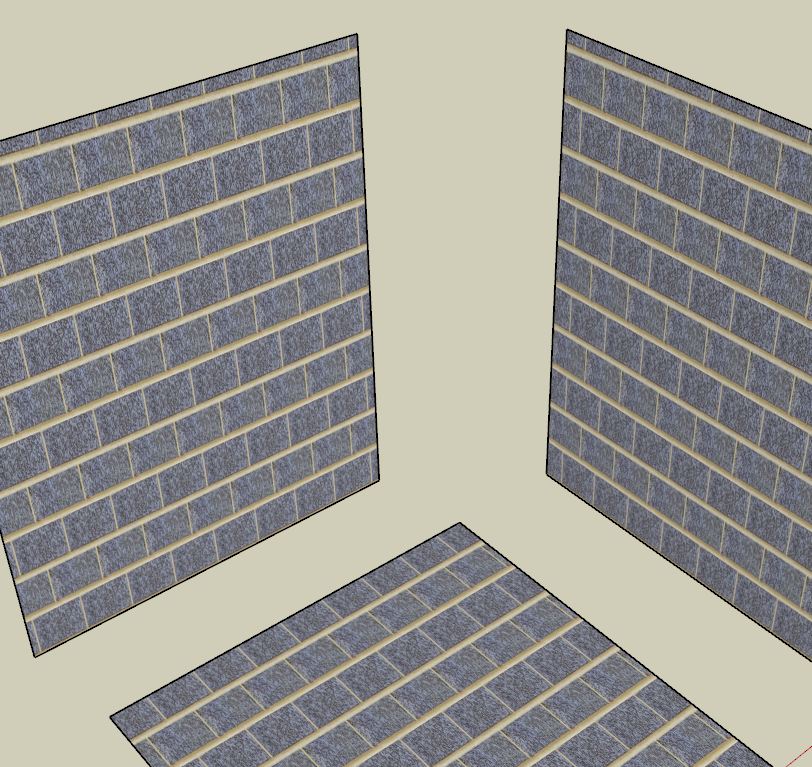
          TIG, i have tried this:
          -painted a surface with a material;
          -used one texture tool on the texture;
          -picked the texture with the sample tool and painted other surfaces with different orientations.
          Only with the "tweak" tool i get a strange behaviour following that workflow on connected faces. The texture looks a lot different on each plane... But if the planes are not connected it works just fine... 😕
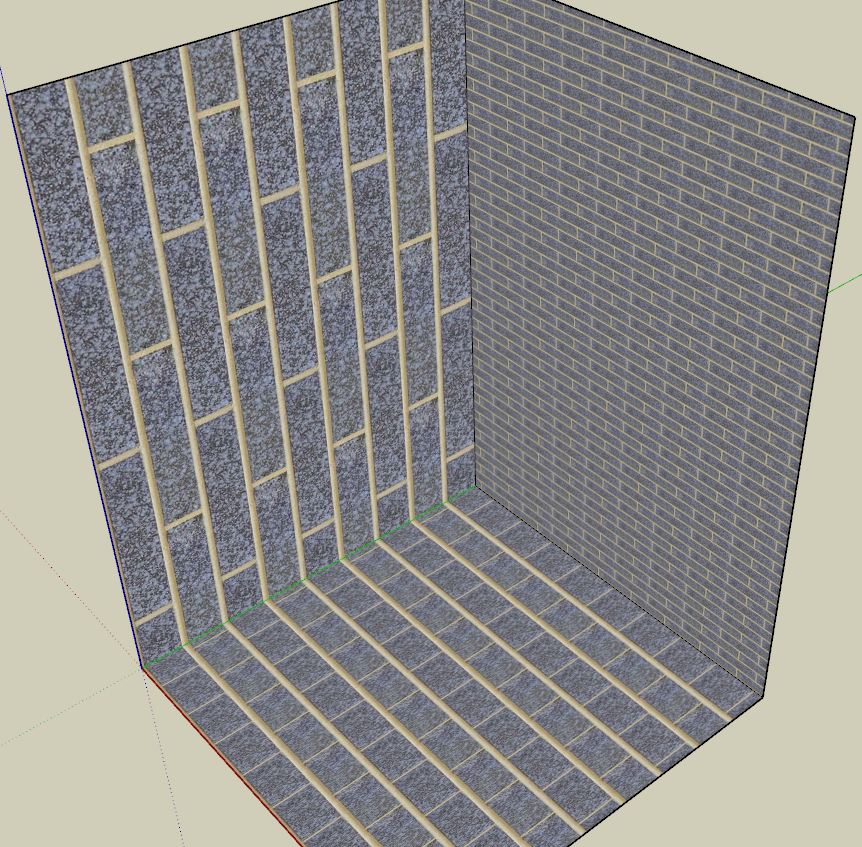

          Cattura_1.JPG


          Cattura_2.JPG

          1 條回覆 最後回覆 回覆 引用 0
          • TIGT 離線
            TIG Moderator
            最後由 編輯

            I think the built-in UV-mapping of connected-faces assumes a certain 'flow' of the material across their shared edges...
            If you have separate faces then their textures are arranged logically on a per-surface basis.
            Hence the different behavior of textures on separate and connected faces... 😕

            TIG

            1 條回覆 最後回覆 回覆 引用 0
            • massimoM 離線
              massimo Moderator
              最後由 編輯

              Hmmm...That happens also with the "texture scale" tool if you input different values for U and V. But that doesn't happen if you use the native "edit" and input different values for length and width. (picture below)
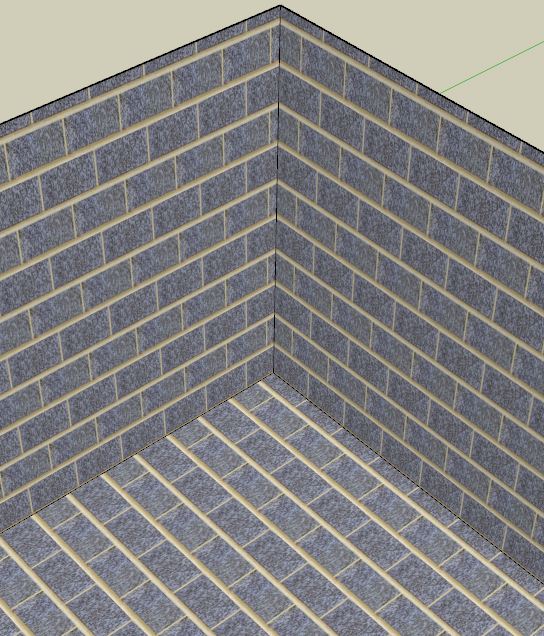

              Cattura.JPG

              1 條回覆 最後回覆 回覆 引用 0
              • TIGT 離線
                TIG Moderator
                最後由 編輯

                Hmmm... this is v1... perhaps there's more to do... 😕

                TIG

                1 條回覆 最後回覆 回覆 引用 0
                • massimoM 離線
                  massimo Moderator
                  最後由 編輯

                  No worries it's already a wonderful set of tools. 😄

                  1 條回覆 最後回覆 回覆 引用 0
                  • EarthMoverE 離線
                    EarthMover
                    最後由 編輯

                    Thanks TIG! Most helpful plugin of the year!

                    3D Artist at Clearstory 3D Imaging
                    Guide Tool at Winning With Sketchup
                    Content Creator at Skapeup

                    1 條回覆 最後回覆 回覆 引用 0
                    • dfswyfD 離線
                      dfswyf
                      最後由 編輯

                      Thank you so much for this, it is very helpful!

                      1 條回覆 最後回覆 回覆 引用 0
                      • R 離線
                        rv1974
                        最後由 編輯

                        Looks like another must-have,
                        Hats off to TIG 👍

                        1 條回覆 最後回覆 回覆 引用 0
                        • sumasterS 離線
                          sumaster
                          最後由 編輯

                          Hello sir,

                          Thank you very much .......
                          Its very useful .............
                          Good luck ........

                          Thanks again .......

                          Thank you,
                          SUmaster

                          1 條回覆 最後回覆 回覆 引用 0
                          • R 離線
                            rv1974
                            最後由 編輯

                            Dear ruby makers!
                            Please, If you put arrow keys (or any other ones) into the game make a temporary shortcut override!!!
                            There are some really usefull scripts with vulgar occupation of keys that make the life much harder.
                            Meanwhile only Thomthom implemented this feature.

                            1 條回覆 最後回覆 回覆 引用 0
                            • TIGT 離線
                              TIG Moderator
                              最後由 編輯

                              @rv1974 said:

                              Dear ruby makers!
                              Please, If you put arrow keys (or any other ones) into the game make a temporary shortcut override!!!
                              There are some really usefull scripts with vulgar occupation of keys that make the life much harder.
                              Meanwhile only Thomthom implemented this feature.
                              Sorry to say BUT I consider that you have it quite backwards!

                              Scripts that use Arrow-keys for 'nudging' values are quite common - which suggests that you shouldn't assign them as your own shortcuts! It's not like we are reusing 'standard shortcut keys' here - we are just using logical key presses within an add-on tool.

                              Just as you wouldn't sanely assign a shortcut key to a number [0-9], as they is used in the VCB in most native tools, or even 'x' or '*' or '/' as that is used in Move+Ctrl copy array etc, or say swap M from Move to Delete ! ...

                              There are lots of keys, and modifier-key combinations for you to choose from when setting your custom shortcuts, without you having to use any of those that are needed by add-ons to be used logically...

                              It was only because Thomthom wanted to use the Move, Rotate etc shortcut keys in his Vertex Tool, that he mimics how they are set up in a default installation for the native tools - so you can use M to Move an entity in the native tools or Move a Vertex within his tool. However, the hoops he has had to jump through in code to get it to work are not acceptable to many scripters. Indeed, if you've ever had his tool crash, leaving these shortcut keys remapped, then you know how annoying even his fix is, because then many of your shortcuts are left permanently reset to the wrong tools, even when you are out of his tool, leaving a manual remap of shortcuts the only option to revert to a default setup... TT's tools are also now compiled as rbs files so the methods are not readily transparent to other scripters...

                              I wrote the original TextureRotate code from scratch in just two hours... as a 'proof of concept' - you'd have had to wait a lot longer for a 'massaged' version of the code to remap shortcuts etc... BUT if you want shortcut keys remapping temporarily then do it yourself - the code is open to your reuse! If you invent a simple, safe and foolproof temporary key remapping method then I suggest you publish it as then scripters might be more inclined to add the safety-net for those of you who persist in shortcutting to keys that are better left alone to tools that really need them 😕

                              TIG

                              1 條回覆 最後回覆 回覆 引用 0
                              • R 離線
                                rv1974
                                最後由 編輯

                                'If You Want a Job Done Right...'. Got the message

                                1 條回覆 最後回覆 回覆 引用 0
                                • R 離線
                                  rv1974
                                  最後由 編輯

                                  Hi TIG!
                                  May I ask your for some new texture editing functionality (especially after 'extrude edges by offset' is out)?
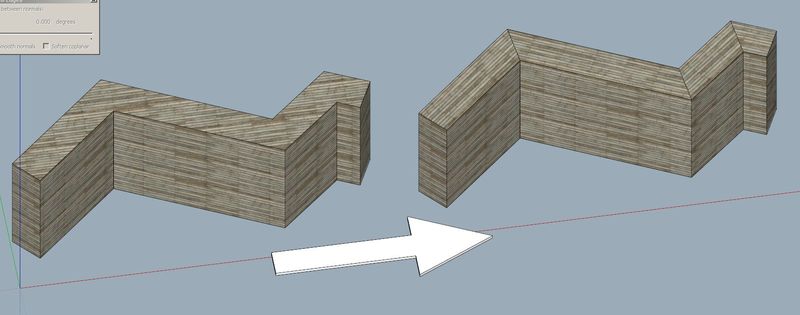

                                  ScreenShot002.jpg

                                  1 條回覆 最後回覆 回覆 引用 0
                                  • M 離線
                                    Matt666
                                    最後由 編輯

                                    Hi TIG, and thank you for this great script!
                                    Just one thing, I've mentioned here an plugin idea, that could rotate a texture along the longest dimension of a surface. Do you think it's possible?

                                    Frenglish at its best !
                                    My scripts

                                    1 條回覆 最後回覆 回覆 引用 0
                                    • TIGT 離線
                                      TIG Moderator
                                      最後由 編輯

                                      Matt

                                      Here's a one-liner that gives you the angles of a selected face's longest edge relative to the X_AXIS/Y_AXIS/Z_AXIS - the result in degrees [e.g. 90.0, 66.666, 0.0] you can then copy+pasted the sensible one into the TextureTool's Rotate dialog and the texture will realign with the long edge...

                                      f=Sketchup.active_model.selection[0];es=f.edges;ed=es[0];d=0;es.each{|e|(d=e.length;ed=e)if e.length>d};x=ed.line[1].angle_between(X_AXIS).radians;y=ed.line[1].angle_between(Y_AXIS).radians-90;z=ed.line[1].angle_between(Z_AXIS).radians;(x=x-90;y=y-90;z=z-90)if f.normal.z.abs==1;p x,y,z
                                      

                                      That assumes that the current texture has never been rotated...
                                      It's not perfect but it's a start... 😕

                                      TIG

                                      1 條回覆 最後回覆 回覆 引用 0
                                      • M 離線
                                        Matt666
                                        最後由 編輯

                                        Thank you for your answer TIG, I'll take a look!
                                        I was thinking more of a tool that would orient textures in current selection (groupe, component, or faces), or even the entire model... 😳

                                        Frenglish at its best !
                                        My scripts

                                        1 條回覆 最後回覆 回覆 引用 0
                                        • TIGT 離線
                                          TIG Moderator
                                          最後由 編輯

                                          The three TextureTools Rotate/Scale/Shunt are written to allow passing of arguments, so they can be run from other tools without a dialog.
                                          So, if you pass an angle in degrees to the 'rotate' tool then there's no dialog...
                                          So you can envisage a new tool that iterates all of the faces in a selection and finds the long side of each, calculates the rotation needed, and then uses the 'rotate' tool with the required angle passed to it so that the faces are processed en mass...
                                          It only works on one selected face at a time... so the new tool's code needs to use
                                          ` ss=model.selection
                                          ssa=ss.to_a
                                          ss.clear

                                          iterate face in faces

                                          ss.add(face)then later ### find angle_in_degrees etc...
                                          TextureTools::Rotate.new(angle_in_degrees)
                                          ss.clear

                                          loop`

                                          on close it could then use
                                          ss.clear ss.add(ssa)
                                          to restore the selection as it was...

                                          TIG

                                          1 條回覆 最後回覆 回覆 引用 0
                                          • M 離線
                                            Matt666
                                            最後由 編輯

                                            Ok that's great! Thank you TIG!

                                            Frenglish at its best !
                                            My scripts

                                            1 條回覆 最後回覆 回覆 引用 0
                                            • 1
                                            • 2
                                            • 3
                                            • 4
                                            • 5
                                            • 6
                                            • 3 / 6
                                            • 第一個貼文
                                              最後的貼文
                                            Buy SketchPlus
                                            Buy SUbD
                                            Buy WrapR
                                            Buy eBook
                                            Buy Modelur
                                            Buy Vertex Tools
                                            Buy SketchCuisine
                                            Buy FormFonts

                                            Advertisement