sketchucation logo sketchucation
    • 登入
    Oops, your profile's looking a bit empty! To help us tailor your experience, please fill in key details like your SketchUp version, skill level, operating system, and more. Update and save your info on your profile page today!
    ⚠️ Important | Libfredo 15.6b introduces important bugfixes for Fredo's Extensions Update

    [Plugin] [$] Artisan (1.2.3) - Feb 28, 2014

    已排程 已置頂 已鎖定 已移動 Plugins
    296 貼文 95 Posters 113.6k 瀏覽 95 Watching
    正在載入更多貼文
    • 從舊到新
    • 從新到舊
    • 最多點贊
    回覆
    • 在新貼文中回覆
    登入後回覆
    此主題已被刪除。只有擁有主題管理權限的使用者可以查看。
    • soloS 離線
      solo
      最後由 編輯

      Post wishes here: http://forums.sketchucation.com/viewtopic.php?f=323&t=40197

      http://www.solos-art.com

      If you see a toilet in your dreams do not use it.

      1 條回覆 最後回覆 回覆 引用 0
      • A 離線
        AcesHigh
        最後由 編輯

        Hi people... I am having some problems with the RoundCurve plugin by Fredo, and he suggested I should do what I intend with ARTISAN.

        I never used Artisan or Subdivide and Smooth... so I want to know if what I want to do is possible with ARTISAN and HOW to do it.

        Basically, what I have, is a square where I cut 2 of its corners with a bezier curve. Then I pushed/pulled the shape. I selected the top surface and applied Roundcurve, but for some reason, the plugin doesnt works well with bezier curves it seems, so the plugin offsets the curves but the offset "overlaps" itself in the curves, causing weird geometry.

        How can I have the same effect with Artisan?

        here is what happens when I try to use RoundCorner in my shape... first image shows the overlapping when offsetting the surface... second shows similar overlapping when using RoundCorner, and 3rd image shows the result of applying roundcorner when the curves overlap.

        3rd image also shows what I intend to do, so you guys can tell me if that is possible with Artisan and how you do that.

        I am also adding the shape that should be extruded and have its corners rounded with Artisan... so I hope you guys can confirm Artisan can do that and teach me how 😞 😞

        http://img542.imageshack.us/img542/8729/roundcorneroverlap.jpg


        artisantestshape.skp

        1 條回覆 最後回覆 回覆 引用 0
        • hellnbakH 離線
          hellnbak
          最後由 編輯

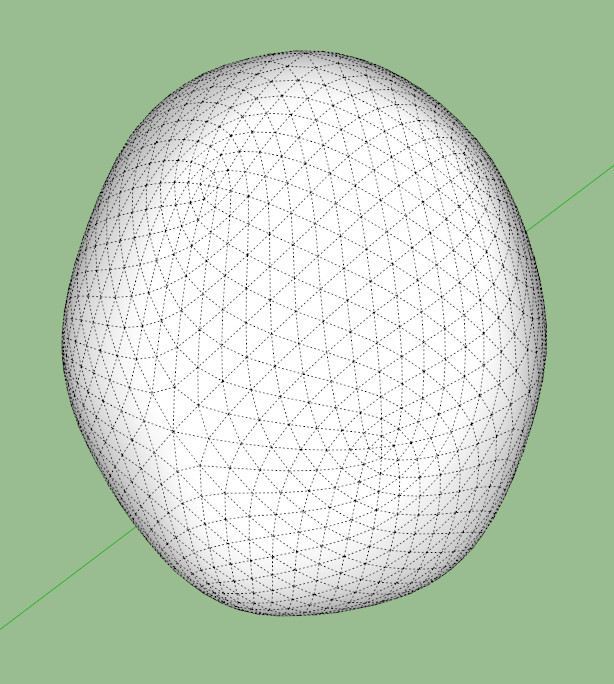
          Decided to set myself down and learn Artisan, and am having problems right off the bat. When I subdivide and smooth a cube, it does not come out smooth like the one in the how-to video. I ran 4 iterations just like in the video, and my results look more like a potato than the nice smooth result in the video. The subdivision patterns are different also.
          Here is what it should look like....
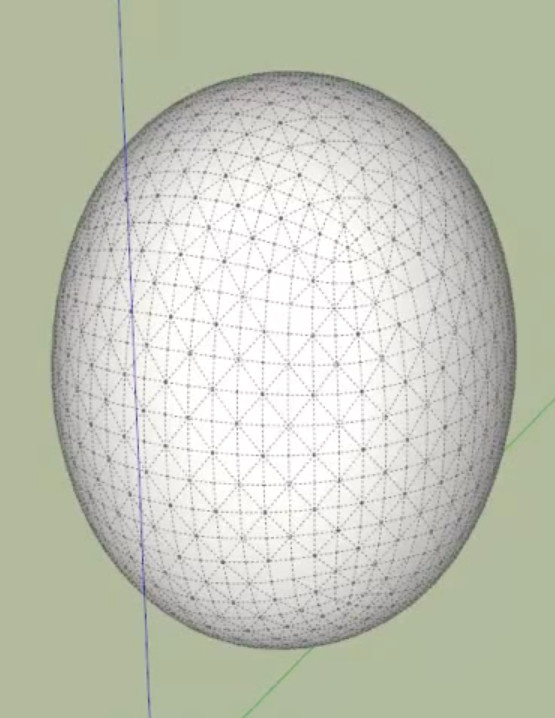
          2.jpg
          and here's what I got......
          3.jpg

          Don't know what I could be doing wrong, you select all the faces, and then subdivide and smooth four times, right? Just like in the video. If I can't get beyond the first basic step, I don't hold out much hope for getting very far with this. Any help will be much appreciated.

          "Politicians are just like diapers -- they need to be changed often, and for the same reason"

          1 條回覆 最後回覆 回覆 引用 0
          • W 離線
            Whaat
            最後由 編輯

            @hellnbak said:

            Don't know what I could be doing wrong, you select all the faces, and then subdivide and smooth four times, right? Just like in the video. If I can't get beyond the first basic step, I don't hold out much hope for getting very far with this. Any help will be much appreciated.

            You might be missing this step:

            After you press the subdivide and smooth button, then type in '4 <enter>'. This is how to properly achieve 4 iterations. (press <enter> again to commit)

            The alternative is to apply the SDS tool 4 times, each with one iteration. If you do this, you will probably not get the desired result.

            SketchUp Plugins for Professionals

            1 條回覆 最後回覆 回覆 引用 0
            • pilouP 離線
              pilou
              最後由 編輯

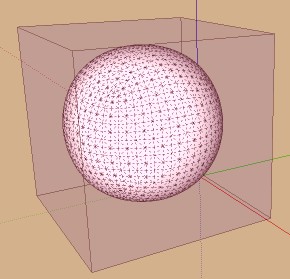
              Curious because from a cube I well obtain a sphere without any problem 😄

              very_curious.jpg

              Frenchy Pilou
              Is beautiful that please without concept!
              My Little site :)

              1 條回覆 最後回覆 回覆 引用 0
              • W 離線
                Whaat
                最後由 編輯

                Info about version 1.2 has been added to the first post.

                Get it here:
                http://artisan4sketchup.com/category/downloads/

                SketchUp Plugins for Professionals

                1 條回覆 最後回覆 回覆 引用 0
                • pbacotP 離線
                  pbacot
                  最後由 編輯

                  Thank you Dale. I have this DL'd already. I should remember, but how can you find out what version is currently installed?

                  MacOSX MojaveSketchUp Pro v19 Twilight v2 Thea v3 PowerCADD

                  1 條回覆 最後回覆 回覆 引用 0
                  • massimoM 離線
                    massimo Moderator
                    最後由 編輯

                    Thanks for the update Dale. 👍

                    @unknownuser said:

                    how can you find out what version is currently installed?

                    You should have a file called "artisan_loader" in the plugins folder which reports the installed version of the plugin.

                    1 條回覆 最後回覆 回覆 引用 0
                    • W 離線
                      Whaat
                      最後由 編輯

                      @pbacot said:

                      Thank you Dale. I have this DL'd already. I should remember, but how can you find out what version is currently installed?

                      Go to Windows->Preferences->Extensions->Artisan

                      SketchUp Plugins for Professionals

                      1 條回覆 最後回覆 回覆 引用 0
                      • pbacotP 離線
                        pbacot
                        最後由 編輯

                        Thanks Dale. Got it! So there's a good use of the extensions Tab after all. Now if they'd just make that window fully expandable and regularize its use...

                        MacOSX MojaveSketchUp Pro v19 Twilight v2 Thea v3 PowerCADD

                        1 條回覆 最後回覆 回覆 引用 0
                        • Mistro11M 離線
                          Mistro11
                          最後由 編輯

                          I am now a proud Artisan License Owner! Thanks for this great plugin! 😎

                          i7-4930k @3.4/3.7GHz, 32Gb RAM, NVidia GTX 980Ti 6Gb, Windows 7 Pro 64bit
                          Structural Integrity is Not Just Physical...It's in the Design and Purpose

                          1 條回覆 最後回覆 回覆 引用 0
                          • pbacotP 離線
                            pbacot
                            最後由 編輯

                            Sometimes I get no results from the sculpt tool at all. However this can change when I close the model or SU and reopen. What might be the things that make this tool work better, or worse?

                            Also: I'd request some lock on vertical movement in the future, so we don't have to hold the shift key down all the time (this is the way I use almost always use it when it works).

                            Version 1.2

                            Thanks, Peter

                            MacOSX MojaveSketchUp Pro v19 Twilight v2 Thea v3 PowerCADD

                            1 條回覆 最後回覆 回覆 引用 0
                            • guanjinG 離線
                              guanjin
                              最後由 編輯

                              Why do I install the free 15-day version of the display icon gray, can not be used.
                              If I buy genuine worry about will not be displayed? ?

                              I come from China, is to learn

                              1 條回覆 最後回覆 回覆 引用 0
                              • W 離線
                                Whaat
                                最後由 編輯

                                @pbacot said:

                                Sometimes I get no results from the sculpt tool at all. However this can change when I close the model or SU and reopen. What might be the things that make this tool work better, or worse?

                                Hi Peter,

                                Maybe you have a mask active? If you have any edge or face selected, the sculpt tool will only affect those selected entities. I am not sure why else you would experience this.

                                Dale

                                SketchUp Plugins for Professionals

                                1 條回覆 最後回覆 回覆 引用 0
                                • W 離線
                                  Whaat
                                  最後由 編輯

                                  @guanjin said:

                                  Why do I install the free 15-day version of the display icon gray, can not be used.
                                  If I buy genuine worry about will not be displayed? ?

                                  Unless Artisan was installed previously on your computer, the icons should not be gray until 15 days have expired.

                                  Once you purchase and register, the icons will no longer be grayed.

                                  If you have problems with the plugin after purchase, I can provide you a refund.

                                  Thanks
                                  Dale

                                  SketchUp Plugins for Professionals

                                  1 條回覆 最後回覆 回覆 引用 0
                                  • M 離線
                                    matsuo_lano
                                    最後由 編輯

                                    I'm getting a bug splat after using subdivide on a single rectangle...

                                    You try to rearrange me 'till I'm sane

                                    1 條回覆 最後回覆 回覆 引用 0
                                    • Rich O BrienR 離線
                                      Rich O Brien Moderator
                                      最後由 編輯

                                      Can you share the file?

                                      Download the free D'oh Book for SketchUp 📖

                                      1 條回覆 最後回覆 回覆 引用 0
                                      • M 離線
                                        matsuo_lano
                                        最後由 編輯

                                        Well, it's a fresh new file I've started, that's the weird thing.

                                        edit

                                        SketchUpUndo1.log says the following:

                                        File New
                                        File New
                                        ======== Starting GL ========

                                        CBaseGLView::OnInitialUpdate
                                        InitializeOpenGL
                                        GetActivePixelFormat
                                        Got PF= 15 from registry
                                        IsValidPixelFormatInfo
                                        requestedpf.accel=1
                                        ARB functions NOT available.
                                        nPfds=66
                                        Pixel format 1 does not do a swap copy.
                                        Pixel format 4 does not do a swap copy.
                                        Pixel format 7 does not do a swap copy.
                                        Pixel format 10 does not do a swap copy.
                                        Pixel format 13 does not do a swap copy.
                                        Pixel format 16 does not do a swap copy.
                                        Pixel format 19 does not do a swap copy.
                                        Pixel format 22 does not do a swap copy.
                                        Pixel format 25 does not do a swap copy.
                                        Pixel format 28 does not do a swap copy.
                                        Pixel format 15 is valid
                                        GLConfigUtils::GetActivePixelFormat ... returning specified format 15
                                        Make a context ... pf=15
                                        Got context @3d9e020 error=0
                                        GL initialization succeeded
                                        ***** First UI thread = 5236
                                        Tool(SketchTool)
                                        Tool(SketchTool)
                                        UseHWAccelerationFirstTime
                                        Not first time ... returning true
                                        Tool(SketchTool)
                                        Tool(SketchTool)
                                        Tool(RectangleTool)
                                        Tool(RectangleTool)
                                        Tool(RectangleTool)
                                        Start(Rectangle)Commit(1)
                                        Tool(RectangleTool)
                                        Tool(SelectionTool)
                                        Start(Reverse Face)Commit(2)
                                        Start(Open)Commit(3)
                                        Start(Change Axes)Commit(4)
                                        Start(Macro)

                                        You try to rearrange me 'till I'm sane

                                        1 條回覆 最後回覆 回覆 引用 0
                                        • pbacotP 離線
                                          pbacot
                                          最後由 編輯

                                          @whaat said:

                                          @pbacot said:

                                          Sometimes I get no results from the sculpt tool at all. However this can change when I close the model or SU and reopen. What might be the things that make this tool work better, or worse?

                                          Hi Peter,

                                          Maybe you have a mask active? If you have any edge or face selected, the sculpt tool will only affect those selected entities. I am not sure why else you would experience this.

                                          Dale

                                          Thank you, Dale, I'll keep that in mind!

                                          BTW is is mathematically impossible to have smooth work in vertical lock mode (like sculpt and flatten)? What do you think about a lock down setting instead of the shift key?

                                          Great tool. Still learning, I guess.

                                          Peter

                                          MacOSX MojaveSketchUp Pro v19 Twilight v2 Thea v3 PowerCADD

                                          1 條回覆 最後回覆 回覆 引用 0
                                          • W 離線
                                            Whaat
                                            最後由 編輯

                                            @pbacot said:

                                            @whaat said:

                                            @pbacot said:

                                            Sometimes I get no results from the sculpt tool at all. However this can change when I close the model or SU and reopen. What might be the things that make this tool work better, or worse?

                                            Hi Peter,

                                            Maybe you have a mask active? If you have any edge or face selected, the sculpt tool will only affect those selected entities. I am not sure why else you would experience this.

                                            Dale

                                            Thank you, Dale, I'll keep that in mind!

                                            BTW is is mathematically impossible to have smooth work in vertical lock mode (like sculpt and flatten)? What do you think about a lock down setting instead of the shift key?

                                            Great tool. Still learning, I guess.

                                            Peter

                                            Good suggestions, thanks! I will add them to the wishlist.

                                            SketchUp Plugins for Professionals

                                            1 條回覆 最後回覆 回覆 引用 0
                                            • 1
                                            • 2
                                            • 8
                                            • 9
                                            • 10
                                            • 11
                                            • 12
                                            • 13
                                            • 14
                                            • 15
                                            • 10 / 15
                                            • 第一個貼文
                                              最後的貼文
                                            Buy SketchPlus
                                            Buy SUbD
                                            Buy WrapR
                                            Buy eBook
                                            Buy Modelur
                                            Buy Vertex Tools
                                            Buy SketchCuisine
                                            Buy FormFonts

                                            Advertisement