sketchucation logo sketchucation
    • 登入
    Oops, your profile's looking a bit empty! To help us tailor your experience, please fill in key details like your SketchUp version, skill level, operating system, and more. Update and save your info on your profile page today!
    🔌 Easy Offset | Offset selected faces in SketchUp in positive and negative offsets. Download

    [Tutorial > Texturing] Texturing an arch - #2

    已排程 已置頂 已鎖定 已移動 SketchUp Tutorials
    sketchup
    87 貼文 18 Posters 34.2k 瀏覽 18 Watching
    正在載入更多貼文
    • 從舊到新
    • 從新到舊
    • 最多點贊
    回覆
    • 在新貼文中回覆
    登入後回覆
    此主題已被刪除。只有擁有主題管理權限的使用者可以查看。
    • massimoM 離線
      massimo Moderator
      最後由 編輯

      Nice one Gai. Thanks.(Thanks to ThomThom too obviously) 👍
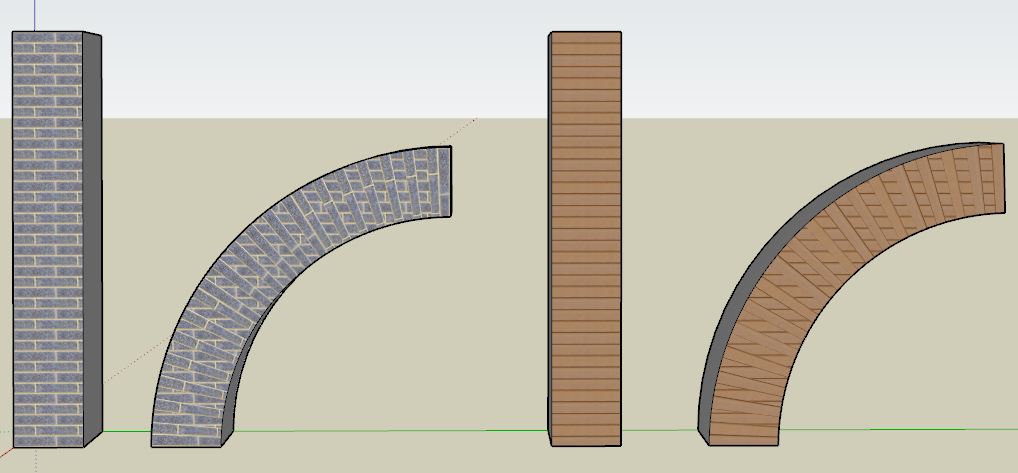
      Followed carefully the tut, however I'm only able to get what you see in the picture. What I'm doing wrong?
      -apply the texture;
      -draw the mortar's lines;
      -hidden geometry on;
      -ctrl+eraser on the lines;
      -hidden geometry off;
      -select the surface with the texture with one click;
      -UVtoolkit-->remember position;
      -bend the pillar;
      -select the surface with the texture with one click;
      -UVtoolkit-->restore position.

      Cattura.JPG

      1 條回覆 最後回覆 回覆 引用 0
      • GaieusG 離線
        Gaieus
        最後由 編輯

        Hi Massimo,

        Can you attach the skp file (preferably beforethe bend)?

        Gai...

        1 條回覆 最後回覆 回覆 引用 0
        • massimoM 離線
          massimo Moderator
          最後由 編輯

          HI Gai, here you have a model before the bend and before the UVtoolkit-->remember position.


          UV.skp

          1 條回覆 最後回覆 回覆 引用 0
          • GaieusG 離線
            Gaieus
            最後由 編輯

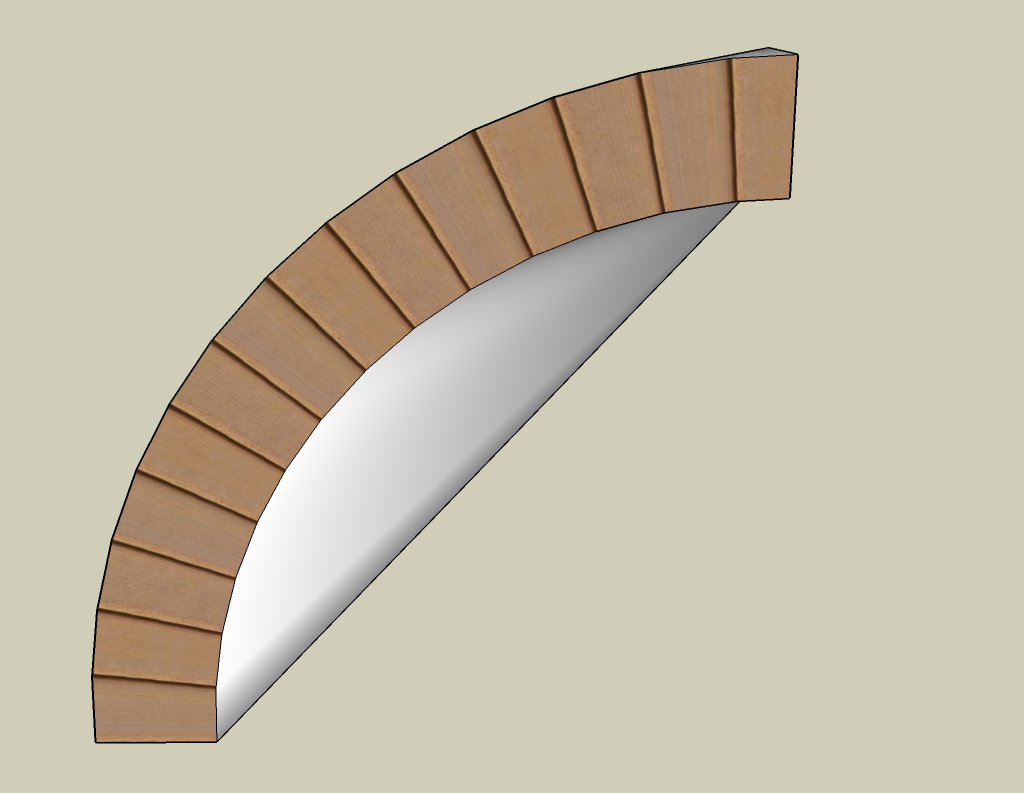
            Hm. To me, it seems to work correctly. I am on SU 8 however - don't know if that makes a difference (should try on 7 as well).

            The bend is a bit funny though as only the front face was subdivided 😄
            (This should obviously not have any effect on the UV part)

            UV.png


            UV.skp

            Gai...

            1 條回覆 最後回覆 回覆 引用 0
            • GaieusG 離線
              Gaieus
              最後由 編輯

              I tried in v.7 and it worked correctly, the same way.

              Gai...

              1 條回覆 最後回覆 回覆 引用 0
              • massimoM 離線
                massimo Moderator
                最後由 編輯

                Have tried also with all faces with subdivisions, but the result is pretty the same. Also the result seems a bit unpredictable: sometimes nothin happens after UVtoolkit-->restore position. Maybe SU 7 is the culprit. Thanks anyway. 😄
                Edit: Oh you're too fast! So it's not SU7.

                1 條回覆 最後回覆 回覆 引用 0
                • GaieusG 離線
                  Gaieus
                  最後由 編輯

                  Here is the file saved after bending but before restoring the UV's. Try to restore from here so that we see where are the steps that went wrong.


                  UV.skp

                  Gai...

                  1 條回覆 最後回覆 回覆 引用 0
                  • massimoM 離線
                    massimo Moderator
                    最後由 編輯

                    Wait...Found it. I'm used to press F4 before bending in order to have subdivisions. If you do that it doesn't work. Thanks for the help. 😄

                    1 條回覆 最後回覆 回覆 引用 0
                    • massimoM 離線
                      massimo Moderator
                      最後由 編輯

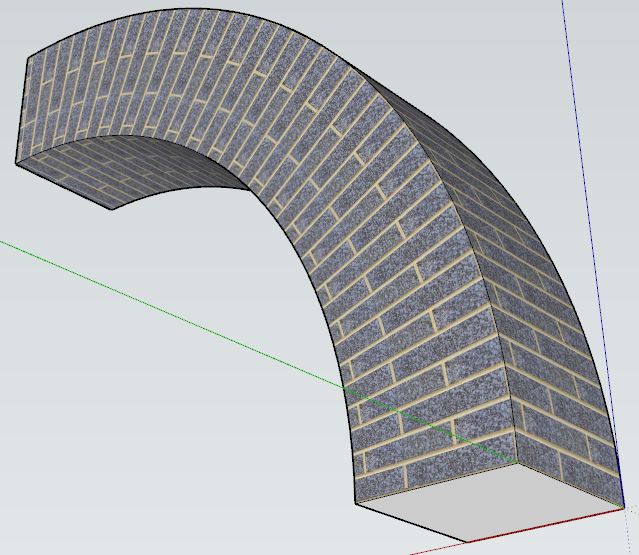
                      And it works also with multiple faces selected. 👍 Even if you will need some adjustment on the corners in this particular case.

                      Cattura.JPG

                      1 條回覆 最後回覆 回覆 引用 0
                      • GaieusG 離線
                        Gaieus
                        最後由 編輯

                        @massimo said:

                        Wait...Found it. I'm used to press F4 before bending in order to have subdivisions. If you do that it doesn't work. Thanks for the help. 😄

                        In the release notes it says that once you add new geometry afterremembering the UV, the data is lost. This is why we need to subdivide first and remember next.

                        It would certainly be awesome if it somehow could remember UV's after modifying the mesh (by adding/removing faces). Maybe one day...

                        @massimo said:

                        And it works also with multiple faces selected. 👍 Even if you will need some adjustment on the corners in this particular case.

                        Yeah. I just select all (of the column) and run the plugin on the whole selection (including all sides).

                        Did I mention that it's an excellent plugin?
                        😄


                        Also, it does not only work on quad faces but on triangles, too. This is very important as some operation may add further subdivision by triangulating (imagine a twist for instance)

                        Gai...

                        1 條回覆 最後回覆 回覆 引用 0
                        • massimoM 離線
                          massimo Moderator
                          最後由 編輯

                          @unknownuser said:

                          Did I mention that it's an excellent plugin?
                          😄

                          Yeah, you did... 😆

                          @unknownuser said:

                          It would certainly be awesome if it somehow could remember UV's after modifying the mesh (by adding/removing faces). Maybe one day...

                          Indeed. 😉

                          1 條回覆 最後回覆 回覆 引用 0
                          • GaieusG 離線
                            Gaieus
                            最後由 編輯

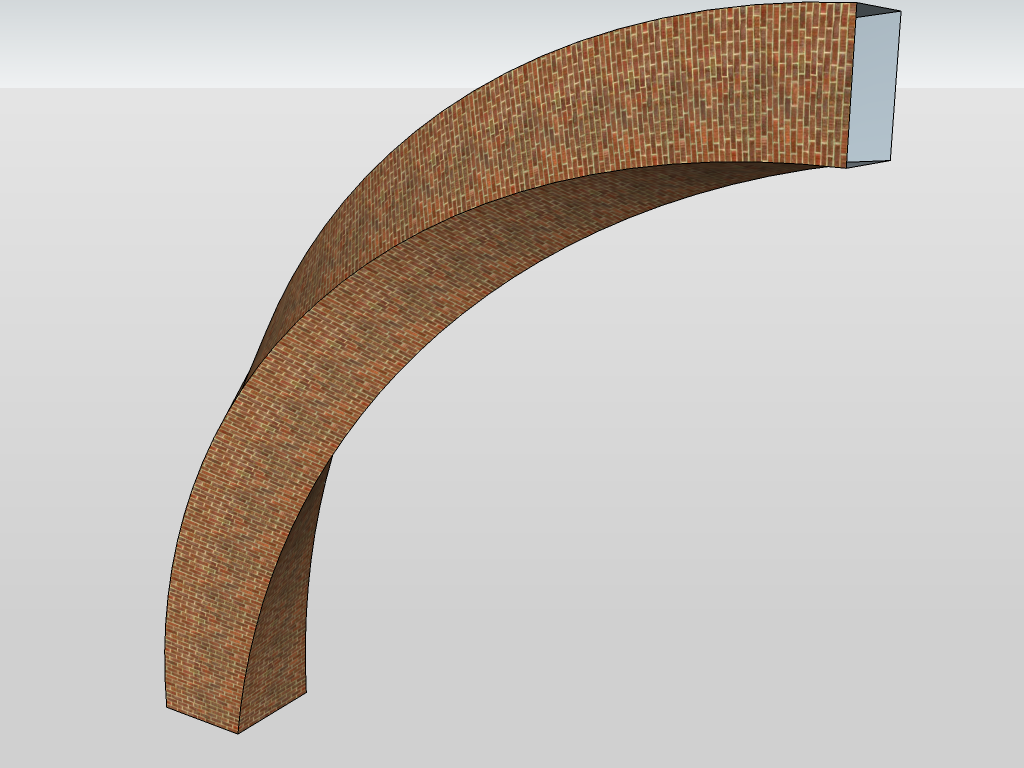
                            Now twisted AND bent. 😲
                            (This definitely needs pre-triangulation as it would be triangulated by the twist anyway)
                            Incredible!

                            UV.png


                            UV.skp

                            Gai...

                            1 條回覆 最後回覆 回覆 引用 0
                            • massimoM 離線
                              massimo Moderator
                              最後由 編輯

                              So Gai now we are waiting for a model of this... 😆
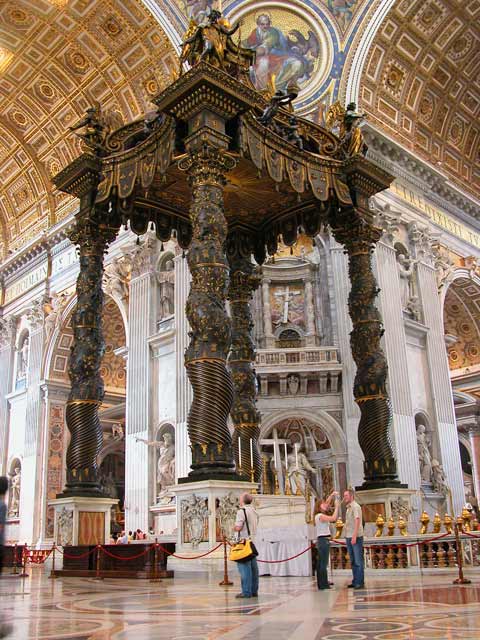

                              chspietro25.jpg

                              1 條回覆 最後回覆 回覆 引用 0
                              • GaieusG 離線
                                Gaieus
                                最後由 編輯

                                Ah, Bernini... I have not always liked that deep Baroque but nowadays I am fine with it...
                                😄

                                Gai...

                                1 條回覆 最後回覆 回覆 引用 0
                                • massimoM 離線
                                  massimo Moderator
                                  最後由 編輯

                                  Yeah, I always preferred Borromini (who also worked a bit at that baldaquin anyway). 😉

                                  1 條回覆 最後回覆 回覆 引用 0
                                  • thomthomT 離線
                                    thomthom
                                    最後由 編輯

                                    I pitty the brick builder. 😄

                                    Thomas Thomassen — SketchUp Monkey & Coding addict
                                    List of my plugins and link to the CookieWare fund

                                    1 條回覆 最後回覆 回覆 引用 0
                                    • D 離線
                                      dominion
                                      最後由 編輯

                                      Sorry to be dumb but how do you subdivide? is it a plugin?

                                      1 條回覆 最後回覆 回覆 引用 0
                                      • GaieusG 離線
                                        Gaieus
                                        最後由 編輯

                                        I just copied the bottom edges along with a linear array (Ctrl+ )

                                        Gai...

                                        1 條回覆 最後回覆 回覆 引用 0
                                        • D 離線
                                          dominion
                                          最後由 編輯

                                          er if i do that it creates faces for each section of the texture, your 2nd image shows it as one face and your first shows dotted lines for the divide my has sild edges?

                                          1 條回覆 最後回覆 回覆 引用 0
                                          • GaieusG 離線
                                            Gaieus
                                            最後由 編輯

                                            Yes, I softened those edges so that when I turn off hidden geometry (which you can see in the first image as dotted), I can select the whole surface as one. If you select all after the array operation and right click > soften edges, check the "soften coplanar edges" box at the bottom right of the dialog.

                                            Gai...

                                            1 條回覆 最後回覆 回覆 引用 0
                                            • 1
                                            • 2
                                            • 3
                                            • 4
                                            • 5
                                            • 1 / 5
                                            • 第一個貼文
                                              最後的貼文
                                            Buy SketchPlus
                                            Buy SUbD
                                            Buy WrapR
                                            Buy eBook
                                            Buy Modelur
                                            Buy Vertex Tools
                                            Buy SketchCuisine
                                            Buy FormFonts

                                            Advertisement
