sketchucation logo sketchucation
    • 登入
    Oops, your profile's looking a bit empty! To help us tailor your experience, please fill in key details like your SketchUp version, skill level, operating system, and more. Update and save your info on your profile page today!
    🔌 Easy Offset | Offset selected faces in SketchUp in positive and negative offsets. Download

    [Plugin] Compo Spray 1.4.2 Updated

    已排程 已置頂 已鎖定 已移動 Plugins
    271 貼文 89 Posters 311.3k 瀏覽 89 Watching
    正在載入更多貼文
    • 從舊到新
    • 從新到舊
    • 最多點贊
    回覆
    • 在新貼文中回覆
    登入後回覆
    此主題已被刪除。只有擁有主題管理權限的使用者可以查看。
    • CadFatherC 離線
      CadFather
      最後由 編輯

      Didier, they're coming in faster than i can download them!

      Thanks! 👍 😄

      1 條回覆 最後回覆 回覆 引用 0
      • V 離線
        valerostudio
        最後由 編輯

        Same here in Win7 64 bit - I hit the button and nothing.

        1 條回覆 最後回覆 回覆 引用 0
        • TIGT 線上
          TIG Moderator
          最後由 編輯

          @valerostudio said:

          Same here in Win7 64 bit - I hit the button and nothing.
          Your message is at odds with the ones following the update 😕
          Works fine for me in Win7 64bit !
          You do have the latest version installed from the PluginStore?
          You have restarted SketchUp ?
          AND you have removed any earlier versions of the tool before this ?
          Are there any error messages in the Ruby Console ?
          When you say you 'hit the button', do you mean the toolbar's button or the dialog's button ?
          More feedback please...

          TIG

          1 條回覆 最後回覆 回覆 引用 0
          • BoxB 離線
            Box
            最後由 編輯

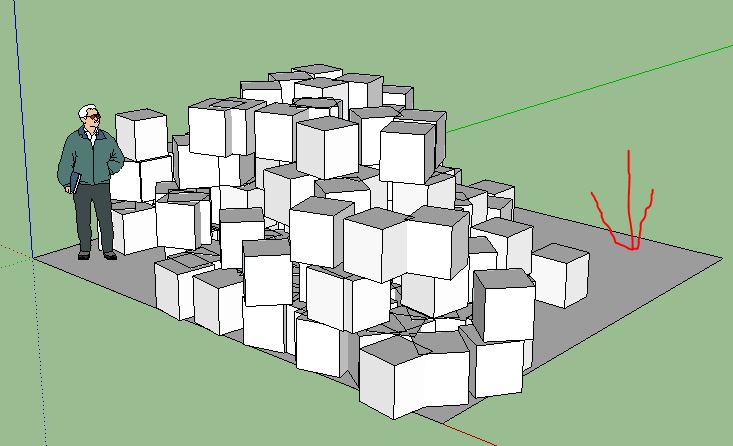
            Make sure you have a surface to spray on.

            Compo.JPG

            1 條回覆 最後回覆 回覆 引用 0
            • soloS 離線
              solo
              最後由 編輯

              @valerostudio said:

              Same here in Win7 64 bit - I hit the button and nothing.

              same here and I do have a plane to spray on.

              http://www.solos-art.com

              If you see a toilet in your dreams do not use it.

              1 條回覆 最後回覆 回覆 引用 0
              • BoxB 離線
                Box
                最後由 編輯

                As tig already said, Which Button? Do you get the settings dialog? or does it not even work from the point of clicking the menu?

                1 條回覆 最後回覆 回覆 引用 0
                • TIGT 線上
                  TIG Moderator
                  最後由 編輯

                  @solo said:

                  @valerostudio said:

                  Same here in Win7 64 bit - I hit the button and nothing.

                  same here and I do have a plane to spray on.
                  What button exactly ?
                  Also any Ruby Console errors ?
                  Have you definitely removed all of the legacy stuff before installing it ?
                  Some of you were installing the older version into the Tools folder, and all manner of foolishness !
                  The updated version clearly working for many of us in v2015, so we need to find what you troublemakers are doing differently 😕

                  TIG

                  1 條回覆 最後回覆 回覆 引用 0
                  • soloS 離線
                    solo
                    最後由 編輯

                    Error; #<NoMethodError; undefined method `dec' for 0.0;Length>
                    c;/users/pete/appdata/roaming/sketchup/sketchup 2015/sketchup/plugins/compospray/compospray.rbs;10;in `initialize'
                    c;/users/pete/appdata/roaming/sketchup/sketchup 2015/sketchup/plugins/compospray/compospray.rbs;98;in `new'
                    c;/users/pete/appdata/roaming/sketchup/sketchup 2015/sketchup/plugins/compospray/compospray.rbs;98;in `compoSpray_main'
                    C;/Users/Pete/AppData/Roaming/SketchUp/SketchUp 2015/SketchUp/Plugins/compoSprayToolbar.rb;19;in `block in <top (required)>'
                    SketchUp;1;in `call'


                    http://www.solos-art.com

                    If you see a toilet in your dreams do not use it.

                    1 條回覆 最後回覆 回覆 引用 0
                    • TIGT 線上
                      TIG Moderator
                      最後由 編輯

                      @Solo

                      Now I see... ☀
                      Didier's code [ill advisedly] messes with 'Float'.
                      I suspect it adds 'dec' as a method.
                      In v2015 'Length' is somewhat divorced from 'Float', so his method 'dec' is probably orphaned with some Units set ups !
                      I look at a fix and update when I can...

                      TIG

                      1 條回覆 最後回覆 回覆 引用 0
                      • TIGT 線上
                        TIG Moderator
                        最後由 編輯

                        I think that this updated version will now work in v2015 with all units settings...
                        http://sketchucation.com/pluginstore?pln=compoSpray Please try it, and report back...

                        TIG

                        1 條回覆 最後回覆 回覆 引用 0
                        • chonC 離線
                          chon
                          最後由 編輯

                          Many thanks TIG ! 👍

                          Works fine for me with AdditionalPluginFolders !!

                          SU2019 pro 19.3.253 + VRay 4.00.02 (Next) on Win10-64Bits

                          1 條回覆 最後回覆 回覆 引用 0
                          • soloS 離線
                            solo
                            最後由 編輯

                            👍

                            Thanks Tig, working now.

                            http://www.solos-art.com

                            If you see a toilet in your dreams do not use it.

                            1 條回覆 最後回覆 回覆 引用 0
                            • V 離線
                              valerostudio
                              最後由 編輯

                              Yes, working. Made sure to delete any old versions and working now in 2015 x64 Win7. HUGE THANKS!!!!

                              1 條回覆 最後回覆 回覆 引用 0
                              • V 離線
                                valerostudio
                                最後由 編輯

                                When you get the warning box that it will take X minutes to complete and you click NO the box doesn't go away and the plugin will not close.

                                1 條回覆 最後回覆 回覆 引用 0
                                • TIGT 線上
                                  TIG Moderator
                                  最後由 編輯

                                  @valerostudio said:

                                  When you get the warning box that it will take X minutes to complete and you click NO the box doesn't go away and the plugin will not close.
                                  Didier's code is Byzantine in its complexity !
                                  I suspect it's because he used 'break' in the earlier version that itself broke in Ruby2.
                                  I replaced it with 'return', but that does nothing !
                                  Maybe the earlier 'break' effectively stopped the tool ?
                                  I'll look through and see if I can adjust things...

                                  TIG

                                  1 條回覆 最後回覆 回覆 引用 0
                                  • TIGT 線上
                                    TIG Moderator
                                    最後由 編輯

                                    Here's an updated version in the PluginStore http://sketchucation.com/pluginstore?pln=compoSpray
                                    Now if you are about to add thousands of components and the warning dialog asks if you want to proceed and you answer NO, then the tool quits and the dialog closes.
                                    Answer YES and it continues...

                                    TIG

                                    1 條回覆 最後回覆 回覆 引用 0
                                    • CadFatherC 離線
                                      CadFather
                                      最後由 編輯

                                      now it is perfect. thank you TIG 👍

                                      1 條回覆 最後回覆 回覆 引用 0
                                      • V 離線
                                        valerostudio
                                        最後由 編輯

                                        Actually I just got a Bugsplat when it tried to close. 😢

                                        1 條回覆 最後回覆 回覆 引用 0
                                        • TIGT 線上
                                          TIG Moderator
                                          最後由 編輯

                                          @valerostudio said:

                                          Actually I just got a Bugsplat when it tried to close. 😢
                                          Please outline your steps.
                                          e.g. what was open, or what was the last thing you did when you closed and splatted ?

                                          TIG

                                          1 條回覆 最後回覆 回覆 引用 0
                                          • chonC 離線
                                            chon
                                            最後由 編輯

                                            TIG,

                                            with your last version, i've got the same problem as Shape Bender, it works fine when i put the CompoSpray plugin in the C:\Users\XX\AppData\Roaming\SketchUp\SketchUp 2015\SketchUp\Plugins folder, but it doesn't work when i put it my Fredo6's AdditionalPluginFolder. 😳

                                            I've got that : When you get the warning box that it will take X minutes to complete and you click NO the box doesn't go away and the plugin will not close.

                                            Any suggestion ? 😕

                                            SU2019 pro 19.3.253 + VRay 4.00.02 (Next) on Win10-64Bits

                                            1 條回覆 最後回覆 回覆 引用 0
                                            • 1
                                            • 2
                                            • 3
                                            • 4
                                            • 5
                                            • 13
                                            • 14
                                            • 1 / 14
                                            • 第一個貼文
                                              最後的貼文
                                            Buy SketchPlus
                                            Buy SUbD
                                            Buy WrapR
                                            Buy eBook
                                            Buy Modelur
                                            Buy Vertex Tools
                                            Buy SketchCuisine
                                            Buy FormFonts

                                            Advertisement