[Plugin] Compo Spray 1.4.2 Updated
-
How I manage to make it work on SU 2013, here in Spain (with bloody accents everywhere...)
1- Copy/Paste CompoSpray folder + .rb in Plugins file as usual
2- Remove all .lingvo but CompoSprayUS.lingvoand it works perfectly ! Nada más....

-
Not for me in France !

Still not working with my config...
-
Broken again in 2015!!!
-
-
Didier has agreed to allow me to update some of his Plugins that are in in the PluginStore.
I have already done of few of the easier ones...
I'll try and have a look at this one sometime this year ! -
I have now updated 'Compo Spray' for Didier - it is now v2014/2015 compatible, and also works from any custom Plugins folder.
Please get the latest version from the PluginStore http://sketchucation.com/pluginstore?pln=compoSpray
If you have messed on installing it in Tools etc please remove it manually and get/install the latest version... -
Thanks TIG, tested in SU2014 & SU2015 on Mac OSX 10.9.5 and the plugin works fine.

-
Thanks for the update!
-
Didier, they're coming in faster than i can download them!
Thanks!

-
Same here in Win7 64 bit - I hit the button and nothing.
-
@valerostudio said:
Same here in Win7 64 bit - I hit the button and nothing.
Your message is at odds with the ones following the update
Works fine for me in Win7 64bit !
You do have the latest version installed from the PluginStore?
You have restarted SketchUp ?
AND you have removed any earlier versions of the tool before this ?
Are there any error messages in the Ruby Console ?
When you say you 'hit the button', do you mean the toolbar's button or the dialog's button ?
More feedback please... -
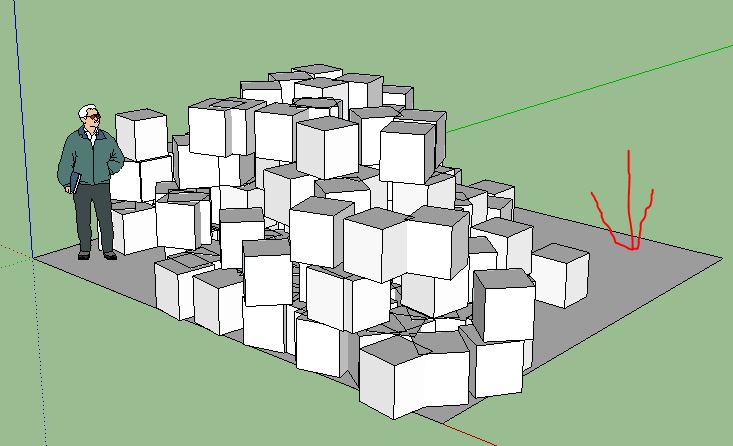
Make sure you have a surface to spray on.
-
@valerostudio said:
Same here in Win7 64 bit - I hit the button and nothing.
same here and I do have a plane to spray on.
-
As tig already said, Which Button? Do you get the settings dialog? or does it not even work from the point of clicking the menu?
-
@solo said:
@valerostudio said:
Same here in Win7 64 bit - I hit the button and nothing.
same here and I do have a plane to spray on.
What button exactly ?
Also any Ruby Console errors ?
Have you definitely removed all of the legacy stuff before installing it ?
Some of you were installing the older version into the Tools folder, and all manner of foolishness !
The updated version clearly working for many of us in v2015, so we need to find what you troublemakers are doing differently -
Error; #<NoMethodError; undefined method `dec' for 0.0;Length> c;/users/pete/appdata/roaming/sketchup/sketchup 2015/sketchup/plugins/compospray/compospray.rbs;10;in `initialize' c;/users/pete/appdata/roaming/sketchup/sketchup 2015/sketchup/plugins/compospray/compospray.rbs;98;in `new' c;/users/pete/appdata/roaming/sketchup/sketchup 2015/sketchup/plugins/compospray/compospray.rbs;98;in `compoSpray_main' C;/Users/Pete/AppData/Roaming/SketchUp/SketchUp 2015/SketchUp/Plugins/compoSprayToolbar.rb;19;in `block in <top (required)>' SketchUp;1;in `call' -
Now I see...

Didier's code [ill advisedly] messes with 'Float'.
I suspect it adds 'dec' as a method.
In v2015 'Length' is somewhat divorced from 'Float', so his method 'dec' is probably orphaned with some Units set ups !
I look at a fix and update when I can... -
I think that this updated version will now work in v2015 with all units settings...
http://sketchucation.com/pluginstore?pln=compoSpray Please try it, and report back... -
Many thanks TIG !
Works fine for me with AdditionalPluginFolders !!
-
Thanks Tig, working now.







Hello! It looks like you're interested in this conversation, but you don't have an account yet.
Getting fed up of having to scroll through the same posts each visit? When you register for an account, you'll always come back to exactly where you were before, and choose to be notified of new replies (either via email, or push notification). You'll also be able to save bookmarks and upvote posts to show your appreciation to other community members.
With your input, this post could be even better 💗
Register Login


Advertisement