sketchucation logo sketchucation
    • 登入
    Oops, your profile's looking a bit empty! To help us tailor your experience, please fill in key details like your SketchUp version, skill level, operating system, and more. Update and save your info on your profile page today!
    ⚠️ Important | Libfredo 15.6b introduces important bugfixes for Fredo's Extensions Update

    [Plugin] Contour Maker v1.6

    已排程 已置頂 已鎖定 已移動 Plugins
    64 貼文 24 Posters 72.4k 瀏覽 24 Watching
    正在載入更多貼文
    • 從舊到新
    • 從新到舊
    • 最多點贊
    回覆
    • 在新貼文中回覆
    登入後回覆
    此主題已被刪除。只有擁有主題管理權限的使用者可以查看。
    • mitcorbM 離線
      mitcorb
      最後由 編輯

      Thanks for your explanation, TIG
      You are an amazing dude.
      Another question. Could this tendency toward deprecation be the reason why older scripts that worked fine last year, suddenly do not work this week, even though the same SUversion is being used?

      I take the slow, deliberate approach in my aimless wandering.

      1 條回覆 最後回覆 回覆 引用 0
      • Didier BurD 離線
        Didier Bur
        最後由 編輯

        Hi,

        @unknownuser said:

        Could this tendency toward deprecation be the reason why older scripts that worked fine last year, suddenly do not work

        Yes, especially since SU8 is out. The API "uses" a newer version of Ruby that is less permissive, concerning arguments within brackets, no spaces between function name and arguments, and such boring coding stuff. 🎉

        DB

        1 條回覆 最後回覆 回覆 引用 0
        • mitcorbM 離線
          mitcorb
          最後由 編輯

          Didier wrote:
          "...such boring coding stuff"
          I am dragging this way off topic, but one more comment and I will quit.
          I superficially understand that all of those punctuation marks and symbols are a way to organize the input, but why should input be so tedious? Just think about it, don't answer so that this thread can continue.

          I take the slow, deliberate approach in my aimless wandering.

          1 條回覆 最後回覆 回覆 引用 0
          • J 離線
            JGA
            最後由 編輯

            Thanks very much, it works well!

            Regards,
            JGA

            1 條回覆 最後回覆 回覆 引用 0
            • C 離線
              chenkl
              最後由 編輯

              Thanks TIG

              1 條回覆 最後回覆 回覆 引用 0
              • pilouP 離線
                pilou
                最後由 編輯

                Life is encapsuled (Life) 😆

                Keep the good work 😎

                Frenchy Pilou
                Is beautiful that please without concept!
                My Little site :)

                1 條回覆 最後回覆 回覆 引用 0
                • C 離線
                  CAD Addict
                  最後由 編輯

                  I haven't had time to try it, but I have a question.

                  Isn't it the same as the Sandbox tools can do?

                  What does it do better than the standrads sandbox?

                  Thanks

                  http://www.cad-addict.com

                  1 條回覆 最後回覆 回覆 引用 0
                  • TIGT 離線
                    TIG Moderator
                    最後由 編輯

                    @cad addict said:

                    I haven't had time to try it...
                    Isn't it the same as [what] the Sandbox [does]...?
                    What does it do... better...?...

                    No, it's quite different!
                    The 'opposite' tool in fact...
                    The Sandbox tool takes contours supplied to it, that are already set at the correct heights, and makes a mesh surface from them.
                    The ContourMaker tool takes a mesh surface and it makes [grouped] contours from it.
                    Your mesh might not have been made from contour data at all, but contours can be very useful when visualizing a complex land-form - this tool lets you add them.
                    🤓

                    TIG

                    1 條回覆 最後回覆 回覆 引用 0
                    • irwanwrI 離線
                      irwanwr
                      最後由 編輯

                      i'd like to try this plugin.
                      i'd like to see if i can draw (or model) a pond near a tent or a house perhaps.
                      i just love to draw 😄

                      thank you 👍

                      1 條回覆 最後回覆 回覆 引用 0
                      • TIGT 離線
                        TIG Moderator
                        最後由 編輯

                        @irwanwr said:

                        i'd like to try this plugin.
                        i'd like to see if i can draw (or model) a pond near a tent or a house perhaps.
                        i just love to draw 😄

                        thank you 👍
                        Get it from the link in the first post in this thread...

                        TIG

                        1 條回覆 最後回覆 回覆 引用 0
                        • irwanwrI 離線
                          irwanwr
                          最後由 編輯

                          umm... i think i still cannot understand how it works and to use it though
                          need to learn more about instruction, mesh definition, etc. 😞

                          1 條回覆 最後回覆 回覆 引用 0
                          • TIGT 離線
                            TIG Moderator
                            最後由 編輯

                            The contours are cut through a grouped mesh [e.g. a terrain surface that is a group]...

                            TIG

                            1 條回覆 最後回覆 回覆 引用 0
                            • marvins_dadM 離線
                              marvins_dad
                              最後由 編輯

                              Man that is sweet Tig!
                              Thanks for another great ruby!

                              My Gallery

                              1 條回覆 最後回覆 回覆 引用 0
                              • M 離線
                                mrdcon
                                最後由 編輯

                                @tig said:

                                The contours are cut through a grouped mesh [e.g. a terrain surface that is a group]...

                                I've downloaded the plugin and created contours for a meshed terrain model that was generated from Goodle maps. Now that I have contours on the meshed terrain model, other than seeing contours, what else can I do with them. I've tried to manipulate the contours (ie, push /pull, etc.) but they are not editable. Am I missing something?

                                1 條回覆 最後回覆 回覆 引用 0
                                • TIGT 離線
                                  TIG Moderator
                                  最後由 編輯

                                  @mrdcon said:

                                  @tig said:

                                  The contours are cut through a grouped mesh [e.g. a terrain surface that is a group]...

                                  I've downloaded the plugin and created contours for a meshed terrain model that was generated from Goodle maps. Now that I have contours on the meshed terrain model, other than seeing contours, what else can I do with them. I've tried to manipulate the contours (ie, push /pull, etc.) but they are not editable. Am I missing something?
                                  Use your imagination ?
                                  Perhaps all some people need is some contours drawn over their terrain to help visualize their design...
                                  But if you want a simplified surface mesh made from the contours edit their group and use the Sandbox tool to make a 'surface from contours'.
                                  The coarser you space the contours the more simplified is the new mesh...
                                  You decide what to do with the tool - I only made it 😒

                                  TIG

                                  1 條回覆 最後回覆 回覆 引用 0
                                  • A 離線
                                    arystoteles
                                    最後由 編輯

                                    thank you for the plugin!

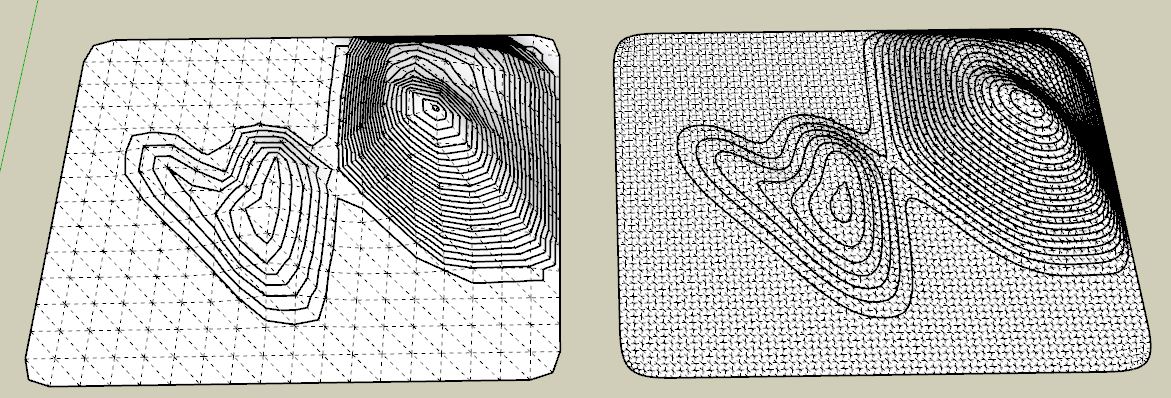
                                    However I was wondering if you could suggest a tip to rebuild the curves and make them ultra smooth?


                                    ScreenClip[14].png

                                    1 條回覆 最後回覆 回覆 引用 0
                                    • massimoM 離線
                                      massimo Moderator
                                      最後由 編輯

                                      Well the smoothness of the curves is related to the smoothness of the mesh.
                                      Here I've used "Artisan" plugin to smooth the terrain.

                                      Cattura.JPG

                                      1 條回覆 最後回覆 回覆 引用 0
                                      • A 離線
                                        arystoteles
                                        最後由 編輯

                                        Oh I see thank you Massimo!

                                        But regardless of the terrain mesh is there a function in Sketchup to rebuild a curve wit fewer points and therefore smooth it out?

                                        1 條回覆 最後回覆 回覆 引用 0
                                        • TIGT 離線
                                          TIG Moderator
                                          最後由 編輯

                                          If you don't want to mess with the mesh you could use a edge 'smoothing' tool...
                                          I think Thomthom has something in his Edge Tools set - you'll [probably] have to use weld.rb on each connected set of contour-lines to make 'curves' from them firs, since they are made as raw individual edges...

                                          TIG

                                          1 條回覆 最後回覆 回覆 引用 0
                                          • massimoM 離線
                                            massimo Moderator
                                            最後由 編輯

                                            You could also use Fredo's bezier spline plugin. Select the curve-->right click-->convert to... ("catmull spline" for example), but as TIG said the curves will intersect with the mesh.

                                            1 條回覆 最後回覆 回覆 引用 0
                                            • 1
                                            • 2
                                            • 3
                                            • 4
                                            • 2 / 4
                                            • 第一個貼文
                                              最後的貼文
                                            Buy SketchPlus
                                            Buy SUbD
                                            Buy WrapR
                                            Buy eBook
                                            Buy Modelur
                                            Buy Vertex Tools
                                            Buy SketchCuisine
                                            Buy FormFonts

                                            Advertisement



