sketchucation logo sketchucation
    • 登入
    Oops, your profile's looking a bit empty! To help us tailor your experience, please fill in key details like your SketchUp version, skill level, operating system, and more. Update and save your info on your profile page today!
    ⚠️ Important | Libfredo 15.6b introduces important bugfixes for Fredo's Extensions Update

    [Plugin] Contour Maker v1.6

    已排程 已置頂 已鎖定 已移動 Plugins
    64 貼文 24 Posters 72.4k 瀏覽 24 Watching
    正在載入更多貼文
    • 從舊到新
    • 從新到舊
    • 最多點贊
    回覆
    • 在新貼文中回覆
    登入後回覆
    此主題已被刪除。只有擁有主題管理權限的使用者可以查看。
    • TIGT 離線
      TIG Moderator
      最後由 編輯

      Here's Contour Maker updated.
      After ~5 years someone pointed out that it doesn't make contours <z=0...
      It now does... AND it's had a general tidy up - it was 5yrs old!

      [flash=600,338:vctzpnpv]http://www.youtube.com/v/I1VOMjDNeZs[/flash:vctzpnpv]

      **Usage:

      First select a Group or Component Instance that has faces that could have
      Contours added, then use the Plugins Menu Item 'Contours'.

      A dialog asks for the vertical spacing (Z-blue) in current units.
      The Contours always start their vertical spacing from Z=0 UP & DOWN.

      It then makes a new layer for the contour-group. The layer is
      named CONT-nnnnnnnn (where nnnnnnnn is based on the date/time).

      It then calculates a series of horizontal slices through the
      selection's faces to make the Contours as specified.**PayPalButton
      Get the latest version from the PluginStore http://sketchucation.com/pluginstore?pln=ContourMaker

      TIG

      1 條回覆 最後回覆 回覆 引用 0
      • mitcorbM 離線
        mitcorb
        最後由 編輯

        TIG:
        Where do we find the original instructions for use, if any?

        I take the slow, deliberate approach in my aimless wandering.

        1 條回覆 最後回覆 回覆 引用 0
        • TIGT 離線
          TIG Moderator
          最後由 編輯

          @mitcorb said:

          TIG:
          Where do we find the original instructions for use, if any?

          Added them to the first post 😒

          TIG

          1 條回覆 最後回覆 回覆 引用 0
          • mitcorbM 離線
            mitcorb
            最後由 編輯

            Thanks, TIG:
            Watch out, someday they will have you bronzed. 💚

            I take the slow, deliberate approach in my aimless wandering.

            1 條回覆 最後回覆 回覆 引用 0
            • KrisidiousK 離線
              Krisidious
              最後由 編輯

              thanks Tig...

              By: Kristoff Rand
              Home DesignerUnique House Plans

              1 條回覆 最後回覆 回覆 引用 0
              • S 離線
                Susy
                最後由 編輯

                Add Contour Maker on Axis (x) and (y)...

                Already in the race the mouse... (Local Expression)

                1 條回覆 最後回覆 回覆 引用 0
                • massimoM 離線
                  massimo Moderator
                  最後由 編輯

                  Thanks TIG, seems to work fine. 😄
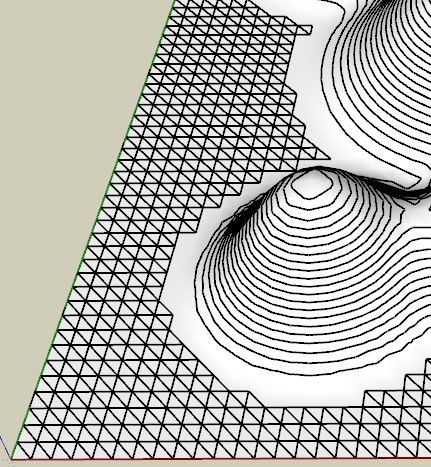
                  It's possible to get rid of that mesh grid on the Z=0 level? Perhaps an option?

                  Cattura.JPG

                  1 條回覆 最後回覆 回覆 引用 0
                  • TIGT 離線
                    TIG Moderator
                    最後由 編輯

                    @massimo said:

                    Thanks TIG, seems to work fine. 😄
                    It's possible to get rid of that mesh grid on the Z=0 level? Perhaps an option?

                    I see the problem.
                    Can you post the example SKP before Contouring...
                    So I can play with it...
                    I suspect some sort of 'Erase Coplanar Edges' is needed within the tool - but it will occur at any z-level if you have a mesh that you haven't used 'Erase Coplanar Edges' on and there are multiple faces - It simply uses what it's given... 😉
                    For now use an 'Erase Coplanar Edges' tool [there are several available] [i]before you make the Contours and the problem will vanish with the coplanar edges...[/i]

                    TIG

                    1 條回覆 最後回覆 回覆 引用 0
                    • massimoM 離線
                      massimo Moderator
                      最後由 編輯

                      @unknownuser said:

                      Can you post the example SKP before Contouring...

                      It was only a quick test and i don't have the file anymore. Anyway you can replicate that easily. It was a terrain mesh generated with the sandbox tools: from scratch+smoove and then smoothened.

                      @unknownuser said:

                      For now use an 'Erase Coplanar Edges' tool [there are several available] before you make the Contours and the problem will vanish with the coplanar edges...

                      Sure. Thanks 😄

                      1 條回覆 最後回覆 回覆 引用 0
                      • GaieusG 離線
                        Gaieus
                        最後由 編輯

                        ThomThom's CleanUp plugin will get rid of those edges, too (and many more...)

                        Gai...

                        1 條回覆 最後回覆 回覆 引用 0
                        • massimoM 離線
                          massimo Moderator
                          最後由 編輯

                          Already used that. 😉 Thanks Gaieus.

                          1 條回覆 最後回覆 回覆 引用 0
                          • simon le bonS 離線
                            simon le bon
                            最後由 編輯

                            @tig said:

                            @massimo said:

                            Thanks TIG, seems to work fine. 😄
                            It's possible to get rid of that mesh grid on the Z=0 level? Perhaps an option?

                            I see the problem.
                            Can you post the example SKP before Contouring...
                            So I can play with it...
                            I suspect some sort of 'Erase Coplanar Edges' is needed within the tool - but it will occur at any z-level if you have a mesh that you haven't used 'Erase Coplanar Edges' on and there are multiple faces - It simply uses what it's given... 😉

                            For now use an 'Erase Coplanar Edges' tool [there are several available] before you make the Contours and the problem will vanish with the coplanar edges...[/i]

                            Hi Tig and Massimo and Gaieus 😄 ,

                            Here are 'Erase Coplanar Edges' tools:

                            thomthom_[Plugin] Cleanup (2.0.0)
                            For SU7.1 Doesn't work on my SU6 free.

                            a4chitect_ cleanup.rb

                            J.H. Aughey_CleanUP Model

                            Well! I have tried Tig's solution:

                            @unknownuser said:

                            For now use an 'Erase Coplanar Edges' tool before you make the Contours and the problem will vanish with the coplanar edges...

                            but that doesn't work very well.
                            The simple working solution I have found is to avoid z=0. Moving the group up (or down), activate Contour Maker, Move the group back to the initial position.

                            Cheers, simon.

                            1 條回覆 最後回覆 回覆 引用 0
                            • MALAISEM 離線
                              MALAISE
                              最後由 編輯

                              Very useful for geological drawings

                              Thanks TIG 👍 👍

                              La Connaissance n'a de valeur que partagée

                              1 條回覆 最後回覆 回覆 引用 0
                              • TIGT 離線
                                TIG Moderator
                                最後由 編輯

                                Simon...

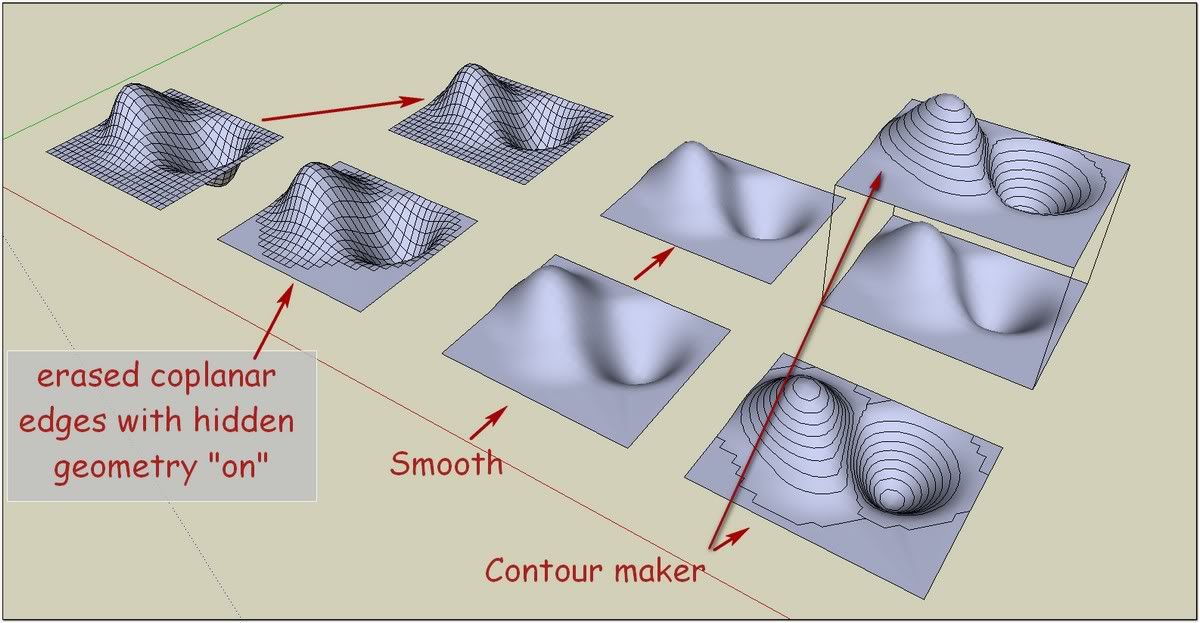
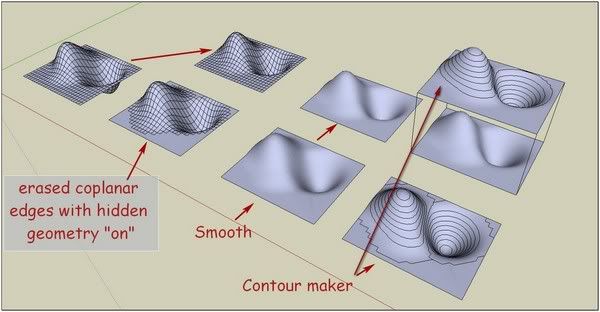
                                When you use the erase coplanar edges tool do you have hidden-geometry 'on'.
                                Then when you have the simplest mesh possible make the contours... ❓

                                TIG

                                1 條回覆 最後回覆 回覆 引用 0
                                • simon le bonS 離線
                                  simon le bon
                                  最後由 編輯

                                  Hi Tig, 😉

                                  I had tried only with all edges unsmoothed.
                                  So I just have tried with hidden geometry "on" as you say. The result is not bad but seems not the best.
                                  http://i274.photobucket.com/albums/jj245/Spendauballet/SketchUp/thContourMaker001.jpg

                                  ++simon

                                  1 條回覆 最後回覆 回覆 引用 0
                                  • TIGT 離線
                                    TIG Moderator
                                    最後由 編輯

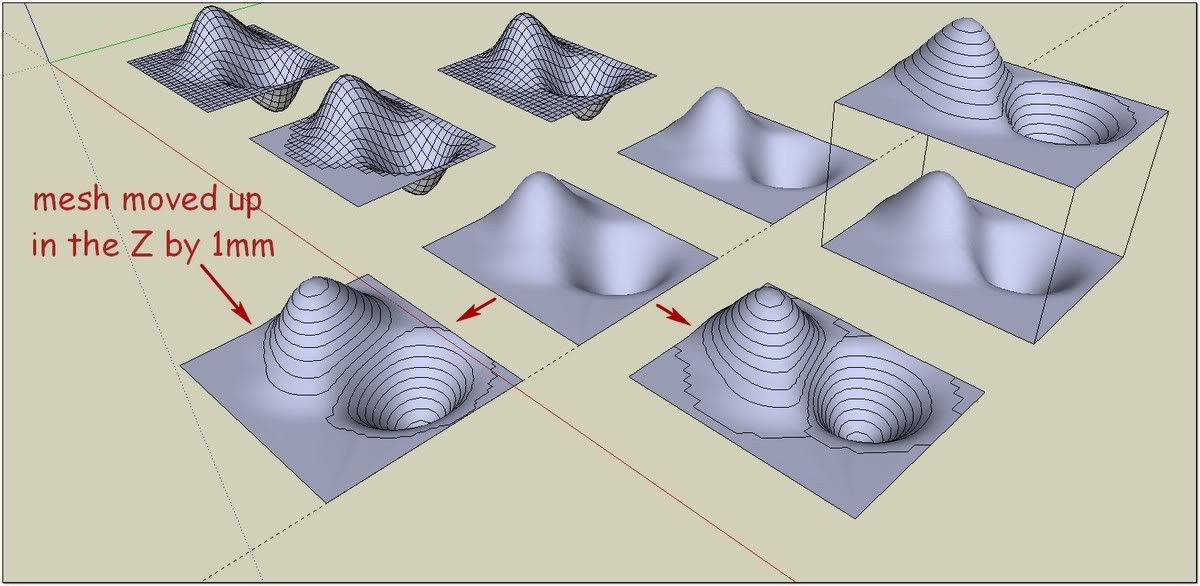
                                    It does exactly what you tell it to do...
                                    If you move the mesh up in the Z by 1mm the result will change... 😒
                                    The contours are 'true' - the mesh might not be exactly as you hope BUT the 'contours' represent what is there...

                                    TIG

                                    1 條回覆 最後回覆 回覆 引用 0
                                    • simon le bonS 離線
                                      simon le bon
                                      最後由 編輯

                                      Ah OK!
                                      I think I began to understand how Contour maker works.

                                      @unknownuser said:

                                      The Contours always start their vertical spacing from Z=0 UP & DOWN.
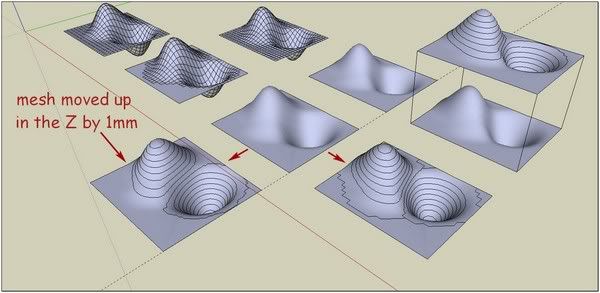

                                      http://i274.photobucket.com/albums/jj245/Spendauballet/SketchUp/thContourMaker002.jpg

                                      😕 simon

                                      1 條回覆 最後回覆 回覆 引用 0
                                      • TIGT 離線
                                        TIG Moderator
                                        最後由 編輯

                                        Here's v1.6 - http://forums.sketchucation.com/viewtopic.php?p=273795#p273795
                                        Minor corrections to syntax [arguments all inside () ] that has no affect on results but covers possible future deprecation...

                                        TIG

                                        1 條回覆 最後回覆 回覆 引用 0
                                        • mitcorbM 離線
                                          mitcorb
                                          最後由 編輯

                                          Hi,TIG:
                                          Could you explain what you mean by possible future deprecation?
                                          It suggests to me that other tools may not tolerate the use of this one?

                                          I take the slow, deliberate approach in my aimless wandering.

                                          1 條回覆 最後回覆 回覆 引用 0
                                          • TIGT 離線
                                            TIG Moderator
                                            最後由 編輯

                                            A method's 'deprecation' is when a method or a part of a method is no longer 'used' or 'works'.
                                            For example in many API examples in the guides it will say for things like:
                                            entities.add_cline point1, point2
                                            this works fine in past and current versions...
                                            BUT the 'standard' way recommended in Ruby and guaranteed to stop faults is to use 'parenthesizes' to enclose all arguments, like this
                                            entities.add_cline(point1, point2)
                                            [Note NO space between the method and opening ( and the arguments are separated by ',']
                                            This also gets over the occasional glitch that occurred in existing code with the new PC version of Ruby shipped with v8, for example in v7 this [probably] worked
                                            my_command (x+y/2), z
                                            in v8 it will fail because the first set of stuff inside the '()' is taken as all the arguments there are and the following ', z' throws an error, but changed to
                                            my_command((x+y/2), z)
                                            it then works for both versions and is also 'future-proof' as all of the arguments are now encapsulated inside the ()...

                                            TIG

                                            1 條回覆 最後回覆 回覆 引用 0
                                            • 1
                                            • 2
                                            • 3
                                            • 4
                                            • 1 / 4
                                            • 第一個貼文
                                              最後的貼文
                                            Buy SketchPlus
                                            Buy SUbD
                                            Buy WrapR
                                            Buy eBook
                                            Buy Modelur
                                            Buy Vertex Tools
                                            Buy SketchCuisine
                                            Buy FormFonts

                                            Advertisement