sketchucation logo sketchucation
    • 登入
    Oops, your profile's looking a bit empty! To help us tailor your experience, please fill in key details like your SketchUp version, skill level, operating system, and more. Update and save your info on your profile page today!
    🔌 Smart Spline | Fluid way to handle splines for furniture design and complex structures. Download

    [Plugin][$] Vertex Tools

    已排程 已置頂 已鎖定 已移動 Plugins
    667 貼文 92 Posters 433.9k 瀏覽 92 Watching
    正在載入更多貼文
    • 從舊到新
    • 從新到舊
    • 最多點贊
    回覆
    • 在新貼文中回覆
    登入後回覆
    此主題已被刪除。只有擁有主題管理權限的使用者可以查看。
    • T 離線
      turbodizayn
      最後由 編輯

      Hi, I think feature to get softselection within preselected choice of objects will be most important thing of all other vertex tool features. I wrote about it many times ago. https://sketchucation.com/forums/viewtopic.php?f=323&t=70985

      @algorad88 said:

      @thomthom said:

      Yes - in fact, it's already added to the upcoming v2.

      Also coming in v2. 😄

      Thanks for the great news 👍 👍 👍

      @thomthom said:

      Can elaborate on this? Screenshots? Example model?

      This is how Vertex Tools selects vertices if I type 30 for soft selection:

      https://i.ibb.co/p2mLKcC/image.png

      But I only want the bottom quads selected. So, firstly I have to group those quads and then modify the vertices:

      https://i.ibb.co/wBWq7H4/image.png

      But this method has some deficiencies:
      first, we will have separated quads by modifying vertices.
      second, to join them again, we need to move those vertices which both takes much time and may not be accurate
      third, we need to explode the group to join the parts again.
      But if there were an option just like grouping which let you choose which vertices to affect the soft selection, then we could eliminate those steps

      https://i.ibb.co/h7d1Z9H/image.png

      1 條回覆 最後回覆 回覆 引用 0
      • O 離線
        optimaforever
        最後由 編輯

        Hi Thom!

        One thing that annoys me is the fact that I need to quit Vertextools mode to select quad loops or rings with QFT... Is it not possible to get loop/ring selections while in Vertex tool ?

        Just wondering... 😉

        1 條回覆 最後回覆 回覆 引用 0
        • summerson1990S 離線
          summerson1990
          最後由 編輯

          Can’t activate my license. Suppose the problem with site’s server (evilsoftwareempire.com) it doesn’t work. Please fix it

          1 條回覆 最後回覆 回覆 引用 0
          • T 離線
            turbodizayn
            最後由 編輯

            Hi,
            Here is how soft editing realized in Rhino
            http://docs.mcneel.com/rhino/6/help/en-us/index.htm#commands/softmove.htm
            If tt_vertex tool has this feature ...!!!

            1 條回覆 最後回覆 回覆 引用 0
            • J 離線
              jukkoo
              最後由 編輯

              @thomthom said:

              @algorad88 said:

              1st: to extrude with scale similar to the move tool by holding the Ctrl key?

              Yes - in fact, it's already added to the upcoming v2.

              Is this in the picture what you were talking about?
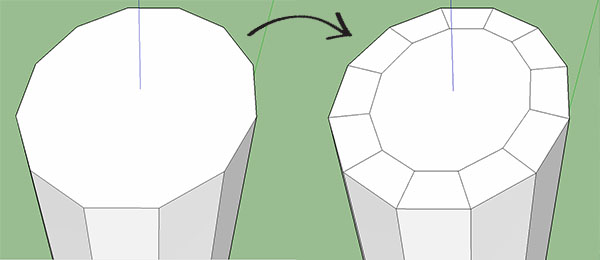
              scale with CTRL?
              I just got vertex tools and was hoping this was already an option. IT is actually an extremely useful tool when modeling with quad geometry.

              When do you plan to complete v2? 😄

              Don't get me wrong, I am extremely grateful for your efforts. Sketchup without your plugins would be half the program it is.

              1 條回覆 最後回覆 回覆 引用 0
              • P 離線
                pipinek
                最後由 編輯

                Greetings,

                Is there any possibility to have the toolbar kept on the screen instead of activated it each time one clicks on the empty screen?

                Thank you in advance.

                1 條回覆 最後回覆 回覆 引用 0
                • E 離線
                  Einstein
                  最後由 編輯

                  Hi!
                  It seems that among Vertex Tools' shortcuts there's no one to call the general toolbar. There are only hotkeys for particular operations but I'd like to press V and activate the plugin toolbar. It would be cool to add such an option I think. Just a suggestion 😄

                  1 條回覆 最後回覆 回覆 引用 0
                  • P 離線
                    pipinek
                    最後由 編輯

                    @einstein said:

                    Hi!
                    It seems that among Vertex Tools' shortcuts there's no one to call the general toolbar. There are only hotkeys for particular operations but I'd like to press V and activate the plugin toolbar. It would be cool to add such an option I think. Just a suggestion 😄

                    Thank you for the suggestion.

                    I have been using a shortcut to activate the toolbar.
                    I find it annoying to have to recall it every time using a single tool.

                    I wish it could be an option to keep the toolbar permanently on the screen.

                    1 條回覆 最後回覆 回覆 引用 0
                    • E 離線
                      Einstein
                      最後由 編輯

                      @pipinek said:

                      I have been using a shortcut to activate the toolbar.

                      How did you do this? I'm looking for just this option.

                      1 條回覆 最後回覆 回覆 引用 0
                      • P 離線
                        pipinek
                        最後由 編輯

                        @einstein said:

                        @pipinek said:

                        I have been using a shortcut to activate the toolbar.

                        How did you do this? I'm looking for just this option.

                        Shortcuts:

                        Tools/Vertex Tools/Edit Vertices

                        Here you can associate a shortcut. The Vertex Toolbar will appear.

                        1 條回覆 最後回覆 回覆 引用 0
                        • GD3DesignG 離線
                          GD3Design
                          最後由 編輯

                          @thomthom said:

                          Yes - in fact, it's already added to the upcoming v2.
                          Also coming in v2. 😄

                          Any news on v2? 😄 😄 😄

                          Maybe a pre-sale 'crowd-fundy' thing to help production...? 😄

                          1 條回覆 最後回覆 回覆 引用 0
                          • thomthomT 離線
                            thomthom
                            最後由 編輯

                            No need, it's just around the corner. 😄

                            Thomas Thomassen — SketchUp Monkey & Coding addict
                            List of my plugins and link to the CookieWare fund

                            1 條回覆 最後回覆 回覆 引用 0
                            • thomthomT 離線
                              thomthom
                              最後由 編輯

                              Version 2 is here!


                              https://sketchucation.com/forums/download/file.php?id=160761&mode=view/rokbox.jpg

                              Version 2.0 Overview

                              Check out key features here: https://evilsoftwareempire.com/vertex-tools/features

                              Full manual: https://evilsoftwareempire.com/vertex-tools/manual

                              Thomas Thomassen — SketchUp Monkey & Coding addict
                              List of my plugins and link to the CookieWare fund

                              1 條回覆 最後回覆 回覆 引用 0
                              • HornOxxH 離線
                                HornOxx
                                最後由 編輯

                                a great new piece of software - Congratulations! 👍 👍
                                will it work with SkUp 2017 Make?

                                never trust a skinny cook

                                1 條回覆 最後回覆 回覆 引用 0
                                • thomthomT 離線
                                  thomthom
                                  最後由 編輯

                                  @hornoxx said:

                                  will it work with SkUp 2017 Make?

                                  Yup! 😄

                                  Thomas Thomassen — SketchUp Monkey & Coding addict
                                  List of my plugins and link to the CookieWare fund

                                  1 條回覆 最後回覆 回覆 引用 0
                                  • jujuJ 離線
                                    juju
                                    最後由 編輯

                                    It almost sounds like Aaron did the voice-over.

                                    Save the Earth, it's the only planet with chocolate.

                                    1 條回覆 最後回覆 回覆 引用 0
                                    • thomthomT 離線
                                      thomthom
                                      最後由 編輯

                                      @juju said:

                                      It almost sounds like Aaron did the voice-over.

                                      That's minion #2199 😉

                                      Thomas Thomassen — SketchUp Monkey & Coding addict
                                      List of my plugins and link to the CookieWare fund

                                      1 條回覆 最後回覆 回覆 引用 0
                                      • pbacotP 離線
                                        pbacot
                                        最後由 編輯

                                        No way! 😮

                                        MacOSX MojaveSketchUp Pro v19 Twilight v2 Thea v3 PowerCADD

                                        1 條回覆 最後回覆 回覆 引用 0
                                        • N 離線
                                          numerobis
                                          最後由 編輯

                                          Very cool! 😎
                                          Now i need to update my SU...

                                          1 條回覆 最後回覆 回覆 引用 0
                                          • thomthomT 離線
                                            thomthom
                                            最後由 編輯

                                            @numerobis said:

                                            Now i need to update my SU...

                                            What version have you been using so far?

                                            Thomas Thomassen — SketchUp Monkey & Coding addict
                                            List of my plugins and link to the CookieWare fund

                                            1 條回覆 最後回覆 回覆 引用 0
                                            • 1
                                            • 2
                                            • 9
                                            • 10
                                            • 11
                                            • 12
                                            • 13
                                            • 33
                                            • 34
                                            • 11 / 34
                                            • 第一個貼文
                                              最後的貼文
                                            Buy SketchPlus
                                            Buy SUbD
                                            Buy WrapR
                                            Buy eBook
                                            Buy Modelur
                                            Buy Vertex Tools
                                            Buy SketchCuisine
                                            Buy FormFonts

                                            Advertisement