sketchucation logo sketchucation
    • 登入
    Oops, your profile's looking a bit empty! To help us tailor your experience, please fill in key details like your SketchUp version, skill level, operating system, and more. Update and save your info on your profile page today!
    🔌 Smart Spline | Fluid way to handle splines for furniture design and complex structures. Download

    [Plugin][$] Vertex Tools

    已排程 已置頂 已鎖定 已移動 Plugins
    667 貼文 92 Posters 434.0k 瀏覽 92 Watching
    正在載入更多貼文
    • 從舊到新
    • 從新到舊
    • 最多點贊
    回覆
    • 在新貼文中回覆
    登入後回覆
    此主題已被刪除。只有擁有主題管理權限的使用者可以查看。
    • thomthomT 離線
      thomthom
      最後由 編輯

      Ah... forgot about that. Been using the dev version of VT2 for so long...

      Thomas Thomassen — SketchUp Monkey & Coding addict
      List of my plugins and link to the CookieWare fund

      1 條回覆 最後回覆 回覆 引用 0
      • BoxB 離線
        Box
        最後由 編輯

        I must admit that has be annoying me for ages and I thought I was either being stupid or there was a glitch in my setup.

        1 條回覆 最後回覆 回覆 引用 0
        • thomthomT 離線
          thomthom
          最後由 編輯

          Sorry about that. I really need to get VT2 ready. Still working on the feature-set though.

          Thomas Thomassen — SketchUp Monkey & Coding addict
          List of my plugins and link to the CookieWare fund

          1 條回覆 最後回覆 回覆 引用 0
          • HieruH 離線
            Hieru
            最後由 編輯

            Rich hit the nail on the head...that's exactly what I was talking about.

            Glad I'm not the only one Box 👍

            As long as it's in the pipeline and it's not down to me being dumb then I'm happy to wait for the next version....no rush Thomas 😉 .

            www.davidhier.co.uk

            1 條回覆 最後回覆 回覆 引用 0
            • C 離線
              cuttingedge
              最後由 編輯

              Hi thomthom,

              Ive been wanting to ask you this question.

              I think the soft selection of Vertex tools is awesome. The only thing is, Can we set the soft selection to select only neighbor vertices (within the specified radius) that are connected. I hope you get what I mean by connected.

              The problem I face is if I try to select vertices in the front, the back are also selected and couldnt deselect it because its with the 'soft select radius', but those are not connected to the rest of the selection in front.

              Image shows what I mean
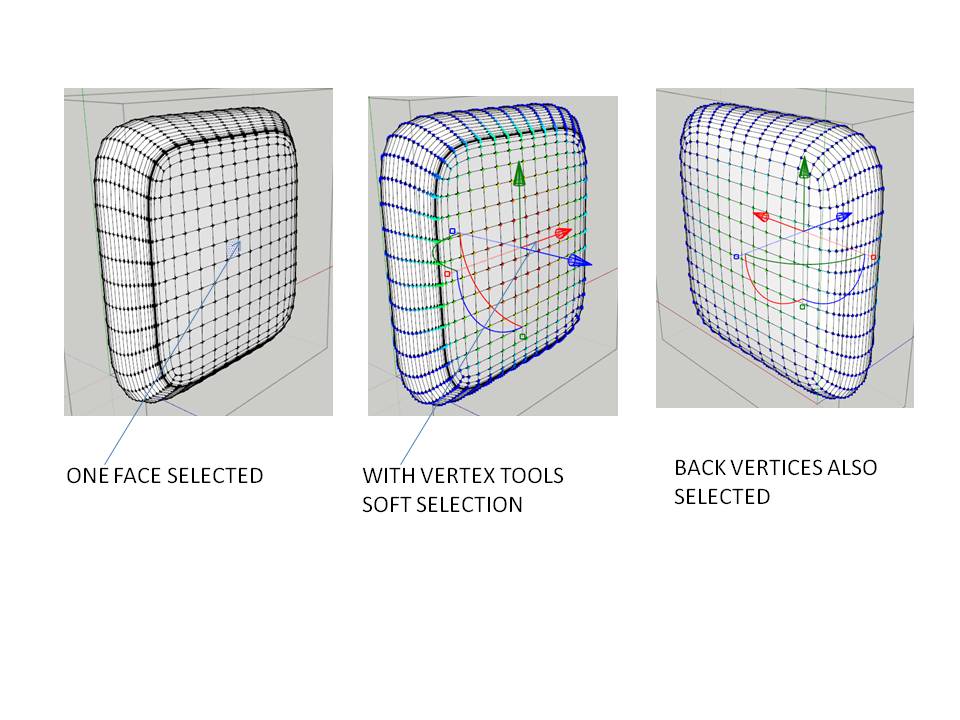
              vertex tools soft selection

              1 條回覆 最後回覆 回覆 引用 0
              • Rich O BrienR 離線
                Rich O Brien Moderator
                最後由 編輯

                I know in VT2 Thom is tackling that issue. I requested an 'Only Connected' type fall-off to allow this type of manipulation.

                Download the free D'oh Book for SketchUp 📖

                1 條回覆 最後回覆 回覆 引用 0
                • pbacotP 離線
                  pbacot
                  最後由 編輯

                  Or "follow surface" so only points are soft-selected in a contiguous fashion from the selection

                  MacOSX MojaveSketchUp Pro v19 Twilight v2 Thea v3 PowerCADD

                  1 條回覆 最後回覆 回覆 引用 0
                  • thomthomT 離線
                    thomthom
                    最後由 編輯

                    Yes - this is slated for V2 of VT.

                    Thomas Thomassen — SketchUp Monkey & Coding addict
                    List of my plugins and link to the CookieWare fund

                    1 條回覆 最後回覆 回覆 引用 0
                    • plot-parisP 離線
                      plot-paris
                      最後由 編輯

                      Hey Thomthom,

                      how's Version 2.0 coming along?

                      I have some questions concerning the new version's functionality:

                      1. Different Soft Selection Falloff-Curves

                      for the Soft Selection currently we are able to select between linear falloff and cosine falloff (soft on both ends). But sometimes different behaviors would be helpful, like soft on one end, hard on the other (exponential).
                      Even better (but increasingly complicated in terms of GUI) would be custom curves 😉
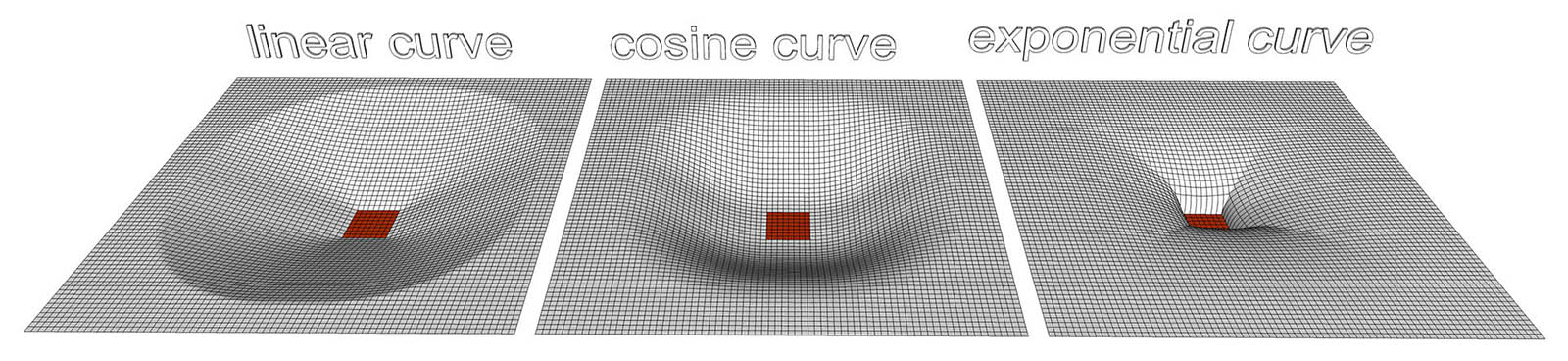
                      VertexTools_FalloffCurvves.jpg

                      2. Extrude Quad-Faces

                      when using the CTRL key to extrude surfaces, would it be possible to automatically turn the resulting surfaces into quad faces? That would help a lot when using SUbD 😄

                      3. Global vs Local Orientation of Gizmo

                      also it could be useful to have an option to orient the Manipulation Gizmo either globally (current behavior) or locally. Should all the selected vertices happen to lie on one plane, the gizmo could be oriented perpendicular to it.
                      Should the selection not be as simple... well, you'll figure something out 😉
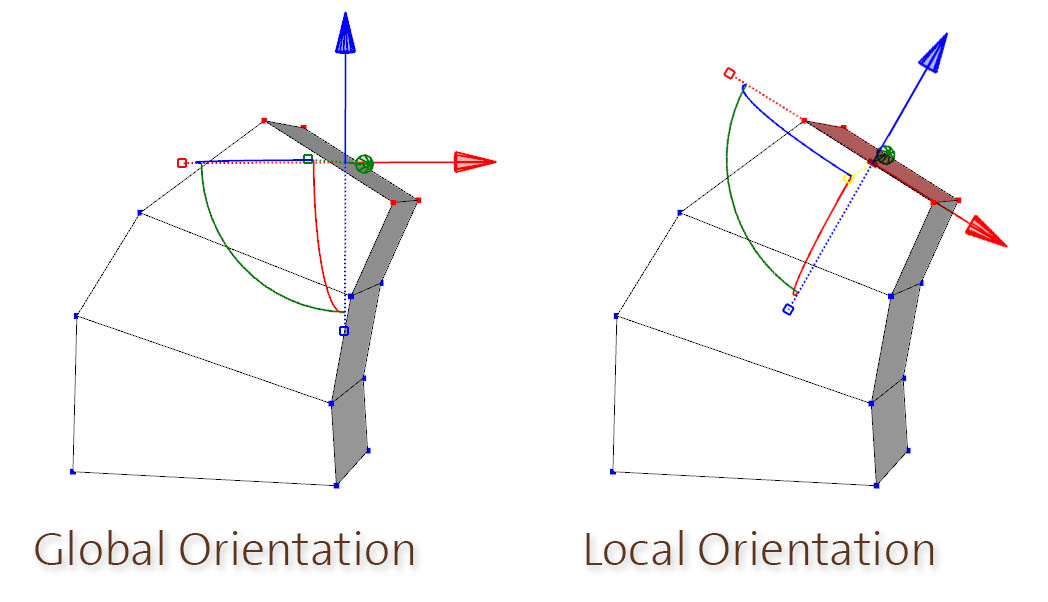
                      VertexTools_Extrude.jpg

                      1 條回覆 最後回覆 回覆 引用 0
                      • cottyC 離線
                        cotty
                        最後由 編輯

                        You can change the orientation of te gizmo already with the right click context menu

                        my SketchUp gallery

                        1 條回覆 最後回覆 回覆 引用 0
                        • thomthomT 離線
                          thomthom
                          最後由 編輯

                          @plot-paris said:

                          how's Version 2.0 coming along?

                          Not all too much activity the last few months. During the summer I do less coding - trying to make use of the little "summer" we get in Norway.
                          The plan is to ship SUbD 2.0 with OpenSubdiv support. (it's not far from complete.) Then pick up Vertex Tools.

                          @plot-paris said:

                          1. Different Soft Selection Falloff-Curves

                          I've been thinking of something like adding a UI that let you control the falloff using bezier curves. Something similar to what 3dsmax do.

                          @plot-paris said:

                          2. Extrude Quad-Faces

                          I'm not sure I follow on this one - extruded edges are all planar faces, right?

                          @plot-paris said:

                          3. Global vs Local Orientation of Gizmo

                          I like that idea - orient to the best fit plane. 👍 👍

                          Thomas Thomassen — SketchUp Monkey & Coding addict
                          List of my plugins and link to the CookieWare fund

                          1 條回覆 最後回覆 回覆 引用 0
                          • C 離線
                            cuttingedge
                            最後由 編輯

                            HI Thomthom,

                            May I wish the ability to make planar along say x , y or z based on the active gizmo.
                            I always had problem mirroring when the vertices are not in their perfect x,y or z.

                            Thanks

                            1 條回覆 最後回覆 回覆 引用 0
                            • thomthomT 離線
                              thomthom
                              最後由 編輯

                              @cuttingedge said:

                              May I wish the ability to make planar along say x , y or z based on the active gizmo.

                              Use gizmo-scale to zero?

                              Thomas Thomassen — SketchUp Monkey & Coding addict
                              List of my plugins and link to the CookieWare fund

                              1 條回覆 最後回覆 回覆 引用 0
                              • C 離線
                                cuttingedge
                                最後由 編輯

                                @thomthom said:

                                @cuttingedge said:

                                May I wish the ability to make planar along say x , y or z based on the active gizmo.

                                Use gizmo-scale to zero?

                                I hope I could made my point clearer. At some point whenever modeling more complicated models, somehow
                                the models gets messed up so i need to cut the half and mirror from the center to make it whole again.

                                But to successfully mirror it, vertices need to be coplanar and need to be at least in perfect alignment with an axis, say x or y.

                                Whenever I run "make planar". Vertices get aligned for sure but not in a defined axis (x or y)
                                Maybe there is something I am not doing correctly.
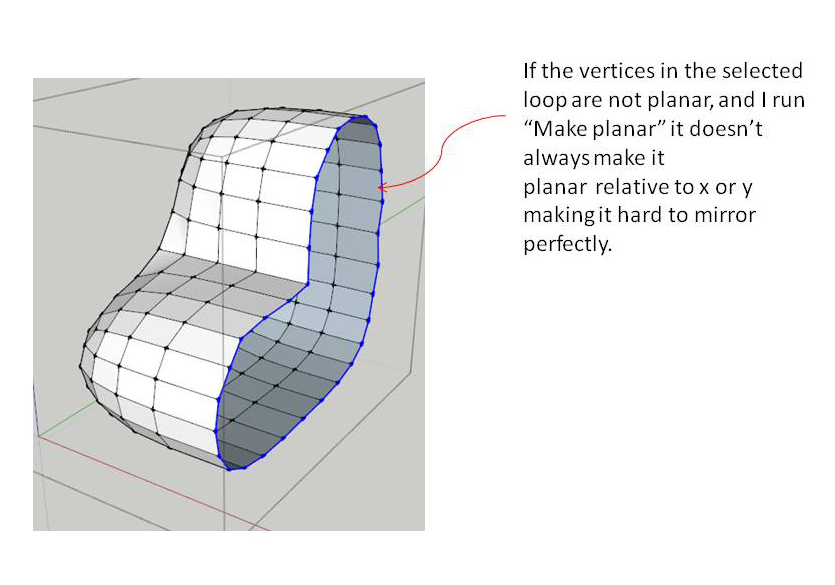
                                make planar

                                1 條回覆 最後回覆 回覆 引用 0
                                • Rich O BrienR 離線
                                  Rich O Brien Moderator
                                  最後由 編輯

                                  Select the verts you want planar and use the Gizmo scale handle to make them planar in the axis of choice.

                                  Just be sure to hit 0 and enter after dragging the handle to scale them planar.

                                  Download the free D'oh Book for SketchUp 📖

                                  1 條回覆 最後回覆 回覆 引用 0
                                  • thomthomT 離線
                                    thomthom
                                    最後由 編輯

                                    ScaleToZero.gif

                                    In VT2 the scale will stop at 0 - making it easier.

                                    Thomas Thomassen — SketchUp Monkey & Coding addict
                                    List of my plugins and link to the CookieWare fund

                                    1 條回覆 最後回覆 回覆 引用 0
                                    • Rich O BrienR 離線
                                      Rich O Brien Moderator
                                      最後由 編輯

                                      Ah...VT2.

                                      #waitingpatientlyforthat

                                      Download the free D'oh Book for SketchUp 📖

                                      1 條回覆 最後回覆 回覆 引用 0
                                      • P 離線
                                        Pherim
                                        最後由 編輯

                                        @escapeartist said:

                                        Great looking plugin!

                                        May I make a suggestion that may provide additional usefulness to the plugin? I have no idea how easy it would be to implement, I don't know darn thing about Ruby. How about different profiles or wave forms used to calculate the shape of the deflection? I notice that the deflection when push/pulled is very smooth, but would it be possible to get different results by selecting a "profie shape", changing the rate and direction (positive or negative displacement) of deflection change across distance selected? Pictures:

                                        [attachment=0:2jjdgjng]<!-- ia0 -->profiles.jpg<!-- ia0 -->[/attachment:2jjdgjng]

                                        Possible? Not worth it?

                                        (Original Post)

                                        As this post is now six years old and it looks like there are still only two choices for this (linear and cosine), will this possibly be added at some point? It would be great to be able to manipulate the curve myself, but the pinched shape from the image would already be a wonderful addition. I am thinking about buying the plugin and this would certainly have an impact on my decision. 😉

                                        1 條回覆 最後回覆 回覆 引用 0
                                        • thomthomT 離線
                                          thomthom
                                          最後由 編輯

                                          @pherim said:

                                          As this post is now six years old and it looks like there are still only two choices for this (linear and cosine), will this possibly be added at some point?

                                          http://sketchucation.com/forums/viewtopic.php?f=323%26amp;t=29636%26amp;p=600137#p599939 😄

                                          Thomas Thomassen — SketchUp Monkey & Coding addict
                                          List of my plugins and link to the CookieWare fund

                                          1 條回覆 最後回覆 回覆 引用 0
                                          • P 離線
                                            Pherim
                                            最後由 編輯

                                            Oh, I didn't see that! And it even is on the last page of the topic... I'm sorry, I just saw it was not yet implemented and did not want to read through all 15 pages, I hope you don't mind.

                                            Sounds great, though, I am looking forward to it.

                                            1 條回覆 最後回覆 回覆 引用 0
                                            • 1
                                            • 2
                                            • 3
                                            • 4
                                            • 5
                                            • 33
                                            • 34
                                            • 2 / 34
                                            • 第一個貼文
                                              最後的貼文
                                            Buy SketchPlus
                                            Buy SUbD
                                            Buy WrapR
                                            Buy eBook
                                            Buy Modelur
                                            Buy Vertex Tools
                                            Buy SketchCuisine
                                            Buy FormFonts

                                            Advertisement