sketchucation logo sketchucation
    • 登入
    Oops, your profile's looking a bit empty! To help us tailor your experience, please fill in key details like your SketchUp version, skill level, operating system, and more. Update and save your info on your profile page today!
    🔌 Easy Offset | Offset selected faces in SketchUp in positive and negative offsets. Download

    [Plugin][$] Vertex Tools

    已排程 已置頂 已鎖定 已移動 Plugins
    667 貼文 92 Posters 414.6k 瀏覽 92 Watching
    正在載入更多貼文
    • 從舊到新
    • 從新到舊
    • 最多點贊
    回覆
    • 在新貼文中回覆
    登入後回覆
    此主題已被刪除。只有擁有主題管理權限的使用者可以查看。
    • thomthomT 離線
      thomthom
      最後由 編輯

      hmm...
      http://www.pathlabtalk.com/forum/images/smilies/paranoid.gif

      Thomas Thomassen — SketchUp Monkey & Coding addict
      List of my plugins and link to the CookieWare fund

      1 條回覆 最後回覆 回覆 引用 0
      • thomthomT 離線
        thomthom
        最後由 編輯

        Version 1.1.2

        • Fixes a small undo bug.

        Thomas Thomassen — SketchUp Monkey & Coding addict
        List of my plugins and link to the CookieWare fund

        1 條回覆 最後回覆 回覆 引用 0
        • thomthomT 離線
          thomthom
          最後由 編輯

          @rich o brien said:

          Any chance we can see pre picked verts dropped when hitting ESC and using the move tool?

          Use the Deselect command.

          Thomas Thomassen — SketchUp Monkey & Coding addict
          List of my plugins and link to the CookieWare fund

          1 條回覆 最後回覆 回覆 引用 0
          • Rich O BrienR 離線
            Rich O Brien Moderator
            最後由 編輯

            http://joyerickson.files.wordpress.com/2012/06/bug-spray.jpg

            Download the free D'oh Book for SketchUp 📖

            1 條回覆 最後回覆 回覆 引用 0
            • panixiaP 離線
              panixia
              最後由 編輯

              @thomthom said:

              Version 1.1.2

              • Fixes a small undo bug.

              should i uninstall/delete the previous build or it overwrites when .rbz is loaded?

              1 條回覆 最後回覆 回覆 引用 0
              • thomthomT 離線
                thomthom
                最後由 編輯

                It should overwrite it. To be sure you can type in the Ruby Console: TT_Vertex::PLUGIN_VERSION - it should return 1.1.2 is successful.

                Thomas Thomassen — SketchUp Monkey & Coding addict
                List of my plugins and link to the CookieWare fund

                1 條回覆 最後回覆 回覆 引用 0
                • panixiaP 離線
                  panixia
                  最後由 編輯

                  ya ya it was just solved, thanks anyway. it overwrites fine. 👍

                  1 條回覆 最後回覆 回覆 引用 0
                  • thomthomT 離線
                    thomthom
                    最後由 編輯

                    Version 1.1.3 Released

                    • Fixes a Gizmo VCB adjustment bug.

                    Thomas Thomassen — SketchUp Monkey & Coding addict
                    List of my plugins and link to the CookieWare fund

                    1 條回覆 最後回覆 回覆 引用 0
                    • pilouP 離線
                      pilou
                      最後由 編輯

                      Sorry where is the link for load the new beta ? 😳

                      Frenchy Pilou
                      Is beautiful that please without concept!
                      My Little site :)

                      1 條回覆 最後回覆 回覆 引用 0
                      • thomthomT 離線
                        thomthom
                        最後由 編輯

                        @unknownuser said:

                        Sorry where is the link for load the new beta ? 😳

                        No beta. Just log in to your account on the Vertex Tools website.

                        Thomas Thomassen — SketchUp Monkey & Coding addict
                        List of my plugins and link to the CookieWare fund

                        1 條回覆 最後回覆 回覆 引用 0
                        • cottyC 離線
                          cotty
                          最後由 編輯

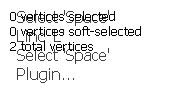
                          It is possible to change the position of the screen text (top left) in a simple manner? It conflicts with the outputof the On Screen Rooling Reel plugin...
                          textconflict.jpg

                          my SketchUp gallery

                          1 條回覆 最後回覆 回覆 引用 0
                          • Rich O BrienR 離線
                            Rich O Brien Moderator
                            最後由 編輯

                            Did you try moving it? 😉

                            Download the free D'oh Book for SketchUp 📖

                            1 條回覆 最後回覆 回覆 引用 0
                            • cottyC 離線
                              cotty
                              最後由 編輯

                              @rich o brien said:

                              Did you try moving it? 😉

                              I thought of a not so simple solution 😎
                              Thank you! I will use this perfect solution until there is a complicated one...

                              my SketchUp gallery

                              1 條回覆 最後回覆 回覆 引用 0
                              • thomthomT 離線
                                thomthom
                                最後由 編輯

                                @cotty said:

                                Thank you! I will use this perfect solution until there is a complicated one...

                                Complicated solution:

                                1. Hack the RBS encryption and decode the original source.
                                2. Find the code for the default position.
                                3. Recompile.
                                4. Bob is you uncle!

                                🤓

                                Thomas Thomassen — SketchUp Monkey & Coding addict
                                List of my plugins and link to the CookieWare fund

                                1 條回覆 最後回覆 回覆 引用 0
                                • mitcorbM 離線
                                  mitcorb
                                  最後由 編輯

                                  Hi, ThomThom:
                                  I just finished trolling through this entire thread, and I know I am missing something. In my first experiments with the tool, I make a random selection on the model and test the Gizmo. I orbit to the other side and see that I have also made a selection on the back side and deformed this in the same way. I thought there was a technique to select only that visible to the camera?

                                  I take the slow, deliberate approach in my aimless wandering.

                                  1 條回覆 最後回覆 回覆 引用 0
                                  • thomthomT 離線
                                    thomthom
                                    最後由 編輯

                                    Enable "Ignore Backfaces" - where the vertices of every face with its backface facing the camera will not be selected.
                                    Note this is not the same as what you see - it's entirely the relationship between the face normal and the camera.

                                    To get true selection of only visible, Make your selection, then right click and choose "Select Only Visible".
                                    http://www.thomthom.net/software/vertex_tools/manual/tools#select_only_visible

                                    Thomas Thomassen — SketchUp Monkey & Coding addict
                                    List of my plugins and link to the CookieWare fund

                                    1 條回覆 最後回覆 回覆 引用 0
                                    • mitcorbM 離線
                                      mitcorb
                                      最後由 編輯

                                      Thank you very much for this hint and thank you very much for an excellent tool.

                                      I take the slow, deliberate approach in my aimless wandering.

                                      1 條回覆 最後回覆 回覆 引用 0
                                      • opalO 離線
                                        opal
                                        最後由 編輯

                                        @mitcorb said:

                                        Hi, ThomThom:
                                        I just finished trolling through this entire thread, and I know I am missing something. In my first experiments with the tool, I make a random selection on the model and test the Gizmo. I orbit to the other side and see that I have also made a selection on the back side and deformed this in the same way. I thought there was a technique to select only that visible to the camera?

                                        pokes nose in Unless something has changed, right click on the tool bar.. ignore backfaces, or access the controls from the tools menu.. same selection, ignore backfaces

                                        1 條回覆 最後回覆 回覆 引用 0
                                        • jo-keJ 離線
                                          jo-ke
                                          最後由 編輯

                                          Just purchased this very useful tool. Didn't had time to play with it but I'm shure I will like it.
                                          Thank you for your useful work.

                                          http://www.zz7.de

                                          1 條回覆 最後回覆 回覆 引用 0
                                          • thomthomT 離線
                                            thomthom
                                            最後由 編輯

                                            @jo-ke said:

                                            Just purchased this very useful tool. Didn't had time to play with it but I'm shure I will like it.
                                            Thank you for your useful work.

                                            👍 😍 👍

                                            Thomas Thomassen — SketchUp Monkey & Coding addict
                                            List of my plugins and link to the CookieWare fund

                                            1 條回覆 最後回覆 回覆 引用 0
                                            • 1
                                            • 2
                                            • 3
                                            • 4
                                            • 5
                                            • 6
                                            • 7
                                            • 8
                                            • 33
                                            • 34
                                            • 6 / 34
                                            • 第一個貼文
                                              最後的貼文
                                            Buy SketchPlus
                                            Buy SUbD
                                            Buy WrapR
                                            Buy eBook
                                            Buy Modelur
                                            Buy Vertex Tools
                                            Buy SketchCuisine
                                            Buy FormFonts

                                            Advertisement