sketchucation logo sketchucation
    • 登入
    Oops, your profile's looking a bit empty! To help us tailor your experience, please fill in key details like your SketchUp version, skill level, operating system, and more. Update and save your info on your profile page today!
    🔌 Smart Spline | Fluid way to handle splines for furniture design and complex structures. Download

    [Plugin] Cloud

    已排程 已置頂 已鎖定 已移動 Plugins
    72 貼文 25 Posters 96.5k 瀏覽 25 Watching
    正在載入更多貼文
    • 從舊到新
    • 從新到舊
    • 最多點贊
    回覆
    • 在新貼文中回覆
    登入後回覆
    此主題已被刪除。只有擁有主題管理權限的使用者可以查看。
    • B 離線
      Ben Ritter
      最後由 編輯

      Thanks again for sharing.

      1 條回覆 最後回覆 回覆 引用 0
      • broomstickB 離線
        broomstick
        最後由 編輯

        now, if only I could find reliable dem sources for Italy...

        Anyone know where I could look?

        1 條回覆 最後回覆 回覆 引用 0
        • GaieusG 離線
          Gaieus
          最後由 編輯

          Thanks Didier,

          I am about starting a new project where we not only reconstruct Roman architecture in my city but also contemporary ground surface (based on geological and archaeological research).

          This is exactly the tool I need in these cases. 👍 👍 👍

          Gai...

          1 條回覆 最後回覆 回覆 引用 0
          • Didier BurD 離線
            Didier Bur
            最後由 編輯

            Nice to see it is useful 😛

            DB

            1 條回覆 最後回覆 回覆 引用 0
            • M 離線
              mozzie
              最後由 編輯

              For me, it's an essential tool.
              And it just gets better!
              Merci Didier!

              1 條回覆 最後回覆 回覆 引用 0
              • M 離線
                mozzie
                最後由 編輯

                The Points Cloud Export function will be a wonderful new tool for me, but I am having trouble with the Export dialog - if I highlight a face with one divide line, then choose Points Cloud >> Export, nothing happens. The Ruby Console shows:

                Error: #<TypeError: no implicit conversion from nil to integer>
                (eval):655:in []' (eval):655:in initialize'
                (eval):1269:in new' (eval):1269:in exportPointsCloud'
                (eval):1281
                (eval):1281:in `call'

                screenshot attached

                Also - would it be possible to nominate a new (not World) origin for export, just as for Import? I will understand if you decide that it will make the tool too complicated.
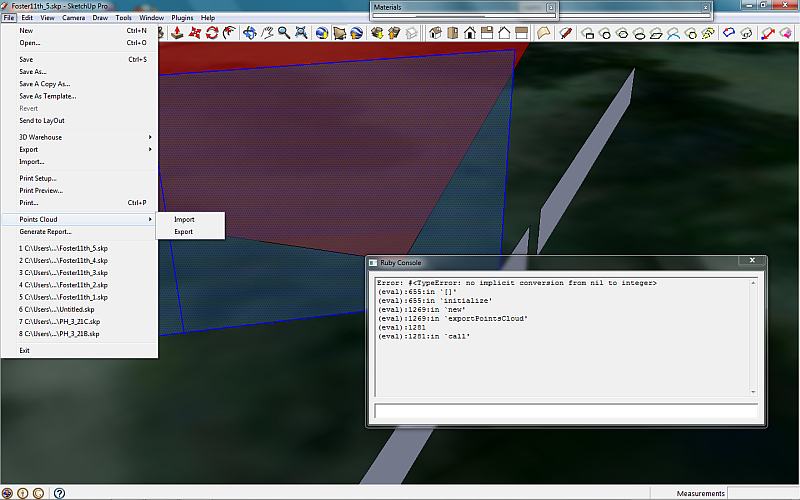

                Screenshot showing Ruby Console

                1 條回覆 最後回覆 回覆 引用 0
                • MALAISEM 離線
                  MALAISE
                  最後由 編輯

                  Very useful, specially for terrain modelling

                  MALAISE

                  La Connaissance n'a de valeur que partagée

                  1 條回覆 最後回覆 回覆 引用 0
                  • Didier BurD 離線
                    Didier Bur
                    最後由 編輯

                    Hi,

                    @ Mozzie: please open the ruby console and copy-paste this line: Sketchup.active_model.options[0][2]
                    Hit enter and post what happens. You should have an integer returned, from 0 to 4. Any other result shows who's the culprit...
                    They changed the units options hash between 7.0 and 7.1 👿

                    DB

                    1 條回覆 最後回覆 回覆 引用 0
                    • thomthomT 離線
                      thomthom
                      最後由 編輯

                      @didier bur said:

                      They changed the units options hash between 7.0 and 7.1 👿

                      !!! ?
                      What? that has not been documented anywhere - has it?

                      Thomas Thomassen — SketchUp Monkey & Coding addict
                      List of my plugins and link to the CookieWare fund

                      1 條回覆 最後回覆 回覆 引用 0
                      • Didier BurD 離線
                        Didier Bur
                        最後由 編輯

                        Hi,

                        v6: length unit is: Sketchup.active_model.options[0][2]
                        v7.0 length unit is: Sketchup.active_model.options[0][2]
                        v 7.1. length unit is: Sketchup.active_model.options[3][2]

                        Am I right ?

                        DB

                        1 條回覆 最後回覆 回覆 引用 0
                        • thomthomT 離線
                          thomthom
                          最後由 編輯

                          oh, you meant the array index - I thought the hash key had changed:

                          ` Sketchup.active_model.options.keys.each {|key| p key; Sketchup.active_model.options[key].each {|k,v| puts "> #{k} - #{v}"} }
                          "PageOptions"

                          ShowTransition - false
                          TransitionTime - 2.0
                          "SlideshowOptions"
                          LoopSlideshow - true
                          SlideTime - 1.0
                          "NamedOptions"
                          "UnitsOptions"
                          LengthPrecision - 0
                          LengthFormat - 0
                          LengthUnit - 2
                          LengthSnapEnabled - false
                          LengthSnapLength - 0.0393700787401575
                          AnglePrecision - 1
                          AngleSnapEnabled - true
                          SnapAngle - 15.0
                          SuppressUnitsDisplay - false
                          ForceInchDisplay - false
                          "PrintOptions"
                          PrintWidth - 7.0
                          PrintHeight - 5.0
                          ComputeSizeFromScale - false
                          SizeInPrint - 1.0
                          SizeInModel - 307.906005859375
                          VectorMode - false
                          FitToPage - true
                          NumberOfPages - 1
                          LineWeight - 0.5
                          PixelsPerInch - 150.0
                          SectionSlice - false
                          ModelExtents - false
                          PrintQuality - 3
                          ScaleAdjustment - 1.0
                          QualityAdjustment - 0.5
                          ["PageOptions", "SlideshowOptions", "NamedOptions", "UnitsOptions", "PrintOptions"]`

                          This is the same in all versions?

                          Thomas Thomassen — SketchUp Monkey & Coding addict
                          List of my plugins and link to the CookieWare fund

                          1 條回覆 最後回覆 回覆 引用 0
                          • TIGT 離線
                            TIG Moderator
                            最後由 編輯

                            You shouldn't hard-code the units items like that [or any other option for that matter] - because the order can change with each build - instead use model.options["UnitsOptions"]["LengthUnit"] that will work no matter what 🤓

                            TIG

                            1 條回覆 最後回覆 回覆 引用 0
                            • Didier BurD 離線
                              Didier Bur
                              最後由 編輯

                              @unknownuser said:

                              use model.options["UnitsOptions"]["LengthUnit"] that will work no matter what

                              ☀ 💭
                              Of course ! I don't know why I didn't though of that before...

                              Bug fixed, new version available, same place.

                              DB

                              1 條回覆 最後回覆 回覆 引用 0
                              • M 離線
                                mozzie
                                最後由 編輯

                                Thanks for the fix ... it is no longer necessry but result is;

                                Sketchup.active_model.options[0][2]
                                nil

                                for 7.1

                                1 條回覆 最後回覆 回覆 引用 0
                                • thomthomT 離線
                                  thomthom
                                  最後由 編輯

                                  There are four Cloud threads - can we clean these up please?
                                  For instance;
                                  Removing the download for the old ones,
                                  Replacing [Plugin] with [Obsolete]
                                  Add a link to the new version
                                  Then finally lock the old ones?

                                  When I was looking at the plugin index it was confusing to what was the latest version.

                                  Thomas Thomassen — SketchUp Monkey & Coding addict
                                  List of my plugins and link to the CookieWare fund

                                  1 條回覆 最後回覆 回覆 引用 0
                                  • thomthomT 離線
                                    thomthom
                                    最後由 編輯

                                    @unknownuser said:

                                    Difficult to keep track of what's new, some topics contain plugins but not the [Plugin] prefix, other topics are posted as questions and then a plugin is added but the first post not renamed with the prefix, etc.

                                    Yea - we should do a cleanup of all these - have them reposted fresh and remove any outdated version.

                                    Thomas Thomassen — SketchUp Monkey & Coding addict
                                    List of my plugins and link to the CookieWare fund

                                    1 條回覆 最後回覆 回覆 引用 0
                                    • J 離線
                                      JGA
                                      最後由 編輯

                                      Thanks very much for providing this plugin, we've recently invested in a Total Station & this translates the point data reliably. Providing a help file is also a boon.
                                      We're also using TIG's contourmaker plugin, which helps when exporting to data to AutoCAD.

                                      Regards,
                                      JGA

                                      1 條回覆 最後回覆 回覆 引用 0
                                      • E 離線
                                        Erkki
                                        最後由 編輯

                                        Hi,

                                        How to get Cloud_71.rbs and Cloud_6.rb to work?

                                        My intention is to load elevation data of a terrain collected with the help of a GSP-logger to create a terrain model for a village. I noticed that there is a plugin Cloud_71.rbs in the Ruby Library Depot by Didier Bur. I understand that the plugin accepts elevation data, if it is in the CSV-format described in the pdf of the plugin. I downloaded Cloud_71.rbs in the plugin folder of Sketchup 7.1 (Windows XP Pro).

                                        For some reason the Cloud_71.rbs didn't show up in the Plugin menu or any other menu either after restart of Sketchup 7.1. The older "Clouds" with extension .rb show up, but unfortunately I wasn't able to get them work with the downloaded sample files, although I browsed all the possible SketchUcation discussion forums and also some others for help.

                                        Does anyone know if there is an any easy way to get the Cloud_xx.rb plugins to work? And how to get the Cloud_71.rbs plugin show up and make terrain in Sketchup 7.1 or even in the newer Sketchup 8? I'm convinced that there are ways - I just couldn't find the way.

                                        I'd be grateful for your help.

                                        Kind regards Erkki Finni

                                        1 條回覆 最後回覆 回覆 引用 0
                                        • Didier BurD 離線
                                          Didier Bur
                                          最後由 編輯

                                          Hi,
                                          Avoid having more than one version of a plugin installed at the same time, remove older versions of cloud script, this may cause the problem.
                                          Hope this helps,

                                          DB

                                          1 條回覆 最後回覆 回覆 引用 0
                                          • E 離線
                                            Erkki
                                            最後由 編輯

                                            @didier bur said:

                                            Hi,
                                            Avoid having more than one version of a plugin installed at the same time, remove older versions of cloud script, this may cause the problem.
                                            Hope this helps,

                                            Hi,

                                            Thanks for the hint! I'll try to do this.

                                            Regards Erkki Finni

                                            1 條回覆 最後回覆 回覆 引用 0
                                            • 1
                                            • 2
                                            • 3
                                            • 4
                                            • 2 / 4
                                            • 第一個貼文
                                              最後的貼文
                                            Buy SketchPlus
                                            Buy SUbD
                                            Buy WrapR
                                            Buy eBook
                                            Buy Modelur
                                            Buy Vertex Tools
                                            Buy SketchCuisine
                                            Buy FormFonts

                                            Advertisement


