sketchucation logo sketchucation
    • 登入
    Oops, your profile's looking a bit empty! To help us tailor your experience, please fill in key details like your SketchUp version, skill level, operating system, and more. Update and save your info on your profile page today!
    🔌 Smart Spline | Fluid way to handle splines for furniture design and complex structures. Download

    [Plugin][$] Curviloft 2.0a - 31 Mar 24 (Loft & Skinning)


    已排程 已置頂 已鎖定 已移動 Plugins
    1.3k 貼文 299 Posters 2.5m 瀏覽 297 Watching
    正在載入更多貼文
    • 從舊到新
    • 從新到舊
    • 最多點贊
    回覆
    • 在新貼文中回覆
    登入後回覆
    此主題已被刪除。只有擁有主題管理權限的使用者可以查看。
    • D 離線
      d12dozr
      最後由 編輯

      Master programmer + master artisan = 😮 😍

      Wow, fantastic work Fredo and Charly...tutorial please, Charly?

      3D Printing with SketchUp Book
      http://goo.gl/f7ooYh

      1 條回覆 最後回覆 回覆 引用 0
      • D 離線
        d12dozr
        最後由 編輯

        Excellent Charly, these works really deserve a thread all of their own in the Gallery.

        3D Printing with SketchUp Book
        http://goo.gl/f7ooYh

        1 條回覆 最後回覆 回覆 引用 0
        • G 離線
          grim
          最後由 編輯

          fredo and charly

          this tool is fantastic, however after reviewing the examples posted by charly i was eager to try them out for myself but when it came time to try step 3 if found that the curviloft menue did not display the same information nor did the black backround profile menu appear i have sinced removed all rubies and reloaded only the latest from you posting to see if i had installed it incorrectly however i get the same responce

          can you enlighten me as to the problem or is there somthing i am over looking

          thanks

          1 條回覆 最後回覆 回覆 引用 0
          • J 離線
            Jim
            最後由 編輯

            I have moved the Curviloft tutorial to the Tutorials Forum - it will hopefully keep both topics more readable.

            http://forums.sketchucation.com/viewtopic.php?f=18&t=29374

            Hi

            1 條回覆 最後回覆 回覆 引用 0
            • halroachH 離線
              halroach
              最後由 編輯

              As all of your wonderful plugins!
              Very nice fredo!

              FlexTools - Super Quick Windows, Doors, Slats...

              1 條回覆 最後回覆 回覆 引用 0
              • D 離線
                dolphus
                最後由 編輯

                Fredo I am a big fan of your work, i hang my head in shame and confess that i cannot get the Curvilot to work when i start uo SU i get the following message " Module Curviloft requires LibFredo6 version greater than 35. Current version is 34" but i do have Version 35 in the plugin dir as well as 34 if i remove the 34 many of my other Fredo plugins work is it possible for anyone to diagnose my problem?
                Thanks in anticipation

                1 條回覆 最後回覆 回覆 引用 0
                • fredo6F 離線
                  fredo6
                  最後由 編輯

                  @grim said:

                  fredo and charly

                  this tool is fantastic, however after reviewing the examples posted by charly i was eager to try them out for myself but when it came time to try step 3 if found that the curviloft menue did not display the same information nor did the black backround profile menu appear i have sinced removed all rubies and reloaded only the latest from you posting to see if i had installed it incorrectly however i get the same responce

                  can you enlighten me as to the problem or is there somthing i am over looking

                  thanks

                  Maybe you just need to click on a junction to get the floating palette appear, if it is your problem.

                  Fredo

                  1 條回覆 最後回覆 回覆 引用 0
                  • fredo6F 離線
                    fredo6
                    最後由 編輯

                    @dolphus said:

                    Fredo I am a big fan of your work, i hang my head in shame and confess that i cannot get the Curvilot to work when i start uo SU i get the following message " Module Curviloft requires LibFredo6 version greater than 35. Current version is 34" but i do have Version 35 in the plugin dir as well as 34 if i remove the 34 many of my other Fredo plugins work is it possible for anyone to diagnose my problem?
                    Thanks in anticipation

                    Check out if you have a subfolder named LIBFREDO6_Dir_35 in the Plugins directory. Normally, the script automatically select the latest version of LibFredo6

                    Fredo

                    1 條回覆 最後回覆 回覆 引用 0
                    • G 離線
                      grim
                      最後由 編輯

                      fredo

                      thanks for the pointers, they work... there seems to be a lot more to using this tool than i realise, i am getting the hang of it slowly

                      1 條回覆 最後回覆 回覆 引用 0
                      • D 離線
                        dolphus
                        最後由 編輯

                        Thank you for the quick reply, I thought i had put the folder in i have now and it works
                        Thank you very much

                        1 條回覆 最後回覆 回覆 引用 0
                        • fredo6F 離線
                          fredo6
                          最後由 編輯

                          @daniel s said:

                          Here I make another quick test for loft feature. It´s simple but y really want to know if it would work in this cases.

                          Daniel S

                          I missed this one.
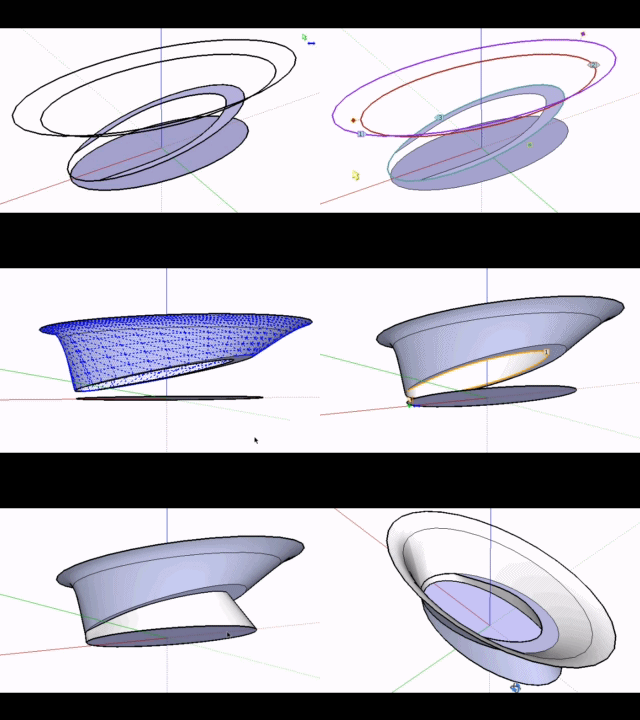
                          Here is the result, with Loft by Spline
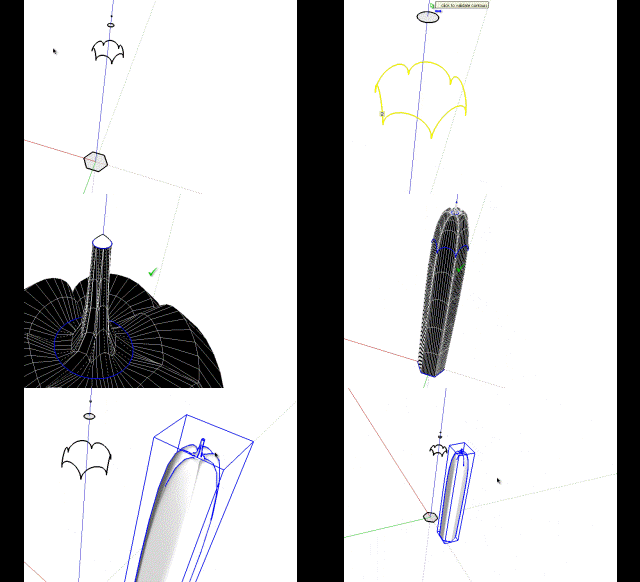
                          Pencil for Loft - Daniel S.gif

                          Fredo


                          Pencil for loft.skp

                          1 條回覆 最後回覆 回覆 引用 0
                          • G 離線
                            grim
                            最後由 編輯

                            danial

                            tried you shape file and came up with very different results see attached file

                            can you enlighten me as to where i am going wrong as i followed your instructions as well as trying one of my own

                            regards

                            david


                            grimshape.skp

                            1 條回覆 最後回覆 回覆 引用 0
                            • D 離線
                              Daniel S
                              最後由 編輯

                              You can select all the contours to make the loft:
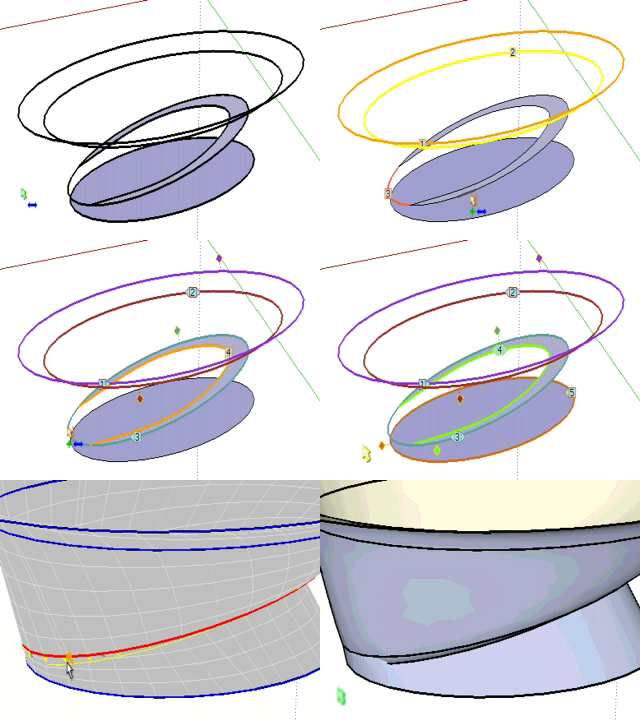
                              1.gif
                              You will see that there is a problem with the default method.. try to change it with the toolbar for different results:

                              Captura.JPG

                              Or you can make it in two parts (for this model I wanted this result):
                              2.gif

                              Daniel S

                              1 條回覆 最後回覆 回覆 引用 0
                              • D 離線
                                Daniel S
                                最後由 編輯

                                The idea was a result like this for that model:
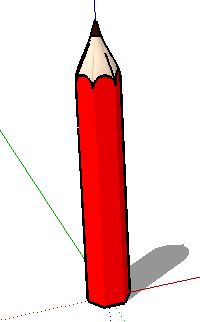
                                pencil.JPG
                                Is better to make the loft in parts and not all togheter in a lot of cases.
                                For example, I´m making a shape where two contours share edges.
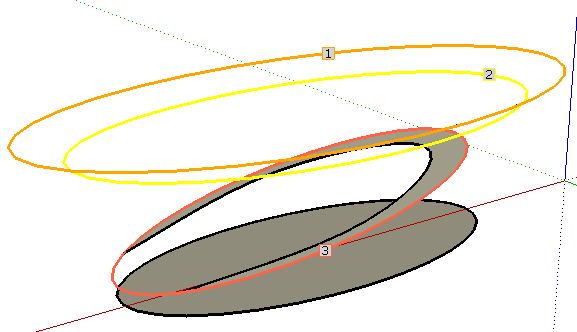
                                1.JPG
                                2.JPG
                                it is better to make a loft between 1-2-3, then explode and after that make the loft 4-5 for better results:
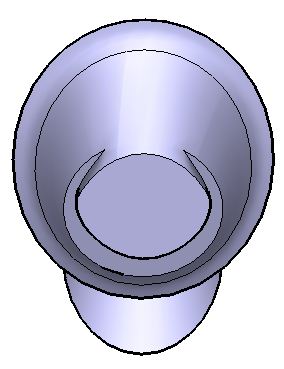
                                3.JPG
                                4.JPG

                                I attach the skp to show that if you make a loft of 1-2-3-4-5 the results are not good in this case.

                                Daniel S


                                shape.skp

                                1 條回覆 最後回覆 回覆 引用 0
                                • fredo6F 離線
                                  fredo6
                                  最後由 編輯

                                  @daniel s said:

                                  The idea was a result like this for that model:
                                  [attachment=6:fuxjwvvf]<!-- ia6 -->pencil.JPG<!-- ia6 -->[/attachment:fuxjwvvf]Daniel S

                                  For the pencil, use the regular Bezier method (first method) instead of Cubic Bezier (default method).
                                  [attachment=0:fuxjwvvf]<!-- ia0 -->Pencil Loft Daniel S.png<!-- ia0 -->[/attachment:fuxjwvvf]
                                  Fredo

                                  PS: for the other shape, there are still some issues when curves are partially overlapping. But it is a good example I can work from.
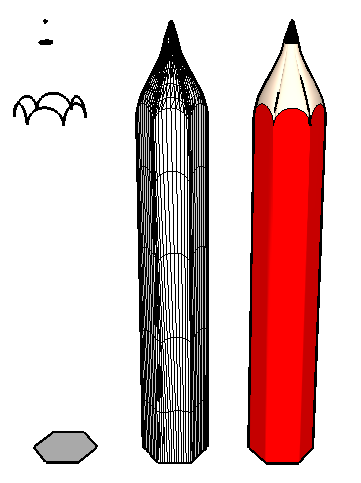

                                  Pencil Loft Daniel S.png

                                  1 條回覆 最後回覆 回覆 引用 0
                                  • thomthomT 離線
                                    thomthom
                                    最後由 編輯

                                    I've yet to try out this plugin for myself - but is there a linear option as well? Or is it just beziers? It seems to be that the pencil would require a linear morphing to get the shape of the tip.

                                    Thomas Thomassen — SketchUp Monkey & Coding addict
                                    List of my plugins and link to the CookieWare fund

                                    1 條回覆 最後回覆 回覆 引用 0
                                    • fredo6F 離線
                                      fredo6
                                      最後由 編輯

                                      @thomthom said:

                                      I've yet to try out this plugin for myself - but is there a linear option as well? Or is it just beziers? It seems to be that the pencil would require a linear morphing to get the shape of the tip.

                                      The Linear option will be available in the next release (along with other spline methods). I came to that conclusion too.
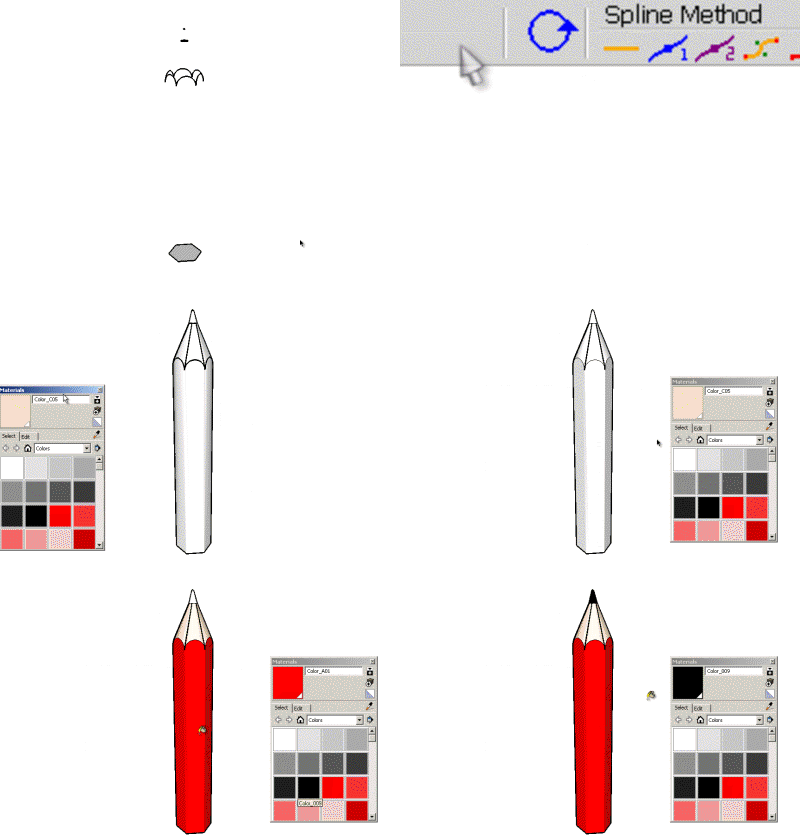
                                      Pencil for Loft - Daniel S - linear.gif
                                      Fredo

                                      1 條回覆 最後回覆 回覆 引用 0
                                      • Bob JamesB 離線
                                        Bob James
                                        最後由 編輯

                                        Just came across this wonderful and amazing new tool.
                                        I'm pretty much speechless: incredible 🎉

                                        This opens up soooo many possibilities. Thank you for this great tool

                                        i7-4930K 3.4Ghz, 2x GTX780 6GB, 32GB DDR3-1600 ECC, OCZ Vertex 4 500GB, WD Black 3TB, 32TB NAS, 4x 27" Monitors, SpaceMouse Pro, X-keys XK-60

                                        1 條回覆 最後回覆 回覆 引用 0
                                        • K 離線
                                          KarinaGM
                                          最後由 編輯

                                          I haven't even had time to use it and I am already in love with this plugin.
                                          Thanks Fredo

                                          **"Aquel que sacrifica un poco de libertad por seguridad, no se merece ninguna y terminará perdiendo ambas"

                                          -Benjamín Franklin.**

                                          1 條回覆 最後回覆 回覆 引用 0
                                          • pilouP 離線
                                            pilou
                                            最後由 編輯

                                            A little use of it 😉
                                            Grow by Tig
                                            Curviloft by Fredo6
                                            FredoScale by Fredo6

                                            http://forums.polyloop.net/picture.php?albumid=23&pictureid=803

                                            http://forums.polyloop.net/picture.php?albumid=23&pictureid=804

                                            Frenchy Pilou
                                            Is beautiful that please without concept!
                                            My Little site :)

                                            1 條回覆 最後回覆 回覆 引用 0
                                            • 1
                                            • 2
                                            • 62
                                            • 63
                                            • 64
                                            • 65
                                            • 66
                                            • 64 / 66
                                            • 第一個貼文
                                              最後的貼文
                                            Buy SketchPlus
                                            Buy SUbD
                                            Buy WrapR
                                            Buy eBook
                                            Buy Modelur
                                            Buy Vertex Tools
                                            Buy SketchCuisine
                                            Buy FormFonts

                                            Advertisement