sketchucation logo sketchucation
    • 登入
    Oops, your profile's looking a bit empty! To help us tailor your experience, please fill in key details like your SketchUp version, skill level, operating system, and more. Update and save your info on your profile page today!
    🔌 Smart Spline | Fluid way to handle splines for furniture design and complex structures. Download

    [Plugin] ExtrudeTools - Full Set

    已排程 已置頂 已鎖定 已移動 Plugins
    636 貼文 178 Posters 791.0k 瀏覽 175 Watching
    正在載入更多貼文
    • 從舊到新
    • 從新到舊
    • 最多點贊
    回覆
    • 在新貼文中回覆
    登入後回覆
    此主題已被刪除。只有擁有主題管理權限的使用者可以查看。
    • TIGT 離線
      TIG Moderator
      最後由 編輯

      @hell0304 said:

      It's worked great on SU2016 but some Error happen on SU2017. Can u please fix it soon???
      I know !
      The new API in v2017 breaks some things [references, IDs etc]
      I have been working on a fix for the last few weeks...
      It has proven awkward !
      Watch for updates...

      TIG

      1 條回覆 最後回覆 回覆 引用 0
      • pbacotP 離線
        pbacot
        最後由 編輯

        Thsnks TIG, Watching for this. Though I am holding off on using v2017.

        MacOSX MojaveSketchUp Pro v19 Twilight v2 Thea v3 PowerCADD

        1 條回覆 最後回覆 回覆 引用 0
        • GMthompsonG 離線
          GMthompson
          最後由 編輯

          i cannot get eebf to work in 2017 I have uninstalled and reinstalled 2017 one plugin at a time starting with freedo tools any suggestions

          you can learn something everyday by paying attention

          1 條回覆 最後回覆 回覆 引用 0
          • Dave RD 離線
            Dave R
            最後由 編輯

            @gmthompson said:

            ...any suggestions

            Suggestions? Yes. Read TIG's last post in this thread. He's working on a fix. I'm sure when he has a suitable fix, he'll release an update.

            Etaoin Shrdlu

            %

            (THERE'S NO PLACE LIKE)

            G28 X0.0 Y0.0 Z0.0

            M30

            %

            1 條回覆 最後回覆 回覆 引用 0
            • TIGT 離線
              TIG Moderator
              最後由 編輯

              Update is 90% done... but it's not there yet...
              😲

              TIG

              1 條回覆 最後回覆 回覆 引用 0
              • Mike AmosM 離線
                Mike Amos
                最後由 編輯

                TIG, we are lucky to get these valuable tools in the first place, I am not going to be pushy over the fix, I can always sort the one piece of geometry in sketchup 2016 until this is sorted to your satisfaction. Many thanks for making sketchup better by your hard work.

                Absentia mortis praesentiam vitae probat, vita autem est argumentum constantiae.

                1 條回覆 最後回覆 回覆 引用 0
                • J 離線
                  jbnarch25
                  最後由 編輯

                  Updates needed for Sketchup 2017 on "Extrude Edges by Rails" , Lattice, face. Works good on 16 guess it has something to do with ruby 2.2 used in 17.

                  1 條回覆 最後回覆 回覆 引用 0
                  • TIGT 離線
                    TIG Moderator
                    最後由 編輯

                    If you look a couple of posts earlier on in this thread, you'll see that the update is in progress...

                    TIG

                    1 條回覆 最後回覆 回覆 引用 0
                    • TIGT 離線
                      TIG Moderator
                      最後由 編輯

                      I know 'they' broke it in v2017.
                      They changed the way exploded groups etc no longer keep an enduring reference to the contents !
                      I have fixed this in several plugins.
                      I have fixed it in this toolset too, but I;ve not reissued yet, because I have an intractable bugsplat occurring if the user does an undo after making some forms, in some of the tools.

                      This is very odd, since it seems unrelated to the main problem they created.

                      In essence, the paths [profiles/rails] are temporarily grouped during the processing to stop them getting messed up by the later processes. At the end it is exploded back as it was. That works fine, but if the user does an undo it bugsplats...

                      It is very odd.
                      I am considering alternative solutions...

                      TIG

                      1 條回覆 最後回覆 回覆 引用 0
                      • S 離線
                        simoncastle
                        最後由 編輯

                        Hi TIG thank you very much for these plugins.

                        I dont know if you are aware that "THEY" broke something in their API which causes the extrude on rails to fail in 2017, its still working correctly in 2016.

                        Im not sure what the problem is, I have a singe cure with 2 rails that join at a pint.
                        As I said its file in 2016. If you cant reproduce it let me know and I will try to upload my file.

                        Sorry for posting this, didn't read the latest posts.
                        Feeling stupid now.
                        😳

                        ... Simon

                        1 條回覆 最後回覆 回覆 引用 0
                        • R 離線
                          rilian
                          最後由 編輯

                          @tig said:

                          It is very odd.
                          I am considering alternative solutions...

                          Bump? Any further news on your bugsplat?

                          1 條回覆 最後回覆 回覆 引用 0
                          • TIGT 離線
                            TIG Moderator
                            最後由 編輯

                            I have most of the problems fixed.
                            However, I might need to recast how some of the tools exit, as I am finding that no permutations of the current exit strategies avoid a BugSplat !
                            😮

                            TIG

                            1 條回覆 最後回覆 回覆 引用 0
                            • 2 離線
                              2k328ci
                              最後由 編輯

                              Hi TIG,

                              I love your tools especially this one! Glad you're working on a 2017 solution. Any news on possible updates? Thanks so much for all your efforts.

                              1 條回覆 最後回覆 回覆 引用 0
                              • TIGT 離線
                                TIG Moderator
                                最後由 編輯

                                Here's v4.0
                                https://sketchucation.com/pluginstore?pln=ExtrudeTools
                                It's now recoded for v2017/v2018 compatibility.
                                However, please be aware it is more prone to BugSplats [especially with an 'undo'] in these newer SketchUp versions, so use with care and always remember to save your model before using these tools...
                                You've been warned !

                                TIG

                                1 條回覆 最後回覆 回覆 引用 0
                                • BoxB 離線
                                  Box
                                  最後由 編輯

                                  Thank you thank you thank you.

                                  1 條回覆 最後回覆 回覆 引用 0
                                  • pilouP 離線
                                    pilou
                                    最後由 編輯

                                    Thx for the efforts! 😎

                                    Frenchy Pilou
                                    Is beautiful that please without concept!
                                    My Little site :)

                                    1 條回覆 最後回覆 回覆 引用 0
                                    • JQLJ 離線
                                      JQL
                                      最後由 編輯

                                      They will be the most welcome bugsplats. Thanks!

                                      www.casca.pt
                                      Visit us on facebook!

                                      1 條回覆 最後回覆 回覆 引用 0
                                      • C 離線
                                        Coolz8
                                        最後由 編輯

                                        Hi TIG! There's a function of the Extrude Edges by Face tool that doesn't seem to work.

                                        https://www.youtube.com/watch?v=Oq55prLHBhs (Skip to 19:55)

                                        The first part works fine, but when working with multiple lines, nothing happens. This seems to work on earlier versions. Are we doing something wrong?

                                        1 條回覆 最後回覆 回覆 引用 0
                                        • TIGT 離線
                                          TIG Moderator
                                          最後由 編輯

                                          I see the issue.
                                          I see the cause.
                                          I am working on a fix.
                                          [Looks like a stoopid typo !]
                                          Watch out for an update...

                                          TIG

                                          1 條回覆 最後回覆 回覆 引用 0
                                          • R 離線
                                            rilian
                                            最後由 編輯

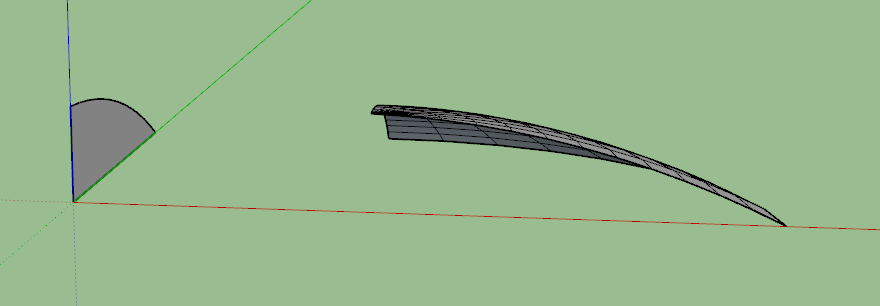
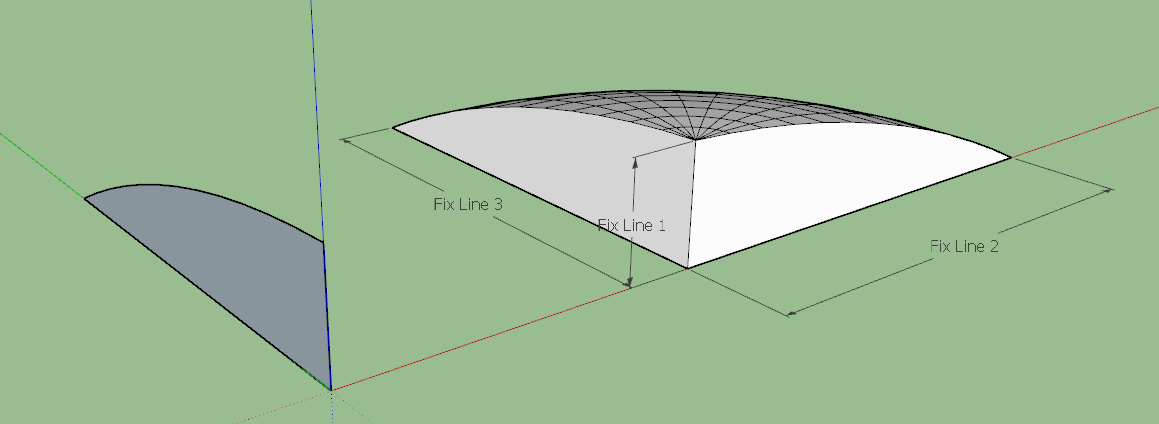
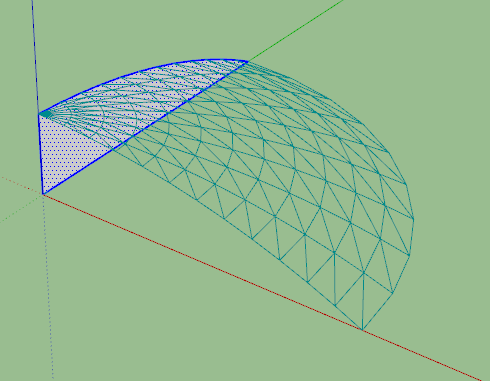
                                            I ran into an issue w/ the lathe tool. Seems sometimes it doesn't put the starting and ending faces on the lathed object. Pics attached. The face created consists of 2 edges and 1 arc. I've tried making them all curves and even welding them all into one big arc to no avail. The fix is simple. I'm ok w/ it but thought I'd bring it up.

                                            Thanks Tig for all the great tools you've made and maintained over the years! Your work is heartily appreciated!! 👍

                                            [edit] Using SU Make 2017 for Windows

                                            shows mesh before create. Vertical line is chosen axis of rotation


                                            Shows mesh post-create


                                            Shows fixed mesh and lines that had to be added to fix it.

                                            1 條回覆 最後回覆 回覆 引用 0
                                            • 1
                                            • 2
                                            • 24
                                            • 25
                                            • 26
                                            • 27
                                            • 28
                                            • 31
                                            • 32
                                            • 26 / 32
                                            • 第一個貼文
                                              最後的貼文
                                            Buy SketchPlus
                                            Buy SUbD
                                            Buy WrapR
                                            Buy eBook
                                            Buy Modelur
                                            Buy Vertex Tools
                                            Buy SketchCuisine
                                            Buy FormFonts

                                            Advertisement