sketchucation logo sketchucation
    • 登入
    Oops, your profile's looking a bit empty! To help us tailor your experience, please fill in key details like your SketchUp version, skill level, operating system, and more. Update and save your info on your profile page today!
    🔌 Easy Offset | Offset selected faces in SketchUp in positive and negative offsets. Download

    [Plugin] CleanUp

    已排程 已置頂 已鎖定 已移動 Plugins
    974 貼文 217 Posters 832.9k 瀏覽 217 Watching
    正在載入更多貼文
    • 從舊到新
    • 從新到舊
    • 最多點贊
    回覆
    • 在新貼文中回覆
    登入後回覆
    此主題已被刪除。只有擁有主題管理權限的使用者可以查看。
    • pilouP 離線
      pilou
      最後由 編輯

      Seems there is not an inner faces selection eraser?

      Frenchy Pilou
      Is beautiful that please without concept!
      My Little site :)

      1 條回覆 最後回覆 回覆 引用 0
      • david_hD 離線
        david_h
        最後由 編輯

        Thanks. I have that and I have run the little installer as well.

        It's going now. thank you.

        You see. . this is why I really shouldn't be wearing the green badge.

        If I make it look easy...It is probably easy

        1 條回覆 最後回覆 回覆 引用 0
        • S 離線
          shifo1002000
          最後由 編輯

          I can't get it to work for Sketchup 8 pro, I pasted the file "tt_cleanup.rb" in the sketchup plugins folder but I get a (Error Loading File tt_cleanup.rb
          no such file to load -- TT_Lib2/core.rb)
          Can you please help?
          I also posted on your video on YouTube, sorry for the inconvenience

          1 條回覆 最後回覆 回覆 引用 0
          • massimoM 離線
            massimo Moderator
            最後由 編輯

            Have you also installed the TT_Lib2 as clearly stated in the very first post under "Requirements"?

            1 條回覆 最後回覆 回覆 引用 0
            • S 離線
              shifo1002000
              最後由 編輯

              I followed your instructions and it worked 😄 thanks a million

              1 條回覆 最後回覆 回覆 引用 0
              • thomthomT 離線
                thomthom
                最後由 編輯

                I'll repackage the plugin as an RBZ and better message for missing TT_Lib2.

                Thomas Thomassen — SketchUp Monkey & Coding addict
                List of my plugins and link to the CookieWare fund

                1 條回覆 最後回覆 回覆 引用 0
                • P 離線
                  Piratestef
                  最後由 編輯

                  with what settings should I clean up this file?

                  https://www.dropbox.com/s/vpqng31chal8v4l/brad%20kussens.skp

                  It keeps losing surfaces, could you work your magic and tell me what settings to use?
                  I really hope this works!

                  1 條回覆 最後回覆 回覆 引用 0
                  • thomthomT 離線
                    thomthom
                    最後由 編輯

                    I'm out traveling so I cannot open the file right now. But I'll guess that the missing faces are very small. When edges are less near and less than 1mm things like that start happening. You'd then have to scale up the model.
                    Note that scaling the instance won't work. You'd have to open up the group or component.

                    Sent from my LT25i using Tapatalk 2

                    Thomas Thomassen — SketchUp Monkey & Coding addict
                    List of my plugins and link to the CookieWare fund

                    1 條回覆 最後回覆 回覆 引用 0
                    • P 離線
                      Piratestef
                      最後由 編輯

                      Ok so I scaled it with 200%, with what setting should I start the cleanup?

                      1 條回覆 最後回覆 回覆 引用 0
                      • thomthomT 離線
                        thomthom
                        最後由 編輯

                        I don't know what settings to recommend because I do not know what result you expect. All the settings are for different proposes.

                        Btw, 2 times might not be enough scaling. You might have to scale up by 10, 100 or 1000 times.

                        Sent from my LT25i using Tapatalk 2

                        Thomas Thomassen — SketchUp Monkey & Coding addict
                        List of my plugins and link to the CookieWare fund

                        1 條回覆 最後回覆 回覆 引用 0
                        • R 離線
                          rs3sekar
                          最後由 編輯

                          Thanks a lot - very useful tool

                          1 條回覆 最後回覆 回覆 引用 0
                          • E 離線
                            ephraimlord65
                            最後由 編輯

                            Really cool ! Nice job and thanks a lot for this plugin ! 😉

                            1 條回覆 最後回覆 回覆 引用 0
                            • M 離線
                              Mybis
                              最後由 編輯

                              Please disregard my question below. The std RBZ installer in my SU8 doesn't seem to work so having read some of your related info I simply changed the RBZ's to ZIP, unpacked them, and moved them to the plug in folder. PU's seem to work fine. Looking fwd to using your cleanup PI ... sounds awesome.

                              Tks.

                              Hi, I'm new to the plug in concept in SU so my apologies in advance.
                              Im on Mac OS10.8.3 / SUpro V8.

                              I am keen to install your cleanup PI and I keep getting the following error
                              "SketchUp was unable to install the Extension you have chosen for some unknown reason.
                              Consult your Extension's documentation for additional help"
                              It seems to come up regardless of the rbz file that I am trying to install.

                              Any advise will be greatly appreciated!

                              scott

                              1 條回覆 最後回覆 回覆 引用 0
                              • thomthomT 離線
                                thomthom
                                最後由 編輯

                                That sounds like a issue that appear from time to time - where OSX users for some reason didn't have full access to the Plugins folder. Once they gave them selves full access they where able to use the RBZ installation feature.

                                Thomas Thomassen — SketchUp Monkey & Coding addict
                                List of my plugins and link to the CookieWare fund

                                1 條回覆 最後回覆 回覆 引用 0
                                • ashscottA 離線
                                  ashscott
                                  最後由 編輯

                                  Its a fantastic plugin thomthom, thanks very much

                                  Just some stuff I do with Sketchup.

                                  1 條回覆 最後回覆 回覆 引用 0
                                  • D 離線
                                    detcharles
                                    最後由 編輯

                                    HELP!

                                    Hello,

                                    I have never posted before and I'm sorry to interrupt a conversation but I am having trouble installing the cleanup plugin. I keep getting an error message saying that google was not able to install the plugin for an unknown reason. I use V.8. and I am currently using a pro trial.

                                    Thanks

                                    1 條回覆 最後回覆 回覆 引用 0
                                    • Dave RD 離線
                                      Dave R
                                      最後由 編輯

                                      The most likely problem is that you haven't set up full read and write permissions for the Plugins folder. Do that and try to install again.

                                      Etaoin Shrdlu

                                      %

                                      (THERE'S NO PLACE LIKE)

                                      G28 X0.0 Y0.0 Z0.0

                                      M30

                                      %

                                      1 條回覆 最後回覆 回覆 引用 0
                                      • plot-parisP 離線
                                        plot-paris
                                        最後由 編輯

                                        Hey Thomthom,

                                        I am using Cleanup every day (or every other minute pretty much). Even got a shortcut assigned that I use as naturally as a wet dog shakes itself dry - its become a reflex!

                                        However, sometimes this reflex rips apart my models, especially when having used plugins like Curviloft prior to it or pretty much every time I import a .3ds file...

                                        One such model is this shiny new Bialetti Espresso Maker (just finished modelling it 😄 ).
                                        Bialetti_EspressoMaker.skp

                                        When I run Cleanup over it, it gets destroyed. Even when I scale it up 100x...

                                        Is there any way to change the cleanup settings to avoid this?

                                        1 條回覆 最後回覆 回覆 引用 0
                                        • massimoM 離線
                                          massimo Moderator
                                          最後由 編輯

                                          Well it works fine for me, without scaling anything, with these settings:
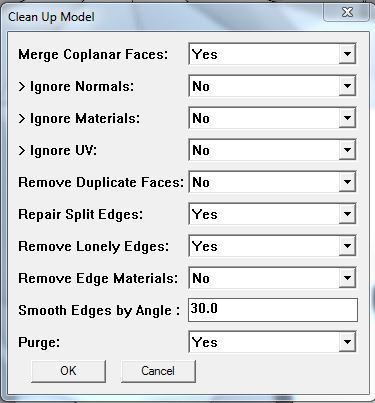
                                          Cattura_01.JPG
                                          Cattura.JPG

                                          1 條回覆 最後回覆 回覆 引用 0
                                          • E 離線
                                            edfishbone
                                            最後由 編輯

                                            Hi

                                            Thanks in advance. Just installed cleanup. Looks great!
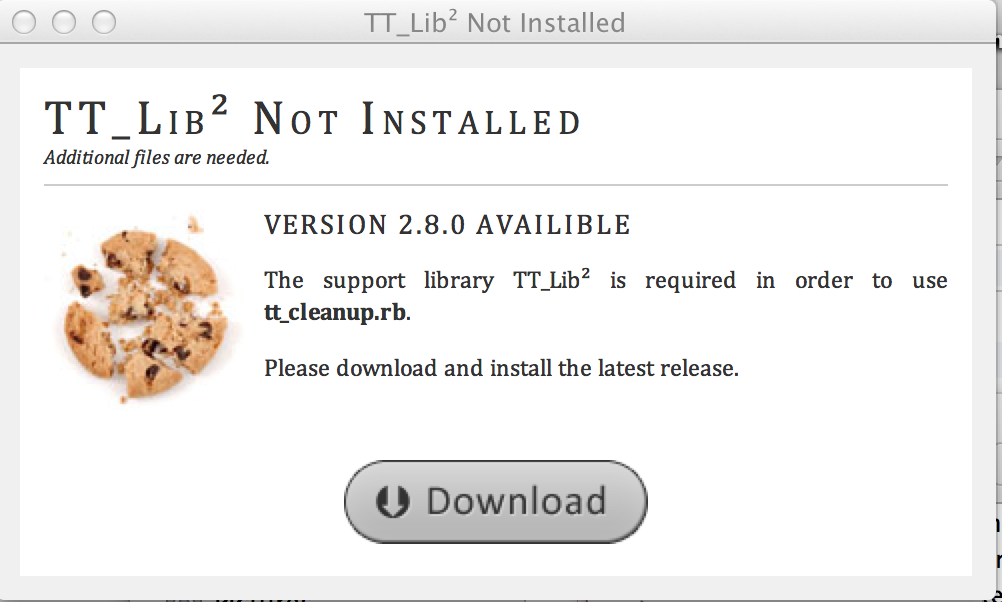
                                            I have the TT Lib2 2.7.1 but the installer is calling for 2.8 which i cannot seem to find. The download link does not work.

                                            best


                                            screenshot

                                            1 條回覆 最後回覆 回覆 引用 0
                                            • 1
                                            • 2
                                            • 25
                                            • 26
                                            • 27
                                            • 28
                                            • 29
                                            • 48
                                            • 49
                                            • 27 / 49
                                            • 第一個貼文
                                              最後的貼文
                                            Buy SketchPlus
                                            Buy SUbD
                                            Buy WrapR
                                            Buy eBook
                                            Buy Modelur
                                            Buy Vertex Tools
                                            Buy SketchCuisine
                                            Buy FormFonts

                                            Advertisement