sketchucation logo sketchucation
    • Login
    Oops, your profile's looking a bit empty! To help us tailor your experience, please fill in key details like your SketchUp version, skill level, operating system, and more. Update and save your info on your profile page today!
    Mac User? | Join the Rayscaper Beta for Mac Learn More

    [Plugin] extrudeEdgesByEdges.rb

    Scheduled Pinned Locked Moved Plugins
    190 Posts 76 Posters 242.4k Views 76 Watching
    Loading More Posts
    • Oldest to Newest
    • Newest to Oldest
    • Most Votes
    Reply
    • Reply as topic
    Log in to reply
    This topic has been deleted. Only users with topic management privileges can see it.
    • TIGT
      TIG Moderator
      last edited by

      @mitcorb said:

      TIG:
      Did you notice the plugin will displace the resulting group a distance away from the originating groups? I don't know if this is a random distance or a proportional distance, or if it is dependent on the geometry of the originating elements. This is just an observation, and not necessarily a problem.
      mitcorb

      The result sometimes displaces... It's to do with the translations of the two groups, I haven't yet worked out how to ensure it always snaps over the original - the displacement is the bounds of the new group v. the originals...

      TIG

      1 Reply Last reply
      Reply Quote 0
      • TIGT
        TIG Moderator
        last edited by

        majid
        Thanks for the ideas...
        Peace, hello: I am happy that the website is active ?
        My Farsi is not so good...

        TIG

        1 Reply Last reply
        Reply Quote 0
        • B
          Ben Ritter
          last edited by

          TIG,

          Very grateful for your talent, and for sharing.

          Thank you.

          1 Reply Last reply
          Reply Quote 0
          • majidM
            majid
            last edited by

            thanx dear TIG .. it is great. maybe the next step is adding options so that it could do something like Follow me ,+ FollowMe&Keep, but whit a noncouplanar profile (like your scrip is doing)... again :it is great TIG 👍
            تیگ عزیز،ممنون از سخاوت تو

            My inspiring A, B, Sketches book: https://sketchucation.com/shop/books/intermediate/2612-alphabet-inspired-sketches--inspiring-drills-for-architects--3d-artists-and-designers-

            1 Reply Last reply
            Reply Quote 0
            • plot-parisP
              plot-paris
              last edited by

              wow, really a nice plugin! thanks a lot, TIG! jumps out of his seat
              (and thanks Gaieus, for pointing me here...)

              that is quite a useful tool.
              next step: birial operation? (two different path-curves and/or several different base-curves...) 😉

              1 Reply Last reply
              Reply Quote 0
              • mitcorbM
                mitcorb
                last edited by

                As Plot-paris said: "next step: birail operation? (two different path-curves and/or several different base-curves...) 😉 and then morph along rails to preset sectional outlines, and who knows what else?

                I am currently enjoying some experimentation with this plugin-- craggy curtains, canyon walls, insect "skins"....

                Thank you TIG
                mitcorb

                I take the slow, deliberate approach in my aimless wandering.

                1 Reply Last reply
                Reply Quote 0
                • olisheaO
                  olishea
                  last edited by

                  does it work well for mac?

                  oli

                  1 Reply Last reply
                  Reply Quote 0
                  • D
                    dylan
                    last edited by

                    Works perfectly on the Mac Oli 😎

                    http://dmdarchitecture.co.uk/

                    1 Reply Last reply
                    Reply Quote 0
                    • P
                      putnik
                      last edited by

                      Thank you TIG!

                      http://keshas.info

                      1 Reply Last reply
                      Reply Quote 0
                      • olisheaO
                        olishea
                        last edited by

                        amazing plugin, works really smooth too. gonna have some fun with this! 😆

                        oli

                        1 Reply Last reply
                        Reply Quote 0
                        • TIGT
                          TIG Moderator
                          last edited by

                          Version 1.1 20090625
                          Speed improvements - face making time ~halved,
                          typename >> kind_of?, triangulation glitch trapped
                          and orientation improved.

                          It's here http://forums.sketchucation.com/viewtopic.php?p=166780#p166780 ...
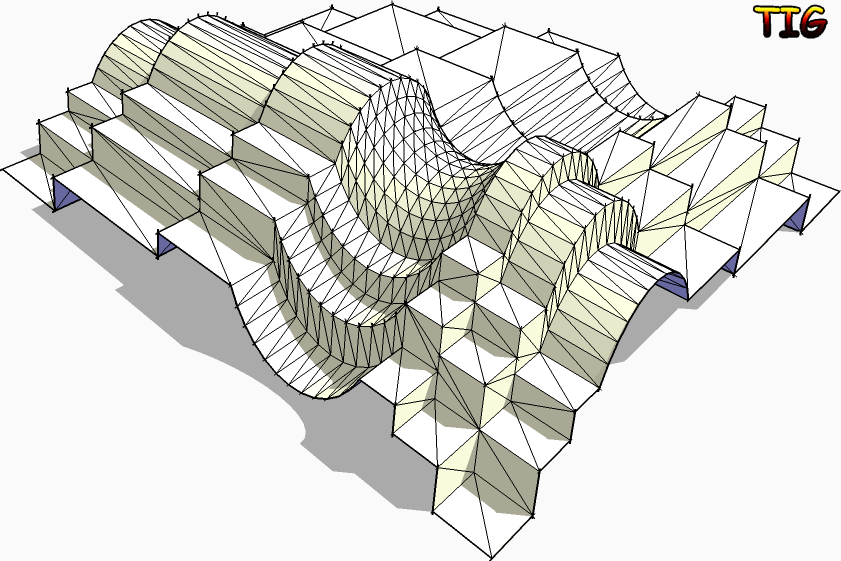
                          Another example...

                          TIG

                          1 Reply Last reply
                          Reply Quote 0
                          • pilouP
                            pilou
                            last edited by

                            The funny of your plug 😉
                            (Click the image)
                            not welded.jpg

                            Frenchy Pilou
                            Is beautiful that please without concept!
                            My Little site :)

                            1 Reply Last reply
                            Reply Quote 0
                            • MALAISEM
                              MALAISE
                              last edited by

                              Great TIG, thanks a lot for this SU enhancement.

                              MALAISE

                              La Connaissance n'a de valeur que partagée

                              1 Reply Last reply
                              Reply Quote 0
                              • JClementsJ
                                JClements
                                last edited by

                                Congratulations TIG!

                                A very useful and well executed script.

                                Questions/Suggestions:

                                1- I assume the order in which the two groups were assigned determines the alignment of the mesh; to the last defined of the two selected groups.

                                2- Not critical, but could there be a Smoothing Dialog that prompts: "a)Smooth or b)Smooth and Soften"?

                                3- A defaults dialog triggered by pressing the [Tab] key? You'd would then be able to assign defaults of a Yes or No for each prompt and which which dialogs would be shown (if shown, then user could temporarily change their default as the script is playing).

                                John | Illustrator | Beaverton, Oregon

                                1 Reply Last reply
                                Reply Quote 0
                                • TIGT
                                  TIG Moderator
                                  last edited by

                                  Here's an update...
                                  Version 1.2 20090625
                                  Orientation speed optimised.
                                  Glitch on groups erase fixed.
                                  Get it here... http://forums.sketchucation.com/viewtopic.php?p=166780#p166780 ...

                                  TIG

                                  1 Reply Last reply
                                  Reply Quote 0
                                  • I
                                    ideas_arte
                                    last edited by

                                    Wow...!
                                    Many thank you very much ...!

                                    Excellent tool, thank you very much again and a hug from Central America ...! 😄

                                    1 Reply Last reply
                                    Reply Quote 0
                                    • massimoM
                                      massimo Moderator
                                      last edited by

                                      Hi TIG and many thanks. I've tried both "intersect with self" or not, but nothing changed. A little problem...
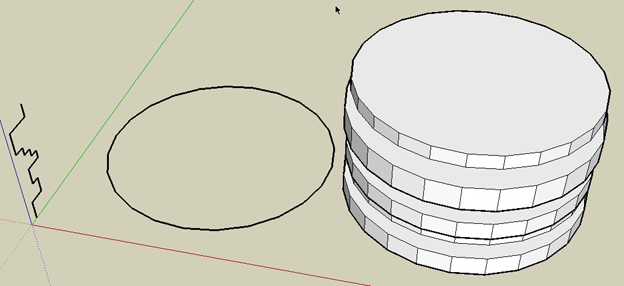
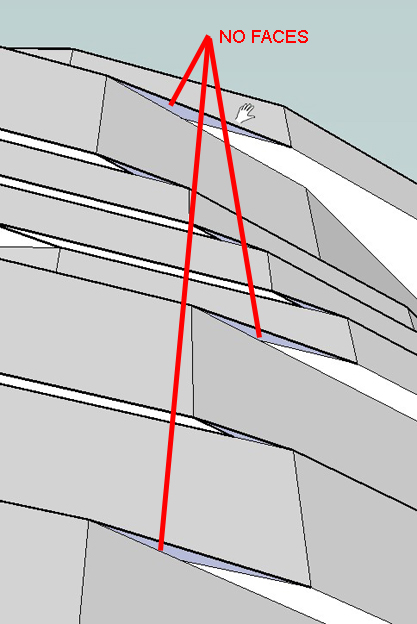
                                      ScreenHunter_03 Jun. 25 19.17.jpg


                                      ScreenHunter_04 Jun. 25 19.18.jpg

                                      1 Reply Last reply
                                      Reply Quote 0
                                      • TIGT
                                        TIG Moderator
                                        last edited by

                                        @massimo said:

                                        Hi TIG and many thanks. I've tried both "intersect with self" or not, but nothing changed. A little problem...

                                        Massimo
                                        Have you tried the latest version v1.2 ? I've just tried to reproduce your path/profile and I get all faces made - no gaps - Any edge that can get a face should get a face ? Your faces aren't reversed are they, so look 'gappped' ?
                                        The only problem I have was because of the convoluted result some faces orient wrongly [inside out] - both in the script AND within SUp later - the only fix is to reverse the problem faces manually ...

                                        I had to guess your model's details - I could test it better with the real thing - if after trying with the latest version it still gaps please PM me with the model attached, so I can see if I get the same problem...

                                        TIG

                                        1 Reply Last reply
                                        Reply Quote 0
                                        • TIGT
                                          TIG Moderator
                                          last edited by

                                          Can you subsequently get the face made if you redraw an edge ? If so then EEbyE should have made that face...
                                          I haven't managed to reproduce it, can one of you PM me a [small] model with the problem ?

                                          TIG

                                          1 Reply Last reply
                                          Reply Quote 0
                                          • pilouP
                                            pilou
                                            last edited by

                                            I have same result but seems normal as this function is not adapted to this!
                                            As the profil stay parallel 😒
                                            At each "rotation" there are creation of an external or internal horizontal face 😄

                                            For ovoid that make just an half circle 😉
                                            And a mirror after 😉
                                            But even with this there some gaps 😉


                                            normal.jpg


                                            gap.jpg

                                            Frenchy Pilou
                                            Is beautiful that please without concept!
                                            My Little site :)

                                            1 Reply Last reply
                                            Reply Quote 0

                                            Hello! It looks like you're interested in this conversation, but you don't have an account yet.

                                            Getting fed up of having to scroll through the same posts each visit? When you register for an account, you'll always come back to exactly where you were before, and choose to be notified of new replies (either via email, or push notification). You'll also be able to save bookmarks and upvote posts to show your appreciation to other community members.

                                            With your input, this post could be even better 💗

                                            Register Login
                                            • 1
                                            • 2
                                            • 6
                                            • 7
                                            • 8
                                            • 9
                                            • 10
                                            • 10 / 10
                                            • First post
                                              Last post
                                            Buy SketchPlus
                                            Buy SUbD
                                            Buy WrapR
                                            Buy eBook
                                            Buy Modelur
                                            Buy Vertex Tools
                                            Buy SketchCuisine
                                            Buy FormFonts

                                            Advertisement