sketchucation logo sketchucation
    • Conectarse
    Oops, your profile's looking a bit empty! To help us tailor your experience, please fill in key details like your SketchUp version, skill level, operating system, and more. Update and save your info on your profile page today!
    🔌 Smart Spline | Fluid way to handle splines for furniture design and complex structures. Download

    [Plugin][$] FredoScale - v3.6a - 01 Apr 24


    Programado Fijo Cerrado Movido Plugins
    1.1k Mensajes 345 Posters 2.4m Visitas 342 Watching
    Cargando más mensajes
    • Más antiguo a más nuevo
    • Más nuevo a más antiguo
    • Mayor número de Votos
    Responder
    • Responder como tema
    Accede para responder
    Este tema ha sido borrado. Solo los usuarios que tengan privilegios de administración de temas pueden verlo.
    • fredo6F Desconectado
      fredo6
      Última edición por

      NEW RELEASE: FredoScale v2.4a - 22 Aug 13

      FredoScale 2.4 is a technical release that implements naming conventions for files and folders to be compliant with EWH requirements. Otherwise there is no functional changes in this release.

      FredoScale 2.4 requires LibFredo6 5.1 or higher.

      The footprint for FredoScale is based on one file and one subfolder:
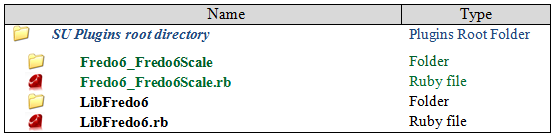
      FredoScale footprint.png

      It is also a good idea to clean up your plugin directory and remove the older versions.
      In the menu Windows > LibFredo6 Settings...> Purge Obsolete Files, you will find a dialog box allowing to remove all or some of these older versions.
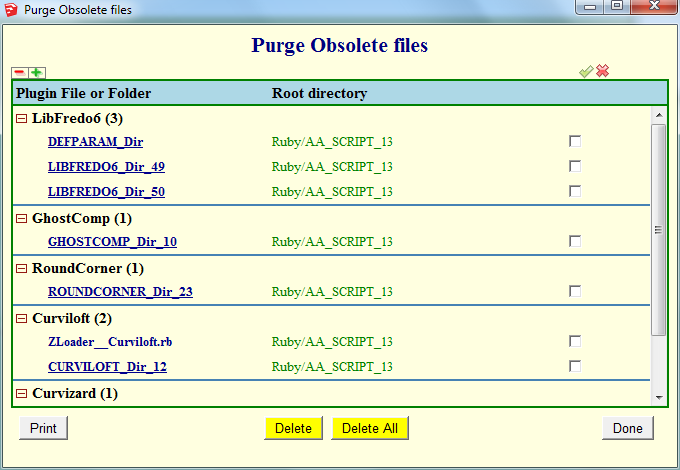
      Snap1.png

      See main post of this thread for Download.

      Fredo

      1 Respuesta Última respuesta Responder Citar 0
      • fredo6F Desconectado
        fredo6
        Última edición por

        NEW RELEASE: FredoScale v2.5a - 30 Aug 13

        FredoScale 2.5 is a technical release that implements naming conventions for files and folders to be compliant with EWH requirements. Otherwise there is no functional changes in this release.

        FredoScale 2.5 requires LibFredo6 5.2 or higher.

        The footprint for FredoScale is based on one file and one subfolder:
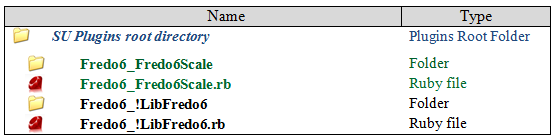
        FredoScale footprint.png

        It is also a good idea to clean up your plugin directory and remove the older versions.
        In the menu Windows > LibFredo6 Settings...> Purge Obsolete Files, you will find a dialog box allowing to remove all or some of these older versions.
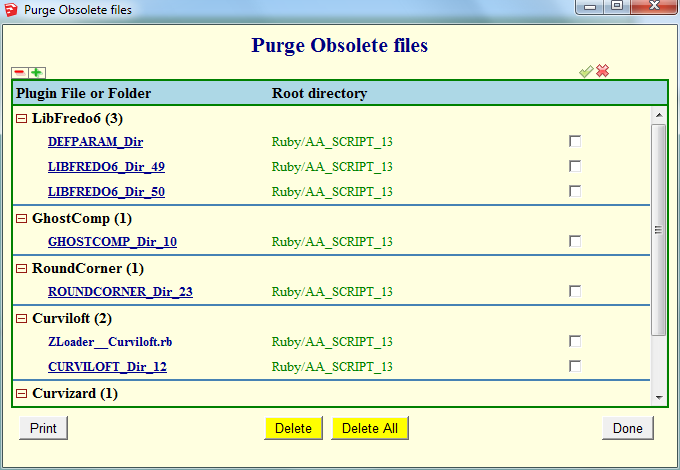
        Purge Obsolete Files.png

        See main post of this thread for Download.

        Fredo

        1 Respuesta Última respuesta Responder Citar 0
        • F Desconectado
          flyashy
          Última edición por

          @fredo6 said:

          @macker said:

          Does anyone else have sketchup crash completely when using the scale/stretch tool on groups that contain groups? I always use extensive grouping so that I can take my models into 3ds max, and this tool would undoubtedly speed up my workflow - but keeps crashing sketchup.

          This may be related to the big issues of "freshly copied groups".

          In your case, was one of the group a copy of another one (you should see "2 instances" in the Entity Info Window.

          If this is the case, then FredoScale needs some evolutions. I have done it on Curvizard.

          As a workaround for complex hirearchy of groups and components, try to perform a Make Unique before [highlight=#ffff80:1qv24jnd](Make Unique is also part of FredoScale).[/highlight:1qv24jnd]

          Fredo

          I didn't understand that bit about Make Unique being part of fredoscale.
          Is there a hidden option in FredoScale command that allows me to make the group unique?
          (I work with groups within groups within groups within.. with a smattering of components thrown in the mix and copies of them all floating all over my models, all the time and could never use fredoStretch as it gives a splat.)
          Or alternately is there a way to make the copied 'group' unique? Components I know, groups I don't know how to make unique.
          Cheers,
          flyashy

          1 Respuesta Última respuesta Responder Citar 0
          • TIGT Desconectado
            TIG Moderator
            Última edición por

            If you have lots of nested groups that have duplicates try this one-liner, copy+paste+<enter> in the Ruby Console - every group in the model is made unique...

            Sketchup.active_model.definitions.each{|d|(d.instances.each{|i|i.make_unique})if d.group? && d.instances[1]}
            

            TIG

            1 Respuesta Última respuesta Responder Citar 0
            • solid-woodS Desconectado
              solid-wood
              Última edición por

              Hi Fredo,

              Why don't I get the same functions in Mac 10.6 for "Streching" target?
              Can't move the fixed point...windows is what I am trying to strech.
              Only moves in the center glass, the L&R glas stayes the same. Doesn't matter where I put the "X"
              Please help. Thanks
              Solid-Wood

              1 Respuesta Última respuesta Responder Citar 0
              • solid-woodS Desconectado
                solid-wood
                Última edición por

                Hi Fredo,

                Just got it...From the new video, thanks. Works like a charm.
                Wonderful!
                SW

                1 Respuesta Última respuesta Responder Citar 0
                • guanjinG Desconectado
                  guanjin
                  Última edición por

                  Hello Fredo6

                  In sketchup2013 normal display Chinese language, Chinese language does not show sketchup8M5 is still in English.
                  I LibFredo6 5.2 or higher

                  Thank you

                  I come from China, is to learn

                  1 Respuesta Última respuesta Responder Citar 0
                  • fredo6F Desconectado
                    fredo6
                    Última edición por

                    @guanjin said:

                    Hello Fredo6

                    In sketchup2013 normal display Chinese language, Chinese language does not show sketchup8M5 is still in English.
                    I LibFredo6 5.2 or higher

                    Thank you

                    I know and this is true for all languages.

                    This is related to the change of naming conventions. I need to republish.

                    In the meantime, just replace __Module = FredoScale by __Module = F6_FredoScale in the file FredoScale_ZH.lang

                    Fredo

                    1 Respuesta Última respuesta Responder Citar 0
                    • guanjinG Desconectado
                      guanjin
                      Última edición por

                      @fredo6 said:

                      @guanjin said:

                      Hello Fredo6

                      In sketchup2013 normal display Chinese language, Chinese language does not show sketchup8M5 is still in English.
                      I LibFredo6 5.2 or higher

                      Thank you

                      I know and this is true for all languages.

                      This is related to the change of naming conventions. I need to republish.

                      In the meantime, just replace __Module = FredoScale by __Module = F6_FredoScale in the file FredoScale_ZH.lang

                      Fredo

                      Thank you, waiting for your new release! 👍

                      I come from China, is to learn

                      1 Respuesta Última respuesta Responder Citar 0
                      • fredo6F Desconectado
                        fredo6
                        Última edición por

                        NEW RELEASE: FredoScale v2.5b - 15 Sep 13

                        FredoScale 2.5b fixes a bug preventing language translations to load.

                        FredoScale 2.5 requires LibFredo6 5.2 or higher.

                        See main post of this thread for Download.

                        Fredo

                        1 Respuesta Última respuesta Responder Citar 0
                        • D Desconectado
                          dedmin
                          Última edición por

                          @fredo6 said:

                          NEW RELEASE: FredoScale v2.5b - 15 Sep 13

                          FredoScale 2.5b fixes a bug preventing language translations to load.

                          FredoScale 2.5 requires LibFredo6 5.2 or higher.

                          See main post of this thread for Download.

                          Fredo

                          After the update:
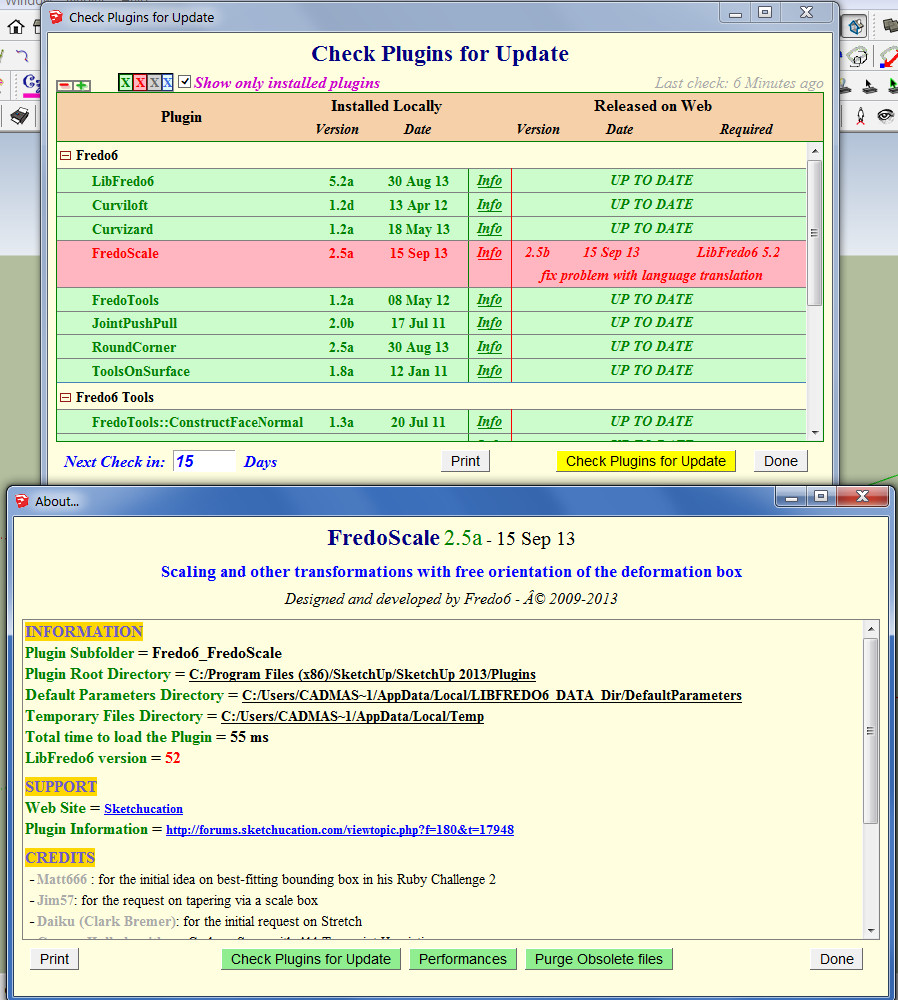
                          2013-09-15_151520.jpg

                          1 Respuesta Última respuesta Responder Citar 0
                          • fredo6F Desconectado
                            fredo6
                            Última edición por

                            @dedmin

                            Thanks very much. I updated the post and Plugin Store today at 15h.

                            Fredo

                            1 Respuesta Última respuesta Responder Citar 0
                            • D Desconectado
                              dedmin
                              Última edición por

                              👍 👍
                              BTW, did You see this:
                              http://sketchucation.com/forums/viewtopic.php?f=323&t=46473&start=90
                              http://sketchucation.com/forums/viewtopic.php?f=323&t=54176

                              1 Respuesta Última respuesta Responder Citar 0
                              • fredo6F Desconectado
                                fredo6
                                Última edición por

                                @dedmin said:

                                :thumb: 👍
                                BTW, did You see this:
                                http://sketchucation.com/forums/viewtopic.php?f=323&t=46473&start=90
                                http://sketchucation.com/forums/viewtopic.php?f=323&t=54176

                                1. For Curvizard Edge Prop, I had found the bug actually but forgot to republish

                                2. For BezierSpline, I have to investigate. This is old code and the tooltip may not reflect the correct alignment

                                Fredo

                                1 Respuesta Última respuesta Responder Citar 0
                                • guanjinG Desconectado
                                  guanjin
                                  Última edición por

                                  Thank timely updates, thank you 😍

                                  I come from China, is to learn

                                  1 Respuesta Última respuesta Responder Citar 0
                                  • LanaL Desconectado
                                    Lana
                                    Última edición por

                                    Thank you, thank you, thank you....is very good.

                                    1 Respuesta Última respuesta Responder Citar 0
                                    • enigmaticE Desconectado
                                      enigmatic
                                      Última edición por

                                      Hi Fredo,

                                      Is it normal dimensions differences in?
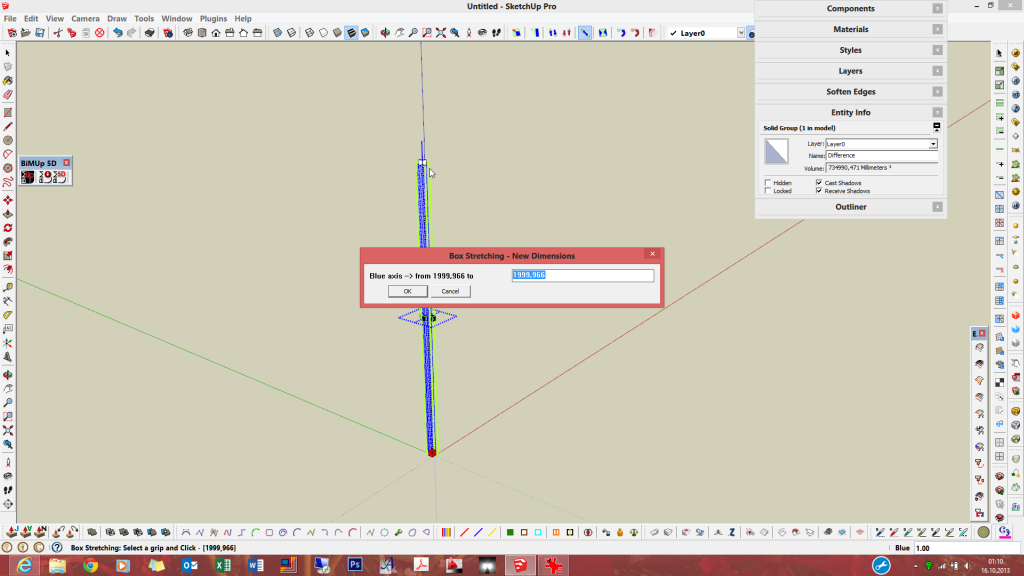

                                      scale_01


                                      scale_02

                                      1 Respuesta Última respuesta Responder Citar 0
                                      • dereiD Desconectado
                                        derei
                                        Última edición por

                                        @enigmatic said:

                                        Hi Fredo,

                                        Is it normal dimensions differences in?
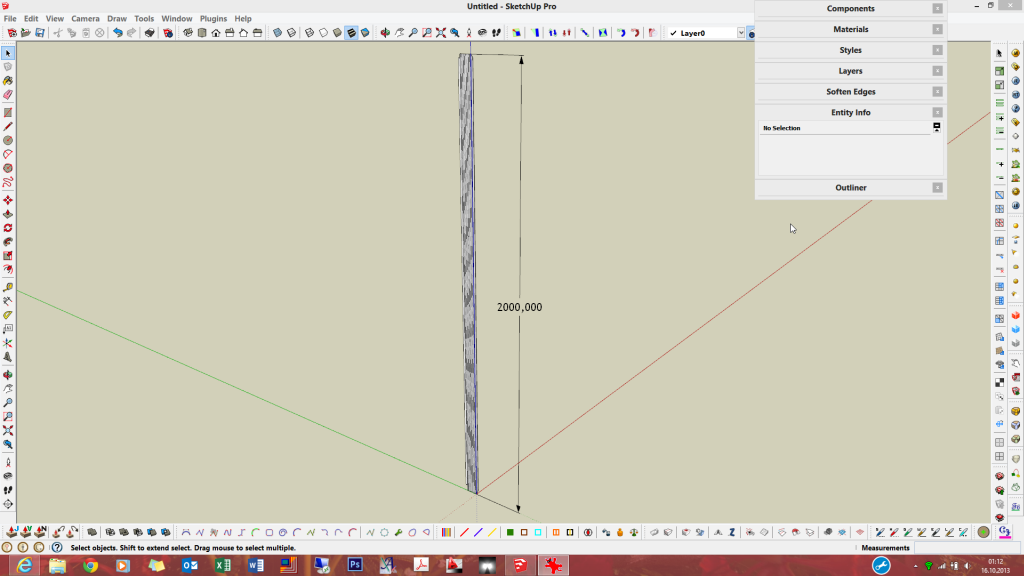
                                        Maybe some rounding ... bug? I'm guessing it rounds in all situations, not considering the units used (and number of decimals) ?

                                        DESIGNER AND ARTIST DEREI.UK

                                        1 Respuesta Última respuesta Responder Citar 0
                                        • S Desconectado
                                          samothrace41
                                          Última edición por

                                          Bonjour,

                                          J'utilise régulièrement FredoScale et Curviloft et je viens de télécharger Joint Push/Pull. Je voudrais te faire une petite donation (symbolique) mais je ne veux pas passer par PayPal. Je voudrais t'envoyer un mail mais je n'ai pas ton adresse. Le mien est samothrace41 @ yahoo.fr
                                          A+
                                          Sylvie

                                          1 Respuesta Última respuesta Responder Citar 0
                                          • J Desconectado
                                            jumpjack
                                            Última edición por

                                            I don't understand if this plugin can help me.

                                            I have a non-planar surface close to a cylindrical surface; I want to extrude a region of the non-planar surface up to the cylinder to create a solid 3d joint between cylinder and the non-planar surface.

                                            Can I use this plugin, or do I need another one?

                                            1 Respuesta Última respuesta Responder Citar 0
                                            • 1
                                            • 2
                                            • 39
                                            • 40
                                            • 41
                                            • 42
                                            • 43
                                            • 56
                                            • 57
                                            • 41 / 57
                                            • First post
                                              Last post
                                            Buy SketchPlus
                                            Buy SUbD
                                            Buy WrapR
                                            Buy eBook
                                            Buy Modelur
                                            Buy Vertex Tools
                                            Buy SketchCuisine
                                            Buy FormFonts

                                            Advertisement