sketchucation logo sketchucation
    • Conectarse
    Oops, your profile's looking a bit empty! To help us tailor your experience, please fill in key details like your SketchUp version, skill level, operating system, and more. Update and save your info on your profile page today!
    🔌 Smart Spline | Fluid way to handle splines for furniture design and complex structures. Download

    [Plugin][$] FredoScale - v3.6a - 01 Apr 24


    Programado Fijo Cerrado Movido Plugins
    1.1k Mensajes 345 Posters 2.4m Visitas 342 Watching
    Cargando más mensajes
    • Más antiguo a más nuevo
    • Más nuevo a más antiguo
    • Mayor número de Votos
    Responder
    • Responder como tema
    Accede para responder
    Este tema ha sido borrado. Solo los usuarios que tengan privilegios de administración de temas pueden verlo.
    • TIGT Desconectado
      TIG Moderator
      Última edición por

      Assuming you have correctly installed the files/subfolders etc...

      Try these extra steps after your Step 4...

      Step 4a.
      Open Preferences > Extensions... find the entry for the tool and activate it...

      Step 4b. [if desired]
      Activate its toolbar from its View > Toolbar entry...

      Step 5... After activation the tool becomes available in the main 'Tools' menu under the submenu 'Fredo6 Collection', submenu for this specific tool...

      TIG

      1 Respuesta Última respuesta Responder Citar 0
      • B Desconectado
        Black_Blade
        Última edición por

        Can't seem to unpack the downloaded zip file into the plug in directory. Get errors in winzip telling me destination directory does not exist. It does for I am looking in it now. I have been able to unzip it onto desktop then I copied it all into the plugin directory but sketchup won't load it for tells me there is a missing file..?

        Not sure where to go from here.

        Attached a pic of the contents of the zip file I d/l'd:
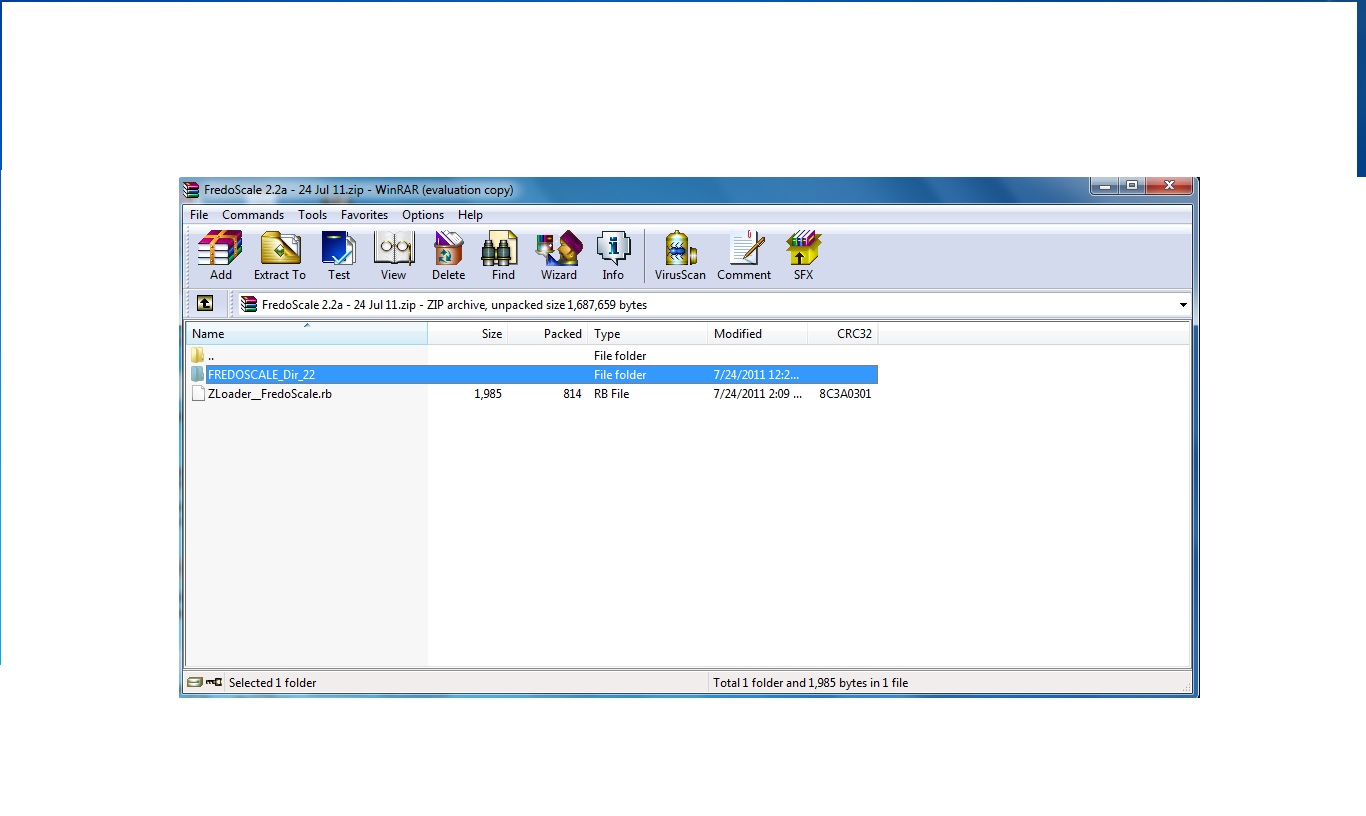

        screen.jpg

        1 Respuesta Última respuesta Responder Citar 0
        • fredo6F Desconectado
          fredo6
          Última edición por

          Apparently, you are missing LibFredo6 library.

          Go to the main post of FredoScale and follow the instructions.

          Fredo

          1 Respuesta Última respuesta Responder Citar 0
          • TIGT Desconectado
            TIG Moderator
            Última edición por

            You might also need to fix the Properties > Security setting for the Plugins folder to FULL for yourself...

            TIG

            1 Respuesta Última respuesta Responder Citar 0
            • S Desconectado
              suntansue
              Última edición por

              Thank you for your excellent work. Much appreciated.

              1 Respuesta Última respuesta Responder Citar 0
              • gillesG Desconectado
                gilles
                Última edición por

                Just a question about Radial Bender:

                Is there any reason I can't bend more than 180°?

                " c'est curieux chez les marins ce besoin de faire des phrases "

                1 Respuesta Última respuesta Responder Citar 0
                • T Desconectado
                  thundermatch
                  Última edición por

                  💚 Thank you for sharing...

                  1 Respuesta Última respuesta Responder Citar 0
                  • T Desconectado
                    thegoodguy
                    Última edición por

                    Amazing work! Thanks so much for this brilliant tool.

                    1 Respuesta Última respuesta Responder Citar 0
                    • V Desconectado
                      Vicky21S
                      Última edición por

                      I've downloaded, extracted and put all the necessary files into the Plugin folder but for some reason cannot see the FredoScale options in Sketchup even when I restart. I've checked the preferences folder, tools panel and still nothing. Someone please help me with this, I am beyond frustrated.

                      1 Respuesta Última respuesta Responder Citar 0
                      • pbacotP Desconectado
                        pbacot
                        Última edición por

                        Vicky,

                        1. Working backwards, You should get a listing in "Tool palettes" for a toolbar and under the Tools menu, "Fredo Collection >> Fredoscale".
                        2. You say you checked in Preferences? Is Fredoscale listed (and checked) in the Extensions window?
                        3. You've gone back to the SCF topics for Fredoscale and LibFredo and checked the requirements and specifics of file placement.
                        4. You saw the warning on the Fredoscale topic:
                          "IMPORTANT: Requires to download LibFredo6 3.6 or higher if not already installed."
                        5. Everything seems right to you then probably the next thing is to post a screenshot of your plugin folder where it shows all the required files, and see if someone can see something out of place.

                        MacOSX MojaveSketchUp Pro v19 Twilight v2 Thea v3 PowerCADD

                        1 Respuesta Última respuesta Responder Citar 0
                        • W Desconectado
                          willie_0
                          Última edición por

                          Thanks Fredo6 your a rockstar..

                          cheers,
                          Willie

                          1 Respuesta Última respuesta Responder Citar 0
                          • fredo6F Desconectado
                            fredo6
                            Última edición por

                            FredoScale, and more generally Ruby scripts, have problems to deal with fresh copies of group. Under the hood, these groups share a common definition until they are edited.

                            So in your case, I would suggest that you

                            • either use Make Unique feature of FredoScale
                            • Just double click of the Group A and B instances to make them unique

                            Fredo

                            1 Respuesta Última respuesta Responder Citar 0
                            • T Desconectado
                              Taniouska111
                              Última edición por

                              😄

                              1 Respuesta Última respuesta Responder Citar 0
                              • B Desconectado
                                bucksbedrooms
                                Última edición por

                                Bug [pretty sure anyway].
                                Hi I love this Fredoscale plugin and was going to make a donation but I am getting some buggy results which I hope there is a solution for. Please see attachments.


                                Some whole components move or don't move instead of scale.


                                Top drawer irratic scaling

                                1 Respuesta Última respuesta Responder Citar 0
                                • cottyC Desconectado
                                  cotty
                                  Última edición por

                                  I've tried some scaling and everything works as expected. Can you desribe your goal more detailed?

                                  my SketchUp gallery

                                  1 Respuesta Última respuesta Responder Citar 0
                                  • J Desconectado
                                    jdkarg1989
                                    Última edición por

                                    Hi. I have a question. When I twist an object and conferm my sketchup crashes. What could this be?

                                    1 Respuesta Última respuesta Responder Citar 0
                                    • fredo6F Desconectado
                                      fredo6
                                      Última edición por

                                      @jdkarg1989 said:

                                      Hi. I have a question. When I twist an object and conferm my sketchup crashes. What could this be?

                                      Are you working on a Group which has been freshly copied?

                                      Fredo

                                      1 Respuesta Última respuesta Responder Citar 0
                                      • TIGT Desconectado
                                        TIG Moderator
                                        Última edición por

                                        Or is the object very tiny ?
                                        Or very large ??

                                        TIG

                                        1 Respuesta Última respuesta Responder Citar 0
                                        • Dave RD Desconectado
                                          Dave R
                                          Última edición por

                                          What are the dimensions of the original before bending?

                                          Etaoin Shrdlu

                                          %

                                          (THERE'S NO PLACE LIKE)

                                          G28 X0.0 Y0.0 Z0.0

                                          M30

                                          %

                                          1 Respuesta Última respuesta Responder Citar 0
                                          • G Desconectado
                                            giorgio1979
                                            Última edición por

                                            Lovely plugin. 😄 Another issue: Sometimes when I do a "radial bending by selection of plane" I get some missing faces on the bending side.
                                            PS: I restarted sketchup, and I cannot reproduce this anymore. Perhaps I set something in Fredolib somewhere during an operation.
                                            See image:

                                            http://s11.postimg.org/5vqbc093n/radial_bending_by_selection_of_plane.png

                                            1 Respuesta Última respuesta Responder Citar 0
                                            • 1
                                            • 2
                                            • 37
                                            • 38
                                            • 39
                                            • 40
                                            • 41
                                            • 56
                                            • 57
                                            • 39 / 57
                                            • First post
                                              Last post
                                            Buy SketchPlus
                                            Buy SUbD
                                            Buy WrapR
                                            Buy eBook
                                            Buy Modelur
                                            Buy Vertex Tools
                                            Buy SketchCuisine
                                            Buy FormFonts

                                            Advertisement





