sketchucation logo sketchucation
    • 登入
    Oops, your profile's looking a bit empty! To help us tailor your experience, please fill in key details like your SketchUp version, skill level, operating system, and more. Update and save your info on your profile page today!
    🔌 Smart Spline | Fluid way to handle splines for furniture design and complex structures. Download

    [Plugin][$] FredoScale - v3.6a - 01 Apr 24


    已排程 已置頂 已鎖定 已移動 Plugins
    1.1k 貼文 345 Posters 2.4m 瀏覽 342 Watching
    正在載入更多貼文
    • 從舊到新
    • 從新到舊
    • 最多點贊
    回覆
    • 在新貼文中回覆
    登入後回覆
    此主題已被刪除。只有擁有主題管理權限的使用者可以查看。
    • utilerU 離線
      utiler
      最後由 編輯

      @solo said:

      hmmmm, I would'nt say that IE is that bad, pretty stable IMO.

      However I noticed that Malvin is using version 6, considering version 8 is out and he has not upgraded one can deduce that he does not have updates enabled therefore all his definitions and drivers are probably outdated.

      Pete, I just un-installed 8 as it was causing some issues and couldn't be bothered to troubleshooting... less time on FreeScale. 😉

      Just Curious...

      1 條回覆 最後回覆 回覆 引用 0
      • J 離線
        jmmad
        最後由 編輯

        @xrok1 said:

        if i stretch a cone from the point upward, what does that have to do with a curve?

        You are right
        The problem with a cone is that upwards its made of triangles you cannot stretch a triangle it would be the same as using scale.

        As it wont work with a 3 side piramid in any direction

        Get Upa !

        1 條回覆 最後回覆 回覆 引用 0
        • fredo6F 離線
          fredo6
          最後由 編輯

          jmmad,

          On your problem of freeze, and since you seem to be able to reproduce the problem, could you just try with the attached file (just drop it into the FREESCALE_Dir_20 folder).

          I am not too sure of what it can be, but I rewrite one part of the code differently.

          Thanks to advise

          Fredo


          to drop into FREESCALE_Dir_20 folder

          1 條回覆 最後回覆 回覆 引用 0
          • J 離線
            jmmad
            最後由 編輯

            @unknownuser said:

            On your problem of freeze, and since you seem to be able to reproduce the problem, could you just try with the attached file (just drop it into the FREESCALE_Dir_20 folder).

            I did what you told me.
            But the freeze continues but its only with this component y tried to duplicate the bug with similar components (a component with 4 nested components inside) and the tool works perfect.
            Its strange i think this might be a isolated problem not much to worry about.

            Thxs for the concern and help


            Freeform Freeze.jpg

            Get Upa !

            1 條回覆 最後回覆 回覆 引用 0
            • fredo6F 離線
              fredo6
              最後由 編輯

              @daniel s said:

              • A feature of the native protactor-rotate tool is missing... The ability of holding down the primary mouse button, and dragging the protractor is great:
                [attachment=1:2xhvp641]<!-- ia1 -->Animation_Rotate_Tool.gif<!-- ia1 -->[/attachment:2xhvp641]
                http://sites.google.com/site/sketchupsage/tweak/rotate
                This option can be added?

              Thank you again for this amazings tools,
              Daniel S

              Daniel,

              Can you try if this works for you (drop the attached file into LIBFREDO6_Dir_31 folder). I must say that I did not know this function, but using it a little bit, it seems very convenient. So thank you for signaling it and evangelizing other users.

              Fredo


              to drop into LIBFREDO6_Dir_31 folder

              1 條回覆 最後回覆 回覆 引用 0
              • P 離線
                princedragoncok
                最後由 編輯

                Thank you for this great set of tools fredo. Seem to handle even complex geometry well. mighty impressed!

                1 條回覆 最後回覆 回覆 引用 0
                • D 離線
                  Daniel S
                  最後由 編輯

                  @unknownuser said:

                  Daniel,

                  Can you try if this works for you (drop the attached file into LIBFREDO6_Dir_31 folder). I must say that I did not know this function, but using it a little bit, it seems very convenient. So thank you for signaling it and evangelizing other users.

                  Fredo

                  Works great for endpoints but if you place the protactor on edges and drag it dosen´t lock in the exact point you start the operation. Is like the protactor slips. The same happens if you place the protactor on a face and drag.

                  Thank you for adding this option!!!
                  Daniel S

                  1 條回覆 最後回覆 回覆 引用 0
                  • fredo6F 離線
                    fredo6
                    最後由 編輯

                    of course.
                    Sorry for that

                    Fredo


                    Lib6Protractor.rb

                    1 條回覆 最後回覆 回覆 引用 0
                    • D 離線
                      Daniel S
                      最後由 編輯

                      The protactor still slips for me.

                      Daniel S

                      1 條回覆 最後回覆 回覆 引用 0
                      • fredo6F 離線
                        fredo6
                        最後由 編輯

                        @daniel s said:

                        The protactor still slips for me.

                        Daniel S

                        Re-sorry.
                        I guess this is better now

                        Fredo


                        Lib6Protractor.rb

                        1 條回覆 最後回覆 回覆 引用 0
                        • pilouP 離線
                          pilou
                          最後由 編輯

                          Is it possible to use the radial Bending only for "slicer" a volume without to bend?
                          If yes how?
                          If I click (start end) a "straight line" along an edge nothing append when release the protractor without bending 😳

                          Frenchy Pilou
                          Is beautiful that please without concept!
                          My Little site :)

                          1 條回覆 最後回覆 回覆 引用 0
                          • fredo6F 離線
                            fredo6
                            最後由 編輯

                            @unknownuser said:

                            Is it possible to use the radial Bending only for "slicer" a volume without to bend?
                            If yes how?
                            If I click (start end) a "straight line" along an edge nothing append when release the protractor without bending 😳

                            I had the idea to isolate the slicer as a separate tool (then in 3 directions). so at least one requestor.
                            In between, you have one in SketchyFFD

                            Fredo

                            PS: If you don't bend, then nothing happens, which is the natural and intentional behavior

                            1 條回覆 最後回覆 回覆 引用 0
                            • D 離線
                              Daniel S
                              最後由 編輯

                              The latest Lib6Protractor.rb works very well like the native SU tool.

                              Thank you Again!!!

                              Daniel S

                              1 條回覆 最後回覆 回覆 引用 0
                              • Jean-FrancoJ 離線
                                Jean-Franco
                                最後由 編輯

                                Hi, Fredo I've a recurent problem after bending. See my picture.
                                Any idea of what happens ?
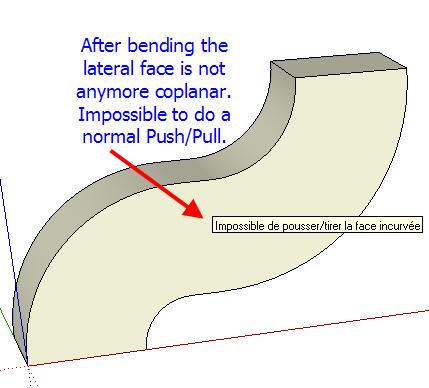
                                FreeScale_20_problem.jpg

                                Jean-Franco

                                1 條回覆 最後回覆 回覆 引用 0
                                • thomthomT 離線
                                  thomthom
                                  最後由 編輯

                                  @jean-franco said:

                                  Hi, Fredo I've a recurent problem after bending. See my picture.
                                  Any idea of what happens ?

                                  They are still co-planar. But there is hidden lines created there. Turn on Hidden Geometry and erase the lines on that surface and you can do a regular push/pull.

                                  Thomas Thomassen — SketchUp Monkey & Coding addict
                                  List of my plugins and link to the CookieWare fund

                                  1 條回覆 最後回覆 回覆 引用 0
                                  • fredo6F 離線
                                    fredo6
                                    最後由 編輯

                                    Very simple;
                                    If you show hidden geometry you'll see all the subface.
                                    In your case, you can easily clean up all those coplanar edges, and then have a surface you can push pull with the native Sketchup tool.

                                    Fredo

                                    Actually, I could have the script do the clean up of coplanar edges automatically as an option. Maybe I'll do that.

                                    1 條回覆 最後回覆 回覆 引用 0
                                    • Chris FullmerC 離線
                                      Chris Fullmer
                                      最後由 編輯

                                      @unknownuser said:

                                      Actually, I could have the script do the clean up of coplanar edges automatically as an option. Maybe I'll do that.

                                      +1 for that idea.

                                      Great Plugin!

                                      Chris

                                      Lately you've been tan, suspicious for the winter.
                                      All my Plugins I've written

                                      1 條回覆 最後回覆 回覆 引用 0
                                      • Jean-FrancoJ 離線
                                        Jean-Franco
                                        最後由 編輯

                                        Thank you all, effectively I missed the point !

                                        Jean-Franco

                                        1 條回覆 最後回覆 回覆 引用 0
                                        • D 離線
                                          Daniel S
                                          最後由 編輯

                                          I make alternative icons and cursors for this plugin:

                                          FreeScale Icons.jpg

                                          Here you can download:

                                          IMAGES_Alternative1.zip

                                          Extract into FREESCALE_Dir_20 and set this ones in "Tools>Fredo6 Collection>Free Scale>Default Parameters"

                                          Daniel S

                                          1 條回覆 最後回覆 回覆 引用 0
                                          • Dave RD 離線
                                            Dave R
                                            最後由 編輯

                                            Daniel, thank you for those alternative icons. They look nice. For some reason I seem to be missing the tools in the 2nd, 4th, 6th and 9th positions on your toolbar. They did copied into the directory, though. It looks like I'm missing the ones with the target.


                                            Etaoin Shrdlu

                                            %

                                            (THERE'S NO PLACE LIKE)

                                            G28 X0.0 Y0.0 Z0.0

                                            M30

                                            %

                                            1 條回覆 最後回覆 回覆 引用 0
                                            • 1
                                            • 2
                                            • 3
                                            • 4
                                            • 5
                                            • 56
                                            • 57
                                            • 2 / 57
                                            • 第一個貼文
                                              最後的貼文
                                            Buy SketchPlus
                                            Buy SUbD
                                            Buy WrapR
                                            Buy eBook
                                            Buy Modelur
                                            Buy Vertex Tools
                                            Buy SketchCuisine
                                            Buy FormFonts

                                            Advertisement