sketchucation logo sketchucation
    • Conectarse
    Oops, your profile's looking a bit empty! To help us tailor your experience, please fill in key details like your SketchUp version, skill level, operating system, and more. Update and save your info on your profile page today!
    🔌 Smart Spline | Fluid way to handle splines for furniture design and complex structures. Download

    [Plugin][$] FredoScale - v3.6a - 01 Apr 24


    Programado Fijo Cerrado Movido Plugins
    1.1k Mensajes 345 Posters 2.4m Visitas 342 Watching
    Cargando más mensajes
    • Más antiguo a más nuevo
    • Más nuevo a más antiguo
    • Mayor número de Votos
    Responder
    • Responder como tema
    Accede para responder
    Este tema ha sido borrado. Solo los usuarios que tengan privilegios de administración de temas pueden verlo.
    • pjbazelP Desconectado
      pjbazel
      Última edición por

      @gaieus said:

      Can you share the model file (or at least the problematic part) you are working with?

      I could upload a file, but Im not sure it would help. This is the behavior all the time. There is not particular file or problem area. It behaves like that all the time.

      Should I upload a file? Will that help?

      Again, its only with the Fredo Scale, not the native scale.

      Let me know if you think it will help ill post one, but it appears to be the script, not a particular file/operation.

      Thanks for the help guys

      1 Respuesta Última respuesta Responder Citar 0
      • pjbazelP Desconectado
        pjbazel
        Última edición por

        @dave r said:

        I see it too on a simple box. When the scale handle first moves it is either to 1.05 or 0.95. That's really no a big deal, though. If you want a precise scale factor, just type the desired value including 1.01 or whatever you really want.

        Exactly, yes that's what mine does. Very frustrating.

        yes, I can type it in, but this is not as useful as there is no real-time feedback/deformation. If its possible to change it I would love to know how.

        Also, possibly more urgent is that fact that in target mode this 'jump' prevents the operation from occurring at all. Neither draging the handle, or typing in parameters produces a result when scaling in this small range.

        Perhaps its a script issue?

        1 Respuesta Última respuesta Responder Citar 0
        • fredo6F Desconectado
          fredo6
          Última edición por

          @pjbazel

          There is a parameter for fixing the minimum amount of scaling when dragging. Unfortunately, I did not make available for setting in the Default Parameters...dialog box.

          I think I will in a next release.

          In the meantime, you can modify the line 180 of file bootstrap_FredoScale.rb, which is:
          LIMIT_InferenceScale = 0.05
          Just change the value, for instance 0.01.

          Fredo

          1 Respuesta Última respuesta Responder Citar 0
          • pjbazelP Desconectado
            pjbazel
            Última edición por

            @unknownuser said:

            @pjbazel

            There is a parameter for fixing the minimum amount of scaling when dragging. Unfortunately, I did not make available for setting in the Default Parameters...dialog box.

            I think I will in a next release.

            In the meantime, you can modify the line 180 of file bootstrap_FredoScale.rb, which is:
            LIMIT_InferenceScale = 0.05
            Just change the value, for instance 0.01.

            Fredo

            Ahhhhh, thank you so much Fredo! And thanks for all the wonderful toys!

            One question, I tried to edit the .rb in a text editor but I was "denied permission". Can anyone tell me how should I go about editing the bootstrap_FredoScale.rb???

            Thanks for the help.

            1 Respuesta Última respuesta Responder Citar 0
            • Dave RD Desconectado
              Dave R
              Última edición por

              You should be able to edit it in your text editor. What program did you try to use to open?

              Etaoin Shrdlu

              %

              (THERE'S NO PLACE LIKE)

              G28 X0.0 Y0.0 Z0.0

              M30

              %

              1 Respuesta Última respuesta Responder Citar 0
              • pjbazelP Desconectado
                pjbazel
                Última edición por

                @dave r said:

                You should be able to edit it in your text editor. What program did you try to use to open?

                Got it!

                It was a security issue. I did not have full read/write access for the file. Just had to give myself permission, which i graciously did.

                1 Respuesta Última respuesta Responder Citar 0
                • M Desconectado
                  mac1
                  Última edición por

                  The attched skp files shows a very simple case using FredoScale 2.2a in the free rotate line inference mode. The plugin seems to declar an intersect point by changing the line color but when one double clicks on the line it shows no division until the base of the triangle is conneted with the line tool. Then intersect happens. All snapping has been deactivated for this case.Using Fredo6 4.5 lib.
                  free roate artifact or issue.skp
                  Is this normal ??

                  1 Respuesta Última respuesta Responder Citar 0
                  • fredo6F Desconectado
                    fredo6
                    Última edición por

                    @mac1 said:

                    The attched skp files shows a very simple case using FredoScale 2.2a in the free rotate line inference mode. The plugin seems to declar an intersect point by changing the line color but when one double clicks on the line it shows no division until the base of the triangle is conneted with the line tool. Then intersect happens. All snapping has been deactivated for this case.Using Fredo6 4.5 lib.
                    [attachment=0:1s75sq9r]<!-- ia0 -->free roate artifact or issue.skp<!-- ia0 -->[/attachment:1s75sq9r]
                    Is this normal ??

                    You are right. The extremity is well positioned, but the target segment is not divided.
                    Actually Fredoscale does nothing else than perform the rotation to the right angle and let Sketchup do the rest as with the native Rotate tool).
                    Should FredoScale force the Divide?

                    Fredo

                    1 Respuesta Última respuesta Responder Citar 0
                    • M Desconectado
                      mac1
                      Última edición por

                      One of the first checks I do is double click the line and if does not divide I conclude some thing is wrong. However, this functionality is not high use ,at least for me, and knowing the artifact I cannot say it is a make play to make a program chage just for that. Maybe some high use users will comment. Otherwise I would suggest to make it a planned change( with other chages) if it isn't a big program impact.
                      The cases I run into, although few, are 3d and so I use the sphere line intersect spread sheet I have.
                      Your tool which is great and that cover all I need . 👍 👍

                      1 Respuesta Última respuesta Responder Citar 0
                      • cottyC Desconectado
                        cotty
                        Última edición por

                        I've seen a different looking toolbar in Richs Tutorial, do someone know a source for these icons?

                        my SketchUp gallery

                        1 Respuesta Última respuesta Responder Citar 0
                        • Rich O BrienR Desconectado
                          Rich O Brien Moderator
                          Última edición por

                          Fredo packages 2 icon types with FredoScale. Dig through the setting under Tools and pick Daniels icon set.

                          Also I tend to change most of my icons

                          Download the free D'oh Book for SketchUp 📖

                          1 Respuesta Última respuesta Responder Citar 0
                          • cottyC Desconectado
                            cotty
                            Última edición por

                            Thanks, I found it ...

                            my SketchUp gallery

                            1 Respuesta Última respuesta Responder Citar 0
                            • T Desconectado
                              thall26
                              Última edición por

                              Hi!
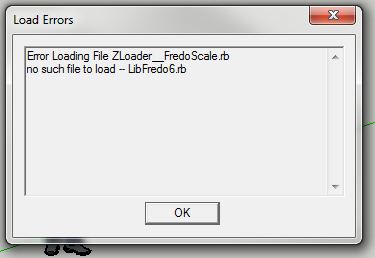
                              I am really excited to use your tools in Sketchup. However, I ran into a problem while starting up Sketchup. Attached is an image of the error box that I see upon starting Sketchup. Let me know what can be done. Thanks!

                              ErrorMSG2.JPG

                              1 Respuesta Última respuesta Responder Citar 0
                              • fredo6F Desconectado
                                fredo6
                                Última edición por

                                @thall26
                                I think you did not install LibFredo6 companion library, as specified in the main post.

                                Fredo

                                1 Respuesta Última respuesta Responder Citar 0
                                • thomthomT Desconectado
                                  thomthom
                                  Última edición por

                                  @unknownuser said:

                                  @thall26
                                  I think you did not install LibFredo6 companion library, as specified in the main post.

                                  Fredo

                                  I've begun to add checks for TT_Lib2 for my plugins that require it - and provide a messagebox explaining what is missing asking if they want to open a webpage where they can download it.

                                  Thomas Thomassen — SketchUp Monkey & Coding addict
                                  List of my plugins and link to the CookieWare fund

                                  1 Respuesta Última respuesta Responder Citar 0
                                  • guanjinG Desconectado
                                    guanjin
                                    Última edición por

                                    @thomthom said:

                                    @unknownuser said:

                                    @thall26
                                    I think you did not install LibFredo6 companion library, as specified in the main post.

                                    Fredo

                                    I've begun to add checks for TT_Lib2 for my plugins that require it - and provide a messagebox explaining what is missing asking if they want to open a webpage where they can download it.

                                    Good attention, so that embodies the humane.

                                    I come from China, is to learn

                                    1 Respuesta Última respuesta Responder Citar 0
                                    • T Desconectado
                                      thall26
                                      Última edición por

                                      I found the problem - I didn't realize that I needed to download a platform ruby file to support the plugin I was trying to install. I'll make sure to read more carefully next time!

                                      1 Respuesta Última respuesta Responder Citar 0
                                      • B Desconectado
                                        ByKAz
                                        Última edición por

                                        Hi Fredo, I'm expecting some crashes sometimes when I'm using the Fredo scale, especially when the file is a little big, like more than 50mb. I'm a mountain lion mac user and I don't know if it's normal, I always save the document before use it, but if you can give me some advice is gonna be great, thanks...

                                        1 Respuesta Última respuesta Responder Citar 0
                                        • TIGT Desconectado
                                          TIG Moderator
                                          Última edición por

                                          I assume you aren't trying to work on the whole 50Mb of geometry !
                                          Make the part you want to bend into a component.
                                          Do a Save_as on it into an external 'part' SKP.
                                          Open that much smaller SKP and run the tool.
                                          If it still fails perhaps it's a physical size issue - very tiny or very gigantic geometry ? If so try using the native tool to Scale the part-model by 10 or 100, process and then Scale back to the original size.
                                          Assuming you get the bending done, save the part-model, then in the main model 'Reload' the component - the updated 'part' will adjust to show its new form...

                                          TIG

                                          1 Respuesta Última respuesta Responder Citar 0
                                          • B Desconectado
                                            ByKAz
                                            Última edición por

                                            @tig said:

                                            I assume you aren't trying to work on the whole 50Mb of geometry !
                                            Make the part you want to bend into a component.
                                            Do a Save_as on it into an external 'part' SKP.
                                            Open that much smaller SKP and run the tool.
                                            If it still fails perhaps it's a physical size issue - very tiny or very gigantic geometry ? If so try using the native tool to Scale the part-model by 10 or 100, process and then Scale back to the original size.
                                            Assuming you get the bending done, save the part-model, then in the main model 'Reload' the component - the updated 'part' will adjust to show its new form...

                                            Thanks TIG, I'm gonna do that. It's a tricky smart choice

                                            1 Respuesta Última respuesta Responder Citar 0
                                            • 1
                                            • 2
                                            • 35
                                            • 36
                                            • 37
                                            • 38
                                            • 39
                                            • 56
                                            • 57
                                            • 37 / 57
                                            • First post
                                              Last post
                                            Buy SketchPlus
                                            Buy SUbD
                                            Buy WrapR
                                            Buy eBook
                                            Buy Modelur
                                            Buy Vertex Tools
                                            Buy SketchCuisine
                                            Buy FormFonts

                                            Advertisement







