sketchucation logo sketchucation
    • Login
    Oops, your profile's looking a bit empty! To help us tailor your experience, please fill in key details like your SketchUp version, skill level, operating system, and more. Update and save your info on your profile page today!
    ⚠️ Update | Sketchucation Tools 5.0.8 released with licensing improvements and bugfixes Download

    [Plugin Library] LibFredo6 - v16.2b - 22 Sep 26


    Scheduled Pinned Locked Moved Plugins
    2.2k Posts 583 Posters 9.0m Views 585 Watching
    Loading More Posts
    • Oldest to Newest
    • Newest to Oldest
    • Most Votes
    Reply
    • Reply as topic
    Log in to reply
    This topic has been deleted. Only users with topic management privileges can see it.
    • TIGT
      TIG Moderator @SunnyGee2017
      last edited by

      @SunnyGee2017
      I think @fredo6 will need more details before he can fully look into the cause...
      e.g.
      Are there any error messages in the Ruby Console or message-boxes ?
      What kind of 'crash' is it ?
      If it's a BugSplat then what are its details, and have you send these reports into SketchUp ?

      TIG

      S 1 Reply Last reply
      Reply Quote 0
      • S
        SunnyGee2017 @TIG
        last edited by

        @TIG It just freezes. I can still move the mouse, but nothing else works. I have to kill the app with the task manager and restart it. It only happens with Fredo plugins. All others work well.

        TIGT 1 Reply Last reply
        Reply Quote 0
        • TIGT
          TIG Moderator @SunnyGee2017
          last edited by

          @SunnyGee2017
          Thanks, that might be helpful...
          Now up to @fredo6

          TIG

          1 Reply Last reply
          Reply Quote 0
          • fredo6F
            fredo6 @SunnyGee2017
            last edited by

            @SunnyGee2017
            Can also invoke menu Window > LibFredo6 Settings.... > Fredo6 Plugin Information... and copy/paste here the content of the Ruby Console.
            This will tell me which version of plugins you have.

            S 1 Reply Last reply
            Reply Quote 0
            • S
              SunnyGee2017
              last edited by

              Fredo6 Plugins Information on 2026-02-08 18:19:24 +0800

              • Platform: x64-mswin64_140 - Ruby: 3.2.2
              • Sketchup: 24.0.553
              • LibFredo6: v15.8d
              • LibFredo6 Binary loaded
              • Sketchucation ExtensionStore: NOT installed
              • SCFLicense: NOT installed
              • Fredo6 Plugins

                Curviloft v2.0a
                FredoTools v4.5c
                JointPushPull v4.9a
                RoundCorner v3.4a

              1 Reply Last reply
              Reply Quote 0
              • S
                SunnyGee2017 @fredo6
                last edited by

                @fredo6
                Fredo6 Plugins Information on 2026-02-08 18:19:24 +0800

                • Platform: x64-mswin64_140 - Ruby: 3.2.2
                • Sketchup: 24.0.553
                • LibFredo6: v15.8d
                • LibFredo6 Binary loaded
                • Sketchucation ExtensionStore: NOT installed
                • SCFLicense: NOT installed
                • Fredo6 Plugins

                  Curviloft v2.0a
                  FredoTools v4.5c
                  JointPushPull v4.9a
                  RoundCorner v3.4a

                1 Reply Last reply
                Reply Quote 0
                • TIGT
                  TIG Moderator
                  last edited by

                  I'm sure @fredo6 will have more to say...
                  but the report your posted shows that although you have the latest versions of the 4 extensions installed,
                  you don't have the SketchUcation toolset installed - for the ExtensionStore and the required SCFLicensing files.
                  Without those all licensed extensions will not work.
                  Download the RBZ for the SketchUcation tools and use the Extension Manager dialog's Install... button.
                  Restart SketchUp to sync everything.
                  Now you will have the licensing set up.
                  You need to validate appropriate licenses for the 4 fredo extensions.
                  If you already have those use them, or get them from the appropriate page on this forum.
                  If you haven't already got a license then buy it.
                  Restart SketchUp after all of this to sync everything...

                  TIG

                  1 Reply Last reply
                  Reply Quote 0
                  • G
                    GavinG
                    last edited by

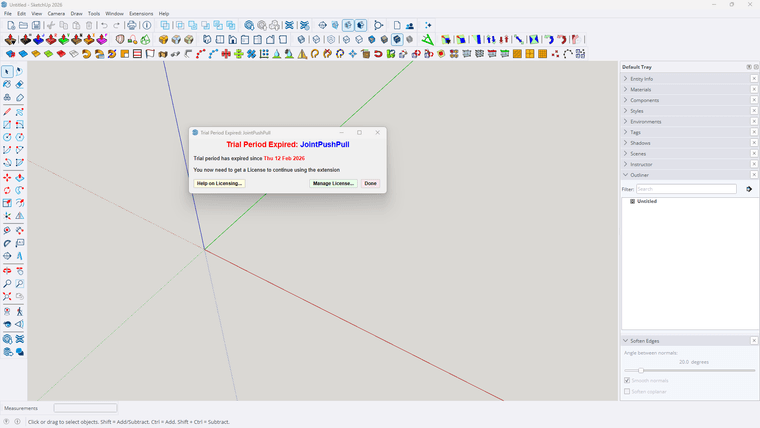
                    I have recently upgraded to sketchup 2026 and my laptop to windows 11. Up till today my Fredo^ plugins have been working fine, until today. I have the prepetual licences for all the plugins, and when I want to use them I get a window saying - TRIAL PERIOD EXPIRED etc etc. I have removed all the files from my PC, and reinstalled Fredo^ and all the plugins from my licence profile on Sketchucation. I have restarted sketchup and still receive the same notification. What must i do next please. Can admin assist?
                    Screenshot 2026-02-15 155403.png

                    Dave RD R 2 Replies Last reply
                    Reply Quote 0
                    • Dave RD
                      Dave R @GavinG
                      last edited by

                      @GavinG do you have the latest version of the Sketchucation Extension Store installed?

                      Etaoin Shrdlu

                      %

                      (THERE'S NO PLACE LIKE)

                      G28 X0.0 Y0.0 Z0.0

                      M30

                      %

                      1 Reply Last reply
                      Reply Quote 0
                      • G
                        GavinG
                        last edited by

                        I think so, I have 3 new icons on my ribbon ( see attached). This is where I get directed when looking for Sketchucation Extension Store

                        1 Reply Last reply
                        Reply Quote 0
                        • G
                          GavinG
                          last edited by

                          Screenshot 2026-02-15 172330.png

                          1 Reply Last reply
                          Reply Quote 0
                          • fredo6F
                            fredo6
                            last edited by

                            First, when you have a problem of license, do not try to reinstall. Just check you have the latest versions.

                            Also, if you get the message of expiration, try first to revalidate the license. It won't count for a new seat.

                            Does it work in your case?

                            G 1 Reply Last reply
                            Reply Quote 0
                            • fredo6F
                              fredo6
                              last edited by fredo6

                              NEW RELEASE: LibFredo6 v15.8e - 15 Feb 26

                              LibFredo6 15.8e is a maintenance release. It includes changes related to:

                              • Bug Fixing
                              • Future compatibility

                              Requirements: SU2017 and above

                              See plugin home page of LibFredo6 for Download of LibFredo6.

                              Main Post of the LibFredo6 thread

                              ntxdaveN 1 Reply Last reply
                              Reply Quote 0
                              • ntxdaveN
                                ntxdave @fredo6
                                last edited by

                                @fredo6 Is there any place where we can find out what the bug fixes are?

                                Press F1...thank me later

                                1 Reply Last reply
                                Reply Quote 0
                                • ntxdaveN
                                  ntxdave
                                  last edited by ntxdave

                                  I did a quick test on an old Animator file and it looks like we now can use perspective and generate a video.

                                  Press F1...thank me later

                                  ntxdaveN 1 Reply Last reply
                                  Reply Quote 0
                                  • G
                                    GavinG @fredo6
                                    last edited by

                                    @fredo6 - I have tried to uninstall and reinstall, no luck, I have just installed the plugin as indicated below in the next reply, still nothing working. I still get the TRIAL PRERIOD EXPIRED window

                                    fredo6F 1 Reply Last reply
                                    Reply Quote 0
                                    • fredo6F
                                      fredo6 @GavinG
                                      last edited by

                                      @GavinG
                                      When you get the expiration message, did you try to click on the button 'Manage License' and revalidate the license (using the file you received by email when you purchased the license)?

                                      If you do not have the license file, you can retrieve it and download it at https://sketchucation.com/webshop/my-licences.php. Just sign in.

                                      1 Reply Last reply
                                      Reply Quote 0
                                      • ntxdaveN
                                        ntxdave @ntxdave
                                        last edited by

                                        said in [Plugin Library] LibFredo6 - v15.8e - 15 Feb 26:

                                        I did a quick test on an old Animator file and it looks like we now can use perspective and generate a video.

                                        Well, I also tried to generate a video with the Animator file that has both perspective and parallel and the generation stopped when it switched from parallel to perspective. So, if the file has all scenes with the camera set the same way (either perspective or parallel) it works fine but having both options in the same file will not generate the video.

                                        Just thought I would pass this along but maybe you already knew that.

                                        Press F1...thank me later

                                        1 Reply Last reply
                                        Reply Quote 0
                                        • R
                                          roxanmusni Newcomers @GavinG
                                          last edited by

                                          @GavinG this is also my problem now. Can someone help me fix this?

                                          Rich O BrienR 1 Reply Last reply
                                          Reply Quote 0
                                          • Rich O BrienR
                                            Rich O Brien Moderator @roxanmusni
                                            last edited by

                                            @roxanmusni said in [Plugin Library] LibFredo6 - v15.8e - 15 Feb 26:

                                            @GavinG this is also my problem now. Can someone help me fix this?

                                            If you have a license and experience issues please update extensions to recent releases

                                            Download the free D'oh Book for SketchUp 📖

                                            1 Reply Last reply
                                            Reply Quote 0

                                            Hello! It looks like you're interested in this conversation, but you don't have an account yet.

                                            Getting fed up of having to scroll through the same posts each visit? When you register for an account, you'll always come back to exactly where you were before, and choose to be notified of new replies (either via email, or push notification). You'll also be able to save bookmarks and upvote posts to show your appreciation to other community members.

                                            With your input, this post could be even better 💗

                                            Register Login
                                            • 1
                                            • 2
                                            • 109
                                            • 110
                                            • 111
                                            • 112
                                            • 113
                                            • 112 / 113
                                            • First post
                                              Last post
                                            Buy SketchPlus
                                            Buy SUbD
                                            Buy WrapR
                                            Buy eBook
                                            Buy Modelur
                                            Buy Vertex Tools
                                            Buy SketchCuisine
                                            Buy FormFonts

                                            Advertisement