sketchucation logo sketchucation
    • 登入
    Oops, your profile's looking a bit empty! To help us tailor your experience, please fill in key details like your SketchUp version, skill level, operating system, and more. Update and save your info on your profile page today!
    🔌 Smart Spline | Fluid way to handle splines for furniture design and complex structures. Download

    The "Duh!" thread (aka the Doh! thread)

    已排程 已置頂 已鎖定 已移動 SketchUp Discussions
    sketchup
    696 貼文 135 Posters 316.1k 瀏覽 135 Watching
    正在載入更多貼文
    • 從舊到新
    • 從新到舊
    • 最多點贊
    回覆
    • 在新貼文中回覆
    登入後回覆
    此主題已被刪除。只有擁有主題管理權限的使用者可以查看。
    • JQLJ 離線
      JQL
      最後由 編輯

      @bob james said:

      Your suggestions create 45 deg rotated squares.
      Why can't someone just make a simple extension to make an orthogonally positioned square starting from a center point?

      If you hit CTRL while designing your square or your four sided circle, you it will create the squared shape as you wish it to... (at least on 2015 I don't know if it's like this in every SU version)

      www.casca.pt
      Visit us on facebook!

      1 條回覆 最後回覆 回覆 引用 0
      • Dave RD 離線
        Dave R
        最後由 編輯

        @jql said:

        @bob james said:

        Your suggestions create 45 deg rotated squares.
        Why can't someone just make a simple extension to make an orthogonally positioned square starting from a center point?

        If you hit CTRL while designing your square or your four sided circle, you it will create the squared shape as you wish it to... (at least on 2015 I don't know if it's like this in every SU version)

        That was a new feature in SU2015.

        Bob, the extension already exists in the Tools on Surface set. I'm sure you must have that one in your library.

        Etaoin Shrdlu

        %

        (THERE'S NO PLACE LIKE)

        G28 X0.0 Y0.0 Z0.0

        M30

        %

        1 條回覆 最後回覆 回覆 引用 0
        • pilouP 離線
          pilou
          最後由 編輯

          The big one of the day! 😄
          I am sure that will be the same for some other users! 💚

          When you make a Push Pull + CTRL that make a new volume from the start face ok
          as usual! 😄

          http://s6.postimg.org/osvrpkq1d/big_dohdoh0.gif

          but...

          that can be used also for make an "impossible Push Pull" ! 😎
          (And thx to TIG for his Solid Solver at the end! 👍

          http://s6.postimg.org/hodygjis1/big_dohdoh.gif

          Frenchy Pilou
          Is beautiful that please without concept!
          My Little site :)

          1 條回覆 最後回覆 回覆 引用 0
          • Bob JamesB 離線
            Bob James
            最後由 編輯

            @dave r said:

            Bob, the extension already exists in the Tools on Surface set. I'm sure you must have that one in your library.

            Close, but you have to move it around until you find the axis pop-up, enter a length, stretch it in the other axis, and enter the same length. And you have to enter the half-length in each case or the square will be twice the size you want: simple except when the square is to be 4 3/16"

            Still seems like a trivial extension to make for a ruby-guy (like sdmitch,for example): pick a point and enter the size of the square (not the half length) and it automatically draws the correct size square on the orthogonal axes.

            i7-4930K 3.4Ghz, 2x GTX780 6GB, 32GB DDR3-1600 ECC, OCZ Vertex 4 500GB, WD Black 3TB, 32TB NAS, 4x 27" Monitors, SpaceMouse Pro, X-keys XK-60

            1 條回覆 最後回覆 回覆 引用 0
            • Rich O BrienR 線上
              Rich O Brien Moderator
              最後由 編輯

              @bob

              why not use a component library of predefined sizes?

              Download the free D'oh Book for SketchUp 📖

              1 條回覆 最後回覆 回覆 引用 0
              • JQLJ 離線
                JQL
                最後由 編輯

                Well that would work with one component alone if you one unit. Insert it at point scale it using CTRL and SHIFT input your dimension.

                www.casca.pt
                Visit us on facebook!

                1 條回覆 最後回覆 回覆 引用 0
                • dereiD 離線
                  derei
                  最後由 編輯

                  I just "Discovered" the wheel... 😍
                  using "deg" or "mm" when setting the camera focal distance, can switch between actual focal distance (35mm equiv) and fov (field of view) measured in degrees. 🤓

                  DESIGNER AND ARTIST DEREI.UK

                  1 條回覆 最後回覆 回覆 引用 0
                  • PixeroP 離線
                    Pixero
                    最後由 編輯

                    I have to add one I discovered the other week by pure accident.
                    Right click on a toolbar to see a list of all loaded and unloaded toolbars.

                    1 條回覆 最後回覆 回覆 引用 0
                    • pilouP 離線
                      pilou
                      最後由 編輯

                      @unknownuser said:

                      Right click on a toolbar

                      On toolbars on The Main toolbar! Not on any toolbars floating on the screen! 😉

                      Frenchy Pilou
                      Is beautiful that please without concept!
                      My Little site :)

                      1 條回覆 最後回覆 回覆 引用 0
                      • pbacotP 離線
                        pbacot
                        最後由 編輯

                        @pixero said:

                        I have to add one I discovered the other week by pure accident.
                        Right click on a toolbar to see a list of all loaded and unloaded toolbars.

                        I don't think so on a Mac. (SU toolbars and windows on Mac are junk).

                        MacOSX MojaveSketchUp Pro v19 Twilight v2 Thea v3 PowerCADD

                        1 條回覆 最後回覆 回覆 引用 0
                        • JQLJ 離線
                          JQL
                          最後由 編輯

                          @pbacot said:

                          I don't think so on a Mac. (SU toolbars and windows on Mac are junk).

                          I'd say the only thing I envy from SU for Mac is pdf import... we don't get that on windows

                          www.casca.pt
                          Visit us on facebook!

                          1 條回覆 最後回覆 回覆 引用 0
                          • david_hD 離線
                            david_h
                            最後由 編輯

                            I'm posting my query here because it is probably pretty obvious to you guys out there, but I've always struggled with it. . .

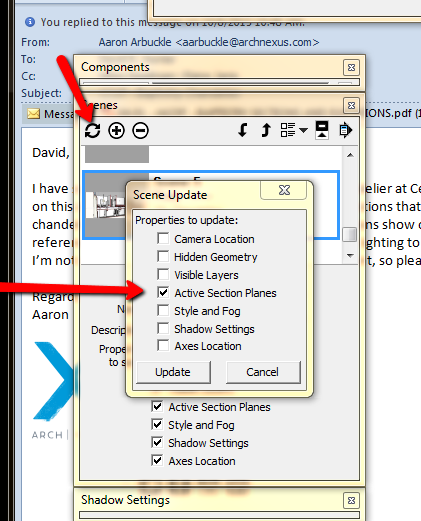
                            I've always found the "Scenes" menu to be counter-intuitive and I can't seem to get it to do what I think it is telling me to do. Specifically, I want one particular scene to be a section but not others I update via the scenes menu, and ONLY that scene but when I tab thru the others the section plane is still active and I have to switch it off. what am I doing wrong. Likewise for things like various styles, or display modes, etc.
                            sect_cut.png

                            Please help me so I can slap my head and go "DUH!"

                            Thanks,

                            David H

                            ps My last query got absolutely no response whatsoever. Still looking for some insight on that as well.

                            Thx,

                            D

                            If I make it look easy...It is probably easy

                            1 條回覆 最後回覆 回覆 引用 0
                            • gonashviliG 離線
                              gonashvili
                              最後由 編輯

                              I've got a question about [regular] selecting, or deselecting, rather. You hit he SHIFT key and it works as +/-, right? Is there a way to have just the 'MINUS' function, so you actually ONLY deselect?
                              Cause, when you select some objects and then when you want to deselect you actually might select some undesirable ones, know what I mean? Especially when there are a lot of lines or what not.... It actually acts as an INVERSION, rather than just DESELCTION.

                              1 條回覆 最後回覆 回覆 引用 0
                              • massimoM 離線
                                massimo Moderator
                                最後由 編輯

                                shift= +/-
                                ctrl+shift= -
                                ctrl= +

                                1 條回覆 最後回覆 回覆 引用 0
                                • gonashviliG 離線
                                  gonashvili
                                  最後由 編輯

                                  Oh!!! Hah, thanks a lot man!

                                  I mean, DOH! of course.

                                  1 條回覆 最後回覆 回覆 引用 0
                                  • JQLJ 離線
                                    JQL
                                    最後由 編輯

                                    @david_h said:

                                    Specifically, I want one particular scene to be a section but not others I update via the scenes menu, and ONLY that scene but when I tab thru the others the section plane is still active and I have to switch it off.

                                    Basically, you're missing the meaning of having those checkboxes checked.

                                    What they mean is:

                                    • When you're creating a scene only the settings that are checked will be stored. All unchecked settings will be not be stored. (Checking sections box on will store current sections settings. If you have an Active section it will be the active section for the scene. If you have no active section, the scene will have no section affecting it. If there are no sections in the scene, then you'll also have no section affecting it.)

                                    • When you have settings unchecked, then you're not storing a state for that section on the scene. (Unchecking Sections will make the scene don't care if a section is active or not. If you insert a section in the model, the scene will be cut, if you change to another scene and come back to this scene, the section from the other scene will still be active, if you change to a scene that has no active section, coming back will keep the scene without an active setting.) Unchecked settings are, therefore, neutral. They can be either on or off, depending on what was the current state when you changed to that scene...

                                    So, in fact, unchecking sections will not make the model fully viewable. It will "randomize" the sections on that scene, unless you know what you're doing, you'll have no control.

                                    www.casca.pt
                                    Visit us on facebook!

                                    1 條回覆 最後回覆 回覆 引用 0
                                    • david_hD 離線
                                      david_h
                                      最後由 編輯

                                      @jql said:

                                      It will "randomize" the sections on that scene, unless you know what you're doing, you'll have no control.

                                      thanks for the response. I think i got half of that. 🎉 But your last sentence kinda summed it up. Is there a Tutorial or something that talks about this? I thought it was much simpler and clearer back in the old days when these were called "Pages". Seemed to work better. 😞

                                      If I make it look easy...It is probably easy

                                      1 條回覆 最後回覆 回覆 引用 0
                                      • JQLJ 離線
                                        JQL
                                        最後由 編輯

                                        David, send me your file, I'll configure it, and send it back. Name the Scenes wisely so I know what you're talking about and describe your issues on a PM. I'll explain exactly what I did and then you could probably understand it better.

                                        www.casca.pt
                                        Visit us on facebook!

                                        1 條回覆 最後回覆 回覆 引用 0
                                        • david_hD 離線
                                          david_h
                                          最後由 編輯

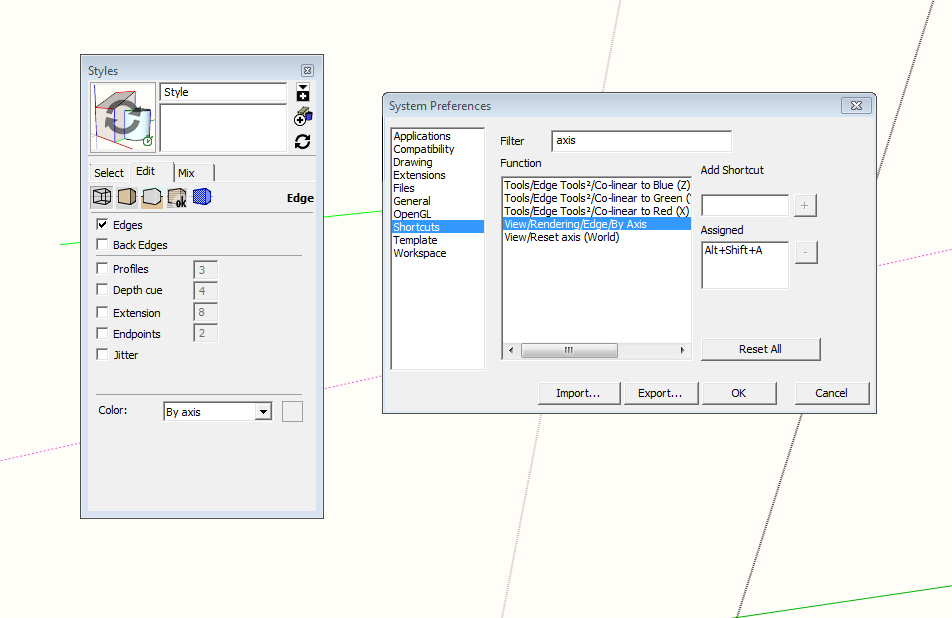
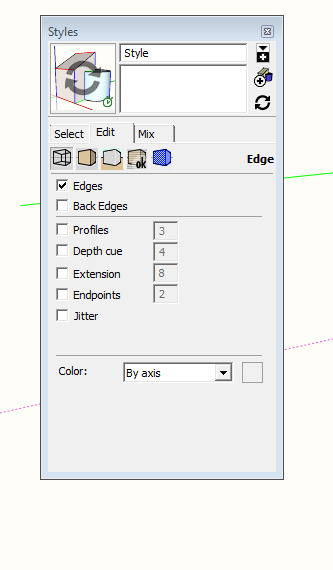
                                          Okay . .. I just got a new computer and have reinstalled SU. A lot of this stuff I did so long ago that I can't remember anymore how I did it. My problem here is I had a shortcut for edge style by exis that shows the axes in their respective green, red and blue colors. It used to be accessed via "View>Rendering>Axis"
                                          axis_1.pngaxis_2.jpg

                                          But on my new download of SU that is no longer there! Any ideas how I can shortcut this?

                                          Thx,

                                          D

                                          If I make it look easy...It is probably easy

                                          1 條回覆 最後回覆 回覆 引用 0
                                          • C 離線
                                            Charlie__V
                                            最後由 編輯

                                            @david_h said:

                                            Okay . .. I just got a new computer and have reinstalled SU. A lot of this stuff I did so long ago that I can't remember anymore how I did it. My problem here is I had a shortcut for edge style by exis that shows the axes in their respective green, red and blue colors. It used to be accessed via "View>Rendering>Axis"

                                            [attachment=2:1fhbp1h6]<!-- ia2 -->axis_1.png<!-- ia2 -->[/attachment:1fhbp1h6][attachment=1:1fhbp1h6]<!-- ia1 -->axis_2.jpg<!-- ia1 -->[/attachment:1fhbp1h6]

                                            But on my new download of SU that is no longer there! Any ideas how I can shortcut this?

                                            Thx,

                                            D

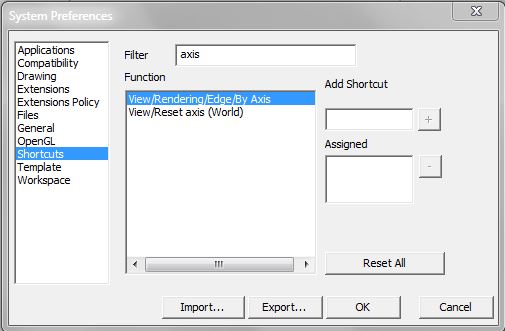
                                            Should be there....I just checked on my install (SU Pro 2016)

                                            EdgebyAxis.JPG

                                            Precision M1710/Win 7 Pro 64 bit/i-7 6920 Quad core 2.9 Ghz -3.8/16Gb ram/NVIDIA M5000M 8Gb

                                            1 條回覆 最後回覆 回覆 引用 0
                                            • 1
                                            • 2
                                            • 29
                                            • 30
                                            • 31
                                            • 32
                                            • 33
                                            • 34
                                            • 35
                                            • 31 / 35
                                            • 第一個貼文
                                              最後的貼文
                                            Buy SketchPlus
                                            Buy SUbD
                                            Buy WrapR
                                            Buy eBook
                                            Buy Modelur
                                            Buy Vertex Tools
                                            Buy SketchCuisine
                                            Buy FormFonts

                                            Advertisement







