sketchucation logo sketchucation
    • 登入
    Oops, your profile's looking a bit empty! To help us tailor your experience, please fill in key details like your SketchUp version, skill level, operating system, and more. Update and save your info on your profile page today!
    🔌 Smart Spline | Fluid way to handle splines for furniture design and complex structures. Download

    The "Duh!" thread (aka the Doh! thread)

    已排程 已置頂 已鎖定 已移動 SketchUp Discussions
    sketchup
    696 貼文 135 Posters 316.5k 瀏覽 135 Watching
    正在載入更多貼文
    • 從舊到新
    • 從新到舊
    • 最多點贊
    回覆
    • 在新貼文中回覆
    登入後回覆
    此主題已被刪除。只有擁有主題管理權限的使用者可以查看。
    • Wo3DanW 離線
      Wo3Dan
      最後由 編輯

      @unknownuser said:

      ....So now I have a scene I use most of the time which doesn't hide the rest of the model, and a scene called "hide rest of the model" which I switch to when I wish to have this function....

      Hi Ken, thanks for sharing.

      You may want to assign these two different options (On/Off) to just one shortcut key. To toggle the view 'Hide rest of model' On/Off. It's fast and available in all models.

      1 條回覆 最後回覆 回覆 引用 0
      • halroachH 離線
        halroach
        最後由 編輯

        Did you know that when you click on the plugins menu and then tap on a letter on your keyboard it cycles through your plugins starting with that letter?
        It's a native Windows feature for keyboard navigation... like when you press Alt in any program.
        I just never thought of using it in Sketchup... Something to think about...

        There is only one drawback, if you only have one plugin that starts with a certain letter it will be activated before you can say Robinson Crusoe!

        Good Luck!

        FlexTools - Super Quick Windows, Doors, Slats...

        1 條回覆 最後回覆 回覆 引用 0
        • cottyC 離線
          cotty
          最後由 編輯

          Not really a new one for me but I use it regularly, so it might be a little Duh! for someone?

          If you select several instances of the same component and use "make unique", these instances become all instances of the new component. An example to clarify what I try to explain ...
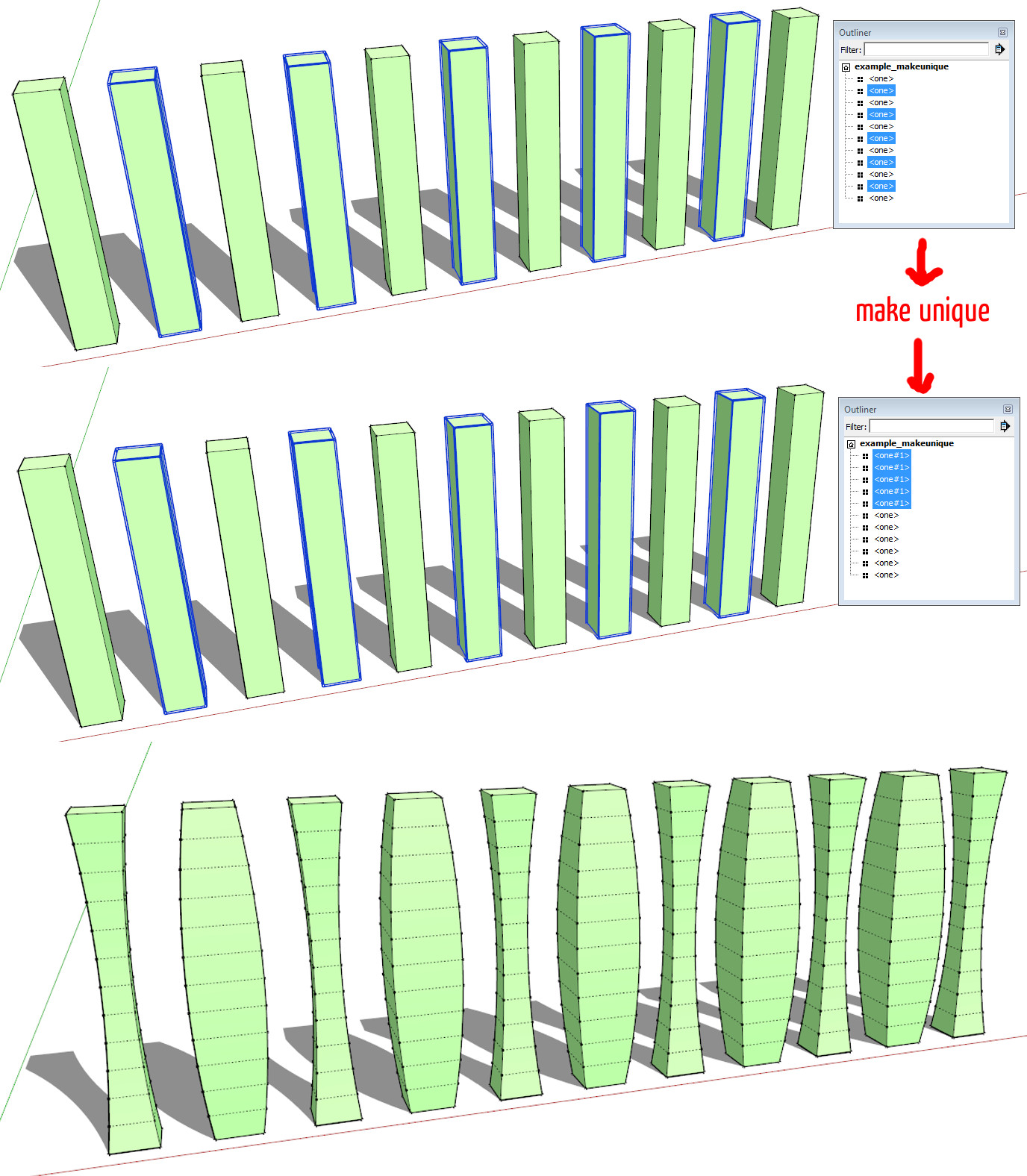

          example_makeunique.jpg

          my SketchUp gallery

          1 條回覆 最後回覆 回覆 引用 0
          • pilouP 離線
            pilou
            最後由 編輯

            Very practical! ☀

            Frenchy Pilou
            Is beautiful that please without concept!
            My Little site :)

            1 條回覆 最後回覆 回覆 引用 0
            • J 離線
              jpalm32
              最後由 編輯

              Now you tell me.
              This could saved me a hour at least.
              Here is a problem. I have 40 lights all the same but separate groups (Not component).
              Anyway to turn them all into one component instance.

              1 條回覆 最後回覆 回覆 引用 0
              • jiminy-billy-bobJ 離線
                jiminy-billy-bob
                最後由 編輯

                @jpalm32 said:

                Now you tell me.
                This could saved me a hour at least.
                Here is a problem. I have 40 lights all the same but separate groups (Not component).
                Anyway to turn them all into one component instance.

                If they were not modified after being copied, yes !
                http://sketchucation.com/resources/pluginstore?pln=tt_selection_toys

                25% off Skatter for SketchUcation Premium Members

                1 條回覆 最後回覆 回覆 引用 0
                • cottyC 離線
                  cotty
                  最後由 編輯

                  @jiminy-billy-bob said:

                  If they were not modified after being copied, yes !
                  http://sketchucation.com/resources/pluginstore?pln=tt_selection_toys

                  Yes, here you can find that function in SU...
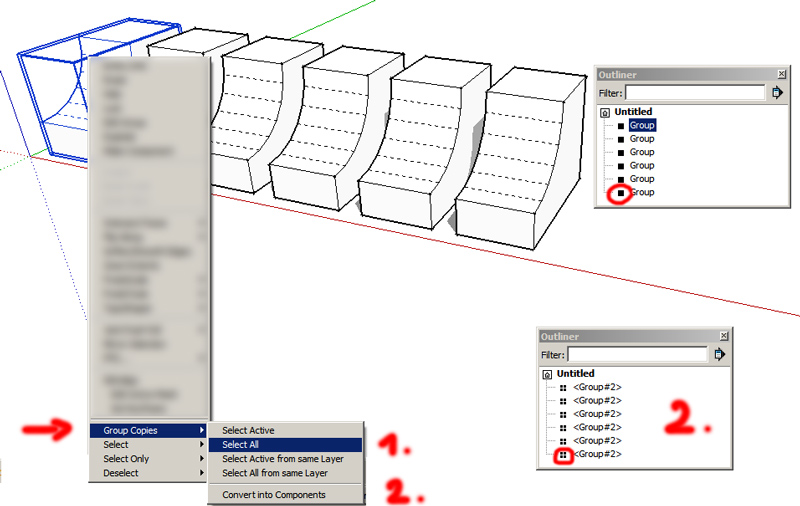

                  convert2comp.jpg

                  my SketchUp gallery

                  1 條回覆 最後回覆 回覆 引用 0
                  • J 離線
                    jpalm32
                    最後由 編輯

                    Thanks, will check it out
                    Cotty, that makes a component out of the whole group.
                    I want them all to be a instance of one component.

                    1 條回覆 最後回覆 回覆 引用 0
                    • BoxB 離線
                      Box
                      最後由 編輯

                      It will take multiple individual groups that are copies and make them instances of one component.

                      So if you have arrayed a group 100 times, it will select all those 100 and make them into 100 instances of one component, which then makes it possible to use the replace selected function of components.

                      1 條回覆 最後回覆 回覆 引用 0
                      • cottyC 離線
                        cotty
                        最後由 編輯

                        A little one...
                        If a circle or an arc is divided by lines, it is possible to change the segments within the entity info window for all parts separately...
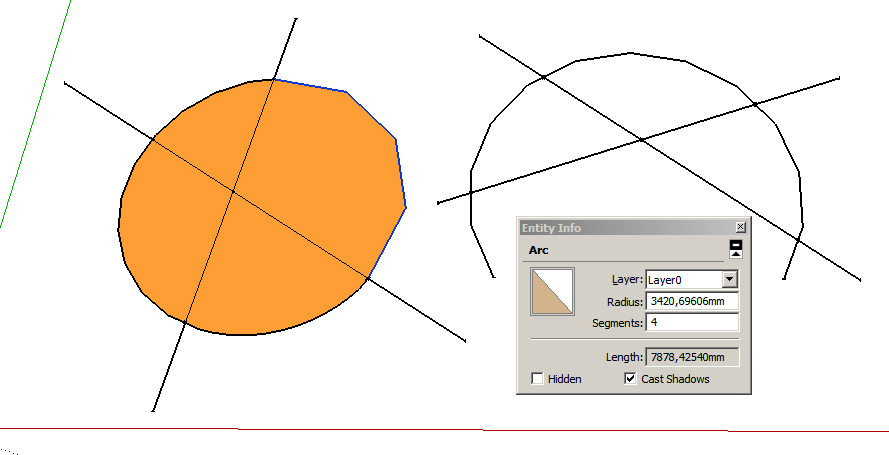

                        segments.jpg

                        my SketchUp gallery

                        1 條回覆 最後回覆 回覆 引用 0
                        • Rich O BrienR 離線
                          Rich O Brien Moderator
                          最後由 編輯

                          Ouch. Face Palm here too!

                          Download the free D'oh Book for SketchUp 📖

                          1 條回覆 最後回覆 回覆 引用 0
                          • plot-parisP 離線
                            plot-paris
                            最後由 編輯

                            @cotty said:

                            If you select several instances of the same component and use "make unique", these instances become all instances of the new component.

                            I just discovered this and headed over here to post it 😄
                            After years and years of SketchUp use! 👊

                            1 條回覆 最後回覆 回覆 引用 0
                            • U 離線
                              unearthed
                              最後由 編輯

                              Doh using selection tools

                              I often need to select faces inside of some line, usually a very complex line (the built area of a terrain, a river plain in a valley etc.). So I was just running thru the process to make a post to this group...

                              Make surface, make lines soft, smooth and turn off then group [I hadn't done this bit before]
                              Drape boundary on surface.
                              Enter group, click on inner area and presto it's selected:
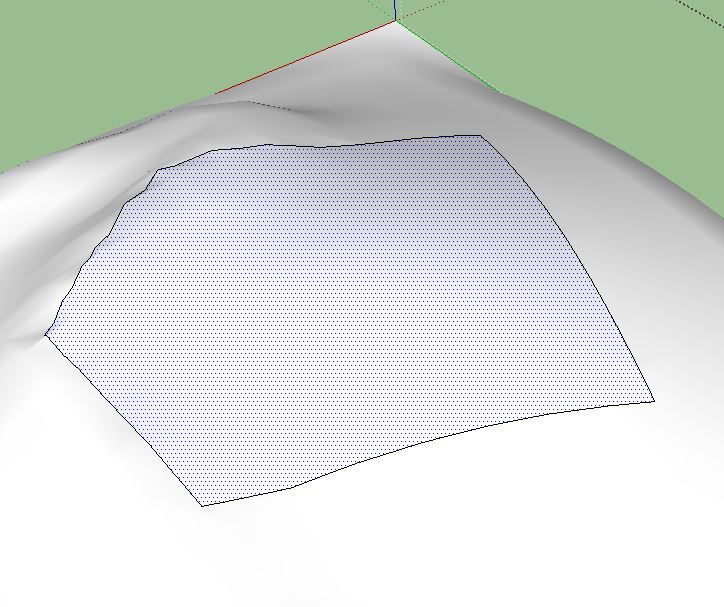
                              SelectFacesInsideLine_works with edges off anyway_just click surface inside line.JPG

                              I went round and round in a lot of circles to get that!

                              Growplan - People ∩ Plants ∩ Place

                              windows 7 64b, 4GB RAM, SU 8.0.16846
                              Gimp, QGIS, Vectorworks 12, Bricscad 11

                              1 條回覆 最後回覆 回覆 引用 0
                              • A 離線
                                Aarhus8000
                                最後由 編輯

                                Just realized yesterday that you can push faces you can't see. I've always used 'Hide Rest of Model' a lot when pushing faces to be able to see the actual face I ment to push or used normal 'Hide' on all surrounding entities to get to the one I actually wanted to modify/push. Turns out the Push tool can "see through" blocking geometry which makes the entire workflow so much quicker. Nice one!

                                • Kristian
                                1 條回覆 最後回覆 回覆 引用 0
                                • cottyC 離線
                                  cotty
                                  最後由 編輯

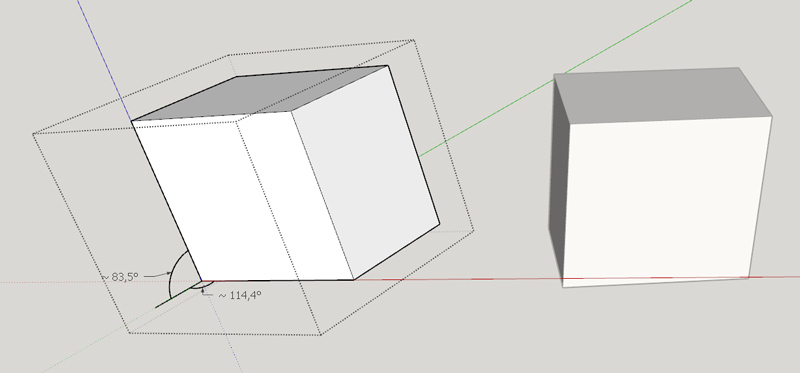
                                  I didn't know that you can get non-perpendicular axes 😲


                                  perpen.jpg

                                  my SketchUp gallery

                                  1 條回覆 最後回覆 回覆 引用 0
                                  • fredo6F 離線
                                    fredo6
                                    最後由 編輯

                                    @cotty said:

                                    I didn't know that you can get non-perpendicular axes 😲

                                    Easy way to get it is to apply FredoScale::PlanarShearto a component.

                                    Shear transformation is conform actually, but the inconvenience is that it deforms the axes. Issues can happen in some scripts because Vector transformation is not natural when axes are not orthogonal.

                                    Fredo

                                    1 條回覆 最後回覆 回覆 引用 0
                                    • R 離線
                                      rv1974
                                      最後由 編輯

                                      If you export a lot of pictures out of skp get the 'Smustard Scene Exporter'- it will save years of sitting in front of monitor.

                                      1 條回覆 最後回覆 回覆 引用 0
                                      • R 離線
                                        rv1974
                                        最後由 編輯

                                        you can easily reassign keyboard keys (on Windows level) with:
                                        http://sharpkeys.codeplex.com/.

                                        1 條回覆 最後回覆 回覆 引用 0
                                        • falkF 離線
                                          falk
                                          最後由 編輯

                                          @pmiller said:

                                          Probably the best SU duh!:

                                          301 Moved Permanently

                                          favicon

                                          (www.sketchucation.com)

                                          (Link to the "Homer" button, which plays the "d'oh!" sound and does an undo. Sadly, it's no longer there. I don't suppose anybody kept a copy?)

                                          1 條回覆 最後回覆 回覆 引用 0
                                          • falkF 離線
                                            falk
                                            最後由 編輯

                                            My biggest D'oh! was learning to write plugins. I had no idea it would be that easy; why didn't I do it years ago?


                                            1 條回覆 最後回覆 回覆 引用 0
                                            • 1
                                            • 2
                                            • 3
                                            • 4
                                            • 5
                                            • 6
                                            • 7
                                            • 34
                                            • 35
                                            • 5 / 35
                                            • 第一個貼文
                                              最後的貼文
                                            Buy SketchPlus
                                            Buy SUbD
                                            Buy WrapR
                                            Buy eBook
                                            Buy Modelur
                                            Buy Vertex Tools
                                            Buy SketchCuisine
                                            Buy FormFonts

                                            Advertisement