sketchucation logo sketchucation
    • Login
    Oops, your profile's looking a bit empty! To help us tailor your experience, please fill in key details like your SketchUp version, skill level, operating system, and more. Update and save your info on your profile page today!
    Mac User? | Join the Rayscaper Beta for Mac Learn More

    The "Duh!" thread (aka the Doh! thread)

    Scheduled Pinned Locked Moved SketchUp Discussions
    sketchup
    696 Posts 135 Posters 622.4k Views 135 Watching
    Loading More Posts
    • Oldest to Newest
    • Newest to Oldest
    • Most Votes
    Reply
    • Reply as topic
    Log in to reply
    This topic has been deleted. Only users with topic management privileges can see it.
    • Wo3DanW
      Wo3Dan
      last edited by

      @unknownuser said:

      .....The first one created on the screen don't want glue! ๐Ÿ˜ฎ
      (and I don't know why โ“ โ“ โ“

      But it does glue to, when created on a face!!!

      (If just on its own at time of creation, then the first one doesn't glue to. For there is nothing for it to glue to. Like copies of unglued instances, they don't glue to any face either.)

      1 Reply Last reply
      Reply Quote 0
      • pilouP
        pilou
        last edited by

        Yes instance are gluing
        but create a component on a face is some annoying ๐Ÿ˜‰
        Component will have not face (background)! ๐Ÿ˜ฎ

        Frenchy Pilou
        Is beautiful that please without concept!
        My Little site :)

        1 Reply Last reply
        Reply Quote 0
        • TIGT
          TIG Moderator
          last edited by

          It glues to a face IF it's on a face when it's created.
          If it's made NOT on a face it's just the same as placing a cutting-component in empty space and then you wouldn't expect that to cut a face when you moved it onto it.
          A cutting-component sets its 'face' to what it's placed onto - if that's 'nil' then it's 'nil' !!!

          TIG

          1 Reply Last reply
          Reply Quote 0
          • plot-parisP
            plot-paris
            last edited by

            a fairly new one:
            before thomthom's Solid Inspector came along, I never knew, whether an object was solid or not.

            I just discovered, that in the Entity Info window SketchUp puts a "solid" in front of the group's name to indicate, when an object is indeed solid... thats cool, isn't it?

            1 Reply Last reply
            Reply Quote 0
            • jeff hammondJ
              jeff hammond
              last edited by

              @plot-paris said:

              a fairly new one:

              fairly new indeed
              this wasn't possible prior to SU8..

              dotdotdot

              1 Reply Last reply
              Reply Quote 0
              • pilouP
                pilou
                last edited by

                About the perpendicular tool of Chris Fullmer (thx Jeff) โ˜€

                Ahhhhhhhh! Never thought (or remembered)to click on the segment ๐Ÿ˜ฎ ๐Ÿ‘

                That was not explicit due this alert message! ๐Ÿ’š

                http://forums.sketchucation.com/download/file.php?id=55372

                Frenchy Pilou
                Is beautiful that please without concept!
                My Little site :)

                1 Reply Last reply
                Reply Quote 0
                • brookefoxB
                  brookefox
                  last edited by

                  Label endpoints; by default you will be given the coordinates of same.

                  ~ Brooke

                  1 Reply Last reply
                  Reply Quote 0
                  • TK0001T
                    TK0001
                    last edited by

                    The day I discovered SHIFT + pressing the scroll wheel = pan was a good day.

                    1 Reply Last reply
                    Reply Quote 0
                    • D
                      d12dozr
                      last edited by

                      It might be a better day when you discover LMB + scroll wheel = Pan as well ๐Ÿ˜‰

                      3D Printing with SketchUp Book
                      http://goo.gl/f7ooYh

                      1 Reply Last reply
                      Reply Quote 0
                      • TK0001T
                        TK0001
                        last edited by

                        @d12dozr said:

                        It might be a better day when you discover LMB + scroll wheel = Pan as well ๐Ÿ˜‰

                        I just tried it. Didn't work.

                        ETA: Whoops, yes it does.

                        This is the greatest day of my life.

                        1 Reply Last reply
                        Reply Quote 0
                        • DavidBoulderD
                          DavidBoulder
                          last edited by

                          Just stumbled across this. Take a 10' cube, use the scale tool to vertically stretch the cube, and just type a distance. This become the new height for your selected object. You don't need to give it a positive or negative number to say home much smaller or bigger you want it. Just type the size you want it to be. If it happens to be smaller than the existing size, then it will get smaller. This seems more useful on a single axis stretch, but it also works when scaling x,y & z at the same time.

                          Don't know how many times I had to divide 10'6 3/4" by 9'3" to figure out the proper scale for something. Actually a long time ago I realized I can snap the stretch to a guide or other geometry so I typically drew a dummy line to snap to, but now I don't even need to do that.

                          (update), so I guess it was right there in the online help, but I haven't read that in 5 years
                          http://sketchup.google.com/support/bin/answer.py?hl=en&answer=94906

                          Other nice tidbits. you can type a negative distance to mirror the object, and if you do a non,uniform 2d or 3d scale, you can type multiple distances, to for example make whatever shape you have drawn, fit in a 20',30',50' bounding box.

                          --

                          David Goldwasser
                          OpenStudio Developer
                          National Renewable Energy Laboratory

                          1 Reply Last reply
                          Reply Quote 0
                          • pilouP
                            pilou
                            last edited by

                            @ DavidB
                            that works also for Move and Rotate ๐Ÿ˜‰

                            Frenchy Pilou
                            Is beautiful that please without concept!
                            My Little site :)

                            1 Reply Last reply
                            Reply Quote 0
                            • S
                              SketchUpNoobie
                              last edited by

                              I used to think you had to click and drag whenever you push/pull, move, rectangle, circle, etc. I just found out a couple of months ago that you could just click, get it where you want it, and click again to finish. I was like, "Oh." ๐Ÿ˜ณ

                              --

                              SketchUpNoobie: the complete noob in all things SketchUp.

                              1 Reply Last reply
                              Reply Quote 0
                              • thomthomT
                                thomthom
                                last edited by

                                @unknownuser said:

                                I used to think you had to click and drag whenever you push/pull, move, rectangle, circle, etc. I just found out a couple of months ago that you could just click, get it where you want it, and click again to finish. I was like, "Oh." ๐Ÿ˜ณ

                                And double-clicking will repeat last operation.

                                Thomas Thomassen โ€” SketchUp Monkey & Coding addict
                                List of my plugins and link to the CookieWare fund

                                1 Reply Last reply
                                Reply Quote 0
                                • S
                                  SketchUpNoobie
                                  last edited by

                                  I know that. ๐Ÿ˜‰ Dunno' when I figured it out though. Probably while watching a tutorial or something. That's why I like watching tutorials even if they are on things I already know.

                                  --

                                  SketchUpNoobie: the complete noob in all things SketchUp.

                                  1 Reply Last reply
                                  Reply Quote 0
                                  • R
                                    Roger
                                    last edited by

                                    It seems that my Duh! moment was taking this long to find this discussion. I have always felt I was the lone idiot, but now I feel much better and much more informed.

                                    Thanks DUHsters.

                                    http://www.azcreative.com

                                    1 Reply Last reply
                                    Reply Quote 0
                                    • Chris FullmerC
                                      Chris Fullmer
                                      last edited by

                                      That is the point of the thread - we all feel like the lone idiot...until you post your stupidity publicly and find that many many other people had done, or are doing, the exact same thing. It's very cathartic ๐Ÿ˜„

                                      Lately you've been tan, suspicious for the winter.
                                      All my Plugins I've written

                                      1 Reply Last reply
                                      Reply Quote 0
                                      • david_hD
                                        david_h
                                        last edited by

                                        Idiots are never alone.

                                        They travel in herds. . . .most frequently seen on the great American Freeway system.

                                        If I make it look easy...It is probably easy

                                        1 Reply Last reply
                                        Reply Quote 0
                                        • TIGT
                                          TIG Moderator
                                          last edited by

                                          You should suffer fools gladly... one day you will be one of them!

                                          I once invented my great new tool for the context-menu that would select all faces with the same material as the one highlighted... then RickW pointed out that it is already a standard built-in tool under Select... ๐Ÿ˜ณ

                                          TIG

                                          1 Reply Last reply
                                          Reply Quote 0
                                          • pilouP
                                            pilou
                                            last edited by

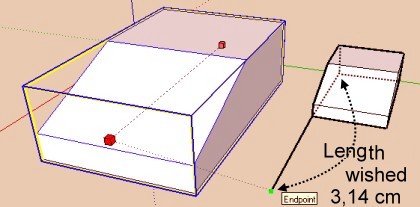
                                            Mine of the day ๐Ÿ’š (thx Regis)
                                            I have found that was a good idea ๐Ÿ’ญ
                                            Draw first the line then use
                                            echelle1.jpg
                                            but... ๐Ÿ’š
                                            you can also with only just enter in the VCB
                                            (whatever unities in activity)
                                            3.14cm
                                            31.4mm
                                            0.0314m
                                            ... (i am not very familiar with inch ๐Ÿ’š
                                            ๐Ÿ˜’

                                            Frenchy Pilou
                                            Is beautiful that please without concept!
                                            My Little site :)

                                            1 Reply Last reply
                                            Reply Quote 0

                                            Hello! It looks like you're interested in this conversation, but you don't have an account yet.

                                            Getting fed up of having to scroll through the same posts each visit? When you register for an account, you'll always come back to exactly where you were before, and choose to be notified of new replies (either via email, or push notification). You'll also be able to save bookmarks and upvote posts to show your appreciation to other community members.

                                            With your input, this post could be even better ๐Ÿ’—

                                            Register Login
                                            • 1
                                            • 2
                                            • 17
                                            • 18
                                            • 19
                                            • 20
                                            • 21
                                            • 34
                                            • 35
                                            • 19 / 35
                                            • First post
                                              Last post
                                            Buy SketchPlus
                                            Buy SUbD
                                            Buy WrapR
                                            Buy eBook
                                            Buy Modelur
                                            Buy Vertex Tools
                                            Buy SketchCuisine
                                            Buy FormFonts

                                            Advertisement