sketchucation logo sketchucation
    • 登入
    Oops, your profile's looking a bit empty! To help us tailor your experience, please fill in key details like your SketchUp version, skill level, operating system, and more. Update and save your info on your profile page today!
    🔌 Smart Spline | Fluid way to handle splines for furniture design and complex structures. Download

    The "Duh!" thread (aka the Doh! thread)

    已排程 已置頂 已鎖定 已移動 SketchUp Discussions
    sketchup
    696 貼文 135 Posters 316.5k 瀏覽 135 Watching
    正在載入更多貼文
    • 從舊到新
    • 從新到舊
    • 最多點贊
    回覆
    • 在新貼文中回覆
    登入後回覆
    此主題已被刪除。只有擁有主題管理權限的使用者可以查看。
    • D 離線
      danbig
      最後由 編輯

      @unknownuser said:

      Left is Hidden, right is softened...

      Other than appearance, is there a difference in how the two behave?

      (I'm slow to Doh! on this one 😕)

      1 條回覆 最後回覆 回覆 引用 0
      • Rich O BrienR 線上
        Rich O Brien Moderator
        最後由 編輯

        In this example the cylinder with the HIDDEN lines, it's faces are still individually manipulated. Where as SOFTENED results one continuous face. SU playing games with the mind
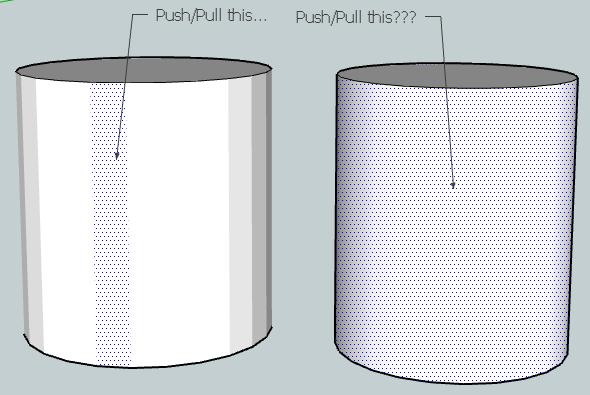
        Difference FaceOff.jpg

        To create the cylinder without softened edges, just draw a circle, then right click it and Explode Curve followed by . Now you can hide edges and see for yourself!

        Download the free D'oh Book for SketchUp 📖

        1 條回覆 最後回覆 回覆 引用 0
        • D 離線
          danbig
          最後由 編輯

          Hmm. Strange. I'm able to create hidden and soft lines (I use hidden lines regularly).

          But if I create two cylinders, just as you have, the hidden line version behaves exactly the same as the soft lines version (sketchup displays the sides as one big face, unless I display "hidden lines" then I can select each face individually).

          Also, my hidden line cylinder looks identical to the soft line cylinder.

          Can anyone comment on the intent behind creating these two different line styles? What is the "suggested" or intended use for each?

          1 條回覆 最後回覆 回覆 引用 0
          • Rich O BrienR 線上
            Rich O Brien Moderator
            最後由 編輯

            Hi DanBIG,

            Draw two circles and the right click as mentioned above to 'Explode Curve'
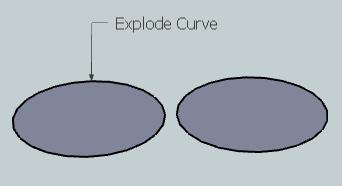
            Explode Curve.jpg

            Now both circles, because we have returned the circle to individual segments, instead of one polyline, SU creates a cylinder with individual faces...
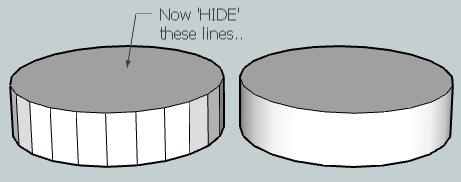
            Hide Lines.jpg

            Hiding these faces do not merge the faces into one another again, it just hides the Edges(Vertices). Thus still enabling you to manipulate each face...
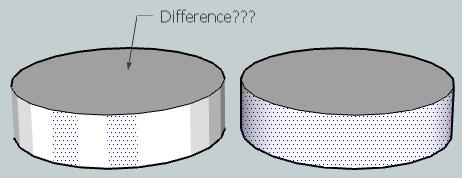
            Difference.jpg

            @unknownuser said:

            What is the "suggested" or intended use for each?

            SU, when it creates CURVES(POLYLINES), allows you to simulate smoothness. As SU natively uses only straight lines to create any curve, having the ability to simulate smoothness/roundness is necessary. When you select View>Hidden Geometry you are effectively asking SU to show both HIDDEN and SOFTENED lines.

            To answer your question, which looks nicer?

            Download the free D'oh Book for SketchUp 📖

            1 條回覆 最後回覆 回覆 引用 0
            • mitcorbM 離線
              mitcorb
              最後由 編輯

              following up
              doesn't it also affect how textures or materials are applied?

              I take the slow, deliberate approach in my aimless wandering.

              1 條回覆 最後回覆 回覆 引用 0
              • GaieusG 離線
                Gaieus
                最後由 編輯

                Regarding textures; it does not really control how they are applied but how you can apply them. I.e. you cannot manipulate texture mapping (positioning, projection etc) on curved surfaces only on singular face(t)s. In order to access these on curved surfaces and be able to do anything, you need to show hidden geometry first.

                Gai...

                1 條回覆 最後回覆 回覆 引用 0
                • GaieusG 離線
                  Gaieus
                  最後由 編輯

                  I have never noticed this...
                  😲
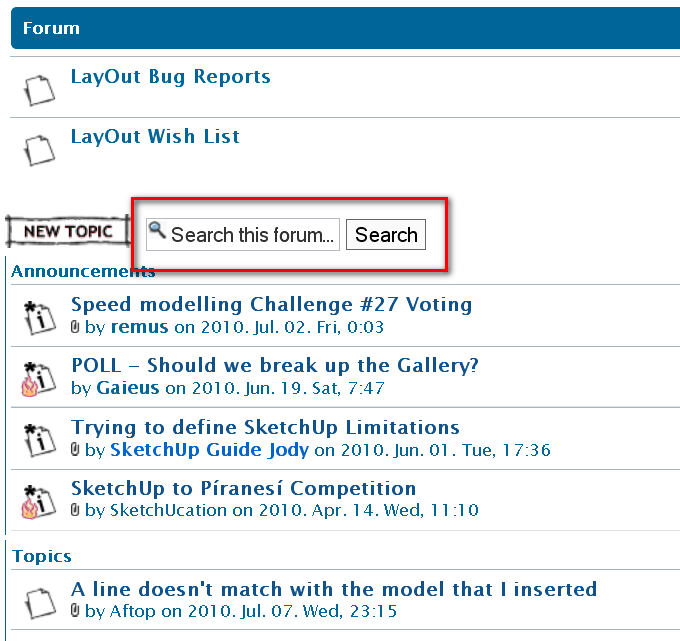
                  And we have a "search this topic" box as well!
                  😮
                  And I am an admin here for about three years now?
                  😒 😳 😕


                  SearchThisForum.png

                  Gai...

                  1 條回覆 最後回覆 回覆 引用 0
                  • mitcorbM 離線
                    mitcorb
                    最後由 編輯

                    @Gaieus:
                    No one is immune. 😉
                    I will probably be next.

                    I take the slow, deliberate approach in my aimless wandering.

                    1 條回覆 最後回覆 回覆 引用 0
                    • thomthomT 離線
                      thomthom
                      最後由 編輯

                      😆

                      Thomas Thomassen — SketchUp Monkey & Coding addict
                      List of my plugins and link to the CookieWare fund

                      1 條回覆 最後回覆 回覆 引用 0
                      • pilouP 離線
                        pilou
                        最後由 編輯

                        Administrator is at first level
                        Moderators second level
                        Surfers users are in the hold 😄
                        Mine Doh of the day 😒
                        One research realised then the second one ... 😳


                        doh.jpg

                        Frenchy Pilou
                        Is beautiful that please without concept!
                        My Little site :)

                        1 條回覆 最後回覆 回覆 引用 0
                        • genma saotomeG 離線
                          genma saotome
                          最後由 編輯

                          @danbig said:

                          @xrok1 said:

                          i think the biggest duh moment of all that everbody (hopfully) goes through is realizing that it matters which way the faces are oriented.

                          90% of the 3dwarehouse posters still havn't had that duh moment. 😆

                          ...ok, I'd better ask, because my mind is blank after reading this.

                          What do you mean, "it matters which way the faces are oriented"?

                          This is either something I know, in different terms, or something I don't know at all.

                          If you export SU models to other software that undestands cad models the "light colored" face is regarded as the surface normal -- an odd phase in itself -- but what that means is that face will change it's appearance per the intensity of the light plus angle of the surface normal relative to the light source whereas the reverse face -- the "dark one" -- does nothing. IOW, any kind of add'l rendering depends upon setting face orientation correctly.

                          1 條回覆 最後回覆 回覆 引用 0
                          • A 離線
                            arklandesign
                            最後由 編輯

                            I hardly ever mess with the axes settings, but have finally had a need to start using this and often found I would inadvertently set the blue axes downwards rather than up.

                            Was watching a tutorial this morning, and found that if one triple clicks (after setting the red axis) it is automatically done correctly for you..... It was a Duhh !!! moment for me.

                            1 條回覆 最後回覆 回覆 引用 0
                            • thomthomT 離線
                              thomthom
                              最後由 編輯

                              When you use the Rectangle tool and make the first click on an edge that is connected to a face, the rectangle tool will align to the edge. 😲 😮 😳

                              Thomas Thomassen — SketchUp Monkey & Coding addict
                              List of my plugins and link to the CookieWare fund

                              1 條回覆 最後回覆 回覆 引用 0
                              • pilouP 離線
                                pilou
                                最後由 編輯

                                When you have a very long list of Plugins under Menu Plugins 😒
                                Just press a letter on the keyboard and you can see every plugs begining by this letter 😮 😲 😳 💚
                                Damned how many time I have losted with this 😳
                                Of course you must know the name of the plugin that you want use 💚

                                @Thomthom
                                @unknownuser said:

                                the rectangle tool will align to the edge

                                Yes but...Inference don't works or maybe you have a trick? 😄
                                Of course I can move the segment atfer drawn the rectangle
                                (maybe the best) but with only the rectangle tool? 😄
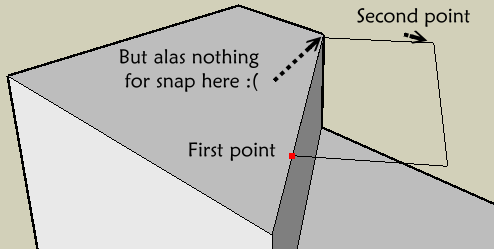
                                alas.png

                                Frenchy Pilou
                                Is beautiful that please without concept!
                                My Little site :)

                                1 條回覆 最後回覆 回覆 引用 0
                                • P 離線
                                  penumbradesign
                                  最後由 編輯

                                  my duh! moment, toggling control while erasing to hide edges rather than erasing them!

                                  1 條回覆 最後回覆 回覆 引用 0
                                  • TIGT 離線
                                    TIG Moderator
                                    最後由 編輯

                                    @penumbradesign said:

                                    my duh! moment, toggling control while erasing to hide edges rather than erasing them!

                                    Eraser+Ctrl 'softens' edges.
                                    Eraser+Shift 'hides' edges.
                                    Eraser+Ctrl+Shift unsoftens edges.
                                    To 'unhide' edges you have to use Entity Info or right-click context-menu 'unhide'... 🤓

                                    TIG

                                    1 條回覆 最後回覆 回覆 引用 0
                                    • ToboboT 離線
                                      Tobobo
                                      最後由 編輯

                                      Eraser+Ctrl+Shift also unhides edges (I think)

                                      Toby

                                      Philippians 4:13

                                      I can do everything through him who gives me strength.

                                      1 條回覆 最後回覆 回覆 引用 0
                                      • thomthomT 離線
                                        thomthom
                                        最後由 編輯

                                        @tobobo said:

                                        Eraser+Ctrl+Shift also unhides edges (I think)

                                        It un-smooths - but doesn't unhide.

                                        Thomas Thomassen — SketchUp Monkey & Coding addict
                                        List of my plugins and link to the CookieWare fund

                                        1 條回覆 最後回覆 回覆 引用 0
                                        • pilouP 離線
                                          pilou
                                          最後由 編輯

                                          Mine of the day 😄
                                          When you create a component with glue property you must reload it from the menu Component 😮

                                          The first one created on the screen don't want glue! 😮
                                          (and I don't know why ❓ ❓ ❓

                                          Frenchy Pilou
                                          Is beautiful that please without concept!
                                          My Little site :)

                                          1 條回覆 最後回覆 回覆 引用 0
                                          • Wo3DanW 離線
                                            Wo3Dan
                                            最後由 編輯

                                            @unknownuser said:

                                            .....The first one created on the screen don't want glue! 😮
                                            (and I don't know why ❓ ❓ ❓

                                            But it does glue to, when created on a face!!!

                                            (If just on its own at time of creation, then the first one doesn't glue to. For there is nothing for it to glue to. Like copies of unglued instances, they don't glue to any face either.)


                                            1 條回覆 最後回覆 回覆 引用 0
                                            • 1
                                            • 2
                                            • 3
                                            • 4
                                            • 5
                                            • 34
                                            • 35
                                            • 3 / 35
                                            • 第一個貼文
                                              最後的貼文
                                            Buy SketchPlus
                                            Buy SUbD
                                            Buy WrapR
                                            Buy eBook
                                            Buy Modelur
                                            Buy Vertex Tools
                                            Buy SketchCuisine
                                            Buy FormFonts

                                            Advertisement