sketchucation logo sketchucation
    • 登入
    Oops, your profile's looking a bit empty! To help us tailor your experience, please fill in key details like your SketchUp version, skill level, operating system, and more. Update and save your info on your profile page today!
    🔌 Smart Spline | Fluid way to handle splines for furniture design and complex structures. Download

    [Plugin] FollowMe and keep (v0.04 update 20090210)

    已排程 已置頂 已鎖定 已移動 Plugins
    223 貼文 79 Posters 186.3k 瀏覽 79 Watching
    正在載入更多貼文
    • 從舊到新
    • 從新到舊
    • 最多點贊
    回覆
    • 在新貼文中回覆
    登入後回覆
    此主題已被刪除。只有擁有主題管理權限的使用者可以查看。
    • T 離線
      Tim Danaher
      最後由 編輯

      @tim danaher said:

      @unknownuser said:

      i really don't know what's going on there Tim and i don't have FAK.rb installed anymore but i tried it with the 1001bit extrude and it worked out..
      that said, we're talking a $30 tool set vs. a free plugin so...

      [attachment=0:3ewotani]<!-- ia0 -->TD_baluster.skp<!-- ia0 -->[/attachment:3ewotani]

      Thanks, Jeff -- Nice result... will have to pony up the dosh, then... 😮

      Hah! No I won't... the developers have made it free for academic use, and since I teach SU at a design school...

      Cheers,

      Tim

      http://vizarch.blogspot.com

      1 條回覆 最後回覆 回覆 引用 0
      • pilouP 離線
        pilou
        最後由 編輯

        @unknownuser said:

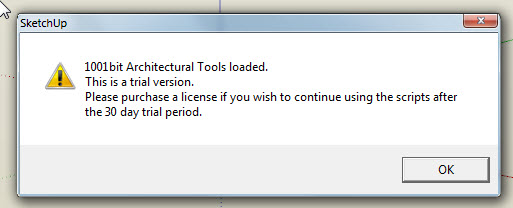
        a $30 tool

        It's free if you use it for personnal use 😎
        You will have just a starting message 😉

        Frenchy Pilou
        Is beautiful that please without concept!
        My Little site :)

        1 條回覆 最後回覆 回覆 引用 0
        • X 離線
          xrok1
          最後由 編輯

          ??
          it says 30 day trial period on mine?

          Capture1.JPG

          “There are three classes of people: those who see. Those who see when they are shown. Those who do not see.”

          http://www.Twilightrender.com try it!

          1 條回覆 最後回覆 回覆 引用 0
          • R 離線
            rainfrog
            最後由 編輯

            Jeff, thanks for alerting me to the continued discussion here, regarding the problem I had a few months back! And also for demonstrating the different results between the original follow me and the 1001bit tool. It is nice to see that there is indeed a plugin out there that performs the exact function I was looking for. Very helpful! 👍

            1 條回覆 最後回覆 回覆 引用 0
            • B 離線
              BERNS
              最後由 編輯

              THIS IS AN EXCELENT PLUGIN FOR TOPOGRAPHY AND MANY OTHER THEMES! I SAVED UP ALMOST 95% OF TIME AND WORK.

              1 條回覆 最後回覆 回覆 引用 0
              • L 離線
                lightburn
                最後由 編輯

                thanks for this wonderful plugin. this just saved me a hell lot of headaches.

                1 條回覆 最後回覆 回覆 引用 0
                • B 離線
                  Blomman
                  最後由 編輯

                  A really useful plugin. It helped me with creating a highway interchange.

                  But what if I want to paint the created shape in more than just one color? Since I'm using this plugin to create a road ramp I really want to be able to paint the sides in different colors and textures. As it is now I can't since all the sides of the thing are treated as one. If I click on the left side for example, the right, top and bottom also gets highlighted. Is there anyway to solve this?

                  By the way, I'm using this plugin together with the bezier curves plugin by Fredo 6 if that matters.

                  1 條回覆 最後回覆 回覆 引用 0
                  • mitcorbM 離線
                    mitcorb
                    最後由 編輯

                    @Blomman:
                    I am not sure if this is valid, but is the resulting model a group or component? If so, could you right click on this, Edit Group, or Edit Component, and then apply colors, materials, textures to the various faces?
                    Save first, then try the above. Undo(Control Z)if this does not get the desired results.

                    Keep watching this thread for other replies.

                    I take the slow, deliberate approach in my aimless wandering.

                    1 條回覆 最後回覆 回覆 引用 0
                    • B 離線
                      Blomman
                      最後由 編輯

                      Yes, the model is automatically turned into a group which, as far as I know, can not have multiple textures or colors applied to. I forgot to mention that I've already done what you suggested (edit group) which is were I noticed the problem I described in my previous post. I've also tried "explode" but with the same result. 😐

                      1 條回覆 最後回覆 回覆 引用 0
                      • Rich O BrienR 離線
                        Rich O Brien Moderator
                        最後由 編輯

                        Has the model, during the FMAK process, had it's edges smoothened?

                        Have you hidden geometry on or off?

                        If it's off, just turn it on and paint the faces. Or right click the entity and choose soften/smooth and lower the slider bar until the lines appear. You can use Ctrl+E to soften any lines that you don't want to see.

                        I could be way off the mark 😕

                        Download the free D'oh Book for SketchUp 📖

                        1 條回覆 最後回覆 回覆 引用 0
                        • B 離線
                          Blomman
                          最後由 編輯

                          The hidden geometry was indeed off, now it works perfectly. Thanks! 😄

                          1 條回覆 最後回覆 回覆 引用 0
                          • S 離線
                            Sir
                            最後由 編輯

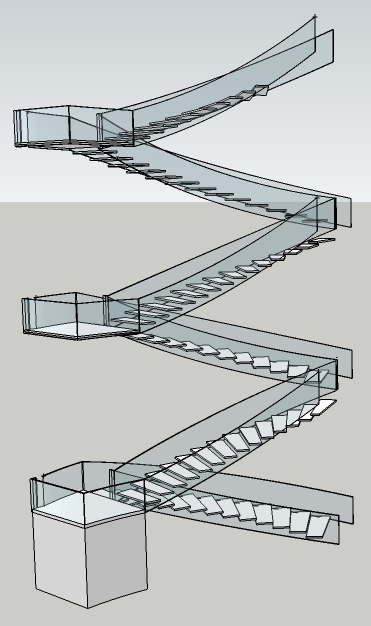
                            this plugin has just saved me hours. i love you.

                            image attached. each side of the stairs is a different curve... pain in the ass.Spatial.jpg

                            1 條回覆 最後回覆 回覆 引用 0
                            • marvins_dadM 離線
                              marvins_dad
                              最後由 編輯

                              Just wanted to say Thanks again!
                              I had lost the ruby and someone helped me find this one again...it is amazing for stairs! 👍

                              My Gallery

                              1 條回覆 最後回覆 回覆 引用 0
                              • D 離線
                                dmonahan96
                                最後由 編輯

                                So I installed the followme and keep plugin and it worked great on the first railing that I used it for but now it keeps crashing my SU every time i try it with this other section. Any suggestions?

                                1 條回覆 最後回覆 回覆 引用 0
                                • S 離線
                                  shoeb_cars
                                  最後由 編輯

                                  google should really learn some good stuff like this...thanks man 👍

                                  1 條回覆 最後回覆 回覆 引用 0
                                  • Dave RD 離線
                                    Dave R
                                    最後由 編輯

                                    So what am I missing? I've read through as much of this thread as I could. I can get FAK to work on simple arcs but not on this longer path. Even though it's not supposed to require it, I added a C-point to the start end of the path. Surely I've done something that isn't right. Can anyone tell me what it is?


                                    FAK Problem.skp

                                    Etaoin Shrdlu

                                    %

                                    (THERE'S NO PLACE LIKE)

                                    G28 X0.0 Y0.0 Z0.0

                                    M30

                                    %

                                    1 條回覆 最後回覆 回覆 引用 0
                                    • mitcorbM 離線
                                      mitcorb
                                      最後由 編輯

                                      Weld- Don't Weld? Group- Don't Group? This is a test, right?
                                      Plugin "deprecation" due to Sketchup version?

                                      I mean, when you're stumped, we're in hell.

                                      I take the slow, deliberate approach in my aimless wandering.

                                      1 條回覆 最後回覆 回覆 引用 0
                                      • Dave RD 離線
                                        Dave R
                                        最後由 編輯

                                        Tim,

                                        I'm flattered by your comments. It wasn't a test. Well, it was a test for me.

                                        I finally figured it out. The path needs to be basically horizontal. I didn't see anything in the thread that indicates this, though every example I saw was thus. Even so, it doesn't really do what I need anyway so I'm off on the hunt for another approach.

                                        Etaoin Shrdlu

                                        %

                                        (THERE'S NO PLACE LIKE)

                                        G28 X0.0 Y0.0 Z0.0

                                        M30

                                        %

                                        1 條回覆 最後回覆 回覆 引用 0
                                        • mitcorbM 離線
                                          mitcorb
                                          最後由 編輯

                                          Well, Dave:
                                          When you say basically horizontal do you mean mostly horizontal or dead flat path, or profile horizontal? I vaguely remember the demos and I may be getting it confused with Chris Fullmer's perpendicular faces tool.

                                          I take the slow, deliberate approach in my aimless wandering.

                                          1 條回覆 最後回覆 回覆 引用 0
                                          • Dave RD 離線
                                            Dave R
                                            最後由 編輯

                                            Sorry for being vague. I turned the helix on its side so its axis was along the green axis. This turned the square profile up on edge as well. I initially use Chris Fullmer's Perpendicular Face Tools to put the square on the end of the helix while the helix was standing up. that worked just fine.


                                            Etaoin Shrdlu

                                            %

                                            (THERE'S NO PLACE LIKE)

                                            G28 X0.0 Y0.0 Z0.0

                                            M30

                                            %

                                            1 條回覆 最後回覆 回覆 引用 0
                                            • 1
                                            • 2
                                            • 5
                                            • 6
                                            • 7
                                            • 8
                                            • 9
                                            • 10
                                            • 11
                                            • 12
                                            • 7 / 12
                                            • 第一個貼文
                                              最後的貼文
                                            Buy SketchPlus
                                            Buy SUbD
                                            Buy WrapR
                                            Buy eBook
                                            Buy Modelur
                                            Buy Vertex Tools
                                            Buy SketchCuisine
                                            Buy FormFonts

                                            Advertisement