sketchucation logo sketchucation
    • Login
    Oops, your profile's looking a bit empty! To help us tailor your experience, please fill in key details like your SketchUp version, skill level, operating system, and more. Update and save your info on your profile page today!
    ⚠️ Update | Sketchucation Tools 5.0.8 released with licensing improvements and bugfixes Download

    [Plugin] Front Face - 1.2

    Scheduled Pinned Locked Moved Plugins
    57 Posts 29 Posters 88.4k Views 29 Watching
    Loading More Posts
    • Oldest to Newest
    • Newest to Oldest
    • Most Votes
    Reply
    • Reply as topic
    Log in to reply
    This topic has been deleted. Only users with topic management privileges can see it.
    • FletchF
      Fletch
      last edited by

      TIG, does it also make all groups and components have the default material? (in case one or two got accidentally painted somehow?)

      Fletch
      3D Modeling addict. Former owner/developer of Twilight Render. sleepinggiantvisual.com

      1 Reply Last reply
      Reply Quote 0
      • E
        Ecuadorian
        last edited by

        Fletch, Matthieu Noblet wrote a plugin for that:
        http://forums.sketchucation.com/viewtopic.php?p=102323#p102323

        -Miguel Lescano
        Subscribe to my house plans YouTube channel! (30K+ subs)

        1 Reply Last reply
        Reply Quote 0
        • TIGT
          TIG Moderator
          last edited by

          @fletch said:

          TIG, does it also make all groups and components have the default material? (in case one or two got accidentally painted somehow?)

          No, it fixes back_materials inside them, but not materials applied to them - to do that you need this line...

          Sketchup.active_model.definitions.each{|d|d.instances.each{|i|i.material=nil}}
          

          🤓

          TIG

          1 Reply Last reply
          Reply Quote 0
          • R
            Royvas
            last edited by

            gosh thank you so much for this 😄 works great

            1 Reply Last reply
            Reply Quote 0
            • alvisA
              alvis
              last edited by

              Thanks
              Tomasz

              1 Reply Last reply
              Reply Quote 0
              • Z
                Zacchia
                last edited by

                Hi Tomasz
                I have found now this plugin!! This is fantastic. Thanks a lot!

                1 Reply Last reply
                Reply Quote 0
                • Z
                  Zacchia
                  last edited by

                  Thomasz
                  It seams that when material is on normal face and i use this plugin then material will be default SU material when turned the faces. Why is it like this? I think it should keep material and just turn faces.

                  1 Reply Last reply
                  Reply Quote 0
                  • J
                    Jrudd
                    last edited by

                    Hi all,

                    Proud to announce that there is finally a solution to the face flipping problem. You can now reverse faces and preserve UV coordinates! I tested it and the results are accurate!

                    The UV Toolkit makes it possible. You also need to download the TT_Lib and put it in your plugins folder.

                    To reverse a face, first select what you want reversed, then go to Plugins > UV Toolkit > Frontface material to Backface (or the opposite).

                    Hope it helps,
                    Jeremy

                    1 Reply Last reply
                    Reply Quote 0
                    • S
                      simoni
                      last edited by

                      I find it works 50% of the time, sometimes textures are mapped wrongly, maybe I am doing something wrong?

                      1 Reply Last reply
                      Reply Quote 0
                      • N
                        Need2SeeAttachments
                        last edited by

                        LOOK AT MY USER NAME, ENOUGH SAID. Need2SeeAttachments.
                        I WANT TO DOWNLOAD, NOW BYE FOREVER SKETCHUCATION.
                        Meant no offence, k thx bai.

                        1 Reply Last reply
                        Reply Quote 0
                        • thomthomT
                          thomthom
                          last edited by

                          Bye bye.

                          Thomas Thomassen — SketchUp Monkey & Coding addict
                          List of my plugins and link to the CookieWare fund

                          1 Reply Last reply
                          Reply Quote 0
                          • D
                            desunvn
                            last edited by

                            Thank you for plugin this

                            1 Reply Last reply
                            Reply Quote 0
                            • danchoD
                              dancho
                              last edited by

                              Hi Tomasz,

                              I was installed Fredo Additional Plugin folder plugin http://sketchucation.com/forums/viewtopic.php?p=345150#p345150
                              and have a problem with finding icons if I use your plugin in another dir.

                              Its only work with Sketchup 2013/Plugins place. Can you look at this?

                              Regards,
                              Daniel

                              1 Reply Last reply
                              Reply Quote 0
                              • TIGT
                                TIG Moderator
                                last edited by

                                @dancho said:

                                Hi Tomasz,

                                I was installed Fredo Additional Plugin folder plugin http://sketchucation.com/forums/viewtopic.php?p=345150#p345150
                                and have a problem with finding icons if I use your plugin in another dir.

                                Its only work with Sketchup 2013/Plugins place. Can you look at this?

                                Regards,
                                Daniel
                                This is an old script...
                                You are unlikely to get it chnaged now...
                                BUT you can adjust the tool's code yourself.
                                It is quite easy...
                                Open the file frontface.rb using Notepad, or another plain text editor like Notepad++ - BUT NEVER USE a word-processor!

                                Near the beginning there are three lines that setup the button icons [#36/40/44]
                                The first line reads:
                                cursor_path = Sketchup.find_support_file("FrontFaceCursor.png", "Plugins/FrontFace_files")
                                You must rewrite it to read:
                                cursor_path = File.join(File.dirname(__FILE__), "FrontFace_files", "FrontFaceCursor.png")
                                so it now looks in a folder named FrontFace_files that is in the folder with the .rb file [wherever that is located], rather than always the main Plugins folder as the original code sets.
                                The other two entries for cursor_path = need to be similarly recast, using: FrontFaceCursorOff and FrontFace_OnDef for the .png respectively...

                                TIG

                                1 Reply Last reply
                                Reply Quote 0
                                • danchoD
                                  dancho
                                  last edited by

                                  Hi TIG,
                                  thanks for help, I do it like you wrote

                                  class FrontFaceTool

                                  def initialize
                                  @ip = Sketchup::InputPoint.new

                                  cursor_path = File.join(File.dirname(__FILE__) ,"FrontFace_files","FrontFaceCursor.png"	
                                  if cursor_path
                                  	@cursor_on = UI.create_cursor(cursor_path, 12, 12)
                                  end
                                  
                                  
                                  cursor_path = File.join(File.dirname(__FILE__) ,"FrontFace_files","FrontFaceCursorOff.png"	
                                  if cursor_path
                                  	@cursor_off = UI.create_cursor(cursor_path, 12, 12)
                                  end
                                  
                                  
                                  cursor_path = File.join(File.dirname(__FILE__) ,"FrontFace_files","FrontFace_OnDef.png"		
                                  if cursor_path
                                  	@cursor_on_def= UI.create_cursor(cursor_path, 12, 12)
                                  end
                                  

                                  end

                                  and receive this error message, have you any idea?

                                  THX
                                  Dancho
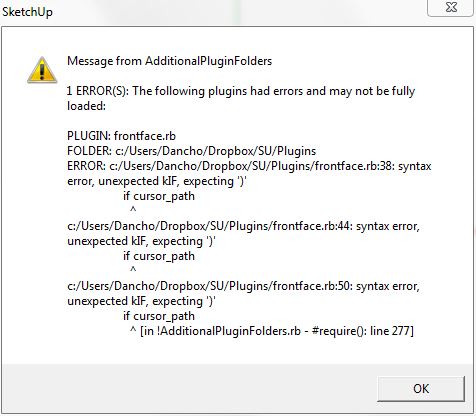

                                  Capture.JPG

                                  1 Reply Last reply
                                  Reply Quote 0
                                  • TIGT
                                    TIG Moderator
                                    last edited by

                                    You have mistyped.
                                    It should be:
                                    cursor_path = File.join(File.dirname(__FILE__), "FrontFace_files", "FrontFaceCursor.png"**)**
                                    The error message tells you the error...
                                    Add the final ) to the three lines and it will work OK...

                                    TIG

                                    1 Reply Last reply
                                    Reply Quote 0
                                    • S
                                      samothrace41
                                      last edited by

                                      A great THANK YOU Tomasz !!!

                                      1 Reply Last reply
                                      Reply Quote 0
                                      • ?
                                        A Former User
                                        last edited by

                                        Is the current FaceFront ruby current with SU 2015 version? I downloaded it and installed it in my Plug in file but it doesn't show up. Any thoughts

                                        1 Reply Last reply
                                        Reply Quote 0
                                        • Dave RD
                                          Dave R
                                          last edited by

                                          @tcalvinsimmons said:

                                          Is the current FaceFront ruby current with SU 2015 version? I downloaded it and installed it in my Plug in file but it doesn't show up. Any thoughts

                                          Hi Tom,

                                          Small world. 😉

                                          So did you try installing it with the SCF PluginStore plugin? Or did you download the file as .rbz from here?


                                          Etaoin Shrdlu

                                          %

                                          (THERE'S NO PLACE LIKE)

                                          G28 X0.0 Y0.0 Z0.0

                                          M30

                                          %

                                          1 Reply Last reply
                                          Reply Quote 0

                                          Hello! It looks like you're interested in this conversation, but you don't have an account yet.

                                          Getting fed up of having to scroll through the same posts each visit? When you register for an account, you'll always come back to exactly where you were before, and choose to be notified of new replies (either via email, or push notification). You'll also be able to save bookmarks and upvote posts to show your appreciation to other community members.

                                          With your input, this post could be even better 💗

                                          Register Login
                                          • 1
                                          • 2
                                          • 3
                                          • 1 / 3
                                          • First post
                                            Last post
                                          Buy SketchPlus
                                          Buy SUbD
                                          Buy WrapR
                                          Buy eBook
                                          Buy Modelur
                                          Buy Vertex Tools
                                          Buy SketchCuisine
                                          Buy FormFonts

                                          Advertisement