sketchucation logo sketchucation
    • 登入
    Oops, your profile's looking a bit empty! To help us tailor your experience, please fill in key details like your SketchUp version, skill level, operating system, and more. Update and save your info on your profile page today!
    🔌 Smart Spline | Fluid way to handle splines for furniture design and complex structures. Download

    [Plugin][$] Tools On Surface - v2.6a - 01 Apr 24


    已排程 已置頂 已鎖定 已移動 Plugins
    638 貼文 203 Posters 1.6m 瀏覽 202 Watching
    正在載入更多貼文
    • 從舊到新
    • 從新到舊
    • 最多點贊
    回覆
    • 在新貼文中回覆
    登入後回覆
    此主題已被刪除。只有擁有主題管理權限的使用者可以查看。
    • H 離線
      haynesc
      最後由 編輯

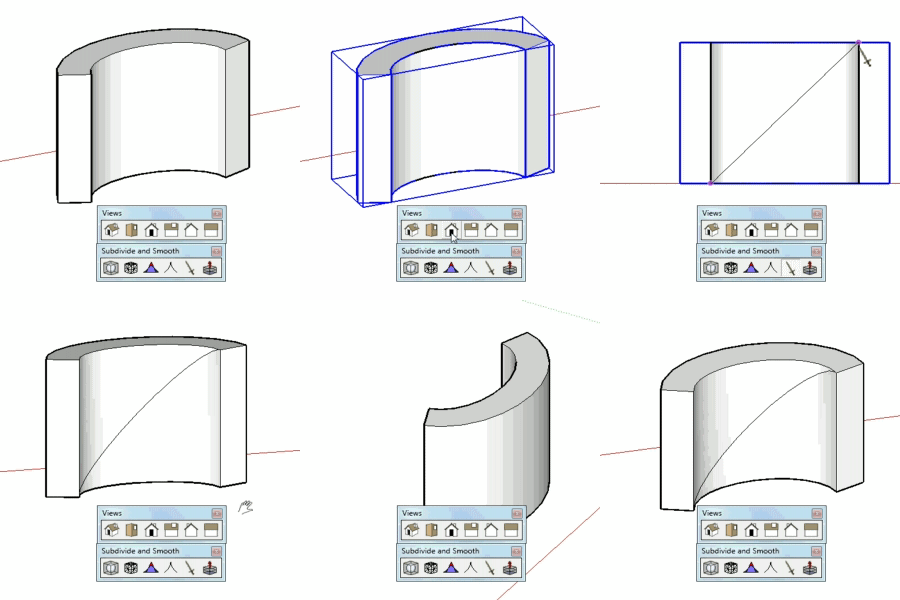
      how would i draw a diagonal curved line from plain to plain ... ? top right corner to bottom left corner ?


      http://f.imagehost.org/t/0905/Untitled-1_3.jpg

      1 條回覆 最後回覆 回覆 引用 0
      • D 離線
        Daniel S
        最後由 編輯

        @haynesc said:

        how would i draw a diagonal curved line from plain to plain ... ? top right corner to bottom left corner ?


        http://f.imagehost.org/t/0905/Untitled-1_3.jpg

        Alternative solution:
        I see that you have Whaat´s "subdivide and smooth". Use the knife tool (a.k.a. zorro) in parallel projection. Also you can group the faces you don´t want to divide:
        subsmooth.gif
        Daniel S

        1 條回覆 最後回覆 回覆 引用 0
        • T 離線
          Toucan
          最後由 編輯

          Where do I find this script?

          1 條回覆 最後回覆 回覆 引用 0
          • Chris FullmerC 離線
            Chris Fullmer
            最後由 編輯

            Hi Toucan, the script is located in the first post of this thread. Go back to page one and look for a download link there. Have fun!

            Chris

            Lately you've been tan, suspicious for the winter.
            All my Plugins I've written

            1 條回覆 最後回覆 回覆 引用 0
            • thomthomT 離線
              thomthom
              最後由 編輯

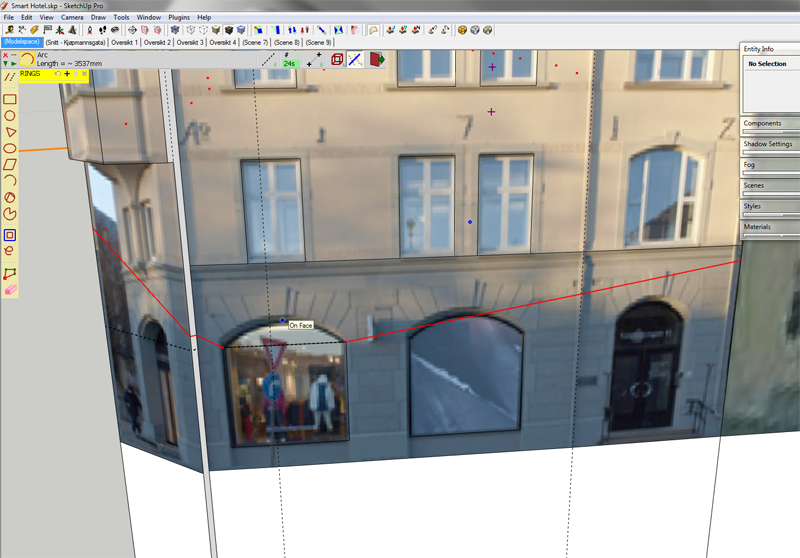
              TOS_oddness.png

              I occasionally get this happening while using TOS. What's causing it?
              I wanted to draw an arc between the two points - going across the two faces.

              Thomas Thomassen — SketchUp Monkey & Coding addict
              List of my plugins and link to the CookieWare fund

              1 條回覆 最後回覆 回覆 引用 0
              • fredo6F 離線
                fredo6
                最後由 編輯

                @thomthom said:

                [attachment=0:h62psy7e]<!-- ia0 -->TOS_oddness.png<!-- ia0 -->[/attachment:h62psy7e]

                I occasionally get this happening while using TOS. What's causing it?
                I wanted to draw an arc between the two points - going across the two faces.

                The algorithm has many flaws, espcially on shape volumes that are closed.
                I am thinking of a serious refresh to resolve these problems (and some others).

                Fredo

                1 條回覆 最後回覆 回覆 引用 0
                • W 離線
                  whippie
                  最後由 編輯

                  What a brilliant tool thanks thanks thanks 😄

                  1 條回覆 最後回覆 回覆 引用 0
                  • B 離線
                    balloon
                    最後由 編輯

                    ☀ Thanks Fredo6 😍

                    1 條回覆 最後回覆 回覆 引用 0
                    • K 離線
                      Khai
                      最後由 編輯

                      may I request an additional feature?

                      adding rounded corners to a shape?

                      1 條回覆 最後回覆 回覆 引用 0
                      • thomthomT 離線
                        thomthom
                        最後由 編輯

                        @unknownuser said:

                        espcially on shape volumes that are closed.

                        So it some times picks the wrong distance/direction between the two points? A workaround would be to break the volume somehow?

                        Thomas Thomassen — SketchUp Monkey & Coding addict
                        List of my plugins and link to the CookieWare fund

                        1 條回覆 最後回覆 回覆 引用 0
                        • fredo6F 離線
                          fredo6
                          最後由 編輯

                          @thomthom said:

                          @unknownuser said:

                          espcially on shape volumes that are closed.

                          So it some times picks the wrong distance/direction between the two points? A workaround would be to break the volume somehow?

                          Somehow, it works much better when the surface is open.
                          But I know how to fix the problem. No easy, but I need some time, as I have to revisit the whole algorithm.

                          Fredo

                          1 條回覆 最後回覆 回覆 引用 0
                          • N 離線
                            nilblo
                            最後由 編輯

                            Rightclick menues issue..
                            After having installed Fredo6 Tools on surface + FredoScale I´m having the darnest stupid problem:
                            Most contextual menues are greyed out, like Intersect with model, Flip along Groups Red, and so on..
                            I can create shortcuts to these commands and they work as expected, but I rely heavily on shortcuts in my work and list of shortcuts is getting more and more crowded. Have I done something wrong here and this is normal behavior? I have been searching the forum but so far havent found a description af this "problem".
                            I have most definetely missed out on something here and the fault is obviously mine (as it usually is) but I really would appreciate an input to help me solve this matter.

                            Vista 64- Sketchup Pro 7.1.6860
                            Plugins: Fredo6 ToolsOnSurface v1.5f LIBFREDO6_Dir_34 (109 mS seems OK?
                            Total time to load plugin = 187 mS) FredoScale v2.0g (Total time to load plugin =124 mS)
                            SketchyPhysics verson3 Kerkythea SU2KT version 3.0 model exporter

                            1 條回覆 最後回覆 回覆 引用 0
                            • S 離線
                              sus4
                              最後由 編輯

                              too Dont Work Ver7.1.6087
                              error massage ZLoader__OnSurface.rb File loading error
                              No such file to load -- LibFredo6.rb

                              1 條回覆 最後回覆 回覆 引用 0
                              • fredo6F 離線
                                fredo6
                                最後由 編輯

                                @nilblo said:

                                Rightclick menues issue..
                                After having installed Fredo6 Tools on surface + FredoScale I´m having the darnest stupid problem:
                                Most contextual menues are greyed out, like Intersect with model, Flip along Groups Red, and so on

                                I have heard that this problem is related to SU itself, though it may be 'helped' by some plugins.
                                I got it occasionally, even not using any plugins.

                                Fredo

                                1 條回覆 最後回覆 回覆 引用 0
                                • S 離線
                                  sketchyup2010
                                  最後由 編輯

                                  Great tool bro. Nice work!!!!

                                  1 條回覆 最後回覆 回覆 引用 0
                                  • D 離線
                                    dylan
                                    最後由 編輯

                                    A minor issue and not sure if this is Mac related.

                                    I can only get the default icons to show.
                                    If I go into Default Parameters and choose IMAGES_DanielS then save changes, it does nothing. I can open the default parameters again and the box is un-ticked.
                                    I have the latest version installed.

                                    http://dmdarchitecture.co.uk/

                                    1 條回覆 最後回覆 回覆 引用 0
                                    • T 離線
                                      theark
                                      最後由 編輯

                                      Thanks a lot.Good plug-in

                                      1 條回覆 最後回覆 回覆 引用 0
                                      • COSEDIMARCOC 離線
                                        COSEDIMARCO
                                        最後由 編輯

                                        @unknownuser said:

                                        Thanks loads for this tool, your work is great!
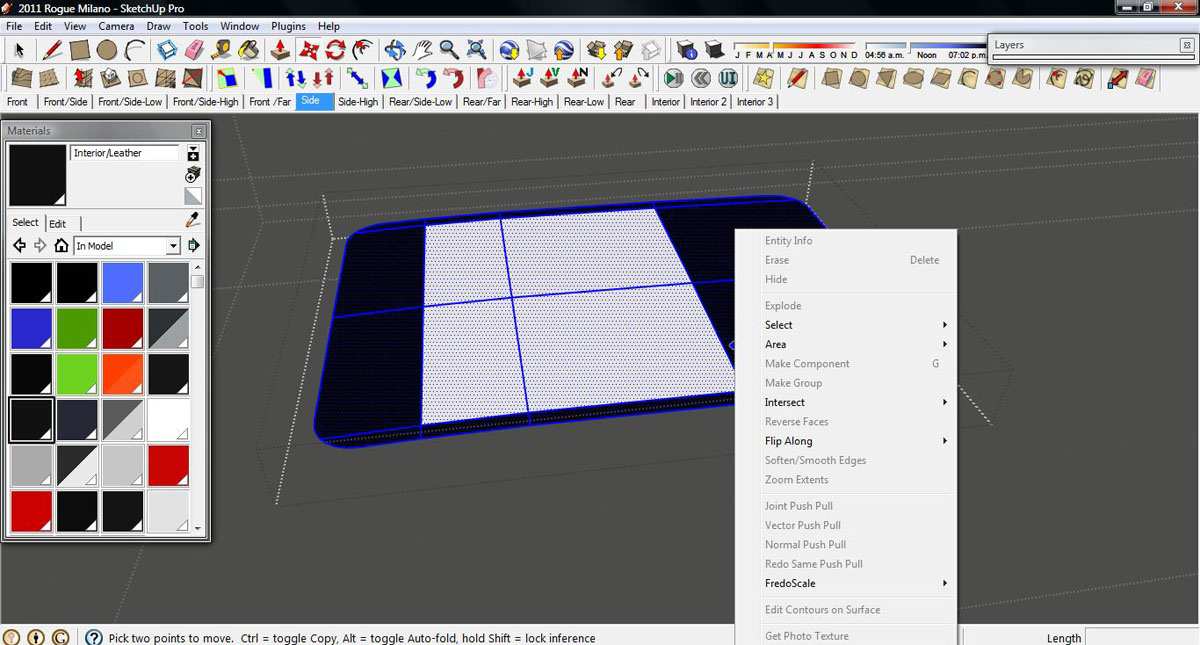
                                        after I use this tool I sometimes loose right click options such as; smooth, make group/component, reverse faces, etc.
                                        [attachment=0:2zrlzv0n]<!-- ia0 -->Image.jpg<!-- ia0 -->[/attachment:2zrlzv0n]

                                        I have this issue too.

                                        [floatl:2wjeiugn]COSEDIMARCO - The Website[/floatl:2wjeiugn]

                                        1 條回覆 最後回覆 回覆 引用 0
                                        • Roguer1R 離線
                                          Roguer1
                                          最後由 編輯

                                          Thanks loads for this tool, your work is great!

                                          @ Dylan
                                          Just replace the default icons with the ones you wish (in the plugins directory). Thats actually the way I did it.

                                          I’m also having another issue. IDK if this has been discussed before or not, but after I use this tool I sometimes loose right click options such as; smooth, make group/component, reverse faces, etc.
                                          Image.jpg

                                          Find all my models on the 3D Warehouse

                                          1 條回覆 最後回覆 回覆 引用 0
                                          • TIGT 離線
                                            TIG Moderator
                                            最後由 編輯

                                            The issue of loosing some right-click context-menu items [i.e. they get "greyed-out"] is a known bug with more recent versions of SketchUp - Google are being pressed to fix it...
                                            Its cause is not wholly established, although having lots of plugins that make context-menu items and repeated clicking on objects seem to both trigger it - separately or together !
                                            All of a context-menu's items still appear correctly under the last item in the main Edit Menu - so you can access them this way if the worst happens...
                                            The only 'fix' is to save and restart SUp - then you should get back the context-menu, albeit momentarily.
                                            Don't load plugins you aren't ever going to use - they increase the load and might just be the 'last-straw...' - move them out of the Plugins folder or rename them from .rb to .txt - that way you can always load them during a session by typing in the Ruby Console load"the_script_name.txt" ...
                                            😒

                                            TIG

                                            1 條回覆 最後回覆 回覆 引用 0
                                            • 1
                                            • 2
                                            • 22
                                            • 23
                                            • 24
                                            • 25
                                            • 26
                                            • 31
                                            • 32
                                            • 24 / 32
                                            • 第一個貼文
                                              最後的貼文
                                            Buy SketchPlus
                                            Buy SUbD
                                            Buy WrapR
                                            Buy eBook
                                            Buy Modelur
                                            Buy Vertex Tools
                                            Buy SketchCuisine
                                            Buy FormFonts

                                            Advertisement