sketchucation logo sketchucation
    • 登入
    Oops, your profile's looking a bit empty! To help us tailor your experience, please fill in key details like your SketchUp version, skill level, operating system, and more. Update and save your info on your profile page today!
    🔌 Smart Spline | Fluid way to handle splines for furniture design and complex structures. Download

    [Plugin][$] Tools On Surface - v2.6a - 01 Apr 24


    已排程 已置頂 已鎖定 已移動 Plugins
    638 貼文 203 Posters 1.6m 瀏覽 202 Watching
    正在載入更多貼文
    • 從舊到新
    • 從新到舊
    • 最多點贊
    回覆
    • 在新貼文中回覆
    登入後回覆
    此主題已被刪除。只有擁有主題管理權限的使用者可以查看。
    • thomthomT 離線
      thomthom
      最後由 編輯

      The Any button is brilliant! Save so much precious space. 👍

      btw, how are you drawing the icons for your viewport toolbar? most of them looks like simple line drawinsgs - but some, like the exit button looks more complicated? bitmap?

      And how do you draw coloured filled areas?

      Thomas Thomassen — SketchUp Monkey & Coding addict
      List of my plugins and link to the CookieWare fund

      1 條回覆 最後回覆 回覆 引用 0
      • N 離線
        notareal
        最後由 編輯

        Welcome to try Thea Render, Thea support | kerkythea.net -team member

        1 條回覆 最後回覆 回覆 引用 0
        • CadFatherC 離線
          CadFather
          最後由 編輯

          to delete the old TOS_Dir_13 folder, it seems you must copy LibTraductor_20.rb from TOS_Dir_13 folder to your new TOS_Dir_15

          also need to change the line TOS_Dir_13 to TOS_Dir_15 in libfredo6.rb

          [require 'TOS_Dir_15/LibTraductor_20.rb' if Sketchup.find_support_file('TOS_Dir_13/LibTraductor_20.rb', "Plugins") #Compatibility]

          Fredo (Thanks) will know better but this works here

          1 條回覆 最後回覆 回覆 引用 0
          • J 離線
            j_forrester
            最後由 編輯

            Had a look and cant see anyone with similar problem. On startup I get the below dialogue box. Any ideas? Installed Fredo 3.4c and run Mac Pro.

            Many thanks.
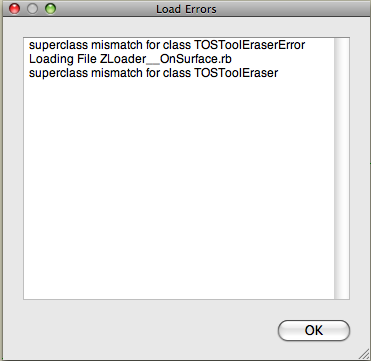
            Picture 1.png

            1 條回覆 最後回覆 回覆 引用 0
            • D 離線
              dylan
              最後由 編輯

              Thanks, really nice improvement 👍

              Can't get Daniels icons to show. If I choose them from Default Parameters and ok it, nothing happens. If I open again, the tick in the box is gone.

              http://dmdarchitecture.co.uk/

              1 條回覆 最後回覆 回覆 引用 0
              • fredo6F 離線
                fredo6
                最後由 編輯

                @thomthom said:

                Can the TOS_Dir_13 folder be removed?

                YES, I forgot to say it.
                Anyway, the folder is passive, as no loader is pointing at it.

                Fredo

                1 條回覆 最後回覆 回覆 引用 0
                • FrederikF 離線
                  Frederik
                  最後由 編輯

                  Thanks for this, Fredo...! 😄

                  Cheers
                  Kim Frederik

                  1 條回覆 最後回覆 回覆 引用 0
                  • D 離線
                    Dan
                    最後由 編輯

                    @unknownuser said:

                    Can't get Daniels icons to show. If I choose them from Default Parameters and ok it, nothing happens. If I open again, the tick in the box is gone.

                    I replaced the icons in "IMAGES_Standard" subfolder with the icons set of choice and all went ok.

                    1 條回覆 最後回覆 回覆 引用 0
                    • D 離線
                      Dan
                      最後由 編輯

                      I don't remember if I gave thanks to you, Fredo, but if I did, I repeat them: THANK YOU VERY MUCH for your life saving, incredible tools! 😍

                      A wish, though: can you make the additional TOS palette to remember its position on screen from a SU session to another?

                      1 條回覆 最後回覆 回覆 引用 0
                      • takesh hT 離線
                        takesh h
                        最後由 編輯

                        @dan said:

                        I replaced the icons in "IMAGES_Standard" subfolder with the icons set of choice and all went ok.

                        Yes the trick did the job, thanks Dan. 👍

                        1 條回覆 最後回覆 回覆 引用 0
                        • D 離線
                          dylan
                          最後由 編輯

                          Thanks Dan, perfect!
                          I was trying to replace them in images DanielS.

                          http://dmdarchitecture.co.uk/

                          1 條回覆 最後回覆 回覆 引用 0
                          • olisheaO 離線
                            olishea
                            最後由 編輯

                            I love this tool, I use it all the time.

                            Endless thanks 😍 😍 😍

                            oli

                            1 條回覆 最後回覆 回覆 引用 0
                            • fredo6F 離線
                              fredo6
                              最後由 編輯

                              @dan said:

                              A wish, though: can you make the additional TOS palette to remember its position on screen from a SU session to another?

                              You can specify the default position in the SeTtings dialog box of LibFredo6 (so in the Windows > LibFredo6 Settings menu).

                              Fredo

                              1 條回覆 最後回覆 回覆 引用 0
                              • fredo6F 離線
                                fredo6
                                最後由 編輯

                                @unknownuser said:

                                Can't get Daniels icons to show. If I choose them from Default Parameters and ok it, nothing happens. If I open again, the tick in the box is gone.

                                It seems there is a problem with that, but only on Mac.
                                I am checking this issue.

                                Fredo

                                1 條回覆 最後回覆 回覆 引用 0
                                • MALAISEM 離線
                                  MALAISE
                                  最後由 編輯

                                  Merci Fredo, I watched the video, that gives us new horizons.... 👍

                                  MALAISE

                                  La Connaissance n'a de valeur que partagée

                                  1 條回覆 最後回覆 回覆 引用 0
                                  • D 離線
                                    Dan
                                    最後由 編輯

                                    @unknownuser said:

                                    You can specify the default position in the SeTtings dialog box of LibFredo6 (so in the Windows > LibFredo6 Settings menu).

                                    Thanks a lot, Fredo!
                                    I completely forgot I can use it to change the default parameters... 😳
                                    This is one of the most complete plugins I see.
                                    Thanks again!

                                    1 條回覆 最後回覆 回覆 引用 0
                                    • L 離線
                                      lorca
                                      最後由 編輯

                                      @dan said:

                                      @unknownuser said:

                                      Can't get Daniels icons to show. If I choose them from Default Parameters and ok it, nothing happens. If I open again, the tick in the box is gone.

                                      I replaced the icons in "IMAGES_Standard" subfolder with the icons set of choice and all went ok.

                                      That did the trick:)------> Thanks.

                                      1 條回覆 最後回覆 回覆 引用 0
                                      • fredo6F 離線
                                        fredo6
                                        最後由 編輯

                                        @dan said:

                                        @unknownuser said:

                                        Can't get Daniels icons to show. If I choose them from Default Parameters and ok it, nothing happens. If I open again, the tick in the box is gone.

                                        I replaced the icons in "IMAGES_Standard" subfolder with the icons set of choice and all went ok.

                                        Dan and Dylan (and any others having the problem of non-persistence of the choice of Icons)

                                        I have a few questions:

                                        1. does it happen on Mac only?

                                        2. Are all other parameters shown in the Button palettes saved across Sketchup sessions (i.e. nb of segments, options, etc...) ?

                                        3. Could someone send me by PM the file ToolsOnSurface.def in the subfolder DEFPARAM_Dir.

                                        Thanks

                                        Fredo

                                        1 條回覆 最後回覆 回覆 引用 0
                                        • G 離線
                                          gaonirico
                                          最後由 編輯

                                          Hi Fredo. Grandiose plugins that have created. But I have a problem, after that installed the new version of ToolsOnSurface 1.5. In SketchUp the option to translate the tools with LibFredo6 appears blank, as also the option to translate ToolsOnSurface. The remainder of the tools to translate function very well, as those of GhostComponent or RoundCorner. In spite of the inconvinient of can translate all tools function perfect they...Oh, I am sorry if not very clear for my poor speak english. 😳

                                          1 條回覆 最後回覆 回覆 引用 0
                                          • fredo6F 離線
                                            fredo6
                                            最後由 編輯

                                            @gaonirico said:

                                            :sketchstatic: Hi Fredo. Grandiose plugins that have created. But I have a problem, after that installed the new version of ToolsOnSurface 1.5. In SketchUp the option to translate the tools with LibFredo6 appears blank, as also the option to translate ToolsOnSurface.

                                            I noticed the problem which seems to be only in SU6 and only the very first time you open the translation dialog box. I am going to investigate.
                                            In between, if you slightly resize the dialog box or close and re-open it, you'll get the content. This is not specific to ToolsOnSurface.

                                            Are you going to translate into Spanish? Any language...., thank you in advance

                                            Fredo

                                            1 條回覆 最後回覆 回覆 引用 0
                                            • 1
                                            • 2
                                            • 28
                                            • 29
                                            • 30
                                            • 31
                                            • 32
                                            • 30 / 32
                                            • 第一個貼文
                                              最後的貼文
                                            Buy SketchPlus
                                            Buy SUbD
                                            Buy WrapR
                                            Buy eBook
                                            Buy Modelur
                                            Buy Vertex Tools
                                            Buy SketchCuisine
                                            Buy FormFonts

                                            Advertisement