sketchucation logo sketchucation
    • 登入
    Oops, your profile's looking a bit empty! To help us tailor your experience, please fill in key details like your SketchUp version, skill level, operating system, and more. Update and save your info on your profile page today!
    🔌 Smart Spline | Fluid way to handle splines for furniture design and complex structures. Download

    Joint Push Pull Classic (Old version) - v2.2a - 26 Apr 17

    已排程 已置頂 已鎖定 已移動 Plugins
    368 貼文 150 Posters 2.0m 瀏覽 150 Watching
    正在載入更多貼文
    • 從舊到新
    • 從新到舊
    • 最多點贊
    回覆
    • 在新貼文中回覆
    登入後回覆
    此主題已被刪除。只有擁有主題管理權限的使用者可以查看。
    • ayan13A 離線
      ayan13
      最後由 編輯

      great plugins ! I use it a lot! Thank you !!!

      1 條回覆 最後回覆 回覆 引用 0
      • H 離線
        helios
        最後由 編輯

        My apologies if this was answered before, but is it possible to use this plugin to uniformly add thickness to a cylinder-like object? I created it by pulling a circle (and then scaling it at several points) and now would like to add some thickness to the currently hollow object, as it is going to be 3D printed. I am, in essence, trying to pull all the outside surfaces at a perpendicular angles.

        Many thanks!

        1 條回覆 最後回覆 回覆 引用 0
        • jgbJ 離線
          jgb
          最後由 編輯

          Yes. Use the Joint Push/Pull (not the Vector). Select the surface of the cylinder and using the JPP tool, click on any face in the selection. It will outline in red. Pull it up as thick as you want, or more accurately, pull up a short distance and type the thickness to the Measurements box. Press <Enter> to get a preview, then <enter> again to complete the thickening.

          Depending on the defaults you have for JPP, it may or may not form a group of the thickened section.
          You can explode the group if you want.


          jgb

          1 條回覆 最後回覆 回覆 引用 0
          • jgbJ 離線
            jgb
            最後由 編輯

            I just got that "transformation" error as well. 😮
            While the attached SKP is documented, here's what happened.

            There are 2 errors depicted in the attached model.

            1 - I tried to thicken (using JPP preset at 90 deg) the housing by .1 inch. Error.
            I read this thread and scaled up 10X, same result.
            If I do the hub and flanges separately, it works, but there is a mess to clean up.

            2 - When I thicken any pair (or more) faces that are at an angle to each other, and any face has a hole in it, the hole thickens at some median angle, not perpendicular to its face. The circle on the thickened face is also distorted into an oval/ellipse.

            There is one other transformation error I've noticed as well, but seems to happen in specific repeatable cases where the transformation logic is simply stumped for a good solution.
            Ya kant code for every case.... bin-der dundat. 😆 (Well respected Indian explorer)
            I'll post a separate model of that problem if wanted.

            So now in those cases I know where to look and do a quick and simple fix.
            Believe me, JPP is a Golden Ruby I cannot live without.

            Apologies... First post I forgot the SKP file. 😳


            As above.


            jgb

            1 條回覆 最後回覆 回覆 引用 0
            • mitcorbM 離線
              mitcorb
              最後由 編輯

              @helios: Not to disparage such a fine tool as Joint Push/Pull, but a possible alternative is Pipe Along Path. Slightly different methodology, but similar result.

              I take the slow, deliberate approach in my aimless wandering.

              1 條回覆 最後回覆 回覆 引用 0
              • jgbJ 離線
                jgb
                最後由 編輯

                @mitcorb said:

                @helios: Not to disparage such a fine tool as Joint Push/Pull, but a possible alternative is Pipe Along Path. Slightly different methodology, but similar result.

                Yes, but PAP is not a tool for this problem. I use PAP a lot and its main advantage is making a tube or pipe along an arbitrary path.

                There are a few other solutions available to thicken the surface of a cylinder, or any shape, either in a straight line or a path. Follow-me is a so-so useful tool for a non-linear path. Making a circle with both inner and outer diameters then extruding the outer ring is probably best, but linear paths only.

                However, JPP is the only tool I know of that will equally thicken all surfaces, linear or not, and even bent/wavy surfaces, which was the case indicated by @helios. Think of an hour-glass. ❗


                jgb

                1 條回覆 最後回覆 回覆 引用 0
                • H 離線
                  helios
                  最後由 編輯

                  Thank you for the quick replies! It looks like this plugin is what I am after.

                  1 條回覆 最後回覆 回覆 引用 0
                  • A 離線
                    ar_max
                    最後由 編輯

                    Thank you very much.
                    Used to feel very good.
                    Sorry.
                    Not good at English. 😄

                    1 條回覆 最後回覆 回覆 引用 0
                    • dereiD 離線
                      derei
                      最後由 編輯

                      Is it JPP polygon-limited ?
                      I have a curved face and I wanted to add thickness to it. Unfortunately, JPP only affected a part of entire mesh.
                      See below.
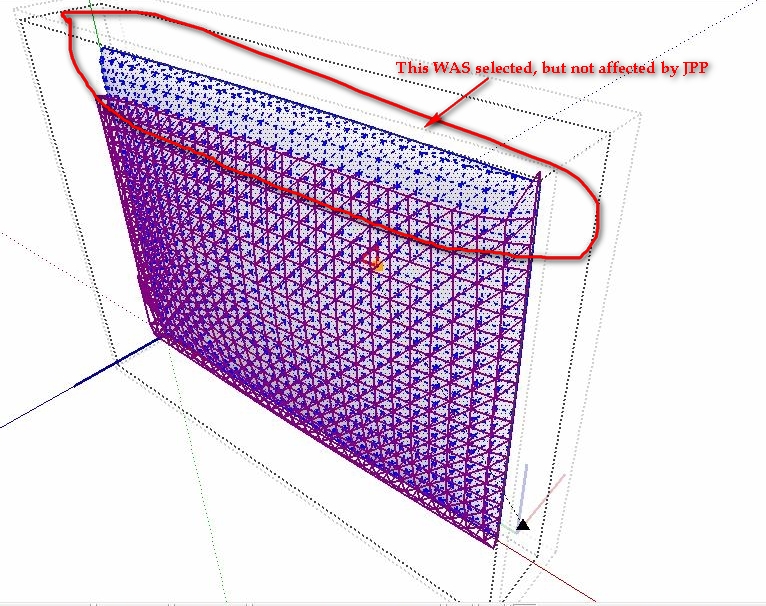

                      JPP.jpg

                      DESIGNER AND ARTIST DEREI.UK

                      1 條回覆 最後回覆 回覆 引用 0
                      • mitcorbM 離線
                        mitcorb
                        最後由 編輯

                        Could it be that the faces were pulled internally because of the direction of your pull and the inference engine trying to snap to a vertex? I don't know, just asking.

                        I take the slow, deliberate approach in my aimless wandering.

                        1 條回覆 最後回覆 回覆 引用 0
                        • dereiD 離線
                          derei
                          最後由 編輯

                          @mitcorb said:

                          Could it be that the faces were pulled internally because of the direction of your pull and the inference engine trying to snap to a vertex? I don't know, just asking.

                          I'm not sure what you are asking...but if is what I think it is, it should be valid only for small distances and only for mouse movement. Or, I moved the mouse to avoid snapping and I input a value in VCB.

                          DESIGNER AND ARTIST DEREI.UK

                          1 條回覆 最後回覆 回覆 引用 0
                          • fredo6F 離線
                            fredo6
                            最後由 編輯

                            @unknownuser said:

                            Is it JPP polygon-limited ?
                            I have a curved face and I wanted to add thickness to it. Unfortunately, JPP only affected a part of entire mesh.
                            See below.

                            JPP has a limit for displaying the feedback wireframe (5000 faces) but I don'th think I put one for the processing.
                            I'll check that and come back.

                            Fredo

                            1 條回覆 最後回覆 回覆 引用 0
                            • Rich O BrienR 離線
                              Rich O Brien Moderator
                              最後由 編輯

                              Hi Fredo,

                              I've Joint PushPull assigned to 'J' shortcut. When I select all geometry and press 'G' to 'Make Component' then 'Set component axis' if I press 'J' during the placing of the axis SU will Bugsplat.

                              It doesn't do this for any other keyboard assigned plugin.
                              It doesn't do it if nothing is assigned to 'J'.
                              It doesn't do it if a native tool is assigned to 'J'.
                              It doesn't do it if another plugin is assigned to 'J'.

                              There are no messages in the Ruby Console. I'm using all the latest version of your plugins.

                              I know that not pressing 'J' solves it

                              Download the free D'oh Book for SketchUp 📖

                              1 條回覆 最後回覆 回覆 引用 0
                              • H 離線
                                helios
                                最後由 編輯

                                After a few days, I'm still struggling to give one of my hollow models some thickness.

                                I created a model that looks sort of like this (i.e. a curve spun around the Z axis):

                                http://i.imgur.com/u1fl6.jpg

                                I then select everything, click Joint Push/Pull, and enter a distance that is my desired thickness (e.g. 10mm). Some sort of calculation happens, but when I check on the model's thickness, it appears unchanged:

                                http://i.imgur.com/hEeEs.jpg

                                What am I doing wrong? How can I get the walls to be thicker?

                                1 條回覆 最後回覆 回覆 引用 0
                                • H 離線
                                  helios
                                  最後由 編輯

                                  Here's the model in question itself (attached).


                                  Bell 6.skp.zip

                                  1 條回覆 最後回覆 回覆 引用 0
                                  • Dave RD 離線
                                    Dave R
                                    最後由 編輯

                                    It worked for me although I probably added the thickness in the wrong direction.

                                    After you select the JPP tool, hit TAB and make sure you've selected "Thickening". If you have "Erase Original Faces" selected, the original faces will get erased and you won't get the thickness. Another thing I did was split the operation into several smaller ones by selecting sections of the shape. I started at the bottom and selected just the surface below the belt and ran JPP on it. Then I worked my way up from there.


                                    Bell 6.skp

                                    Etaoin Shrdlu

                                    %

                                    (THERE'S NO PLACE LIKE)

                                    G28 X0.0 Y0.0 Z0.0

                                    M30

                                    %

                                    1 條回覆 最後回覆 回覆 引用 0
                                    • mitcorbM 離線
                                      mitcorb
                                      最後由 編輯

                                      I would have guessed that faces need reversing, and overall size of the object would need scaling to produce the effect, but this may not apply here.

                                      I take the slow, deliberate approach in my aimless wandering.

                                      1 條回覆 最後回覆 回覆 引用 0
                                      • Dave RD 離線
                                        Dave R
                                        最後由 編輯

                                        You're right. the faces were all reversed but that and the size of the thing didn't affect the operation in this case.

                                        Helios, I did forget to mention the face orientation thing and that you ought not to work so far from the origin.

                                        I updated the file to put the thickening on the inside so the little detail at the top shows correctly. The model could stand a bunch of cleanup but I'll leave that to you.


                                        Bell 6.skp

                                        Etaoin Shrdlu

                                        %

                                        (THERE'S NO PLACE LIKE)

                                        G28 X0.0 Y0.0 Z0.0

                                        M30

                                        %

                                        1 條回覆 最後回覆 回覆 引用 0
                                        • H 離線
                                          helios
                                          最後由 編輯

                                          Wow, you guys are awesome. Thank you so much -- this is way beyond what I expected for help!

                                          1 條回覆 最後回覆 回覆 引用 0
                                          • G 離線
                                            Gardentwine
                                            最後由 編輯

                                            hi This is great script and use it often in creating stuff for my Hammer editor(source), the only thing it takes a while cause i have to do each face separately, is there or is it posible for this script to allow me to select more than one face and then group each face separately and still get the same results, (not sure if this would cause overlaping solids)


                                            1 條回覆 最後回覆 回覆 引用 0
                                            • 1
                                            • 2
                                            • 3
                                            • 4
                                            • 5
                                            • 18
                                            • 19
                                            • 3 / 19
                                            • 第一個貼文
                                              最後的貼文
                                            Buy SketchPlus
                                            Buy SUbD
                                            Buy WrapR
                                            Buy eBook
                                            Buy Modelur
                                            Buy Vertex Tools
                                            Buy SketchCuisine
                                            Buy FormFonts

                                            Advertisement




