Joint Push Pull Classic (Old version) - v2.2a - 26 Apr 17
-
I think that he is requesting that you can doubleclick a surface to repeat the last Push-Pull operation. Like the native Push-Pull where you double-click and it extrudes the faces you clicked the same distance as the previous PP.
-
@unknownuser said:
Did you encounter problems?
FredoNo i didn't, in fact the script seems smoother than before..

-
@thomthom said:
I think that he is requesting that you can doubleclick a surface to repeat the last Push-Pull operation. Like the native Push-Pull where you double-click and it extrudes the faces you clicked the same distance as the previous PP.
yes
or can be "shift + click mouse"and other questios is:
and to generate pushpull. now you have to do:
selcted face + three click with mouse
can be changed to :
selected face + two click with mouse
similar to native sketchup. -
@unknownuser said:
@unknownuser said:
oh, hey.
one thing i keep meaning to ask you about JPP is if there's a way to make 'thickening' the default finishing method?JPP does not really have persistent options like some other scripts.
However, you can edit the file jointpushpull_main.rb and, on line 386, replace the statement@option_finishing = 'D'by@option_finishing = 'R'Fredo
 Thanks...big help as I only ever use thickening also.
 -
@diego-rodriguez said:
@thomthom said:
I think that he is requesting that you can doubleclick a surface to repeat the last Push-Pull operation. Like the native Push-Pull where you double-click and it extrudes the faces you clicked the same distance as the previous PP.
yes
or can be "shift + click mouse"and other questios is:
and to generate pushpull. now you have to do:
selcted face + three click with mouse
can be changed to :
selected face + two click with mouse
similar to native sketchup.JointPushPull would deserve a more natural interface mode, I agree. I'll see what I can do, because that may not so simple, and anyway I had the intention to re-engineer it more in the style of my more recent plugins.
Fred
-
is JPP 1.5 for SU8 only or will it work with 7.1?
-
-
Thank you Fredo
great tool that gets a lot of use. -
Thank you Fredo
great tool that gets a lot of use. -
I've been playing with Joint Push pull on some relatively simple non orthogonal but simple objects (still just six sided objects). I was surprised to see when I changed my cube to something non orthogonal and then performed a JPP my newly made faces and edges were not parallel to their original elements.
Reading into the documentation I think that is because Joint Push pull gets the vector for the new point from the average of the three points. This seems perfect on orthogonal objects, or maybe even symmetrically angled objects, but not when asymmetrical angles are introduced. I made an asymmetrically tapered cube and used the standard SketchUp push/pull to extrude the faces out by 24 inches. Based on an earlier test I confirmed that the new Joint Push Pull line is on a vector from the original point through the center of a triangle of the three points generated by the push pull. The distance between the original point and the new point is 2' 8-5/16" (I assume the length is optimized to minimize the change in the position or normal of the three planes). I then used a different method to generate the desired new shape. I drew lines for each pair of faces showing where they would intersect if they had been extended. These lines all meet at a point which represents the ideal location for the new point. It allows the other planes to stay exactly where they should be. 24" away from the original faces (and still parallel). Incidentally the distance between the original and new point with this method is 2' 8'11/16".
Would it be possible to have an alternate method for JPP that worked in this way. I suppose it may be slower, first have to determine the implied intersection lines for each pair of adjacent faces, and then where they intersect, but I think the results would be very clean. In theory (as long as your push pull distance was not too large to create problems) you could JPP a selection of surfaces in by 24 inches, and then back out by 24 inches with almost perfect alignment (minus rounding errors) to your original geometry. Maybe this won't work in all cases, but for the times it will work it could provide better results. I think it is better for boxy shapes vs. highly faceted surfaces (if making them smaller vs. larger).
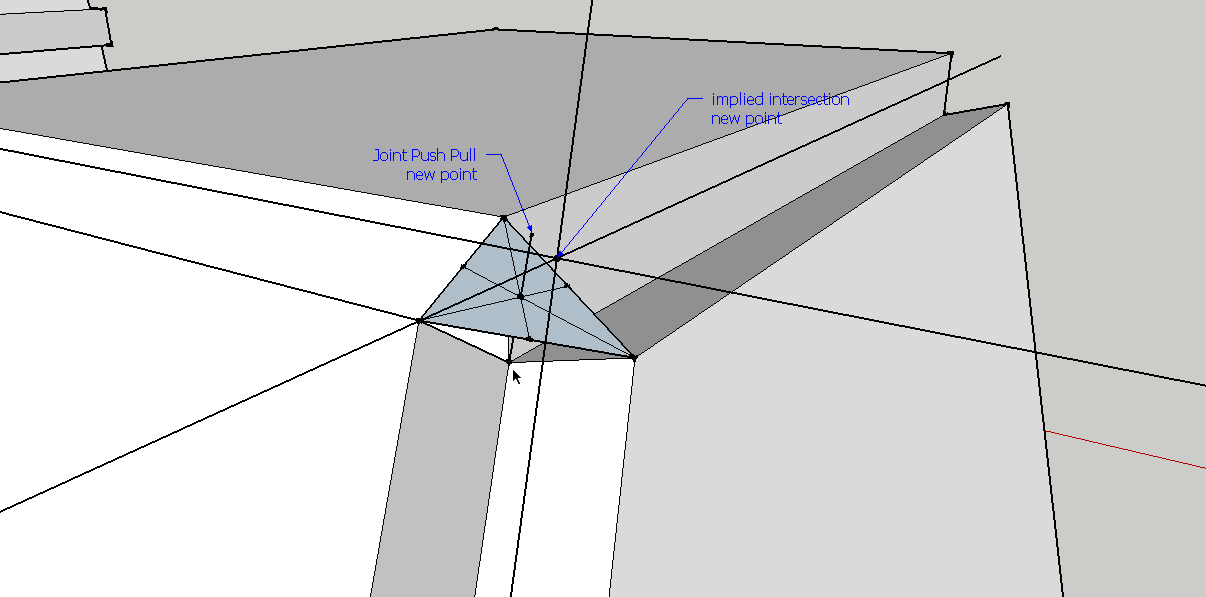
SketchUp file that screenshot was from. This shows my workflow a bit more.
-
Any chance of a new option to thicken a wall on both sides and delete the original wall in one step please?
Would allow for example tracing the centreline of a complex wall from Google Earth, (eg. the walls of a house) then thickening it in one step.
At present it is difficult to achieve. You have to thicken it in one direction by half, then thicken it the other way by the same amount. Problem is when you do the second step it leaves the original faces there, or at least the outlines, even if you specify delete original faces, meaning you wind up with a line down the centreline of the wall top and bottom which you then have to delete. For a long complex wall that can be painful.
-
Another request please. An option to say borders on external faces EXCEPT THE BOTTOM FACE. When thickening a wall for example, a face on the bottom is often not wanted since it will be sitting flat on the Google Earth surface.
-
@pmolsen said:
Another request please. An option to say borders on external faces EXCEPT THE BOTTOM FACE. When thickening a wall for example, a face on the bottom is often not wanted since it will be sitting flat on the Google Earth surface.
Just don't select the bottom face.
-
Regarding your issue with Joint PushPull not staying orthogonal, Use either VectorPushPull or NormalPushPull as other options. You can predefine the path the PushPull will follow with a line segment or by example with a nearby line already in the model.
That is, if I understood your problem.
-
@thomthom said:
Just don't select the bottom face.
I do not know what you mean. I do not select the bottom face. I select the single vertical faces and push-pull them one direction. Faces get created all round and top and bottom. Without deselecting the selected faces I then push-pull them in the opposite direction. There is no way of not creating the bottom faces.
But the problem is the outlines of the original faces remain on the top and bottom, along with numerous other lines generated by the push-pull. How do I prevent them?
One thing I tried was pulling the faces in one direction with "Delete original faces" on and "No Borders". I then used the Cleanup plugin to delete all the orphaned edge lines from the original faces. I then reselected all the faces and tried to pull them in the opposite direction using Thickening and Borders on Outer Faces Only. It does not work.
When you pull the wall in one direction using thickening, the original faces stay selected. If you then pull them in the other direction without deselecting them, they all move in the correct direction.
If you do the first push-pull with no borders and delete original faces they do not stay selected. After you do the cleanup, you reselect them and try to pull them in the other direction but it does not work properly. Some of them pull the correct direction. Others pull the opposite way (the same direction as the first push-pull operation) meaning those parts of the wall end up offset from where they should be.
-
thanks
-
 thk u sure!! i'm beginner.
 -
I've been trying to extrude a wasching bowl by 12mm. The JPP crashes on me every time I do this no matter whether I try it on my XP machine at work or my Mac at home. Is this a bug, or too many faces?
Kind regards,
Napper
-
Napper
It's an awkward shape to JPP...
I can't get a good result either
Here's an alternative method...
As it's a solid you can use Jim Foltz's 'shell' @12mm, then temporarily hide the top of the original outer-shell, PushPull the top of the new solid inner-shell up ~50mm so it will pierce the outer-shell's top, intersect both groups' geometry together, and then erase the unwanted parts in them, explode the two groups together and re-group as one, smooth it...![WHB_Test2[TIGd].PNG](/uploads/imported_attachments/k5xU_WHB_Test2TIGd.PNG) WHB_Test2[TIGd].skp
WHB_Test2[TIGd].skp -
Hi TIG,
this worked quite well, actually! I had to redo it, as I had given you the inner shell and needed an outer shell but that was good practice, actually... :smile: And along the way I got a new plugin, I had not been aware of as of yet. So, what I wanted to say is: THANK YOU!!! :smile:Napper











Advertisement