sketchucation logo sketchucation
    • Login
    Oops, your profile's looking a bit empty! To help us tailor your experience, please fill in key details like your SketchUp version, skill level, operating system, and more. Update and save your info on your profile page today!
    Mac User? | Join the Rayscaper Beta for Mac Learn More

    [Plugin] Automatic Face Reverser

    Scheduled Pinned Locked Moved Plugins
    35 Posts 32 Posters 87.0k Views 32 Watching
    Loading More Posts
    • Oldest to Newest
    • Newest to Oldest
    • Most Votes
    Reply
    • Reply as topic
    Log in to reply
    This topic has been deleted. Only users with topic management privileges can see it.
    • A
      arcano
      last edited by

      fantastic ruby ! Thanks a lot !

      1 Reply Last reply
      Reply Quote 0
      • T
        TeKnoel
        last edited by

        Wow! This is going to be great! 😍

        1 Reply Last reply
        Reply Quote 0
        • S
          SU Reviewer
          last edited by

          This is definitely a useful plugin. But I noticed that if you already have textures applied to a face and then reverse the faces, the plugin reverses the texture as well. I realize that reversing the faces is the whole point of the plugin but is there a way to ignore it if a texture is present or move the texture to the new side (so it stays in the same location)?

          Thanks for your hard work! πŸ‘

          Living Einstein's dream through SketchUp.
          "Imagination is a preview of life's coming attractions" - Albert Einstein

          Joe Simhon ~ SketchUp Plugin Reviews

          1 Reply Last reply
          Reply Quote 0
          • Didier BurD
            Didier Bur
            last edited by

            Hi SUReviewer,
            Good point. On the to-do list...

            DB

            1 Reply Last reply
            Reply Quote 0
            • R
              Ruturaj
              last edited by

              Hello,

              yes this plugin is very useful.......

              Thank you Didier Bur πŸ‘ πŸ‘ πŸ‘

              Thanks,
              Ruturaj

              Thanks,
              RuturaJ

              1 Reply Last reply
              Reply Quote 0
              • honoluludesktopH
                honoluludesktop
                last edited by

                Sigh.....I spent several weeks duplicating this plugin because I didn't do a good enough job searching for this one. Oh well, good practice programing.

                From the documentation, it will find faces inside components and groups, this is better then reverse_back_face, but not in interior views (reverse_back_face will). Maybe some one will come along and do both.

                1 Reply Last reply
                Reply Quote 0
                • L
                  lenova
                  last edited by

                  Thank you!

                  1 Reply Last reply
                  Reply Quote 0
                  • O
                    orjinalp
                    last edited by

                    thanks...

                    1 Reply Last reply
                    Reply Quote 0
                    • S
                      sijeljaaf
                      last edited by

                      Thank you so much but it doesn't work with my sketchup pro 8
                      Thanks

                      1 Reply Last reply
                      Reply Quote 0
                      • TIGT
                        TIG Moderator
                        last edited by

                        @sijeljaaf said:

                        Thank you so much but it doesn't work with my sketchup pro 8
                        Thanks
                        You have to explain how it doesn't work...
                        Does it download, install, add menu entires, any error messages [on screen or in the Ruby Console?], run as expected but not reverse faces, do it sometimes work, does it work but not work as you envisaged???

                        Once we have a better idea we can think about how we can resolve the issue, clearly it works for lots of people so something must be awry with your setup...

                        TIG

                        1 Reply Last reply
                        Reply Quote 0
                        • JVT_LTDJ
                          JVT_LTD
                          last edited by

                          Many thanks to this... Its truly functional...

                          1 Reply Last reply
                          Reply Quote 0
                          • U
                            unal
                            last edited by

                            teşekkürler:)

                            1 Reply Last reply
                            Reply Quote 0
                            • V
                              vaaron21
                              last edited by

                              @tig said:

                              @sijeljaaf said:

                              Thank you so much but it doesn't work with my sketchup pro 8
                              Thanks
                              You have to explain how it doesn't work...
                              Does it download, install, add menu entires, any error messages [on screen or in the Ruby Console?], run as expected but not reverse faces, do it sometimes work, does it work but not work as you envisaged???

                              Once we have a better idea we can think about how we can resolve the issue, clearly it works for lots of people so something must be awry with your setup...

                              It comes up in the plugin manager but it doesn't appear in the drop down menu for plugins.

                              1 Reply Last reply
                              Reply Quote 0
                              • Dave RD
                                Dave R
                                last edited by

                                @vaaron21 said:

                                It comes up in the plugin manager but it doesn't appear in the drop down menu for plugins.

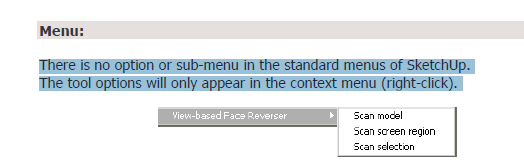
                                If you read the PDF file that came with the plugin you would see on the third page that this plugin shows only in the context menu. It doesn't appear in Plugins or any other the other menus.
                                Capture.PNG

                                Etaoin Shrdlu

                                %

                                (THERE'S NO PLACE LIKE)

                                G28 X0.0 Y0.0 Z0.0

                                M30

                                %

                                1 Reply Last reply
                                Reply Quote 0
                                • J
                                  jorgesalros
                                  last edited by

                                  Works fine, well done

                                  1 Reply Last reply
                                  Reply Quote 0
                                  • F
                                    function
                                    last edited by

                                    I'm not seeing the context menu in 2014... this plugin is great!

                                    1 Reply Last reply
                                    Reply Quote 0
                                    • bazB
                                      baz
                                      last edited by

                                      @function said:

                                      I'm not seeing the context menu in 2014... this plugin is great!

                                      Me too

                                      1 Reply Last reply
                                      Reply Quote 0
                                      • BoxB
                                        Box
                                        last edited by

                                        Baz, Didiers plugins haven't been updated to work with SU2014 but some of them can be fixed. This is one of them. It's a simple edit.
                                        Tig explains how here.
                                        http://sketchucation.com/forums/viewtopic.php?f=323%26amp;t=12354%26amp;start=60#p513679

                                        1 Reply Last reply
                                        Reply Quote 0
                                        • TIGT
                                          TIG Moderator
                                          last edited by

                                          Didier has agreed that I might update some of his Plugins available from the PluginStore...
                                          Please get the latest version from the PluginStore http://sketchucation.com/pluginstore?pln=Vbfr It is compatible with v2014 and v2015.

                                          TIG

                                          1 Reply Last reply
                                          Reply Quote 0
                                          • E
                                            Emersonvip
                                            last edited by

                                            thanks! very good. 5 stars.

                                            1 Reply Last reply
                                            Reply Quote 0

                                            Hello! It looks like you're interested in this conversation, but you don't have an account yet.

                                            Getting fed up of having to scroll through the same posts each visit? When you register for an account, you'll always come back to exactly where you were before, and choose to be notified of new replies (either via email, or push notification). You'll also be able to save bookmarks and upvote posts to show your appreciation to other community members.

                                            With your input, this post could be even better πŸ’—

                                            Register Login
                                            • 1
                                            • 2
                                            • 1 / 2
                                            • First post
                                              Last post
                                            Buy SketchPlus
                                            Buy SUbD
                                            Buy WrapR
                                            Buy eBook
                                            Buy Modelur
                                            Buy Vertex Tools
                                            Buy SketchCuisine
                                            Buy FormFonts

                                            Advertisement