sketchucation logo sketchucation
    • Login
    Oops, your profile's looking a bit empty! To help us tailor your experience, please fill in key details like your SketchUp version, skill level, operating system, and more. Update and save your info on your profile page today!
    ⚠️ Important | Libfredo 15.6a introduces important bugfixes for Fredo's Extensions Update

    [Plugin][$] FredoCorner - v2.7a - 31 Mar 24


    Scheduled Pinned Locked Moved Plugins
    439 Posts 152 Posters 541.6k Views 150 Watching
    Loading More Posts
    • Oldest to Newest
    • Newest to Oldest
    • Most Votes
    Reply
    • Reply as topic
    Log in to reply
    This topic has been deleted. Only users with topic management privileges can see it.
    • Rich O BrienR Offline
      Rich O Brien Moderator @Djilz
      last edited by

      @Djilz said in [Plugin][$] FredoCorner - v2.7a - 31 Mar 24:

      Au début, c'était gratuit et je te trouvais vraiment généreux de partager ainsi ton travail d'extension. Lorsque c'est devenu payant, j'étais content pour toi. Enfin, ton travail serait reconnu. J'ai acheté une licence perpétuelle à USD 12$. L'an dernier, c'était USD 15$. Mes étudiants achetaient cette licence. Maintenant, le coût est à USD 30$. Pour mes étudiants c'est désormais CAD 41$ et ils refusent désormais de l'acheter.

      At first, it was free, and I thought you were really generous to share your extension work like this. When it became a paid service, I was happy for you. Finally, your work would be recognized. I bought a perpetual license for $12 USD. Last year, it was $15 USD. My students bought this license. Now, the cost is $30 USD. For my students, it's now $41 CAD, and they refuse to buy it anymore.

      RoundCorner and Fredo Corner are separate extensions. It would seem you mixing up the prices between both.

      Roundcorner is still $15

      SketchUcation | Cart

      favicon

      (sketchucation.com)

      Download the free D'oh Book for SketchUp 📖

      1 Reply Last reply Reply Quote 0
      • M Offline
        MarcusS
        last edited by

        Get "License seat exceeded", how do I solve that?
        I guess seat is number of installations, I only have one but reinstalled my computer,

        Rich O BrienR 1 Reply Last reply Reply Quote 0
        • Rich O BrienR Offline
          Rich O Brien Moderator @MarcusS
          last edited by

          @MarcusS said in [Plugin][$] FredoCorner - v2.7a - 31 Mar 24:

          Get "License seat exceeded", how do I solve that?
          I guess seat is number of installations, I only have one but reinstalled my computer,

          Please run the Window > Libfredo Settings > Fredo6 Plugins Information for Sketchucation Support menu command in SketchUp and copy/paste the output into your reply.

          Download the free D'oh Book for SketchUp 📖

          1 Reply Last reply Reply Quote 0
          • M Offline
            MarcusS
            last edited by

            Fredo6 Plugins Information on 2025-09-22 11:27:32 +0200

            • Platform: x64-mswin64_140 - Ruby: 3.2.2
            • Sketchup: 25.0.660
            • LibFredo6: v15.4b
            • LibFredo6 Binary loaded
            • Sketchucation ExtensionStore: 4.4.1
            • SCFLicense: v6.4a - 74
            • Fredo6 Plugins

              FredoCorner v2.7a

            • SCFLicense directory present

              Signature File: 2025-09-21 17:08:52 +0200

            1 Reply Last reply Reply Quote 1
            • Rich O BrienR Offline
              Rich O Brien Moderator
              last edited by

              @MarcusS If you got to https://sketchucation.com/webshop/my-licences.php can you release any seats?

              Download the free D'oh Book for SketchUp 📖

              M 1 Reply Last reply Reply Quote 0
              • M Offline
                MarcusS @Rich O Brien
                last edited by

                @Rich-O-Brien, yes, that worked. Thanks!

                1 Reply Last reply Reply Quote 0
                • R Offline
                  RASKL
                  last edited by

                  Hello. I've been using Fredocorner for a number of years but it has recently stopped working.

                  I am on SU 25.0.660 64 bit. Windows.

                  I hover over the toolbar and i get the label saying "Round corners in 3D" but when i click the buttons nothing happens.

                  Please help!

                  Dan

                  1 Reply Last reply Reply Quote 0
                  • Rich O BrienR Offline
                    Rich O Brien Moderator
                    last edited by

                    @RASKL

                    Please run the Window > Libfredo Settings > Fredo6 Plugins Information for Sketchucation Support menu command in SketchUp and copy/paste the output into your reply.

                    Download the free D'oh Book for SketchUp 📖

                    1 Reply Last reply Reply Quote 0
                    • G Offline
                      Gent
                      last edited by

                      Dear Fredo! I thank you for your work. It means a lot to me as an aspiring designer. I bought some of your products and they are great. But I have a question and I do not know where to ask it to get your answer. Situation: I want to stop working on the Windows 10 operating system and upgrade to version 11. Will the licenses for your plugins that I bought be relevant? Will I be able to use them on the new operating system? Thank you.

                      Rich O BrienR 1 Reply Last reply Reply Quote 1
                      • Rich O BrienR Offline
                        Rich O Brien Moderator @Gent
                        last edited by

                        @Gent

                        I want to stop working on the Windows 10 operating system and upgrade to version 11. Will the licenses for your plugins that I bought be relevant? Will I be able to use them on the new operating system?

                        Yes, they will work. You will need to release seats at https://sketchucation.com/webshop/my-licences.php because if the device is the same but the OS changes then the licensing will see it as a new device.

                        Download the free D'oh Book for SketchUp 📖

                        1 Reply Last reply Reply Quote 0
                        • G Offline
                          Gent
                          last edited by

                          @Rich-O-Brien Thank you for your quick answer!

                          1 Reply Last reply Reply Quote 1
                          • A Offline
                            ArqFigueroa
                            last edited by

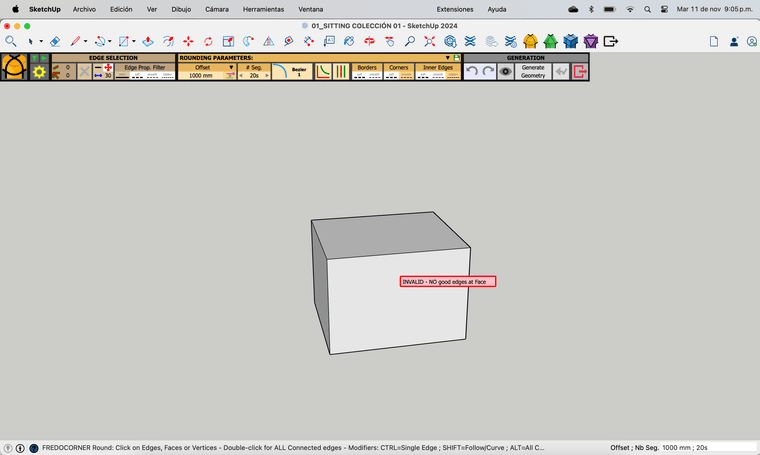
                            Captura de pantalla 2025-11-11 a la(s) 9.05.31 p.m..png

                            Hi ! Can somebody help me please, Been working with the free version but after pay the license it stop working

                            Rich O BrienR 1 Reply Last reply Reply Quote 1
                            • Rich O BrienR Offline
                              Rich O Brien Moderator @ArqFigueroa
                              last edited by

                              @ArqFigueroa Share the file please

                              Download the free D'oh Book for SketchUp 📖

                              1 Reply Last reply Reply Quote 0
                              • A Offline
                                ArqFigueroa
                                last edited by

                                It happens with any file, even in a new one 😞

                                1 Reply Last reply Reply Quote 1
                                • Rich O BrienR Offline
                                  Rich O Brien Moderator
                                  last edited by

                                  @ArqFigueroa Please enable this edge setting
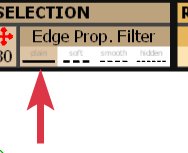
                                  image.png

                                  Download the free D'oh Book for SketchUp 📖

                                  1 Reply Last reply Reply Quote 0
                                  • A Offline
                                    ArqFigueroa
                                    last edited by

                                    Ooh it works ! Thank you so much !!!

                                    Rich O BrienR 1 Reply Last reply Reply Quote 1
                                    • Rich O BrienR Offline
                                      Rich O Brien Moderator @ArqFigueroa
                                      last edited by

                                      @ArqFigueroa It is the edge property filter. You had yours set to not select Hard edges.

                                      Download the free D'oh Book for SketchUp 📖

                                      1 Reply Last reply Reply Quote 0
                                      • G Offline
                                        GraceMien Newcomers
                                        last edited by

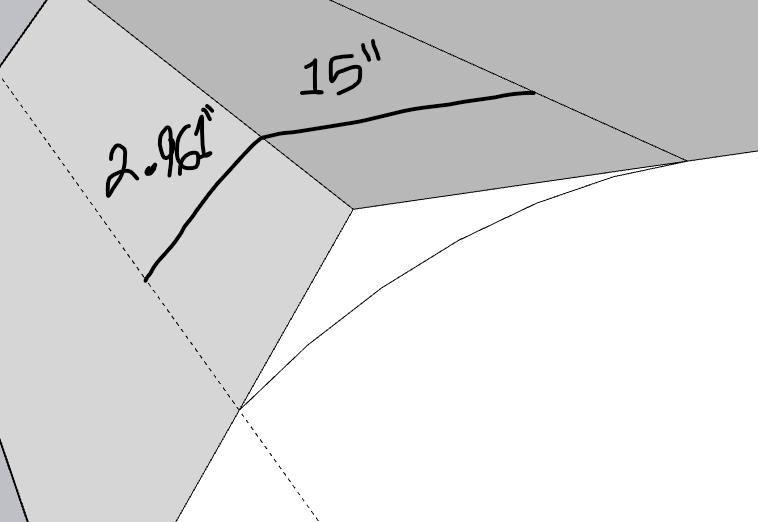
                                        Hi there! I was curious if it's possible to round a corner with an uneven offset? I'm looking through guides and documentation, but I figured it would probably be easier to just ask the source directly instead of spending a couple hours researching a feature that might not even exist. Thank you for your time!
                                        example corner.png

                                        G 1 Reply Last reply Reply Quote 1
                                        • Rich O BrienR Offline
                                          Rich O Brien Moderator
                                          last edited by

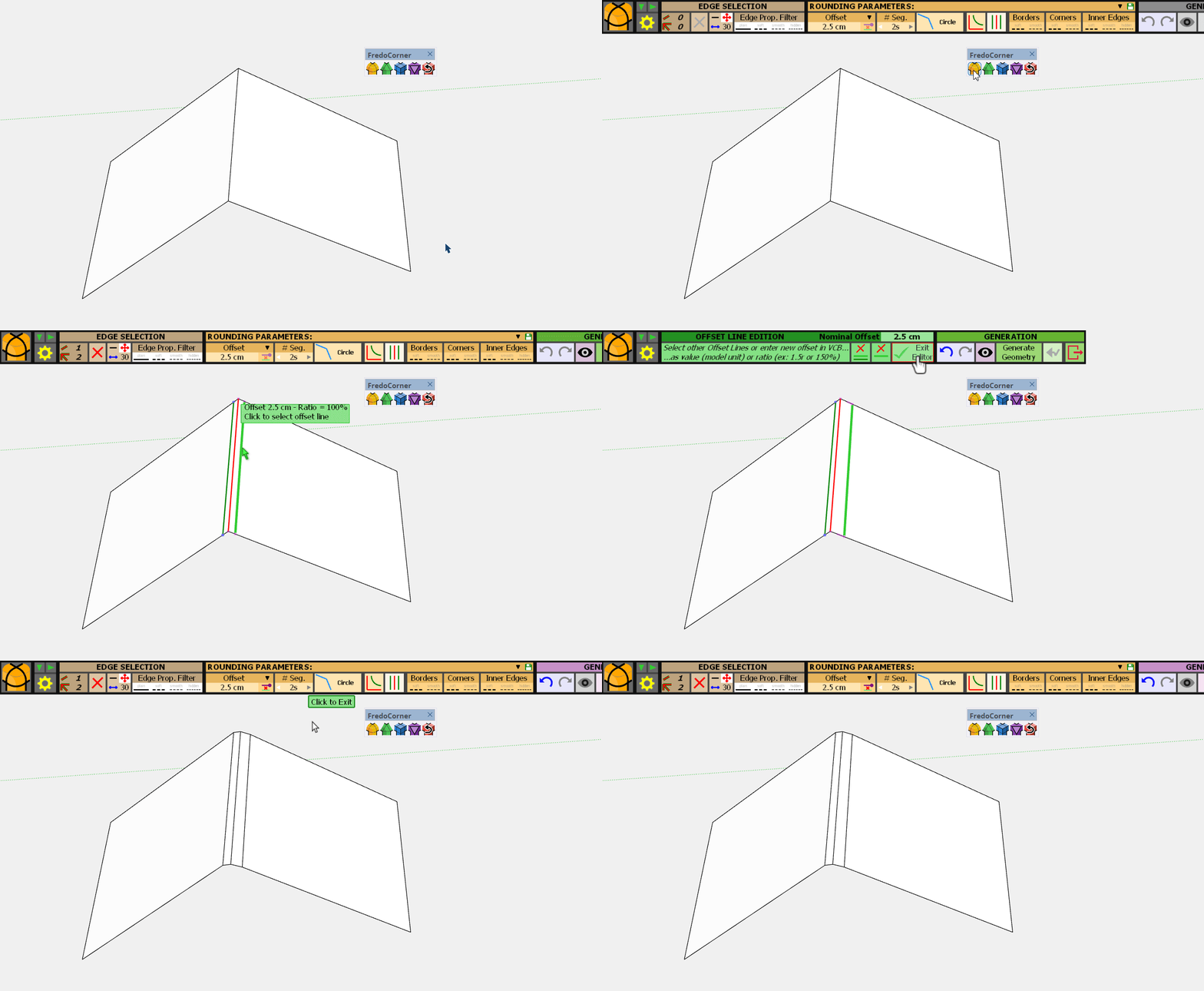
                                          Click the edge and type the variable offset in the VCB as either a length/radius or %
                                          SketchUp_mSx8Q6rslT.gif

                                          Download the free D'oh Book for SketchUp 📖

                                          1 Reply Last reply Reply Quote 0
                                          • G Offline
                                            GraceMien Newcomers @GraceMien
                                            last edited by

                                            Oh awesome! Thank you so much for such a quick and helpful reply. I really appreciate it.

                                            1 Reply Last reply 👍 Reply Quote 1
                                            • 1
                                            • 2
                                            • 18
                                            • 19
                                            • 20
                                            • 21
                                            • 22
                                            • 22 / 22
                                            • First post
                                              Last post
                                            Buy SketchPlus
                                            Buy SUbD
                                            Buy WrapR
                                            Buy eBook
                                            Buy Modelur
                                            Buy Vertex Tools
                                            Buy SketchCuisine
                                            Buy FormFonts

                                            Advertisement