sketchucation logo sketchucation
    • Login
    Oops, your profile's looking a bit empty! To help us tailor your experience, please fill in key details like your SketchUp version, skill level, operating system, and more. Update and save your info on your profile page today!
    Mac User? | Join the Rayscaper Beta for Mac Learn More

    [Plugin] Add Layer [1.1.0]

    Scheduled Pinned Locked Moved Plugins
    58 Posts 23 Posters 17.4k Views 23 Watching
    Loading More Posts
    • Oldest to Newest
    • Newest to Oldest
    • Most Votes
    Reply
    • Reply as topic
    Log in to reply
    This topic has been deleted. Only users with topic management privileges can see it.
    • tt_suT
      tt_su
      last edited by

      Note that in SU older than 2014 creating layers with the special flag might cause SU to trigger the Fix Model dialog. That warning is a bug - nothing was messed up, it was the validation code that was wrong. And the Fix Model dialog will reset the flag unfortunately.

      1 Reply Last reply
      Reply Quote 0
      • N
        Nortti
        last edited by

        Thank you for the 'Add Layer' plugin! This is a huge time saver. Although, when I select "Layer visible on selected scene only" it does not create a layer. Am I missing something? Still even without this feature it's a success.

        Thanks for any help in getting this fully working.

        Mac OSX 10.9.2 / SketchUp Pro 2013

        1 Reply Last reply
        Reply Quote 0
        • J
          Jim
          last edited by

          @nortti said:

          Thank you for the 'Add Layer' plugin! This is a huge time saver. Although, when I select "Layer visible on selected scene only" it does not create a layer. Am I missing something? Still even without this feature it's a success.

          Thanks for any help in getting this fully working.

          Mac OSX 10.9.2 / SketchUp Pro 2013

          You should get a dialog if you select this option an there are no Scenes in the model. If there are Scenes in the model, then please try to select this option while the Ruby Console window is open. Are there any errors shown?

          Hi

          1 Reply Last reply
          Reply Quote 0
          • jiminy-billy-bobJ
            jiminy-billy-bob
            last edited by

            @tt_su said:

            Note that in SU older than 2014 creating layers with the special flag might cause SU to trigger the Fix Model dialog. That warning is a bug - nothing was messed up, it was the validation code that was wrong. And the Fix Model dialog will reset the flag unfortunately.

            The only flag causing an issue is "LAYER_HIDDEN_BY_DEFAULT", isn't it?

            25% off Skatter for SketchUcation Premium Members

            1 Reply Last reply
            Reply Quote 0
            • JQLJ
              JQL
              last edited by

              @tt_su said:

              Note that in SU older than 2014 creating layers with the special flag might cause SU to trigger the Fix Model dialog. That warning is a bug - nothing was messed up, it was the validation code that was wrong. And the Fix Model dialog will reset the flag unfortunately.

              Ahhh! So that's why my models needed fixing everytime!...

              www.casca.pt
              Visit us on facebook!

              1 Reply Last reply
              Reply Quote 0
              • J
                Jim
                last edited by

                @otb designworks said:

                Awesome! Any way to change the layer behavior after it has been created?

                For instance, if I make a layer and choose for it to be hidden for new scenes, but then I change my mind and want it visible for new scenes, is that possible to change?

                thanks!

                I could implement editing by using a Listbox instead of a Textbox...
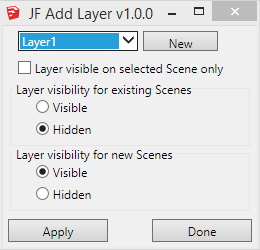
                2014-03-12_201733.png

                But then I'd need a dialog for the new layer name...
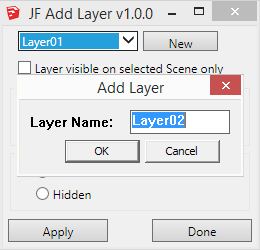
                2014-03-12_202033.png

                Or perhaps not even have the add new layer option - just have the plugin be a layer behavior editor.

                ❓

                Hi

                1 Reply Last reply
                Reply Quote 0
                • J
                  Jim
                  last edited by

                  @techdave02 said:

                  There add scenes layer that works / on only that scene or you can update it to work in other scenes works well for dimensions http://sketchucation.com/forums/viewtopic.php?f=10%26amp;t=36583

                  Error 404 (Not Found)!!1

                  favicon

                  (sketchuptips.blogspot.ca)

                  The option to make the layer "visible on the selected scene only" should work, no?

                  That's my blog you linked to - and this plugin is an update to the one you linked to.

                  Hi

                  1 Reply Last reply
                  Reply Quote 0
                  • K
                    ktkoh
                    last edited by

                    I downloaded this plugin from the SU Store for the purpose of learning the SKUI interface.
                    However while testing I was not able to get the check box "Layer visible on selected Scene only" to create a new layer.

                    Error; #<NameError; undefined local variable or method `txt_LayerName' for JF;;AddLayer;Module>
                    C;/Users/Keith/AppData/Roaming/SketchUp/SketchUp 2014/SketchUp/Plugins/jf_add_layer/main.rb;155;in `add_layer'
                    C;/Users/Keith/AppData/Roaming/SketchUp/SketchUp 2014/SketchUp/Plugins/jf_add_layer/main.rb;110;in `block in main'
                    C;/Users/Keith/AppData/Roaming/SketchUp/SketchUp 2014/SketchUp/Plugins/jf_add_layer/SKUI/events.rb;82;in `call'
                    C;/Users/Keith/AppData/Roaming/SketchUp/SketchUp 2014/SketchUp/Plugins/jf_add_layer/SKUI/events.rb;82;in `block in trigger_event'
                    C;/Users/Keith/AppData/Roaming/SketchUp/SketchUp 2014/SketchUp/Plugins/jf_add_layer/SKUI/events.rb;78;in `each'
                    C;/Users/Keith/AppData/Roaming/SketchUp/SketchUp 2014/SketchUp/Plugins/jf_add_layer/SKUI/events.rb;78;in `trigger_event'
                    C;/Users/Keith/AppData/Roaming/SketchUp/SketchUp 2014/SketchUp/Plugins/jf_add_layer/SKUI/window.rb;357;in `event_control_callback'
                    C;/Users/Keith/AppData/Roaming/SketchUp/SketchUp 2014/SketchUp/Plugins/jf_add_layer/SKUI/window.rb;311;in `callback_handler'
                    C;/Users/Keith/AppData/Roaming/SketchUp/SketchUp 2014/SketchUp/Plugins/jf_add_layer/SKUI/window.rb;269;in `block in add_callback'
                    C;/Users/Keith/AppData/Roaming/SketchUp/SketchUp 2014/SketchUp/Plugins/jf_add_layer/SKUI/window.rb;203;in `call'
                    C;/Users/Keith/AppData/Roaming/SketchUp/SketchUp 2014/SketchUp/Plugins/jf_add_layer/SKUI/window.rb;203;in `show_modal'
                    C;/Users/Keith/AppData/Roaming/SketchUp/SketchUp 2014/SketchUp/Plugins/jf_add_layer/SKUI/window.rb;203;in `show'
                    C;/Users/Keith/AppData/Roaming/SketchUp/SketchUp 2014/SketchUp/Plugins/jf_add_layer/main.rb;145;in `main'
                    C;/Users/Keith/AppData/Roaming/SketchUp/SketchUp 2014/SketchUp/Plugins/jf_add_layer/main.rb;185;in `block in <module;AddLayer>'
                    -e;1;in `call'
                    

                    The other options worked as expected. Note: this also failed in 2013 with a slightly different error message.

                    Keith

                    1 Reply Last reply
                    Reply Quote 0
                    • J
                      Jim
                      last edited by

                      Keith - I am looking into this, but can not reproduce it in any version from 2008 thru 2014.

                      Hi

                      1 Reply Last reply
                      Reply Quote 0
                      • J
                        Jim
                        last edited by

                        Keith - I believe this is fixed in version 1.0.1. Let me know.

                        Thanks for taking the time to report the error.

                        Hi

                        1 Reply Last reply
                        Reply Quote 0
                        • K
                          ktkoh
                          last edited by

                          Yes it is fixed now.

                          Keith

                          1 Reply Last reply
                          Reply Quote 0
                          • jiminy-billy-bobJ
                            jiminy-billy-bob
                            last edited by

                            @jim said:

                            I don't mind, but I really think you should implement this in Layers Panel natively

                            Done!

                            404 Not Found

                            favicon

                            (sketchucation.com)

                            Thanks a lot πŸ˜‰

                            25% off Skatter for SketchUcation Premium Members

                            1 Reply Last reply
                            Reply Quote 0
                            • J
                              Jim
                              last edited by

                              Updated to version 1.1.0 using a Dropdown for selecting and changing the visibility properties.

                              Hi

                              1 Reply Last reply
                              Reply Quote 0
                              • D
                                dedmin
                                last edited by

                                Win7 - Personalization - Set Custom text size (DPI)- 125%
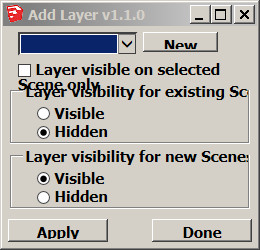
                                2014-04-12_091257.jpg

                                1 Reply Last reply
                                Reply Quote 0
                                • J
                                  Jim
                                  last edited by

                                  Thanks for the report - I am researching a fix.

                                  Hi

                                  1 Reply Last reply
                                  Reply Quote 0
                                  • tt_suT
                                    tt_su
                                    last edited by

                                    Jim, what version of SKUI are you using? I thought I had it fixed, because I use 125% scaling on my Win7 MacBook pro due to the retina screen.

                                    1 Reply Last reply
                                    Reply Quote 0
                                    • J
                                      Jim
                                      last edited by

                                      SKUI/version.rb says "0.1.0"

                                      Hi

                                      1 Reply Last reply
                                      Reply Quote 0
                                      • tt_suT
                                        tt_su
                                        last edited by

                                        I haven't been updating SKUI version - as I haven't made a release of it. I mean, are you using the latest committed version from GitHub?

                                        1 Reply Last reply
                                        Reply Quote 0
                                        • J
                                          Jim
                                          last edited by

                                          I thought so, but 3 files have been updated in SKUI and not in Add Layer:

                                          core.rb
                                          embed_skui.rb
                                          js/ui.js

                                          But those changes are related to FILE encoding, and browser detection.

                                          Hi

                                          1 Reply Last reply
                                          Reply Quote 0
                                          • TIGT
                                            TIG Moderator
                                            last edited by

                                            @otb designworks said:

                                            I am running mac 10.9.5 and SU2015. This plugin is not working at all on my system. It will create a new scene, regardless of visibility settings, but this scene is visible on all existing and new layers. It is as if I had used the + button in the Scene Palette.

                                            It was installed through the Sketchucation Plugin

                                            Thoughts?
                                            I am confused πŸ˜•
                                            This Plugin opens a dialog so you can make a new Layer or modify the behaviors of a selected existing Layer.
                                            The Layer's 'behavior' relates to Scene tabs, and it is in three parts.

                                            • Visible in selected [current] Scene tab only
                                            • Visible/Hidden in existing Scene tab
                                            • Visible/Hidden in new Scene tabs
                                              It does not create Scenes ?

                                            You seems to be jumbling Layer and Scene πŸ˜•
                                            Please clarify...

                                            TIG

                                            1 Reply Last reply
                                            Reply Quote 0

                                            Hello! It looks like you're interested in this conversation, but you don't have an account yet.

                                            Getting fed up of having to scroll through the same posts each visit? When you register for an account, you'll always come back to exactly where you were before, and choose to be notified of new replies (either via email, or push notification). You'll also be able to save bookmarks and upvote posts to show your appreciation to other community members.

                                            With your input, this post could be even better πŸ’—

                                            Register Login
                                            • 1
                                            • 2
                                            • 3
                                            • 2 / 3
                                            • First post
                                              Last post
                                            Buy SketchPlus
                                            Buy SUbD
                                            Buy WrapR
                                            Buy eBook
                                            Buy Modelur
                                            Buy Vertex Tools
                                            Buy SketchCuisine
                                            Buy FormFonts

                                            Advertisement