sketchucation logo sketchucation
    • Login
    Oops, your profile's looking a bit empty! To help us tailor your experience, please fill in key details like your SketchUp version, skill level, operating system, and more. Update and save your info on your profile page today!
    ⚠️ Update | Sketchucation Tools 5.0.8 released with licensing improvements and bugfixes Download

    [Plugin] UV Toolkit

    Scheduled Pinned Locked Moved Plugins
    377 Posts 86 Posters 398.5k Views 86 Watching
    Loading More Posts
    • Oldest to Newest
    • Newest to Oldest
    • Most Votes
    Reply
    • Reply as topic
    Log in to reply
    This topic has been deleted. Only users with topic management privileges can see it.
    • thomthomT
      thomthom
      last edited by

      Copy from one mesh to another is more challenging.
      UV copy/paste only works on per quad-face.

      If you have a mapped mesh, then use the UV Memory function to store the UVs - then you can make a copy of that mesh - modify it (as long as you don't erase/recreate the faces and finally use the UV Restore function.

      Copy from a mesh to another would require the mesh to have the same structure, same number of faces etc. The challenge is trying to match it all up.

      hmmm...

      Thomas Thomassen β€” SketchUp Monkey & Coding addict
      List of my plugins and link to the CookieWare fund

      1 Reply Last reply
      Reply Quote 0
      • GaieusG
        Gaieus
        last edited by

        @thomthom said:

        Copy from a mesh to another would require the mesh to have the same structure, same number of faces etc. The challenge is trying to match it all up.

        Well yes, as the plugin currently works (also), it is obvious. But as I explained, I'll have to finish the untextured model first and then texture it.

        @thomthom said:

        If you have a mapped mesh, then use the UV Memory function to store the UVs - then you can make a copy of that mesh - modify it (as long as you don't erase/recreate the faces and finally use the UV Restore function.

        This method would require to re-model each vault. In my above example, the two vaults are identical in face count and all. So with "my version" I could (re-)texture the whole thing any time by texturing the "regular" one and then transfer the co-ordinates to the other one.

        But of course, if it is a no-go, I won't insist (somehow I thoughtyour unpublished beta worked that way)

        Gai...

        1 Reply Last reply
        Reply Quote 0
        • thomthomT
          thomthom
          last edited by

          It's not a complete go. But it may not be part of the next release. ...will see... Would be a very useful tool.

          Thomas Thomassen β€” SketchUp Monkey & Coding addict
          List of my plugins and link to the CookieWare fund

          1 Reply Last reply
          Reply Quote 0
          • GaieusG
            Gaieus
            last edited by

            @thomthom said:

            Would be a very useful tool.

            Definitely. And thanks for listening!
            πŸ˜„

            (We could add a topic next to "Google is listening" like "ThomThom is listening")
            πŸ˜„

            Gai...

            1 Reply Last reply
            Reply Quote 0
            • Rich O BrienR
              Rich O Brien Moderator
              last edited by

              Or even "Gaieus is pestering" maybe?

              Download the free D'oh Book for SketchUp πŸ“–

              1 Reply Last reply
              Reply Quote 0
              • GaieusG
                Gaieus
                last edited by

                I am only doing it for the sake of the community (i.e. squeezing everything out of Thom in order that we have the greatest UV plugin ever!)
                πŸ˜„

                Gai...

                1 Reply Last reply
                Reply Quote 0
                • Rich O BrienR
                  Rich O Brien Moderator
                  last edited by

                  I'll agree on the UV toolkit being excellent but don't forget he needs to concentrate on Bezier Patch for me.

                  Now i need to return to baking the world biggest cookie.....for Thom.....my pal...... πŸ‘

                  Download the free D'oh Book for SketchUp πŸ“–

                  1 Reply Last reply
                  Reply Quote 0
                  • R
                    Ro33y
                    last edited by

                    thanks a lot thom!! πŸ‘

                    very usefull... β˜€

                    1 Reply Last reply
                    Reply Quote 0
                    • R
                      robert111
                      last edited by

                      why uv toolkit , no work with me, i have make uv toolkit (2.1.0) and TT_Lib2 (v2.4.0) in sketchup / plugin but i dont find uv toolkit in my plugin

                      is the same problem with sketchup 7 and 8
                      plz i need solution for this problem
                      thanks

                      1 Reply Last reply
                      Reply Quote 0
                      • thomthomT
                        thomthom
                        last edited by

                        Windows or OSX? Can you post a screenshot of where you placed the files?
                        Any error messages?

                        Thomas Thomassen β€” SketchUp Monkey & Coding addict
                        List of my plugins and link to the CookieWare fund

                        1 Reply Last reply
                        Reply Quote 0
                        • R
                          robert111
                          last edited by

                          thanks thomthom
                          i have uv toolkit and not toolkit2
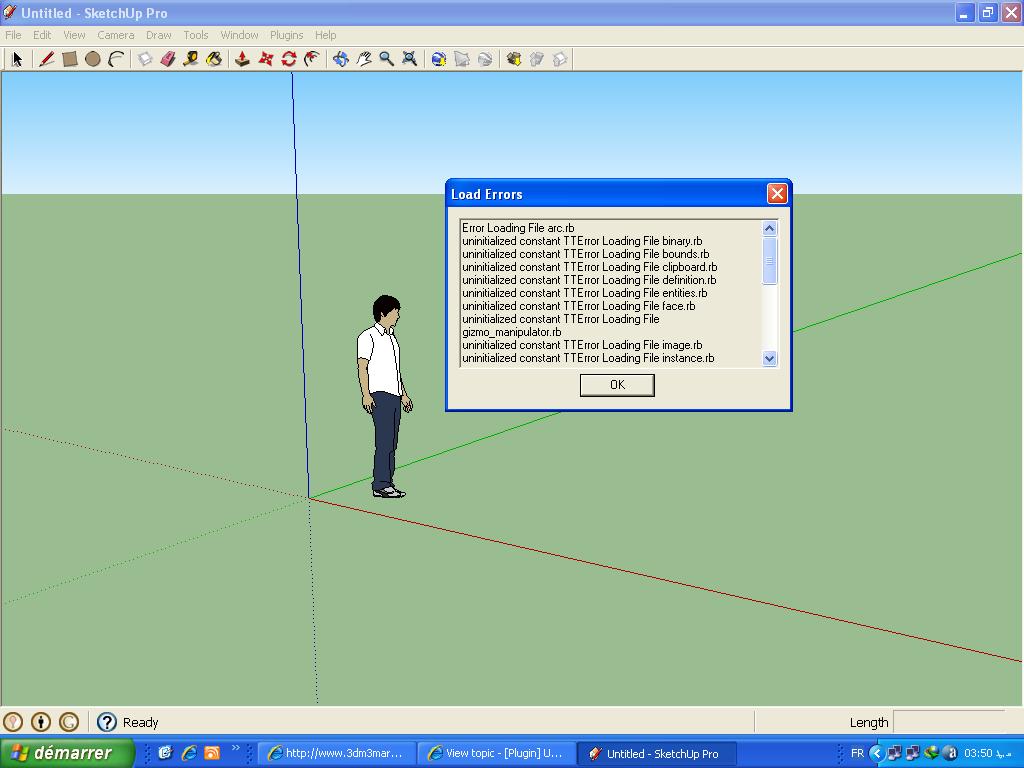

                          01.JPG


                          02.JPG


                          03.JPG

                          1 Reply Last reply
                          Reply Quote 0
                          • R
                            robert111
                            last edited by

                            i have windows xp pack 3

                            1 Reply Last reply
                            Reply Quote 0
                            • thomthomT
                              thomthom
                              last edited by

                              I'm guessing you put all the content of the TT_Lib2 folder directly into the plugins folder?
                              Have a look at the footprint description of TT_Lib2 - towards the bottom of the first post.

                              Thomas Thomassen β€” SketchUp Monkey & Coding addict
                              List of my plugins and link to the CookieWare fund

                              1 Reply Last reply
                              Reply Quote 0
                              • R
                                robert111
                                last edited by

                                yes i put all the content of the TT_Lib2 folder directly into the plugins folder

                                1 Reply Last reply
                                Reply Quote 0
                                • thomthomT
                                  thomthom
                                  last edited by

                                  It should be there.
                                  It should be ...\Plugins\TT_Lib2\<*.rb> - like the footprint description for TT_Lib illustrates.

                                  Thomas Thomassen β€” SketchUp Monkey & Coding addict
                                  List of my plugins and link to the CookieWare fund

                                  1 Reply Last reply
                                  Reply Quote 0
                                  • R
                                    robert111
                                    last edited by

                                    I did not understand, can you explain more clearly

                                    1 Reply Last reply
                                    Reply Quote 0
                                    • J
                                      JoZ
                                      last edited by

                                      Ehy ThomThom, great plugin πŸ˜„
                                      Any chance you would look into increasing it with numerical input transformations like: translation, rotation, scale as possible in 3dpaintbrush for example (see this part of video: http://www.youtube.com/watch?feature=player_detailpage&v=h_7ZOgjxREM#t=125s) ?
                                      That would be very usefull, avoiding me the need to often switch to other 3d app just for this (I often need precise numerical transform) πŸ˜„

                                      1 Reply Last reply
                                      Reply Quote 0
                                      • thomthomT
                                        thomthom
                                        last edited by

                                        When I finish the transoformation gizmo you'll be able to use numerical input for some transformations.

                                        Thomas Thomassen β€” SketchUp Monkey & Coding addict
                                        List of my plugins and link to the CookieWare fund

                                        1 Reply Last reply
                                        Reply Quote 0
                                        • J
                                          JoZ
                                          last edited by

                                          Perfect... now I must remind of that... everything I think... You have yet thought about! πŸ˜›

                                          1 Reply Last reply
                                          Reply Quote 0
                                          • W
                                            wannabe
                                            last edited by

                                            hi

                                            I'm using sketchup for a while now (i got used to sketchup6 and this plugin works fine with it πŸ˜„ )
                                            well I haven't got any request for a plugin before but this one just peaks my curiosity...

                                            I thought of "linking" all faces (by id or something) to a brother object which we could deform and even unwrap (^^), texture and use remember uvs so it saves the current material position
                                            BUT
                                            restore it on the original

                                            what do u think ? possible ?

                                            deforming the face was nice however without I'd be happy too 😎

                                            great work so far works great

                                            1 Reply Last reply
                                            Reply Quote 0

                                            Hello! It looks like you're interested in this conversation, but you don't have an account yet.

                                            Getting fed up of having to scroll through the same posts each visit? When you register for an account, you'll always come back to exactly where you were before, and choose to be notified of new replies (either via email, or push notification). You'll also be able to save bookmarks and upvote posts to show your appreciation to other community members.

                                            With your input, this post could be even better πŸ’—

                                            Register Login
                                            • 1
                                            • 2
                                            • 8
                                            • 9
                                            • 10
                                            • 11
                                            • 12
                                            • 18
                                            • 19
                                            • 10 / 19
                                            • First post
                                              Last post
                                            Buy SketchPlus
                                            Buy SUbD
                                            Buy WrapR
                                            Buy eBook
                                            Buy Modelur
                                            Buy Vertex Tools
                                            Buy SketchCuisine
                                            Buy FormFonts

                                            Advertisement