sketchucation logo sketchucation
    • Login
    1. Home
    2. TaffGoch
    3. Posts
    Oops, your profile's looking a bit empty! To help us tailor your experience, please fill in key details like your SketchUp version, skill level, operating system, and more. Update and save your info on your profile page today!
    ⚠️ Important | Libfredo 15.6b introduces important bugfixes for Fredo's Extensions Update
    Offline
    • Profile
    • Following 0
    • Followers 0
    • Topics 7
    • Posts 364
    • Groups 1

    Posts

    Recent Best Controversial
    • RE: Patent illustrations

      There's a limitation to patent illustrations that could be problematic for SketchUp. The sample image that Mike provided demonstrates it well. Do you see it?

      Patent illustrations must be line drawings, with no shading. Or more precisely, shading must be depicted using lines or solid-black; no shades of grey. You can see how this is done in Mike's example image.

      I suspect that SketchUp can be manipulated into not using shading/shadows, but it looks like those 'shading lines' are going to have to be added 'manually.' Still, SketchUp could take a lot of the workload out of producing an accurate orthographic line drawing for a patent.

      I reproduced a patent image (posted here in a discussion last year) that demonstrated SketchUp's ability to depict the proper orthographic view. (Images on the left taken from a patent.) The SketchUp image, on the right, would have to be further cleaned up, to remove the variable shades from the conic surfaces. Otherwise, it's a near-perfect match.
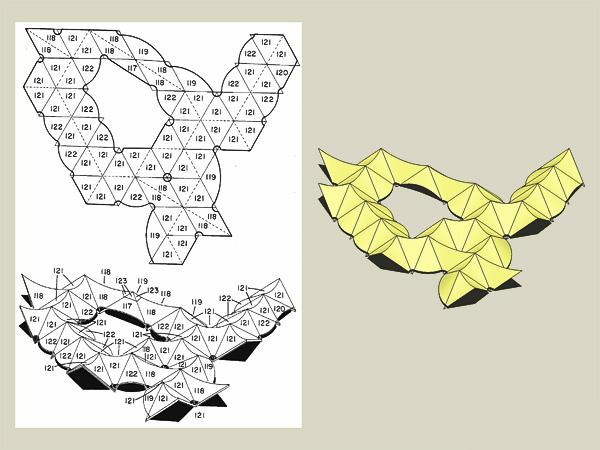
      Conics.jpg
      I'd vote yes - SketchUp can more-than-adequately do the job. Perhaps, even a 'style' could be defined that would automatically take care of most of the shading work.

      Regards,
      Taff
      posted in SketchUp Discussions
      TaffGochT
      TaffGoch
    • RE: Construction Point at Origin can not be done > Why?

      Jim,

      It's been around that long? Geez, you'd think it would have been taken care of by now.

      Does it behave this way only on one platform, or both PC and Mac? ("I'm a PC.")

      Taff

      posted in SketchUp Discussions
      TaffGochT
      TaffGoch
    • RE: Construction Point at Origin can not be done > Why?

      Huh! Bizarre...

      ...actually it is there, but 'invisible.' I generally use the 'point at center' plugin for circles. I created a circle centered at the origin, used the 'point at center' context menu command, then deleted the circle.

      No guide point is visible, but if you select with the 'right-drag' select box, the 'entity info' box indicates a guide point is selected. Doing the exact same thing, just off center, creates and displays the guidepoint.

      Turning off axis visibility makes no difference, so that's not the problem.

      You can select and move the guidepoint, but it remains invisible!

      To me, this behavior looks like a reportable bug...

      Regards,
      Taff

      posted in SketchUp Discussions
      TaffGochT
      TaffGoch
    • RE: Problem GPU/CPU???

      Darren,

      I also have Precision M90, which I purchased last November. The graphics card is the nVidia Quadro FX 1500M. (Operating system Windows XP Pro SP2)

      I'm using the two-year old nVidia driver from DELL, version 84.29

      As long as I keep anti-aliasing off, I've had zero problems in SketchUp. Most of the time, even anti-aliasing works fine. As far as games, I haven't had any problems running 'Half-Life/Orange Box' at full speed; all graphic features enabled (on a 1920x1200 pixel screen, at that!)

      I can't comment on Vista, but I will tell you that I purposely avoided it, in favor of WinXP (I prefer not to serve as a guinea pig for Microsoft, thank you very much.)

      Regards,
      Taff

      posted in SketchUp Discussions
      TaffGochT
      TaffGoch
    • RE: Creating Rope - More Explanation Needed

      bigstick,

      I haven't yet discovered a low-poly means of construction, either.

      If rope is serving as merely a component in a larger model, it would logically be better to depict the appearance of rope with a texture on a cylindrial surface. Unfortunately, the texture doesn't register very well between adjacent faces. It ends up looking more like patchwork, rather than rope.

      I was hoping someone else might have worked this out. Oh well...

      ...but I did indeed enjoy working on the geometric problem. As you've noticed from my models, I seem to favor geometric constructions over more 'practical' uses of SketchUp. (I can't understand how some folks complain about lack of precision in SketchUp - I love it.)


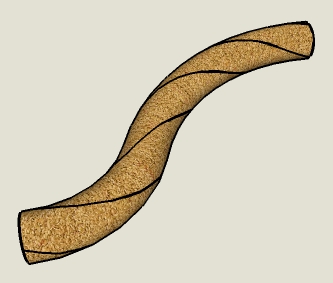
      Now that I think about it some more, one idea that should work is to stop at the 3-helix stage, leaving the helices visible on the surface of a colored cylindrical 'tube.' The tube would then provide the appearance of rope, without actually having to model the strands. (To put it another way, instead of the helices defining the centerlines of the strands, they would serve as apparent edges between strands.)

      Close-up, it looks pretty lame, but from a distance, as part of a larger model, it should serve as a reasonable facsimile of rope.

      Hwyl mawr,
      Taff
      (Glad to see that someone got the Welsh nickname reference.)


      RopeSim.jpg

      posted in SketchUp Discussions
      TaffGochT
      TaffGoch
    • RE: Creating Rope - More Explanation Needed

      bigstick,

      That works quickly, when modeling along a straight line. I've used it as well:

      'Three-Strand Rope Study'
      http://sketchup.google.com/3dwarehouse/details?mid=6314b47c3c79791861748fff0acb7ad

      But how do you draw convoluted, irregular rope arrangements?

      I've tried modifying the above technique; doing the follow-me, selecting each joint and rotating it around the centerline (in increments as I move along the rope.) That was so time consuming (and eye-crossing.)

      Through more experiments...

      'Rope Twist Study'
      http://sketchup.google.com/3dwarehouse/details?mid=6509d5585ba63ac5b5b34ecf8890b0ef

      'Rope Grommet Study'
      http://sketchup.google.com/3dwarehouse/details?mid=c1cd24304534076bdfb305973222a554

      'Bowline • 3-Strand Rope • Construction'
      http://sketchup.google.com/3dwarehouse/details?mid=a1d0f59bb2a6325d1672893bc20b4763

      ...I settled on the 'helices-on-cylinder' approach depicted in the last one. It may produce more geometry, but doesn't take as long to model.


      AndriyG81,

      Your description sounds like the 'Rope Grommet Study' above. Is that how you do it, too? (Or am I reading your description wrong, and you have another method I could possibly try?)


      Regards,
      Taff

      posted in SketchUp Discussions
      TaffGochT
      TaffGoch
    • RE: Problem with 3dtext

      Dave,

      I don't know when the 3Dtext routine reads the fonts on the computer, but if it does so at the onset of the tool, a problem with your fonts could be glitching SketchUp.

      I'm not saying this is the cause, but it could be one potential item to check off your debugging list. Since SketchUp has had problems with certain characters in the filenames of textures, perhaps font filenames could also present similar problems.

      Side note: I have many (probably too many) fonts on my machine, but haven't seen this behavior. So, I don't think the number of fonts would be a problem; maybe just one font filename is confusing SketchUp.

      Just thinking outside the box here...

      Regards,
      Taff

      posted in SketchUp Discussions
      TaffGochT
      TaffGoch
    • RE: Apply image to curved item

      @gaieus said:

      But first of all, turn on hidden geometry (View menu) because you cannot position=project an image on a curved surface only on a single face.

      Gai, don't you have that backwards?

      You're correct about positioning textures, but projecting only works with hidden geometry off.

      Regards,
      Taff

      posted in SketchUp Discussions
      TaffGochT
      TaffGoch
    • RE: Apply image to curved item

      mateoc15,

      Just to avoid confusion, note that SketchUp terms, 'projecting' and 'wrapping,' describe two similar, but separate, texturing features. Both topics are described in the bottom half of this 'Users Guide' page:

      http://download.sketchup.com/OnlineDoc/gsu6_win/Content/D-Modification_Tools/ModTool-PositionTexture.htm?Highlight=Wrapping|Projecting

      Remus is correct in his description of steps to project a texture, and this is generally the fastest way to texture a shape like a bat. (But you may not like the woodgrain along the sides, 90 degrees from the 'front' face; it depends on the detail of your texture image.)

      Wrapping requires a different set of steps. You might want try both projecting and wrapping, to see which best provides the appearance you're after.

      Regards,
      Taff

      posted in SketchUp Discussions
      TaffGochT
      TaffGoch
    • RE: Need Help on SPIRALOID SHAPE

      Simon,

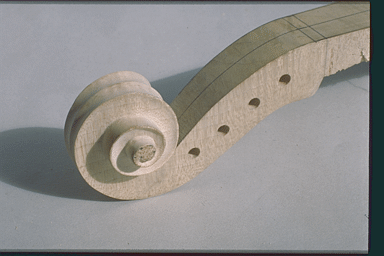
      When I stumbled across this image while web-surfing, I immediately recalled your discussion thread:

      fig94.gif
      This is a violin in-the-making. There are even more curved and 'dished/cupped' surfaces evident here. A prospective thought-provoker for your 'Everythingcurved Stair'?

      Regards,
      Taff

      posted in Newbie Forum
      TaffGochT
      TaffGoch
    • RE: How i can model this shape

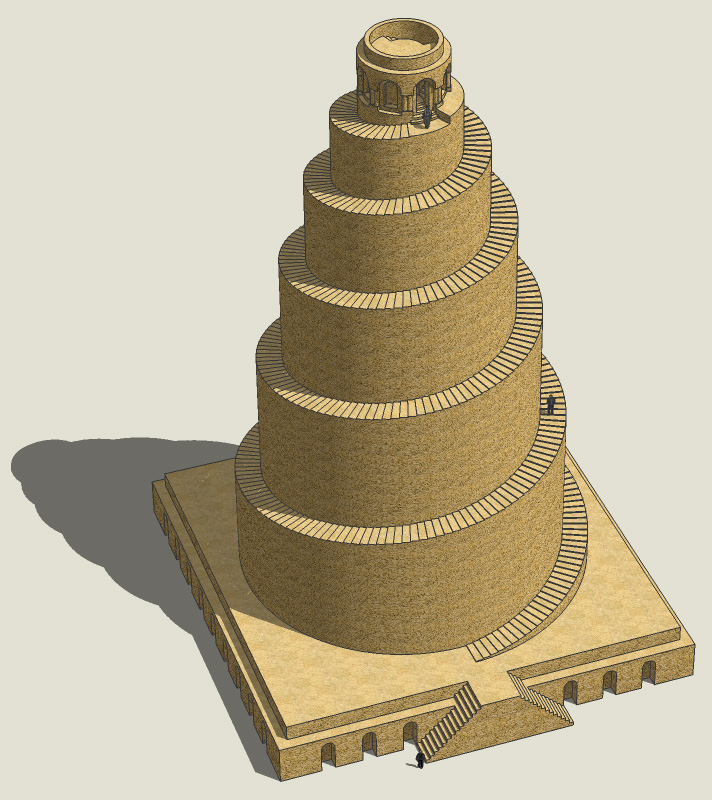
      For those interested, I've added the upper chamber to the above-referenced 'work in progress.' (I'm done - I certainly don't intend to model the blast damage from the 2005 bombing!)

      There doesn't appear to actually be a 'chamber' in there - only internal spiral stairs to the roof deck. It looks like it's completely filled-in stonework (conjecture.) Historically, there was apparently a wooden post-and-roof structure above the deck. (Only the sockets for the posts remain today.)

      Model is posted in the SketchUp 3D Warehouse:

      Error 404 (Not Found)!!1

      favicon

      (sketchup.google.com)

      I'm certainly wrong about some of the upper details, but I can't find photos taken from the correct angle - showing the doorway and internal stairs at the top.
      Updated Trimble 3DWarehouse URL for the SketchUp model:
      https://3dwarehouse.sketchup.com/model/de78ece7f12a167c663f954f31de8916/Malwiya-Tower

      Regards,
      Taff


      Samarra.jpg

      posted in SketchUp Discussions
      TaffGochT
      TaffGoch
    • RE: How i can model this shape

      gorygreg,

      I would think that would indeed work...

      ...if all the steps were the same size and shape. The only characteristic they share is their 'rise' (the amount of increased height.) The push/pull does have a feature that permits quicker repetition - after raising one step, all you have to do is double-click the next step. It will raise the exact same amount. Do it again, and it raises another increment.

      So, it does help, but still, there are hundreds of steps to process.

      You're right that a rubyscript could probably be devised to achieve all the uplifts one-after-another, but the time spent writing and debugging the script would likely take longer than what I did manually. If I were to need it for subsequent models, then it might be advantageous to develop such a script.

      Believe me, I thought long-and-hard about how I might automate the process (to any degree,) but couldn't come up with any time-saving concept. Again, I didn't want to think long about, and toy with possibilities, if all that thinking would ultimately take longer than manual push/pulling.

      Any insights from ruby pros would be interesting to hear about, though...

      Regards,
      Taff

      posted in SketchUp Discussions
      TaffGochT
      TaffGoch
    • RE: Creating Rope - More Explanation Needed

      Mark,

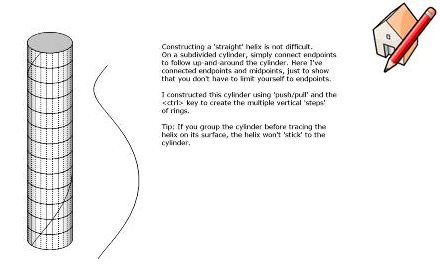
      I included, in that rope model, a group (off-screen) that shows the technique I used for making the 3 helical paths. For more explanation, you can refer to this 'quickie' demo model, just now posted:

      Error 404 (Not Found)!!1

      favicon

      (sketchup.google.com)

      Regards,
      Taff


      SketchUp 6.0.515(free) / Win XP Pro / nVIDIA Quadro FX 1500M


      Capture_3-19-2008.png

      posted in SketchUp Discussions
      TaffGochT
      TaffGoch
    • RE: How i can model this shape

      Okay, I was wrong...

      ...about the name of this spiral. I got the construction right, and it does indeed serve the need of the model, but it's attributed not to Archimedes, but to Theodorus. (Actually, I can't visually tell the difference when comparing the two.)

      Fred, I posted drawing instructions at the 3D Warehouse:

      Error 404 (Not Found)!!1

      favicon

      (sketchup.google.com)

      There's a pretty good summary of several different spirals at:

      Link Preview Image
      Spirals

      About spirals

      favicon

      (www.mathematische-basteleien.de)

      I liked the Theodorus spiral because it's construction is purely mechanical, and doesn't require processing a formula. Plus, as I've said, the objective was equal line segments. This is the only spiral (of which I'm currently aware) that readily provides that characteristic.

      Regards,
      Taff

      posted in SketchUp Discussions
      TaffGochT
      TaffGoch
    • RE: How i can model this shape

      @fbartels said:

      Would you mind sharing how you made the starting spiral in the model?

      Fred,

      I was considering posting a description of the archimedean-spiral construction method (which I originally learned as a draftsman.) Your request settles it - I'll show additional details in a new model. I'll let you know when it's up...

      Taff

      posted in SketchUp Discussions
      TaffGochT
      TaffGoch
    • RE: How i can model this shape

      alwa7sh_r

      Please note that I wasn't attempting to produce precise results here. I was merely testing a construction method. If all you're looking for is a spiral-ramp construction technique, there are much easier methods. (I can point some out in the 3D Warehouse, if need be.)

      If you look at my model, you'll see that the spiral rotates in the wrong direction (easily flip-corrected.) Also, I didn't concern myself with the correct proportions of the top surface, width-to-height, and other relative measurements.

      So, this was simply a geometric-construction exercise to me. If it gets you started in correctly modeling your objective, then I'm gratified.


      All that being said, I found the architecture to be quite fascinating (particularly considering its age.) As such, I'm working on a model of it, with photo-approximated dimensions and proportions. (But since you're working on a car-park ramp, that isn't really your goal, right?) 😎

      Regards,
      Taff


      Work in progress...

      posted in SketchUp Discussions
      TaffGochT
      TaffGoch
    • RE: How i can model this shape

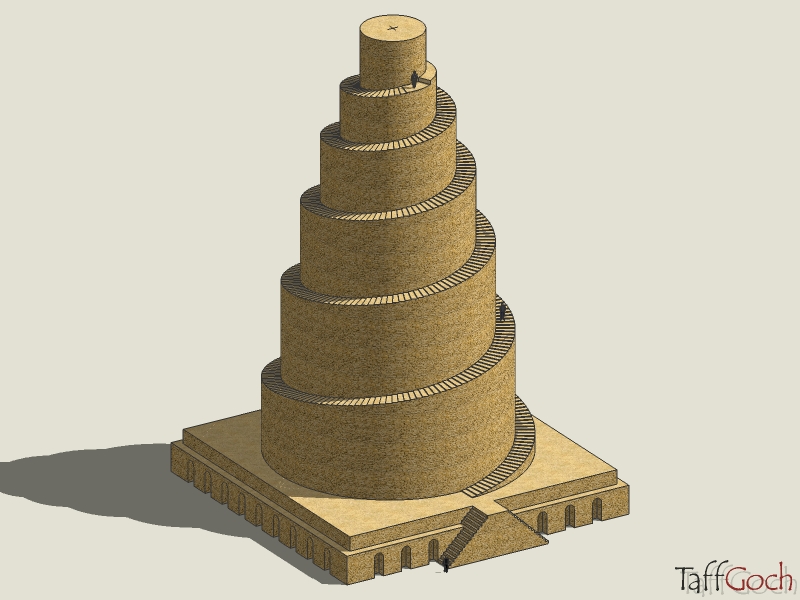
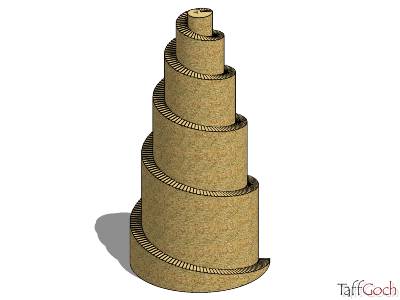
      Even though it appears that this discussion is one of those abandoned by its original poster, I was intrigued by its challenge.

      From the internet images available, the spiral steps appear to be of equal depth (tread.) My initial attempts to model it produced steps of decreasing tread, because I was using equal angular displacement. As the steps rise up the spiral, the radius decreases, so equal angle division of the spiral didn't produce satisfactory results.

      Thinking about the math that would have been applied by the original builders, I assumed that the work of Archimedes would have been known. Since one of the methods for drawing an archimedean spiral uses equal edge segments, starting at the center and spiraling outwards, I tested the archimedean spiral as the initial 'floorplan' for the tower.

      From the result, it looks like this is how the actual tower footprint was laid out. I haven't bothered with adjusting the height, as that would be a simple scaling job for SketchUp. I just wanted to confirm the geometric concept of construction. (I also didn't model the topmost chamber.)

      Error 404 (Not Found)!!1

      favicon

      (sketchup.google.com)

      (I've retained the spiral construction entities in the model, off to the left of the tower depiction.)

      Construction of the spiral plan was easy enough. The worst part of modeling was the individual push/pull for each of the 397 steps!

      I can't seem to resist a geometric challenge. Fortunately, SketchUp provides the necessary horsepower and precision to test potential solutions.

      Regards,
      Taff


      SketchUp 6.0.515(free) / Windows XP Pro SP2 / nVIDIA Quadro FX 1500M


      Minaret.jpg

      posted in SketchUp Discussions
      TaffGochT
      TaffGoch
    • RE: ATTN: TaffGoch >> Bucky on stage!!

      Chris,

      I have copies of the Synergetics books. You're right, they're not much for reading. I use them as reference sources, and even then, only a few sections of the material have practical application (to me, anyway.)

      Man! - I never even considered actually sitting down and READING Synergetics. Maybe the next time I'm having trouble getting to sleep....

      Regards,
      Taff

      posted in Corner Bar
      TaffGochT
      TaffGoch
    • RE: ATTN: TaffGoch >> Bucky on stage!!

      Fred,

      How about that - I've valued your models, too (one of my few 'bookmarks' to the 3DWarehouse.)

      Funny, you mention the 'Whole Earth Catalog.' I, too, cut my teeth on a lot of the information from that first book. (I look at it as a precursor to the internet.) From there, I learned about 'DomeBook II' and obtained a copy. That book is still in my library, and still fascinates my students, even today.

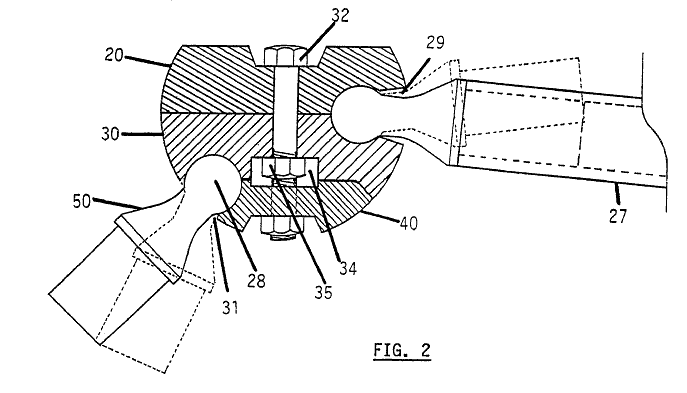
      For years, I've collected information regarding the construction of geodesic structures (thank God for the internet!) Your hub design reminded me of a patent I had downloaded a couple of years ago.

      If you use Google's Patent search you can find a lot of 'prior art' on inventions related to 'space frame' construction (what you call TIN structures.) If you search on terms 'space frame,' 'structure,' 'connector' and similar, you get hundreds of hits.

      The specific patent I recalled is number 4974986:

      Error 404 (Not Found)!!1

      favicon

      (www.google.com)

      This is only one example of many similar designs. I don't want to 'burst any bubbles' here, but advise that you be careful. If you make any money on this venture, you can be sure that the lawyers will start 'crawling out of the woodwork' to claim patent infringement. You'd best have your own patent attorney beforehand.

      Maybe they won't care if it's a toy, and doesn't threaten anyone else's profits (but you can never tell with lawsuits nowadays.)

      Don't let legal issues stop you - just be prepared.

      Regards,
      Taff


      Space Frame Hub.png

      posted in Corner Bar
      TaffGochT
      TaffGoch
    • RE: [Tutorial > Modeling] How to Model a Horn Shape

      I've used a different technique, also using 'scale' factors:
      http://sketchup.google.com/3dwarehouse/details?mid=97b8fc8464aed5a47193a3f94ff03a46

      Anyone else have another way to "skin this cat?" I've found that new methods for achieving a desired objective are always appreciated by the Community.

      Regards,
      Taff

      posted in SketchUp Tutorials
      TaffGochT
      TaffGoch
    • 1
    • 2
    • 15
    • 16
    • 17
    • 18
    • 19
    • 17 / 19