sketchucation logo sketchucation
    • Login
    1. Home
    2. sdmitch
    3. Posts
    Oops, your profile's looking a bit empty! To help us tailor your experience, please fill in key details like your SketchUp version, skill level, operating system, and more. Update and save your info on your profile page today!
    ⚠️ Important | Libfredo 15.6b introduces important bugfixes for Fredo's Extensions Update
    Offline
    • Profile
    • Following 0
    • Followers 4
    • Topics 54
    • Posts 1,483
    • Groups 2

    Posts

    Recent Best Controversial
    • RE: [Plugin] FloorGenerator ( Updated 6-Apr-2017)

      @sdmitch said:

      @rogalxxx said:

      here, Floor generator on stock settings, two identical planes-second one with tiles applied.
      looks like geometry has some random lines and faces, even though I have set no random parameter.

      I retested FloorGenerator in SU2017 using your model and, in 16 tests, 5 appeared to be normal, 1 had a single tile missing and the other 10 had several missing in random locations.

      My initial test seemed ok because I stupidly used the Random Colors option.

      I will do what I can to fix this problem.

      [highlight=#ff0000:sj7zyo1x]GOOD NEWS!!!! Once again it seems that the problem is the same old group explode redefining the ID of the selected face. Updated version now available in Plugin Store and my blog.[/highlight:sj7zyo1x]
      posted in Plugins
      sdmitchS
      sdmitch
    • RE: [Plugin] FloorGenerator ( Updated 6-Apr-2017)

      @rogalxxx said:

      here, Floor generator on stock settings, two identical planes-second one with tiles applied.
      looks like geometry has some random lines and faces, even though I have set no random parameter.

      I retested FloorGenerator in SU2017 using your model and, in 16 tests, 5 appeared to be normal, 1 had a single tile missing and the other 10 had several missing in random locations.

      My initial test seemed ok because I stupidly used the Random Colors option.

      I will do what I can to fix this problem.

      [highlight=#ff0000:153r5xxr]GOOD NEWS!!!! Once again it seems that the problem is the same old group explode redefining the ID of the selected face. Updated version now available in Plugin Store and my blog.[/highlight:153r5xxr]

      posted in Plugins
      sdmitchS
      sdmitch
    • RE: Boolean Subtraction or ???

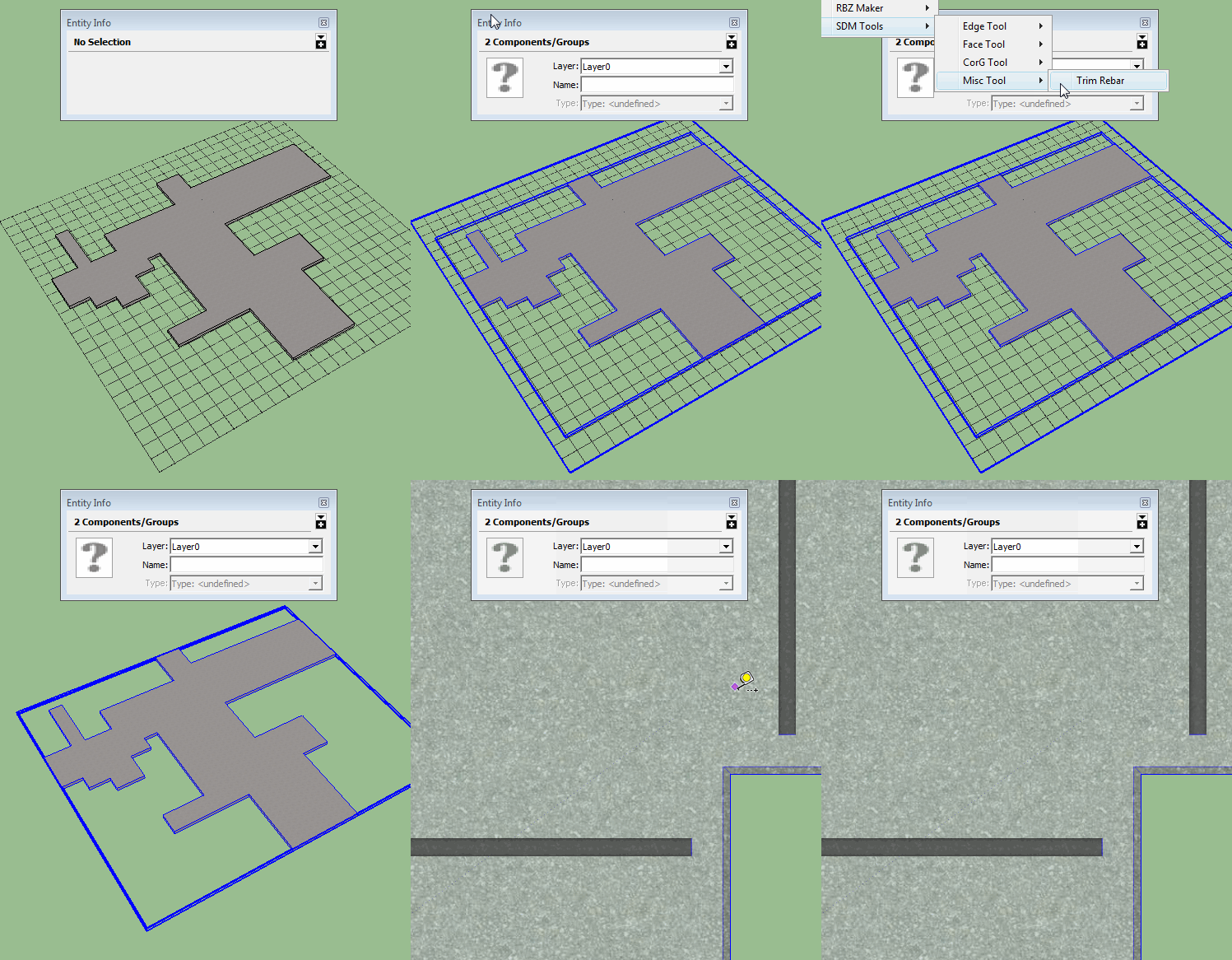
      Not that difficult.


      Trim Rebars.gif

      posted in Developers' Forum
      sdmitchS
      sdmitch
    • RE: [Plugin] FloorGenerator ( Updated 6-Apr-2017)

      @rogalxxx said:

      I'm having problems with the plugin in SU 2017. Su 2015 seems to be working fine.

      Using even stock settings I get a lot of random tiles missing.

      I have tested FloorGenerator in SU2017 and had no problem with missing tiles.

      Could you post your model so I could test it myself?

      posted in Plugins
      sdmitchS
      sdmitch
    • RE: Boolean Subtraction or ???

      @medeek said:

      Currently the rebar or mesh is created so that it extends to the full extent of the bounding box of the slab. I would like to use the boolean subtraction that is built into SketchUp to trim the reinforcement so that it is properly contained within the slab.

      What should the distance be from the end of the rebar to edge of the slab?

      posted in Developers' Forum
      sdmitchS
      sdmitch
    • RE: Copy a Group within a Component in Ruby, preserve location

      @hank said:

      @sdmitch: Thank you. This worked mostly, successfully copying the groups out to the model, however the transformations did not seem to make it. Of the 3 test "WALL" components in my file, one group was the correct size but moved, the other two were the wrong size AND moved.

      Also,

      ent = @mod.active_entities
      

      returned undefined method `active_entities' for nil:NilClass so I changed it to

      ent = mod.active_entities
      

      to get the script to run. Am I missing something about the @? Which I think means you are calling an "instance" variable?

      @Dan Rathbun: Thank you. I am just using the layer as an easy selector for the groups I want within the component. Do you recommend another way?

      Sorry about that. I always use @variables as a habit and just missed removing that one. Looks like I got the 'transformation' order wrong which had no effect on my un-rotated un-scaled test wall. Try this one.

      mod = Sketchup.active_model
      ent = mod.active_entities
      mod.definitions.each{|d|
        next if d.image? || d.group? || d.name!="WALL" # skip images, groups, and any component not named "WALL"
        d.instances.each{|ci|
          ci.definition.entities.each{ |wall_primative_group|
            if wall_primative_group.layer.name == "WALL_PRIMITIVES" # only proceed with groups on target layer
              group_copy = ent.add_instance(wall_primative_group.entities.parent,ci.transformation*wall_primative_group.transformation)
              group_copy.name = 'WALL_PRIMITIVES_COPY'
            end
          }
        }
      }
      
      
      posted in Developers' Forum
      sdmitchS
      sdmitch
    • RE: Copy a Group within a Component in Ruby, preserve location

      You were on the right track with method#1. Once you have the definition, you need to iterate the instances of that definition. When making the copy, you need to apply the transformations of both the component instance and the group in order to have the copy be the same as the original.

      mod = Sketchup.active_model
      ent = mod.active_entities
      mod.definitions.each{|d|
        next if d.image? || d.group? || d.name!="WALL" # skip images, groups, and any component not named "WALL"
        d.instances.each{|ci|
          ci.definition.entities.each{ |wall_primative_group|
            if wall_primative_group.layer.name == "WALL_PRIMITIVES" # only proceed with groups on target layer
              group_copy = ent.add_instance(wall_primative_group.entities.parent, wall_primative_group.transformation*ci.transformation)
              group_copy.name = 'WALL_PRIMITIVES'
            end
          }
        }
      }
      
      
      posted in Developers' Forum
      sdmitchS
      sdmitch
    • RE: Component that can not be made unique

      It makes perfect sense I guess that, if you only have one instance of a component in the model it is already 'unique'. What I was trying to do is create a basic component in the model then place and modify copies of that component without effecting the original. Placing and hiding a copy solves the 'logic problem'.

      posted in Developers' Forum
      sdmitchS
      sdmitch
    • Component that can not be made unique

      Is there any reason that a component created by a plugin can not be made unique?

      I've tried using a group and .to_component as well as creating the definition.entites. In both cases, when the component is added to the model, the 'Make Unique' option is grayed out. If I copy the instance, the copy can be made unique while the original still can not be.

      I guess the answer is to hide an instance in the model so additional copies can be placed made unique and modified

      posted in Developers' Forum
      sdmitchS
      sdmitch
    • RE: Hole drilled at an angle

      Just make the tube long enough that it intersects with the top and bottom faces. Repeat the deletions on bottom side.

      posted in SketchUp Discussions
      sdmitchS
      sdmitch
    • RE: Hole drilled at an angle

      @zipster1967 said:

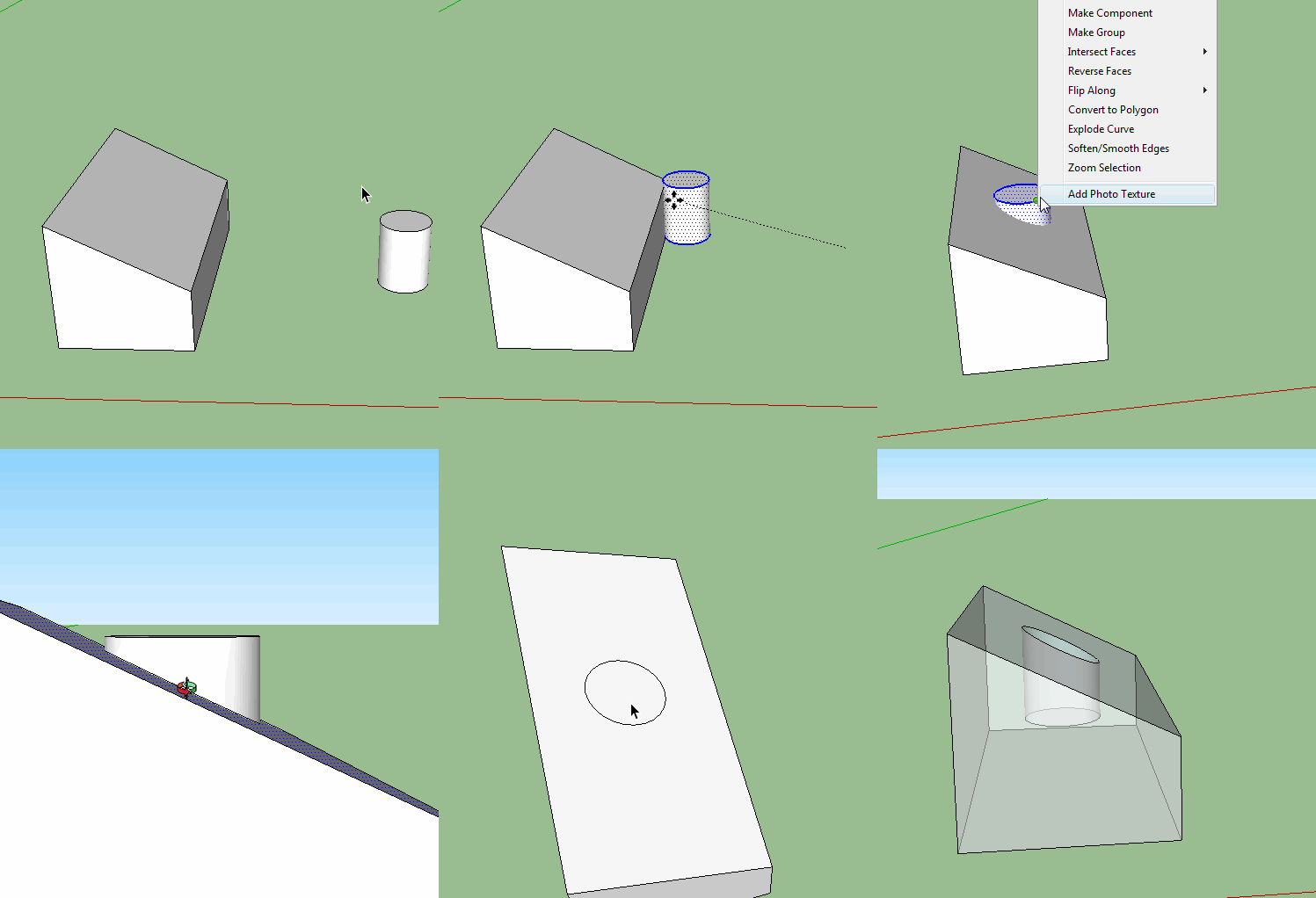
      Is there a way to drill out a hole that is at an angle to the face of the containing "box"

      Create a tube the diameter of the hole you want to drill. Move the tube to the desired location and attitude. Right on the selected tube and choose 'Intersect with model'. Delete the extended tube and face.


      drill at angle.gif

      posted in SketchUp Discussions
      sdmitchS
      sdmitch
    • RE: [Plugin] FloorGenerator ( Updated 6-Apr-2017)

      Once again SU2017 is acting in a different way than previous versions. Maybe there is a solution but I doubt it.

      posted in Plugins
      sdmitchS
      sdmitch
    • RE: [Plugin] FloorGenerator ( Updated 6-Apr-2017)

      @yourpasswordis said:

      I saw it posted on the first page of this plugin, a LAP setting would be AMAZING.

      I'm in Architectural Visualization and material properties don't allow for accurate displacement maps. A plugin like this is tantalizingly close to creating the repeating clap/lap siding which our pro-user group needs. Sketchup has been blessed with rendering engines but this modelling aid is missing!

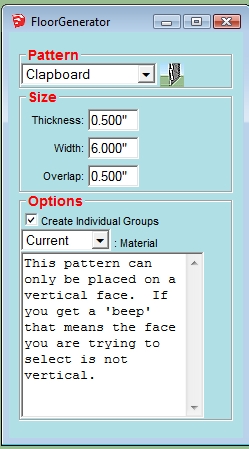
      A basic "Clapboard" option has been added.


      Clapboard.jpg

      posted in Plugins
      sdmitchS
      sdmitch
    • RE: [Plugin] FloorGenerator ( Updated 6-Apr-2017)

      @meegg said:

      Your plugin is amazing. Thank You.
      Is there a possibility to make some additional options in octagons pattern? Option to give the size of two tiles: the big one and the smaller one. It would be very helpful.

      Have you looked at the "Hopscotch" patterns?

      posted in Plugins
      sdmitchS
      sdmitch
    • RE: [Plugin] Stair Maker

      Since I don't have or have access to a Mac, there is no way for me to address this problem.

      posted in Plugins
      sdmitchS
      sdmitch
    • RE: Resizing a Component

      @ebelg2000 said:

      Thanks, that's great, exactly what I had in mind and more. My problem now is I have absolutely zero knowledge of Ruby and therefore how to implement your solution. Any suggestions on how I might proceed would be greatly appreciated. Thanks again for your help

      Select the Component Instance. Open the Ruby Console, Window>Ruby Console. Copy and Paste the code into the Ruby Console input and press Enter. You can repeat the process by selecting another Component Instance. Clicking the the Ruby Console input and pressing the Up arrow and then the Enter key.

      This is a simplistic solution and will only work with Component Instances that are not rotated by some angle other than 90 degrees due to the bounding box expanding and contracting base on the rotation.

      posted in Woodworking
      sdmitchS
      sdmitch
    • RE: Resizing a Component

      @ebelg2000 said:

      Is there an easy way to resize a compenent, adding a uniform amount to each side? For instance, if I have a component that is 10" x 10", is there a way to add 1/4" to each side, changing it to a 10.5" x 10.5" other than by using push pull on each of the edges? Thanks

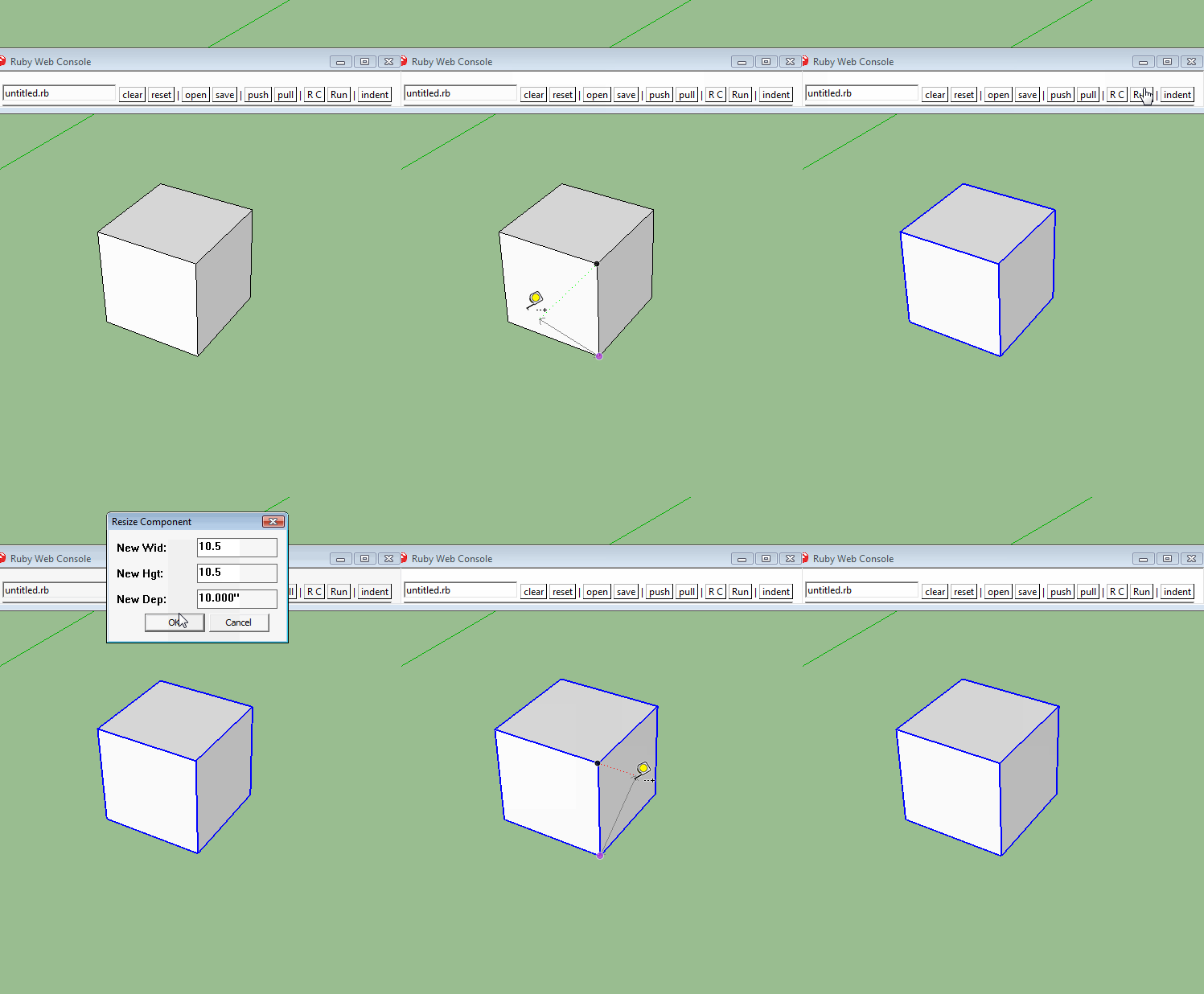
      Scaling the component instance about it's center using Ruby is probably the easiest way to do it.

      @mod = Sketchup.active_model
      @ent = @mod.active_entities
      @sel = @mod.selection
      @vue = @mod.active_view
      ci = @sel.grep(Sketchup;;ComponentInstance)[0]
      if ci
       dims = UI.inputbox(["New Wid;","New Hgt;","New Dep;"],[ci.bounds.width,ci.bounds.height,ci.bounds.depth],"Resize Component")
       if dims
        wid,hgt,dep=dims
        xscl = wid/ci.bounds.width
        yscl = hgt/ci.bounds.height
        zscl = dep/ci.bounds.depth
        org = ci.bounds.center
        tr = Geom;;Transformation.scaling(org,xscl,yscl,zscl)
        ci.make_unique; ci.transform! tr
       end
      end
      

      resize ci.gif

      posted in Woodworking
      sdmitchS
      sdmitch
    • RE: [Plugin] Lines to tubes

      @josephkim626 said:

      Indeed it behaves funny when it is run on rectangles.

      But it seems fine for some others.

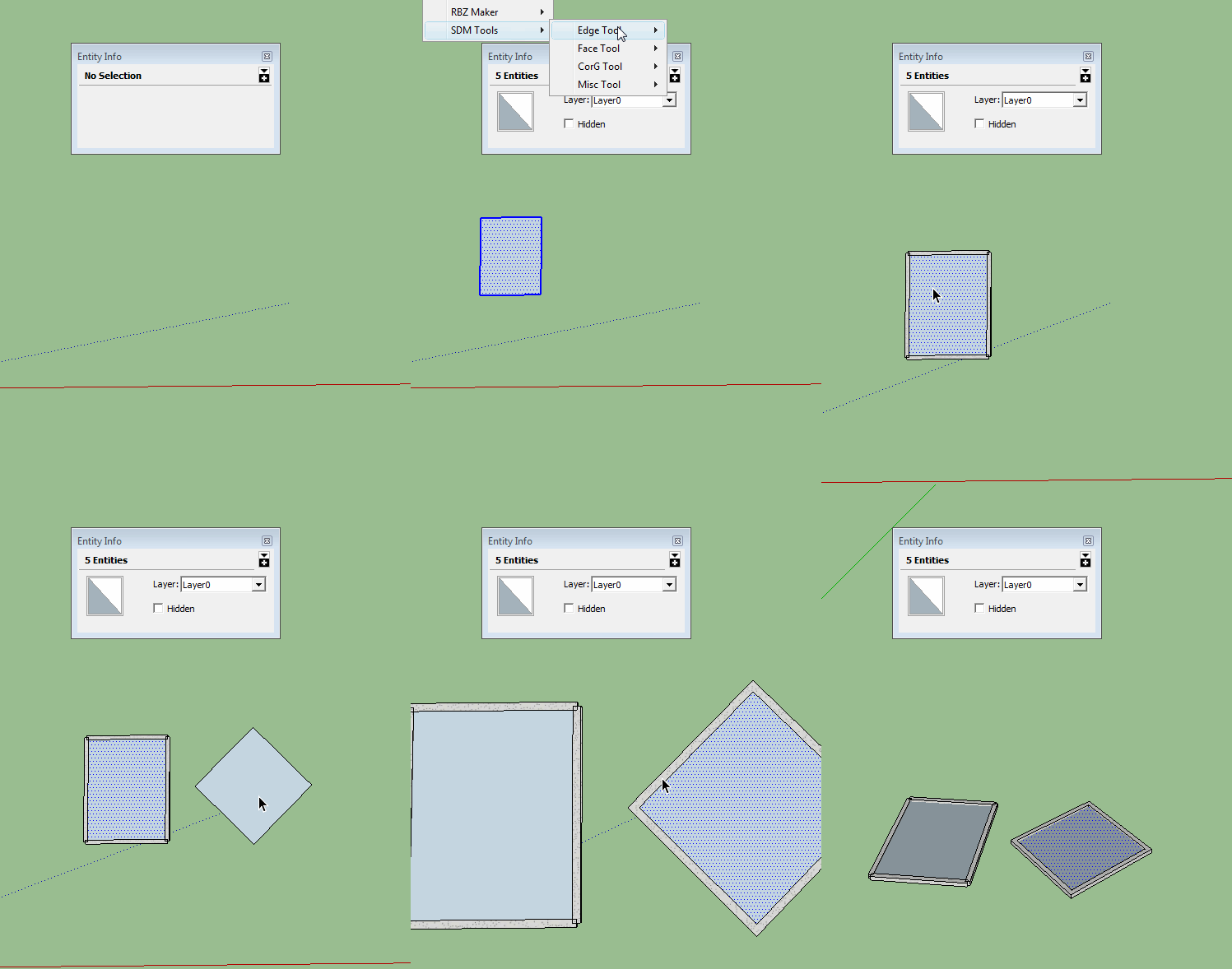
      Fixed the problem with rectangles in my Edge_to_Tube plugin. Normal rectangles are bounded by 4 edges and not a 'curve' as polygons and circles are.


      edge to tube.gif

      posted in Plugins
      sdmitchS
      sdmitch
    • RE: Plug-in idea - Rounded rectangle, Lozenge, etc as in Layout.

      My RoundedCornerRectangle still works.

      posted in Developers' Forum
      sdmitchS
      sdmitch
    • RE: Rough cut stone without a texture

      @glenn at home said:

      HI all, what would be a good way to model rough cut stone for say large granite blocks?
      TIA

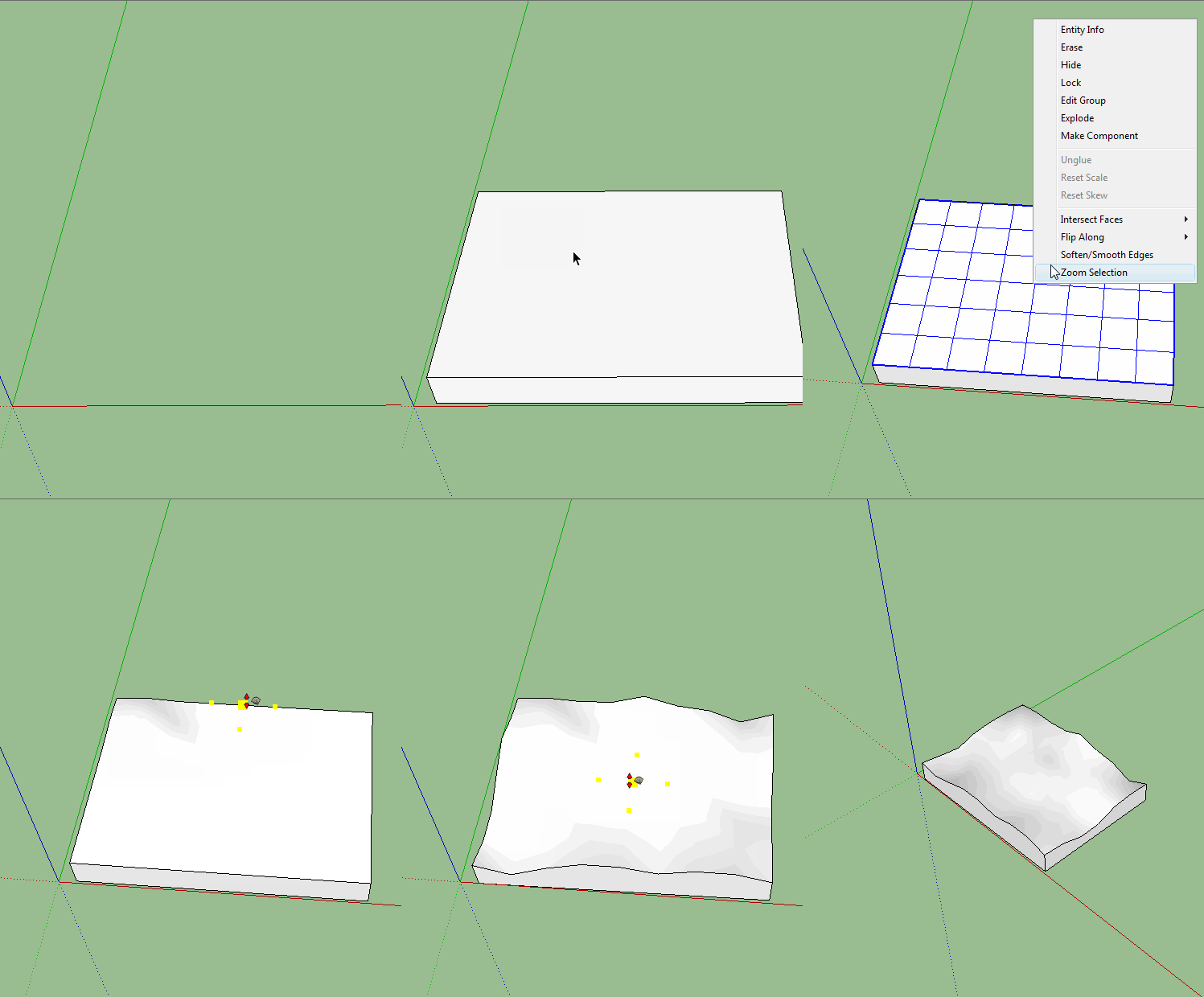
      1. Draw a Rectangle1. Pushpull to create Box1. Delete top of the Box1. Create new top using Sandbox From Scratch mesh1. Explode mesh and soften edges1. Use Smoove Tool to create rough surface

      Roughcut Stone.gif

      posted in SketchUp Discussions
      sdmitchS
      sdmitch
    • 1
    • 2
    • 3
    • 4
    • 5
    • 6
    • 7
    • 8
    • 74
    • 75
    • 6 / 75