sketchucation logo sketchucation
    • Login
    1. Home
    2. panixia
    3. Posts
    Oops, your profile's looking a bit empty! To help us tailor your experience, please fill in key details like your SketchUp version, skill level, operating system, and more. Update and save your info on your profile page today!
    🚨 Skimp | 25% Off until March 30 Buy Now
    Offline
    • Profile
    • Following 1
    • Followers 1
    • Topics 13
    • Posts 839
    • Groups 1

    Posts

    Recent Best Controversial
    • RE: Can this be done in SU?

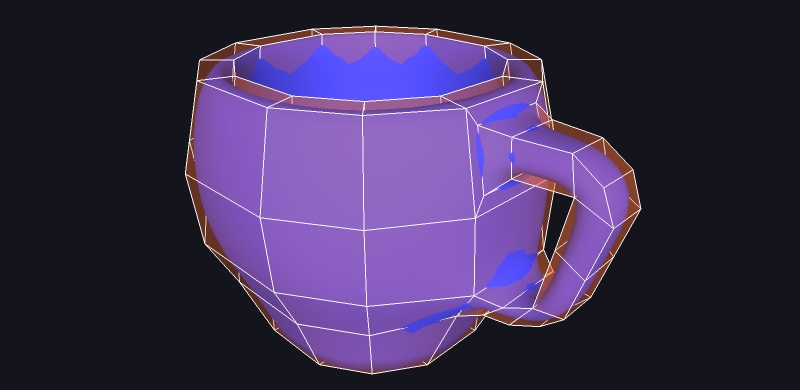
      @michaliszissiou said:

      Very nice suggestions, leading to terrible topology.
      Don't try it if some real displacement gonna happen.
      For exactly the same reason don't import it in zbrush or sculptris.

      There's only one decent way to model such things and it's not supported in SU.

      why not?


      tazza quad.jpg

      posted in SketchUp Discussions
      panixiaP
      panixia
    • RE: Colourizing a material

      vray doesn't recognize sketchup-colorized textures. it just renders the base image.

      posted in SketchUp Discussions
      panixiaP
      panixia
    • RE: Mugorots

      @nomeradona said:

      thank You cadmonkey. After gaining some knowledge and understanding with thea materials. I redid the forgotten room render here it is.

      https://fbcdn-sphotos-f-a.akamaihd.net/hphotos-ak-ash4/256241_4023573180331_1723070857_o.jpg

      really impressive and realistic rendering the light feels so natural!!
      it looks like a real photo, maybe the one and only thing to perfect could be the bike, i think adding more subdivision to the low poly frame (maybe also you rotate it next time instead of scale -1 so the drivetrain is on the right side πŸ˜› )
      apart that detail an outstanding job!

      posted in Gallery
      panixiaP
      panixia
    • RE: Rendering several individual scenes

      if tou need a batch rendering, go to the "animation settings" in sketchup "enable scene transition" and set the time value to 1s, also set scene delay to 0, then go to the vray animation tab, tick animation on, tick include frame number, tick save to "filename.filetype" as you would do for any animation. now, in the fps tab select "custom" and set the value to 1. now vray will render only 1 frame for every scene.
      i use often this workaround, the only downside i found is that isn't possible using this trick to render separate channes (eg. alpha channel, z-depth, etc..)
      hope this can help.

      posted in V-Ray
      panixiaP
      panixia
    • RE: [FIXED] Rendering transparant png

      @brknbrkn said:

      I have read something about enabling colourtexture for transparency

      yes, this is the quick way. maybe is a problem of older versions. update it.

      posted in V-Ray
      panixiaP
      panixia
    • RE: Sketchup - vray - .exr question

      i'm still having some troubles with those exr-saved large images..
      i found that if i don't save the maps and keep the the "single frame" calculation mode of IR and LC maps, it renders fine, but has exactly the same memory limitation with the standard VFB render mode.
      if i save maps things get better on the memory side, but i found strange color artifact such as zones rendered in flat red, or flat green or flat blue.
      in particular i found this problem popping out every time i try to use a saved IR map using "from file" mode.
      so i'm rendering with saved LC maps, but still using "single frame" method for IR.
      how can i solve this problem? did anyone find a good tutorial on the whole maps saving/loading stuff?

      posted in V-Ray
      panixiaP
      panixia
    • RE: Perforated metal

      simply use a png map with a transparent background in the in the diffuse slot.
      make sure to tick the "use texture transparency" checkbox.
      you can use the same diffuse png map to get bump/displacement/reflection/whatever map just with a little photoshop..

      hope this can help..

      posted in V-Ray
      panixiaP
      panixia
    • RE: A quest for better understanding of textures

      @broomstick said:

      may I publish here a little tutorial on how to use the Vray Blend Material?

      It's useful to have bump maps without a diffuse texture (sort of)

      yes you can!
      😍

      posted in V-Ray
      panixiaP
      panixia
    • RE: Simple Artisan examples collection

      πŸ˜›

      posted in Organic Modelling
      panixiaP
      panixia
    • RE: Simple Artisan examples collection

      @cotty said:

      The making of the wine glass is in the .skp:

      • Draw lines on picture
      • Follow me with hexagon
      • Subdivide with Artisan
        (The wine is a copy of the inner glass with a little scalefactor and closed top face)

      why do you need subdivision to do this? can't you just followme a circle instead of exagon? or i'm missing something?

      posted in Organic Modelling
      panixiaP
      panixia
    • RE: [Plugin] BezierSpline - v2.2a - 22 Apr 21

      @the.pjt said:

      we want a toolbar with one Icon that runs commands on the screen like your toolsonsurface, curvy loft ,etc

      +1 πŸ‘
      actually the only downside in one of the best plugin ever!

      posted in Plugins
      panixiaP
      panixia
    • RE: TexSky VS HDRi comparison

      mmm.. maybe you can try to resize the model.. not sure.. πŸ˜•

      posted in V-Ray
      panixiaP
      panixia
    • RE: Vray 1.49.01 Still no render progress bar...

      @dkendig said:

      with the way things currently are set up, we have to basically restart the whole scene parsing process again for each scene if we want to account for visibility changes, which slows down animation renders considerably.

      i understand, i suspected it.. but maybe would be possible to add it as an option to tick, so that it is not default, but, if you really need it from time to time, you may try to render the animation properly even if slowly.. i don't know, you have to tell, but i think this could be at least an half way solution.. πŸ’­
      as we say in italy "meglio feriti che morti" ---translation--> "is better to be hurt than to be died" πŸ˜„

      very thank for your answering πŸ‘

      posted in V-Ray
      panixiaP
      panixia
    • RE: Vray 1.49.01 Still no render progress bar...

      @dkendig said:

      it will be in the next release: http://screencast.com/t/mqfvvDv390Ev

      what about the layer visibility option to support object animation plugins like twilight does? will it be possible in the next VfSU?

      posted in V-Ray
      panixiaP
      panixia
    • RE: To Fresnel or not to Fresnel?

      @andybot said:

      the fresnel reflection might be a checkbox (instead of having to load a separate TexFresnel)

      peraphs the separated TextFresnel is needed for adding it in the perpendicular sub-slot of specular map.. anyway i agree it should be default in reflection, TexNone is good for mirrors only..

      posted in V-Ray
      panixiaP
      panixia
    • RE: Ugly displacement on curved surface.

      maybe this http://www.holmes3d.net/graphics/subdivision/ could help a bit, even if very basic and contains some greek letters πŸ˜„ i found it some times ago.. it made me suspect that the original catmull-clark algorithm is intended to work on a quad cage, while the loop subdivision triangulates it all.. i think the loop subdivs is the one behind the existing subdivision SU plug-ins (both free and commercial) it seems that a "quadrified" catmull-clark would be nicer and cleaner.. anyway.. i will search further, maybe if i fiund something nicer, we can open an "official" dedicated thread for this request.. i know is not easy, but i know it isn't impossible for you, man.. you have the technology! πŸ‘Ώ

      posted in V-Ray
      panixiaP
      panixia
    • RE: Ugly displacement on curved surface.

      something like this, maybe?

      http://rosettacode.org/wiki/Catmull%E2%80%93Clark_subdivision_surface

      favicon

      (www.rorydriscoll.com)

      posted in V-Ray
      panixiaP
      panixia
    • RE: Vray 1.49.01 Still no render progress bar...

      isn't the RT feature also a better sign?
      will the "signs" become reality? hope so..

      posted in V-Ray
      panixiaP
      panixia
    • RE: Ugly displacement on curved surface.

      ah ok, useful tip, anyway its' original model had material tiled very large (0,005 repeat, as already stated) mapped on a mesh with very small subdivisions 5mmx5mm nonquad-quad faces, i'm not sure but i think the problem could be related to the fact that the single facets are to small for the displacement to properly work.. am i wrong?
      or maybe the strange behaviour of his mesh can related to the not so clean mesh buiding.. don't know how he build the surface, but i found sort of overlappin edges and so on.. i also tried to turn it quadface whit your brilliant tool, to be sure the mapping was uniform, but it didn't work, it follows diagonals here and there, even if apparently the mesh is, how can i say, a full square-cell grid, with no poles/odd topology.. didn't untderstand why it reacts in strange way..
      as a general statement i noticed that the cleaner the mesh, the smooter the displacement will work..

      ps. any idea of further developments on quadface tools? loved it! thanks again.. [PLUGINREQUESTMODE/ON]Never planned to do a sort of catmull-clark plug based on quadfaces? That would be ultra-powerful indeed[PLUGINREQUESTMODE/OFF] πŸ˜›

      posted in V-Ray
      panixiaP
      panixia
    • RE: Vray 1.49.01 Still no render progress bar...

      @thomthom said:

      @newxieland said:

      Think it's back in VfR ... right?

      it does.

      posted in V-Ray
      panixiaP
      panixia
    • 1
    • 2
    • 38
    • 39
    • 40
    • 41
    • 42
    • 41 / 42