sketchucation logo sketchucation
    • Login
    1. Home
    2. optimaforever
    3. Posts
    Oops, your profile's looking a bit empty! To help us tailor your experience, please fill in key details like your SketchUp version, skill level, operating system, and more. Update and save your info on your profile page today!
    πŸ”Œ Smart Spline | Fluid way to handle splines for furniture design and complex structures. Download
    O
    Offline
    • Profile
    • Following 0
    • Followers 0
    • Topics 22
    • Posts 239
    • Groups 1

    Posts

    Recent Best Controversial
    • Flextools error in Console when loading

      Hello,

      Today I got this error in ruby console during SU startup. Is it serious doctor?

      Error: #<NameError: undefined local variable or method load_necessary_components' for #<F3d::FlexTools::Observers::FlexToolsObserver:0x0001c8b018c4f8>> c:/users/ryo/appdata/roaming/sketchup/sketchup 2017/sketchup/plugins/f3d_flextools/modules/libs/observers.rbe:80:in onOpenModel'

      posted in FlexTools render plugins extensions
      O
      optimaforever
    • RE: Convert 3D Max files to SketchUp

      Hello!

      What does the maxscript actually? You can turn the textures visibility on in the viewport with the max menu but it doesn't interfere with the export does it?

      In any case you need to convert the vray/corona/mr/revit materials to standard before exporting to obj/fbx within 3dsmax.

      With 3dsmax 2017-2018 you have a scene converter inside max, which is useful to convert any material to standard. BUT as usual sometimes you need to switch to manual pilot as lots of things like fallof, blend, color correction, 2-sided, mix and other things aren't easily translatable to standard shader.

      I use fbx to export to SU (and import with Fluid Importer Pro) but obj works nice too.

      posted in SketchUp Discussions
      O
      optimaforever
    • Flexwindow FT 2.5: glass panels

      Hello!

      A feature I love in FW is the ability to quickly switch between 1 sided and 2 sided glass panel.
      While this is very handy (as the script creates automatically 2 different su materials), may I suggest customisable glass material definition scripting?

      I explain myself:
      I sometimes need different glass material settings depending on interior or exterior shots.
      For interior shots, I prefer having 1-sided glass panels so that sunlight enters more easily. For exterior shots, I prefer 2-sided glass to get nice reflections of the environment.

      My actual worfklow is to generate 2 sided glass (depth of 2cm for instance) within FW, go inside the glass panel group, keep the outer face as is, group/cut the inner glass face and put on a layer named "2sided glass", so I can switch it off when I need to.

      For interior shots, I apply a non-refractive material to the glass, and switch the 2sided glass layer off.
      For exterior shots, I swap the glass material with a refractive shader and switch the layer on.
      Yes, it's quite a workflow but I prefer to avoid having 2 different models for the same project if possible.

      So my question is:
      Is it possible to automatically put the glass panel's inner face in the "2sided glass" layer or anything similar? An automatic scene management alike?

      Question 2:
      When I tweak the (autogenerated) glass material name (apply a thea shader on it) and define a flexwindow favourite, what happens to the thea material definition? Is it embedded inside the favourite?

      Question 3:
      What about more possibilities like double and triple glazing parameters? For exterior/interior high end shots sometimes I need to model triple glazing to get realistic reflections.

      Long live FW!

      posted in FlexTools render plugins extensions
      O
      optimaforever
    • RE: FlexTools 1.1.0 Favourites

      Ok, sorry. I must be more explicit. I meant that the thumbnails help if they're be big enough (sometimes there are a lot of variants and it's difficult to distinguish betwern them). If one could define the snapshot it's even nicer as you can focus on the differences but one could imagine a folder hierarchy system too.

      posted in FlexTools
      O
      optimaforever
    • FlexTools 1.1.0 Favourites

      Well... I have some time today πŸ˜‰

      I like the idea of the favourites in Flextools. A long awaited for feature.
      Now, I'd prefer the word "preset" instead of favourite but that's just a personal taste πŸ˜„

      To be really useful, I'd like FT to generate an explicit thumbnail of the preset, as sometimes I'm too lazy or uninspired when naming the preset. Dale's Profile Builder excels at that, even if sometimes it generates the thumbnail according to the actual axis system in use in SU when calling the PB window, which is not always ideal.

      I criticize a lot, but it's because I want FT to be even better πŸ˜„
      Keep up the good work!

      posted in FlexTools render plugins extensions
      O
      optimaforever
    • Flextools 1.1.0 Cutter toggle button

      Hi it's me again πŸ˜‰

      While handy, the cutter toggle button is too shy, I think.
      The status deserves to be more visible, just an outer edge isn't enough.
      I suggest wether change the colour of the icon when in cutter mode or use a scissor icon?

      posted in FlexTools render plugins extensions
      O
      optimaforever
    • FlexTools: descriptive drawing for parameters

      Hi again,

      THis is a generic request but is it possible to have a small drawing quickly explaining the different parameters and where the offsets are taken exactly? The official Flex website are often outdated as you keep adding new parameters or behaviours and I end up forgetting how to use some parameters.

      1001bit pro is very explanatory for example (well, sometimes it's buggy too as Goh hasn't updated for a long time)... A small bitmap embedded inside the dynamic component parameters window would be very cool.

      posted in FlexTools render plugins extensions
      O
      optimaforever
    • FlexSlat FT 1.2 orientation &amp; construction points

      I love FlexSlat and I often use it to quickly model railings.

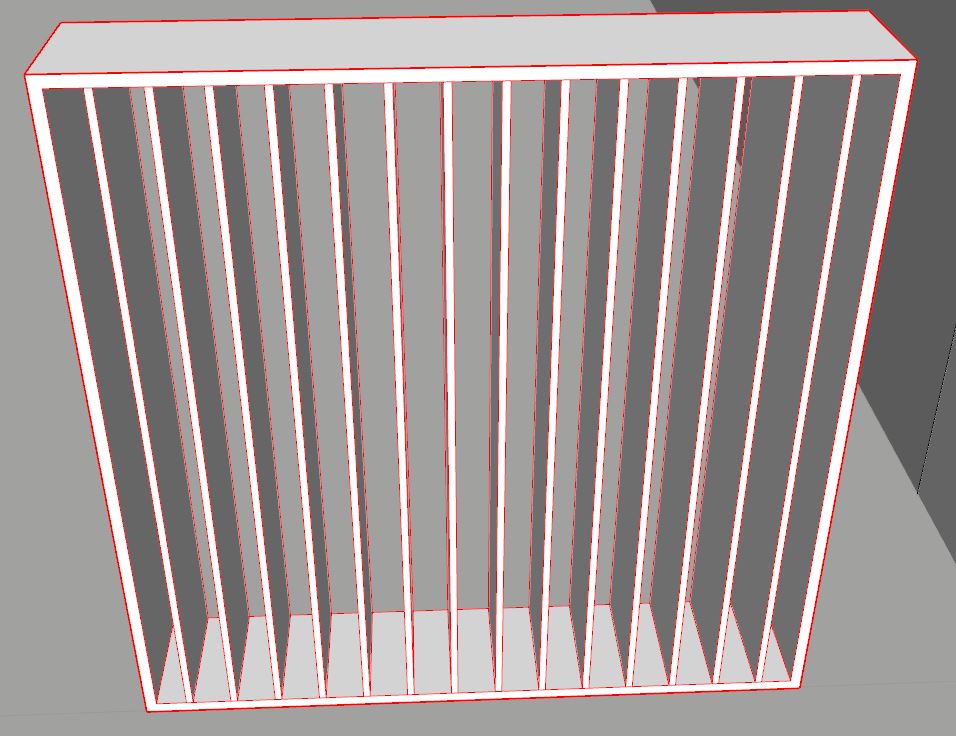
      1. Is it possible to have a quick parameter to make the slats vertical? By default they are horizontal and I always rotate manually the component to create vertical poles.

      2. In order to place the poles precisely when I don't want a frame around it, I wether keep a dummy frame and when correctly placed, I change the frame size to 0x0, wether I use the script "add construction points to the bounding box corners". This is a generic topic but is it possible to have these construction points generated by default? I mean, a bounding box usable by the SU default inferences?


      vertical slats

      posted in FlexTools render plugins extensions
      O
      optimaforever
    • FlexWindow FT 2.5: sticky component behaviour

      Hi Yoni and devs,

      1. I see that the new FlexWindow is sticky by default.
        While this is often handy and I understand the advantage, sometimes it's annoying to have the FlexWindow stick to the ground when you want to create a vertical curtainglass (which by principle doesn't cut a wall, being the wall itself).

      EDIT: sorry, I hadn't seen the toggle cutter button... πŸ’š

      1. I can't create presets (favourites?) from my existing FlexWindow/doors/slats (grayed add favs icon). I guess this mean ΓΉy components are not compatible with the new Flex definition standards?
      posted in FlexTools render plugins extensions
      O
      optimaforever
    • RE: Flextools 1.1.0 beta redundant icons

      Ok. Indeed problem solved. thanks!

      posted in FlexTools
      O
      optimaforever
    • Flextools 1.1.0 beta redundant icons

      Hi Yoni & all,

      I've installed 1.1.0 and my toolbar gets quite long.
      I've Flexdoor FT 1.2, Flexdoor FT 1.3 (grayed), etc.
      Is it normal?


      flextools toolbar

      posted in FlexTools render plugins extensions
      O
      optimaforever
    • RE: Welcome to FlexTools Beta

      @esterkimx said:

      I hope our plugin will improve your workflow πŸ˜„

      Hello, thanks for creating this forum.
      yes, flextools are already improving (a lot) my workflow. I'll post all the ideas I chatted about with Yoni here soon...

      posted in FlexTools
      O
      optimaforever
    • RE: [Tutorial] Animator Quick Start

      Ok, thanks gor the reply.
      So I still need to export my model to animate the cam in 3dsmax for now...

      posted in Animator Beta
      O
      optimaforever
    • RE: [Tutorial] Animator Quick Start

      Hello Fredo,

      Is there a simple way to make a camera move along a spline path? and following a target moving itself along a path?

      posted in Animator Beta
      O
      optimaforever
    • RE: [BUG] SU mesh Validity Check error

      The thing is, if I save you a file, then when you'll reopen it, you probably will not see the error.
      It only happens (eventually) when you're working and once it happens, you can't get rid of it until you close the file.

      posted in SUbD
      O
      optimaforever
    • RE: [BUG] SU mesh Validity Check error

      If it doesn't ring a bell to you, it means I'm an isolate case?
      The only way to solve the issue is to save, close skp and then reopen it...
      But that doesn't explain me where the issue lies...

      posted in SUbD
      O
      optimaforever
    • [BUG] SU mesh Validity Check error

      Hi all,

      From time to time I get the infamous Problems were found that could not be fixed
      The entity at address ********** has an invalid id (***) destroyed ()
      during a random Validity Check when saving the skp.

      I'm pretty sure it's related to SubD and QFT usage but can't solve the issue.

      Anyone?

      posted in SUbD render plugins extensions
      O
      optimaforever
    • RE: Version 2 is out!

      Look at the subdivided mesh and you'll realize it's not quad at all.
      It's a triangle based mesh.
      So of course it will not work. You have the same problem as I had earlier.
      Convert to quad before launching Subd.

      posted in SUbD
      O
      optimaforever
    • RE: Version 2 is out!

      @thomthom said:

      That might be it... using QFT there is a toolbar button to convert Sandbox Tools meshes to QFT meshes.

      That was it. Obviously something went wrong when subdividing... πŸ˜•


      not quads visibly

      posted in SUbD
      O
      optimaforever
    • RE: Version 2 is out!

      Thanks Thom for the reply,

      Actually the sharp border option didn't work at all.
      Perhaps had I to convert the sandbox mesh (+ artisan) to QFT quad first?

      posted in SUbD
      O
      optimaforever
    • 1
    • 2
    • 7
    • 8
    • 9
    • 10
    • 11
    • 12
    • 9 / 12