Oops, your profile's looking a bit empty! To help us tailor your experience, please fill in key details like your SketchUp version, skill level, operating system, and more. Update and save your info on your profile page today!
⚠️ Important | Libfredo 15.6b introduces important bugfixes for Fredo's Extensions Update
 Offline
Posts
-
RE: [Plugin] Sculpt Tools (help)
It is definetely a great plugin... it workes fine with SU6 ,but bulge tool sometimes doesn't works with SU7...and I must choose another tool , then comeback to sculp tool, to force it working.is it a bug or interfere with other plugs...something abou SU7 or...?
-
RE: [Plugin] Sculpt Tools (help)
this is not Sketchup...you are kidding me this is skerinobrush **U**P, .... thanx this is working fine....
-
RE: [Plugin] UVTools v0.1
Pixero,
 it would be great , and I guess it would be doable using SU7
 -
RE: [Plugin] UVTools v0.1
dear Whatt, I am still pending for improvment , maybe adding qubic mapping, or maybe adding an interface...,
thanx again for great plugins -
RE: Suggestion to have "true" light in Podium
yes mates , I removed the ;UPPER; (fake) part, so I had to increase the light power ( this is not such important) the important part is that, if for example you lower the ceiling to about i.e. 1m to the light, the fake one goes wrong , but mine would work fine (bkz the fake part would intefer the ceiling)... so I've tried to imitate the reality , more true....
-
Suggestion to have "true" light in Podium
by now podium light are usually composed of two or more groups as emitter and they seem to work as "point" lights... also usually one of this light emitters is located "out" of the light, where that it mimics the light behavior , but in fact it must;nt be there and it is a bit fake.... I tried to find another way that is more adapted to realastic lamps:"biger light emiter Groups" and no "out group".
but the problem is that such groups would be occuping the scene and confusing, so there must be other solution,...
as it is not important , to use even "points" to enlarge the light emitter group size, so I started to add "point" at the extreme boundries of the group, so it is not confusing, at the same time easy to use and more"adapted to reality"
but maybe the next step is using "dynamic component behaviors" to add an slider beside each llight , to increase or decrease light power.
here is an example of adding points, to group and deleting "out of lamp" emitter groups.
please download and render using podium and compare both lights, the near one is a modified light whit my suggestion , and the far one is a light from podium light plugin package.
-
RE: [Plugin] Sculpt Tools (help)
First of all, thanx for such brilliant tool..it was one of my dreams...
It worked for mr ,but seems to me that I'v missed icons. -
RE: Standardizing all plugin appearance
-
RE: Standardizing all plugin appearance
hi all again.
I strongly want your attention and participation, at this topic , and guess we -sooner or later- would face this fact that we need an standard format for highly recomended scripts. or at least , it will ease the using of them.
suggestion: as sfc toolbars, we could start doing standardizing , for few scripts...let me know what do you think? plz -
RE: Bowling Vacuum
great as usual... which editor you have used to make the animation ,Ithil?
-
RE: Some new Renders..
all rendder are verry nice, also trees are excelent silver!!!! from where did you got 3d ones ( not 2d palms...)
-
RE: [Plugin] ExtendTool v0.2 (update 20090708)
yes I see
 , when it didn't worked for me , I deleted it ...
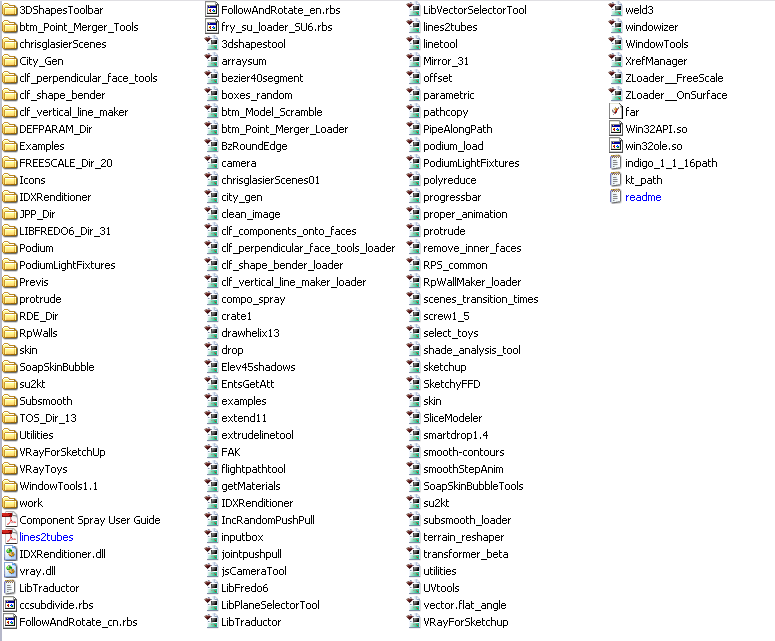
  , then I thought that maybe other plugins interfer it , so i shared the plugins folder picture..
also all lines are coplanar , and i repaired the inserted cad file by hand (149 trim extend needed ... as the autocad is going to be more fuzzy!!!!)
ok ... I am thinking that if we could have a better (smarter) cad import plugin? bkz when we import cad files , then su convertes circle to 24 sided su native cirles , and then there would be a gap between the circle and rest of the model... so maybe we could resolve this with a ruby cad importer!!!

-
RE: [Plugin] ExtendTool v0.2 (update 20090708)
I imported a cad file , and as usuall it had lots of stray lines...so I desided to use the plugin, but nothing happend
 ...
...
here is my plugin folder view :
-
RE: Standardizing all plugin appearance
yes mate it is a bit late , but we have a idiom that says :at every moment that you catch fish from the water, it would be fresh...
yes it is a bit late , but it would be worse if we don't do that at his moment...but if we start it , after a while we would reach to an stable point soon -
RE: Bonzai 1.0 is released
dear Coen; other mates
I thought that standardizing plugin user interface would be a great step tward your idea ( and also going out of this puzzle space of plugins) so i started this topic, and it would be nice if participate:
http://forums.sketchucation.com/viewtopic.php?f=180&t=20121 -
Standardizing all plugin appearance
this is very raw idea and I strongly need you comments. I was thinking that SU+Plugins hase become like a puzzle
... I mean that each plugin has its own entry,and option method... i.e one uses "tab" key to show the options, other uses "Ctrl+1"...and so on....I tought that we could have some standards: i.e. in wings3d , you can do the commands visually, but if you press "tab" key , then the numeric entry for each command will appear....
this is a very raw idea,(specially bkz I don't know any ruby..etc...and maybe I can't see the probably problems ... but i guess it is possible and we could make an standardizing system to suggest our generous rubists... I think it would be a major step on improving plugin appearance and going out of dark area 
c&c are strongly welcome
