sketchucation logo sketchucation
    • Login
    1. Home
    2. jim smith
    3. Posts
    Oops, your profile's looking a bit empty! To help us tailor your experience, please fill in key details like your SketchUp version, skill level, operating system, and more. Update and save your info on your profile page today!
    ⚠️ Important | Libfredo 15.6b introduces important bugfixes for Fredo's Extensions Update
    Offline
    • Profile
    • Following 0
    • Followers 0
    • Topics 27
    • Posts 435
    • Groups 1

    Posts

    Recent Best Controversial
    • RE: [REQ] Wood siding textures

      @unknownuser said:

      Dave,

      here is a link to a Nana Wall video of the panels being used in Aspen. I have specified them on projects and they are quite good, but expensive. But like everything you get what you pay for (usually).

      http://www.nanawall.com/Gallery/viewer.aspx?media=wmv&mid=74

      Oh, by the way guys, thanks for the textur

      Dave,

      here is a link to a Nana Wall video of the panels being used in Aspen. I have specified them on projects and they are quite good, but expensive. But like everything you get what you pay for (usually).

      http://www.nanawall.com/Gallery/viewer.aspx?media=wmv&mid=74

      Oh, by the way guys, thanks for the textures!

      Jim

      posted in SketchUp Components
      jim smithJ
      jim smith
    • RE: Does anyone here live near Cannes, France?

      Hi Jeff,
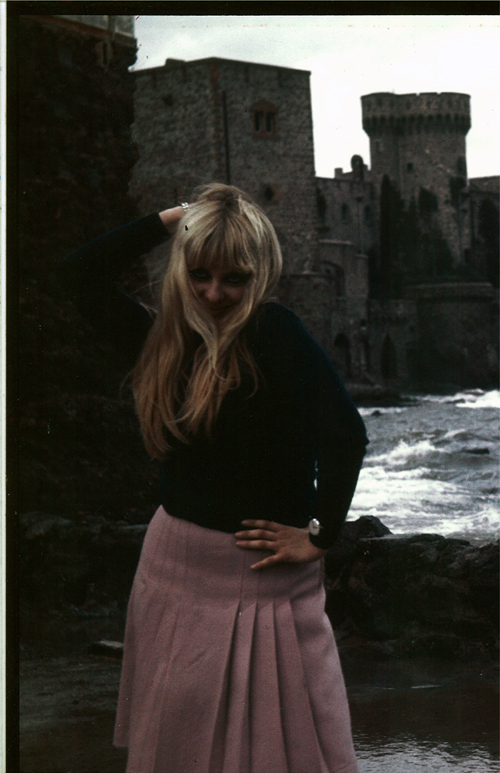
      I don't live near Cannes now - but spent part of a year in school (University of Illinois) in a little town 7K. west along the coast road called LaNapoule. It was a long time ago, went back to visit 10 years ago and nothing changed in the town but the have a huge harbor now. Kind of disturbed the peacefull character of the area but still beautiful. Attached is a phot of two of the attractions in LaNapoule from my school days. One is Dominique, who by now is middle aged and maybe not such a hippie and the other - unchanged as of my 10 years ago visit is the Henry Clews castle, where our foreign studies program for the U of I was stationed for a few years. (Now they're in Paris). From Cannes you are close to everything by bus, train and plane. There is the main street in Cannes - Boulvevard de la Croisette that follows the coast line- called N98 out of town - (the scenic route to LaNapoule and to Nice by the way) where you can enjoy the sandy, topless beaches and see the Palas des Festivals where they have the film festival in May. It is a real zoo down there in May. A few K's east is Nice, a big college town with lots to do but with rocky beaches. A bit further east is Monaco which is a must see. Up in the hills all along the coast are perfume makers, art colonies and galleries. Lot of French Impressionist history. Heading west from Cannes are a lot of interesting small towns including LaNapoule, further out- not exactly local - Saint Tropez (I think current home of Brigitte Bardot) and major port cities like Toulon and Marseille-( see Corbusiers Unite).

      By the way, as I remember on of our forum members Fymoro, has French Riviera down as his location - might give him a pm?

      Anyway - have a great trip, hard not to. Share some photos when you get back I'd love to see them.


      LaNapoule-Dominique.jpg

      posted in Corner Bar
      jim smithJ
      jim smith
    • RE: Punctuation is powerful

      Here are a few from the "national punctuation day" web page:

      Let’s eat, mommy.
      Let’s eat mommy.

      Quality service and attention to detail.
      Quality, service, and attention to detail.

      Don’t use commas, which are not necessary.
      Don’t use commas which are not necessary.

      Giant moving, sale Friday
      Giant moving sale Friday

      Punctuate this paragraph:
      That that is is that that is not is not thats it that is.

      Why punctuation is important to one’s sex life:

      Pre-marital sex: What some people have before marriage.
      Extra marital sex: What some people have in a happy marriage.
      Extra-marital sex: What people have in a not-so-happy marriage.
      If you’re having a lot of #3, you’re probably not having a lot of #2. It all depends where you place the hyphen.

      posted in Corner Bar
      jim smithJ
      jim smith
    • RE: Pro exporters

      here is a link to a comparison chart of free/pro

      Error 404 (Not Found)!!1

      favicon

      (sketchup.google.com)

      It shown jpeg/tiff/png/KMZ/Collada export but no dxf/dwg import or export

      posted in Newbie Forum
      jim smithJ
      jim smith
    • RE: Newbie from Scotland

      @bloonose said:

      Sussed the problem I was having by using the follow me tool tutorial 😍 but I dont seem to have any plugin link, when I click Window I can see Ruby Console, but that's all I can find. When I see other peoples versions it has a plugin link at the top?

      Thanks

      Bloonose,
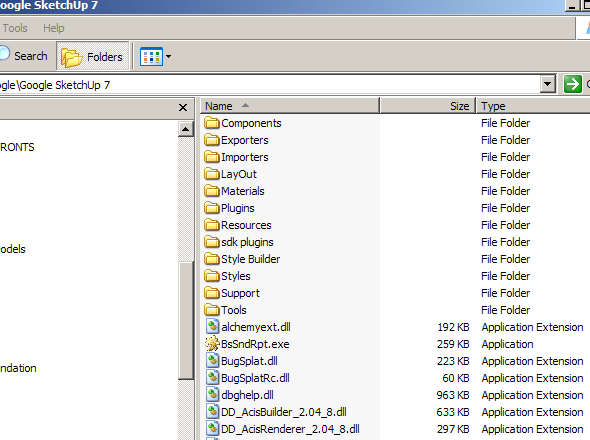
      do you have a plugins sub-folder in your main google 7 folder? I can't think of a reason it would not show up on your top menu. Check out this screen shot of my file structure. Free and pro versions have equal use of plugins as NewOne mentioned, so I find this very curious. In the free version, you won't have layout and I think style builder is also a pro version item, but the rest should be there and functional.


      mainfolder.png

      posted in Newbie Forum
      jim smithJ
      jim smith
    • RE: Newbie from Scotland

      Bloonose - Welcome to the forum.

      Just a few quick tips, I'm sure you will get more from the group as the day goes on.
      Follow the link below to see a collection of plugin gif's that give you a feel for their function.

      http://forums.sketchucation.com/viewtopic.php?f=323&t=16909

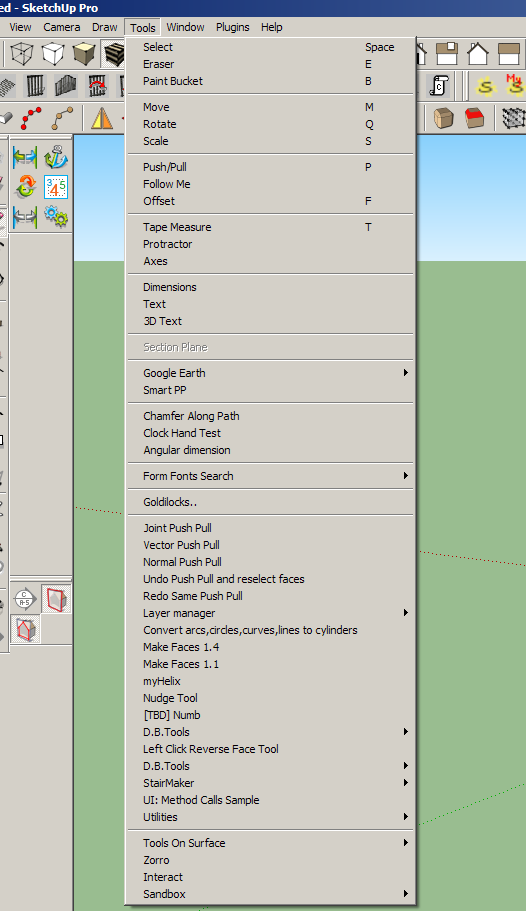
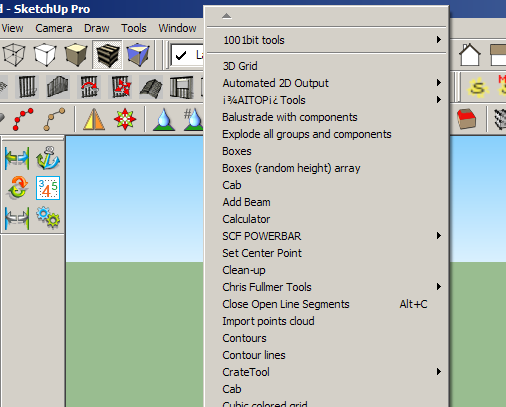
      As for loading and making them work, quite simply load them into your plugins sub-folder in your sketchup folder and they automatically load (except for a few specialties that need a bit of extra work) You access them at the top tool bar in the plugins pull down menu. There are more in the tools pull down.

      There is a special user group for wood workers. Go to your "user control panel" and pick "user Groups", towards the bottom of the list you will find the wood workers. Get together with them and talk wood.

      I highly recommend looking through the many tutorials - top line of Sketchucation - look for the tutorial tab. You can find just about anything there. If you can't, send up a flare online and you should get an answer.

      Nice start for your first post by the way. Keep the faith! You will soon be having fun 😆


      Screen shot of the tools pulldown


      screen shot of the plugins pull down

      posted in Newbie Forum
      jim smithJ
      jim smith
    • RE: Menu Options Keeps Graying Out!

      I have noticed functions drop out lately, and as a user since 2002, it seems to me this has happened only since the 7.0 upgrade. It isn't often but usually after I have been working on a model for a long time,maybe 4 or 5 hours, suddenly I can't copy anything - copy only moves objects. Some other functions will gray out as well but I have not kept track of which ones. The copy drop out is the most annoying and what I have been doing is closing GSU and reopen it which seems to rejuvinate everything. I have not kept track of what triggers the drop outs, except large models, lots of left and right clicking and long sessions. I will keep notes now that I see it is not just me.

      posted in SketchUp Bug Reporting
      jim smithJ
      jim smith
    • RE: Christmas chuckles...

      As "they" say - No Good Deed Goes Unpunished

      posted in Corner Bar
      jim smithJ
      jim smith
    • RE: I share Ivi component

      Thank you Nacholo,
      this ivy will come in handy and I agree it is very light. As long as it isn't in a really close up view it will be perfect.

      posted in SketchUp Components
      jim smithJ
      jim smith
    • RE: GrowFamily

      Excellent timing - Just in time to celebrate your first Thanksgiving together. Congratulations to the three of you! 😍

      posted in Developers' Forum
      jim smithJ
      jim smith
    • Makes me feel young

      Just read my architects newswire fom Monday- news flash on Oscar Niemeyer; Inspiring. Makes me feel young. I would like to know what keeps him going and get a bottle. 👍

      Another icon I though was either dead or in a nursing home is actor Ernest Borgnine, who is still going strong, still working at 92. Just heard him on a radio talk show in Chicago.

      November 23, 2009 | The latest architecture business, design, and product news from around the web

      ASSOCIATED PRESS

      At 101, post-op Oscar Niemeyer gets back to work

      Actually, he'll turn 102 on Dec. 15. Niemeyer had surgery several weeks ago for gallstones and an intestinal tumor. But now he's back at work, reportedly designing a group of buildings in Niteroi, a city near Rio de Janeiro. He told the newspaper O Globo that he found being in the hospital rather lonely. "I needed to keep busy, keep in touch with friends, maintain the rhythm of my life," he says.

      posted in Corner Bar
      jim smithJ
      jim smith
    • RE: Bump Maping Textures in SU/Podium

      Liam887

      I am not a Podium Guru by any means, but hasve found the Podium forum and help pages are good sources for how to do these sort of procedures. Below is a copy of the text from the Podium help page indexed bump maps. If you go to their help you will find these instructions, step by step illustrations and some sample bumpmaps to download. Hope this helps!

      BumpMaps

      The simplest way to use bumpmaps, is to paint a SketchUp native texture to a face and rename the texture in the Material browser to xxxx_bumpX.The final X should be a value between 1 and 5.

      For example:

      Create a face in SketchUp.
      Go to the SketchUp Material browser and find Brick_Tumbled texture in the Bricks and Cladding category.
      Paint this texture on to the face.
      Go back to the material browser and select the In Model icon.
      Click on the Brick_Tumbled image and change the name of the image to Brick_Tumbled_bump5 (make sure you change the name in the top of the material browser – see Fig below)

      Render the face. After rendering, change the name of the Brick_Tumbled_bump5 to Brick_Tumbled_bump1. Render and notice the difference between the two.

      Another good example of this is in the bump.skp file located in the Clipmaps.zip file.

      1. Open the bump.skp file.

      2. Go to the SketchUp Material browser. Notice how the name of the texture is leather_bump3.

      3. Render the scene.

      4. Change the name of the texture to leather_bump

      5. Render and see the difference.

      A more effective way to create bumpmap textures for Podium renderings is to create a new file called xxx_bumpmap.jpg. The xxx equates the original name of the texture file.For example, for the texture file leather.jpg, you must create a file called leather_bumpmap.jpg.

      1. Place a texture jpg file in the podiumtexture folder.

      For example, if you rendered the Brick_Tumbled or Leather examples above, Podium will automatically save Brick_Tumbled.jpg and Leather.jpg to the podiumtexture folder.Use these files as our texture files.

      Note: If you want to use a SketchUp native texture file, first paint the texture on a face, then open your Material Browser, click InModel icon, right click on the texture you want to use and Export Texture Image.This will create a jpg of your SketchUp texture.Save it to your podiumtexture folder.

      Make a copy of the original texture file and rename it to xxx_bumpmap.jpg, i.e. – leather_bumpmap.jpg or brick_tumbled_bumpmap.jpg.
      Open the xxx_bumpmap.jpg file in Photoshop or another image editing program.Create a B&W version of the image and/ or invert it.In the below example, I used Fireworks to find the edges of the leather image and saved this.

      Save the edited xxx_bumpmap.jpg file.Make sure it is in the podiumtexture folder with your orginal texture file.
      Open SketchUp and import the original texture file as a texture and paint it to a face. As before, change the name of the image in the material browser to xxx_bump5 (i.e. leather_bump5 or Brick_Tumbled5). Render it.Notice how the rendered image looks different than previous examples.

      The trick is getting an effective xxx_bumpmap.jpg image using your favorite image editing program. Please look at the forum to get better examples than these from the several experienced users contributing to the forum.

      Download Sample Bumpmap library.

      In this library are several texture files and their corresponding xxx_bumpmap.jpg files. Download the zip file and freely use these bumpmap images. There are two files for each bumpmap. One is the original texture image in .jpg format. The other is the corresponding xxx_bumpmap.jpg file. Keep in mind the xxx_bumpmap.jpg files and their corresponding texture .jpg files must be stored in the /podium/texture/ folder.

      Download Here. (4MB)

      posted in Extensions & Applications Discussions
      jim smithJ
      jim smith
    • RE: Do you use large or small icons on your toolbars?

      I alternate between large and small. When using my laptop with my 24" monitor - working from home, I use the large icons. When on the road with the lap top - I use the small. Nice to have the option to give a bit more real estate on the 15.6" screen. Also I use the large icons on my office desk top (with a 24" screen).

      And Al, I am one of the old guys - but I have a pair of "computer" glasses that lets me use small icons on the laptop with a 1200x800 resolution

      posted in SketchUp Discussions
      jim smithJ
      jim smith
    • RE: Kids With Autism Love This Software

      Thanks for the link. I have designed several group homes for a local organization that provides care for autistic kids and young adults. I forwarded the Newsweek article to the director and volunteered to help set up a program to teach GSU. Should be interesting. I will let you know how it goes.

      posted in Corner Bar
      jim smithJ
      jim smith
    • RE: Best Renderer when using many plants

      Almost all of the render programs have a trial period. Since something like rendering quality has a lot to do with the "eye of the beholder" I suggest that you set up a test scene with all the sort of plants you would typically use and plug the scene into Podium-Twilight-etc. and see which one gives you the ease of use and quality you expect.

      posted in Newbie Forum
      jim smithJ
      jim smith
    • RE: Need two plugins which I CANT REMEMBER the name :(

      I think one of your missing tools is Chris Fullmers "Perpendicular Face Tool" it is three tools in one - a square, circle and custom face perpendicular to a line.

      He has a collection of must have tools.

      posted in Developers' Forum
      jim smithJ
      jim smith
    • RE: Problems with SU7

      Here is the other attachment


      SiteModel-withcars.skp

      posted in SketchUp Discussions
      jim smithJ
      jim smith
    • RE: Problems with SU7

      Jeff,

      I played with both models a bit. I found the problem more with the cad drawing than with GSU. I have attached both models with a few adjustments. For the first one, with car striping, I deleted the draped model on the ground plane and used "drop" from the 1001 bits tool bar. (I recommend the investment in this tool bar) Then exploded and went over it with "flatten to 2D" and "make faces", "extend close lies" a few times. This helped define some of the areas but many were very stubborn - so - I took the other model without parking to see how it would fair, and spent more time on it. I did the same steps as the first model and was able to make individual spaces over most of the model - left a few for you to do - but the problem making the faces I found to be tiny open lines and double lines. I spent most of my time re-doing many of the boundary lines until the areas formed a face.

      I have struggled with these sort of site plans in the past and have not found an easy answer. The rubies help a lot, but on a really messed up Autocad import, it just seems that you need to do a lot of manual cleanup.


      SiteModel-cleanedup.skp

      posted in SketchUp Discussions
      jim smithJ
      jim smith
    • RE: [Plugin] CleanUp

      Thom,

      Thank you for this ruby. I have been working on a huge model - 120MB - for a downtown facade restoration program. Lots of geometry and textures. I tried the script on a previously saved model to test it and nothing was missing except the junk lines etc. per your specifications. Tried it on the final model with the same fine results. Didn't dramatically reduce the size - 123MB down to 120MB but every bit helps.

      Thanks again.


      19-100-SWcorner-ChaseATM-scene53.jpg

      posted in Plugins
      jim smithJ
      jim smith
    • RE: School Desk

      Graphically I think the chair is great, but it looks very uncomfortable. The nearly 90 degree seat and back and the front lip going all the way to the floor. I would find it difficult to sit there for a long lecture. The front lip would also make the cleaning people a bit crazy - difficult to clean around. I recommend studing the angles and lifting the front lip, giving a bit of room to tuck your ankles back under the chair. ALSO as most school chair designers, you have forgotten all about we much abused Left Handed People!

      posted in Gallery
      jim smithJ
      jim smith
    • 1 / 1