Use the context menu to set the group/component to "separate by>materials".
Best,
Jason.
 Offline
Use the context menu to set the group/component to "separate by>materials".
Best,
Jason.
I feel much the same, and I even got into curvilinear perspective back when I was hand drawing, but obviously SketchUp makes perspective drawing somewhat obsolete. 
Back on topic -- I would say the render looks very good but there are some places where maybe some things could be improved a bit.
Some things that jump out to me:
I can't really find fault with anything else 
Best,
Jason.
One thing that is important to keep in mind when using MXM files within SketchUp is the type of tiling that the creator of the MXM file specified.
There are 2 types of tiling possible: Relative and Meters.
The basic idea is that Meters (which used to be known as "RealScale" in older versions of Maxwell) allows the creator to set up the MXM texture(s) to tile at a specific real-world size... this requires the UVs for that object to be 1 meter X 1 meter. The way this is accomplished inside SketchUp is via the Maxwell>UV Coordinates context menu -- here you choose your UV projection type (Cubic/Planar/Spherical/Camera) and set the projection size to 1 meter.
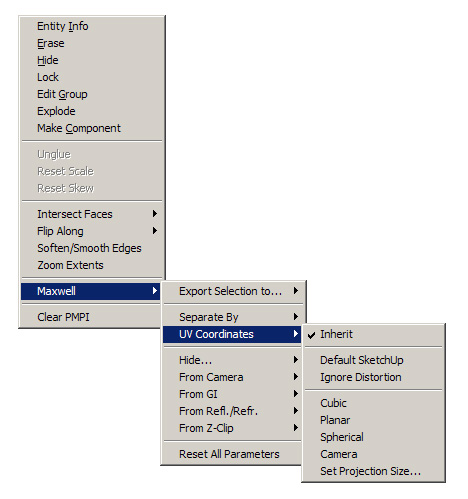
However if the MXM is set up to tile using Relative (typically with a value of 1 and 1) it will automatically tile at the scale and aspect ratio of the UVs created inside SketchUp. The easiest way to control this is to choose one of the texture images used in the MXM and create a new SketchUp material (setting the scale in the SketchUp material to whatever you want as your final).
Unfortunately, often without MXED you will not know if the MXM is set to Meters or Relative tiling, and as you can see you would take very different actions in SketchUp to get proper results.
Best,
Jason.
It's common in ArchViz renders to use shift lens to essentially create a 2-point perspective image... personally I greatly dislike this and I'll explain why.
The practical reason why 2-point perspective was the standard (back when everything was hand drawn for ArchViz) is because 2-point perspective is much easier to draw than 3-point perspective (what we call 3D)... 1-point perspective is even easier but it tends to be very limiting (so it was rarely used).
So, originally, it was about getting reasonably good results with the minimum work on the part of the visualizer. However over time this look became so common that people began to think this was the "right" way.
However, there is nothing that says that this is the "right" way at all, it's just what people are used to seeing -- and furthermore, it irritates me because effectively we are expected to produce renders with one arm tied behind our backs by denying ourselves the full power of the 3D environment/tools with these archaic "rules".
Moreover, the extreme perspective distortions I often see in ArchViz Renders as a result of this fanatical (nearly religious) need to have the "verticals all parallel" makes my eyes want to bleed 
That said, I am no ArchViz specialist -- nor would I want to be one because the first time I had to listen to somebody tell me a render was wrong because of the "verticals not being parallel" I would probably go on a tirade (like this one).
Your mileage may vary... and of course, for the sake of commercial success, it's probably not wise to go against industry conventions too much (even if they are stupid inbred conventions).
I've been holding that one inside for a very long time... I'm sure I just pissed off half the board. 
Best,
Jason.
I'm glad you got it sorted -- I'll try to explain why this may have happened.
In SketchUp UV's can be assigned via inheritance -- meaning you assign SketchUp (SKM) materials (which have the default UV scale built into them) and these can be assigned at any level of group or component.
This creates some issues due to the fact that there can be contradictory information at different levels of grouping/component... Combined with the fact the UVs at the different levels can be custom modified in scale/rotation/etc.
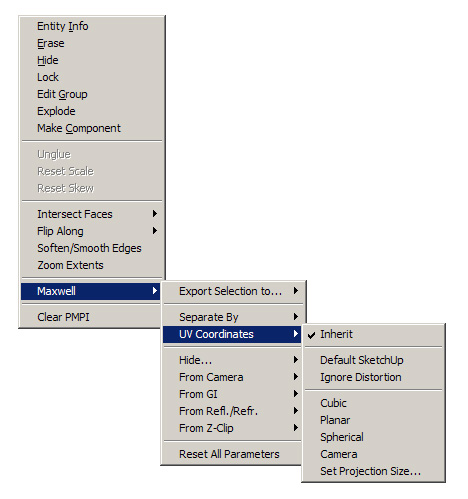
The Maxwell plugin needs to decide at what level the UVs will be generated for the MXS file (what you open in Studio). It does this via the settings in the Maxwell>UV Coordinates context menu.
In that menu you can find a couple of options to troubleshoot UV issues between SketchUp and Maxwell (Default SketchUp & Ignore Distortion) -- and you can also find several non-SketchUp UV projection types (Cubic/Planar/Spherical/Camera), with the option to set the Maxwell projection size for each of those non-SketchUp projections.
What is important to keep in mind here is none of these options will have any effect in your SketchUp viewport -- they are only relevant to what Maxwell produces.
When I get a SketchUp file made by somebody else the first thing I do is spend quite some time cleaning up the materials from the Group/Component level(s) and make sure that what I am seeing in SketchUp is being applied only at the "face level" of the geometry.
I also tend to explode as many groups and components as possible to clear up any UV re-scaling issues that can be introduced when you create a group or component and then scale it up or down.
Also, as a matter of pure anal-retentiveness, I always make sure all of the normals are facing the correct direction, and no faces have any material applied to the backside -- these are what I would consider "best practices" for in-SketchUp texturing for Maxwell.
Best,
Jason.
Since you have Maxwell, just install the Maxwell plugin for 3DSMAX (it's free after all) and export the trees as MXS files -- which you can then either open in Maxwell Studio -or- place directly into SketchUp using the MXS referencing capabilities of the latest Maxwell/SketchUp plugin.
Best,
Jason.
Do bear in mind you have created a scene where there are many more bounces to resolve than normal (by virtue of having mirrors reflecting into each other -- AGS is just a metal mirror with reduced opacity) -- this will take time to resolve and as I said SL 18 would be the minimum I would personally accept as "final".
Best,
Jason.
For a mirror it is probably fastest to just use metal (silver preset)-- AGS is meant to only be used for window glazing, and real glass on a mirror will drive up rendering time considerably (and be only marginally more realistic except in close-ups).
If you find you are willing to pay the render-time costs for a more realistic "glass" mirror use a setup like the attached file.
Best,
Jason.
Generally noise like that is the result of unresolved caustics -- this either can be reflective or refractive caustics as the element working to resolve.
Typically I do not think of a Maxwell render as "final" until somewhere between SL 18-22 (depending on the materials used).
One thing that can cause caustics which take an incredible amount of SL to resolve is dielectric materials (true glass and water) -- which in some lighting scenarios can take up to SL 35 to clear (hardly practical)... This is the reason AGS exists.
Best,
Jason.
Most likely this is an emitter/instancing issue -- disable "use instances" to check.
Also, you should probably update to the newest version of Maxwell and see if that clears the issue up.
Best,
Jason.
@andybot said:
I guess I'm a bit taken aback by your level of frustration. On the one hand, I do agree it seems like you've been harping on the same issues for years, and with no visible effect. However, you've gone well beyond squeaky wheel in many posts...
I'm sure, as a matter of fact I've even pointed out I'm aware of how this is coming across in previous posts -- and I do feel regretful of that.
But here's what I know: they do read this stuff. In the past I've tried to be more diplomatic and genial in my requests and that got me nowhere... with the amount of apathetic and apologetic themes posted in these threads I feel my voice of dissatisfied dissension must be even louder to make sure it rises above the din (so to speak). They can disagree with me but hopefully they will find me impossible to ignore (or shut up).
There is a small glimmer of hope for real change here and now -- things are not the same as they were and now is the time to speak up... strike while the iron is hot and all that. 
I may seem hostile, but in actuality there is an underlying hopefulness that is pervasive in my posts... otherwise I would not post at all.
Best,
Jason.
I'm not sure how it was implied that I don't use other 3D applications -- I have 5 other 3D applications I use regularly already. I'm all about simplification, I want to reduce the overall amount of applications I need to use to keep my life simpler.
Things have gone through a very large change with the move from Google to Trimble -- I don't think it will be as superficial as many of you believe... what I am doing is fighting for my wants/needs to be given attention.
The squeaky wheel gets the grease as they say -- and I am going to squeak as loud and as often as I can until I see SketchUp 2013. At that point I will consider the fat lady to have sung and I will move on if need be. To be honest I was going to leave months ago, but it was requested I stay -- so I have adopted a "wait and see" attitude rather than just giving up.
I remember the crap hit the fan when version 8 was released. SketchUp 2013 backlash will be even worse if they don't get on the ball... I'm hoping Trimble is listening (and will apply pressure) because I've more or less given up on John.
Best,
Jason.
I already said it -- the Maxwell plugin is better, but that may not currently be a as true as it once was (things may have improved with the Modo plugin since I last looked).
Modo is certainly one of my top 3 choices... however I have invested money and time into SketchUp and I want to be absolutely sure before I dump it.
Modo also does a bunch of things I don't place a high priority on: animation, subD and built in rendering are features I don't need (so why pay for them)... I think you may have misunderstood what I was saying in regards to those features.
Best,
Jason.
Both of your examples of what SketchUp is not are examples of specialists tools -- I'm not talking (and never have) about incorporating specialists tools into SketchUp (we don't need a swiss army knife).
I'm talking about modeling 101 tools and functionality -- other users brought up subD (I have not), other users bring up animation (I will not), other users bring up built-in rendering (I will not)... you can tack on whatever other pet project users may want.
64-bit is not some sideline thing, nor is UV mapping/unwrap -- these are fundamental aspects of almost all general modeling applications. Control over how co-planar faces triangulate is also not some outlandish request for a modeling application.
If you want to say that nobody but architects should be using SketchUp, I think you are dead wrong.
Best,
Jason.
@andybot said:
No, tell me how you really feel
You've been a one-man wrecking ball of negativity - what's your point? Do you expect to effect any change in this way? I just don't see it.
I'm being confrontational because now is the time to make these things clear... if not now, when? There is an opportunity for change to occur, but if nobody gets confrontational then nothing will change.
Best,
Jason.
@sketch3d.de said:
@jason_maranto said:
...so I guess the "3D for everyone" is also a mislabeling. I mean that phase says SketchUp is meant to be a general modeler -- not an "architectural sketching" specialist.
this slogan is probably created by marketing and surely refers to the ease-of-use, i.e. everyone is enabled to do 3D modeling with SU because of it's simplicity and obvioulsy not to be a 'general modeler' ...whatever this should be.
That's fine, except both John and the people at Trimble have invoked that exact phrase in recent statements about SketchUp's future... doesn't seem to be the actions of a group of people who want to distance themselves from bad Google marketing spin.
"Simple to use" does not a "3D for everyone" program make -- a waffle iron is simple to use, but I can not cook pasta on it (for that I would want a stove and pots and pans). For something to be applicable to everyone it needs to be a generalist, not a specialist... ease of use is a secondary consideration to actual utility.
Best,
Jason.
@mike lucey said:
Jason, I think you are being a little hard on John B and the SU Dev Team. I will agree that SU development during the Google years was pretty dismal but I also imagine working within the Google environment was extremely restricting even if they did allow one to bring their dog and laundry to work and sit in a tent within the office and climb a wall from time to time. The one thing, I think Google did not allow was direction to be set by the developers.
Just look at the fist thing they did when they acquired the application. They gave it away for free with little consideration given to how this act would effect the overall future development of the program! Okay this action quickly opened the doors to a vast collection of users of all kinds but I don't think it helped the development of SU in any way, only Google's main business ..... advertising. How could any development team set their sights on which way to go, development wise! Those years must have been confusing to say least, still a frustrated developer could always 'climb a wall' or sit in his/her 'tent'.
Perhaps... I was willing to believe the same until John came onto these forums spouting the same drivel he did while being supposedly "constrained" by Google.
So I can draw only a few possible conclusions from this:
These days I'm using ZBrush and Hexagon for my subD and UV Unwrap -- but neither support a Maxwell plugin and moving stuff into and out of Sketchup is a real drag.
I suppose if SketchUp became a significantly better importer/exporter (and host of) of dense geometry then my UV issues would be somewhat alleviated. Because really my main interest in SketchUp at this point is the superior Maxwell plugin -- I work with high-poly organic-type models so often these days that SketchUp has become a liability... any geo I make with vanilla Sketchup looks simplistic and clunky, unless I go into plugin detail overdrive.
And of course trying to get clean texture mapping on complex plugin generated surfaces within SketchUp is a joke... just doing something with a rounded corner is tough.
Another problem that really creates issues outside SketchUp is there is no option for setting how planar surfaces are triangulated (and this is hidden, by SketchUp, from the user at all times)... cut a circular hole in a simple plane and export (yeah, I know -- it blows bigtime) -- I like formZ's controls over this aspect in particular and that alone is almost enough to get me to switch.
Best,
Jason.
For softer shadows with the Physical Sky you want to increase the atmospheric scattering of the sunlight (thus diffusing the light) -- this is done primarily by increasing the Turbidity Coefficient (a little goes a long way here -- between .01 and .1 is best) and increasing the Reflectance/Scattering Asymmetry (0.85 would be my maximum value for both settings).
Best,
Jason.
@rich o brien said:
I definitely don't see SU needing to add an all singing all dancing UV mapping tool...
You are killing me 
