Oops, your profile's looking a bit empty! To help us tailor your experience, please fill in key details like your SketchUp version, skill level, operating system, and more. Update and save your info on your profile page today!
Check out Febhouse | New extensions for Shadow Analysis in SketchUp Download
G
Offline
Posts
-
RE: Importing Dwg files to SkUp8
@jade said:
Is there a way to import existing dwg files into 8 other than Pro?
Did you keep v7 installed? If so use that and then save as a skp file than open in v8

-
RE: A few lab cabinet images
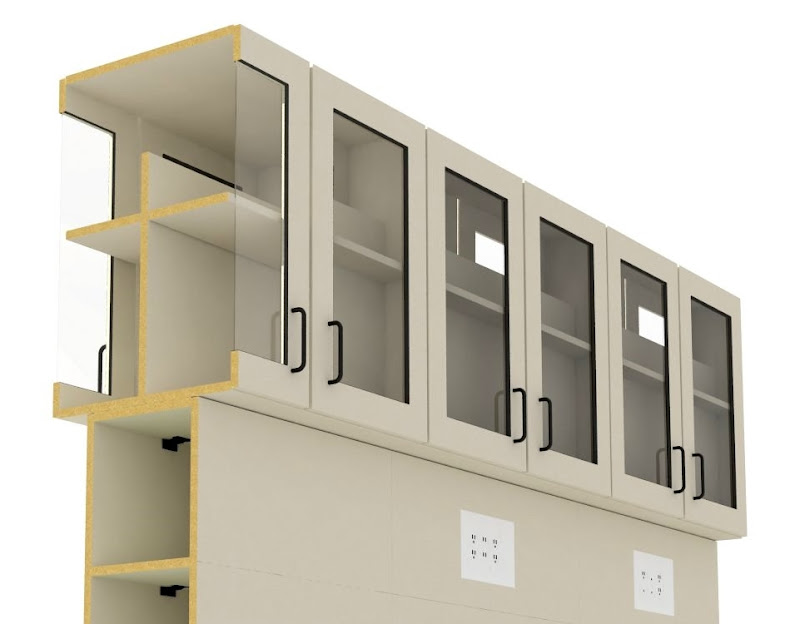
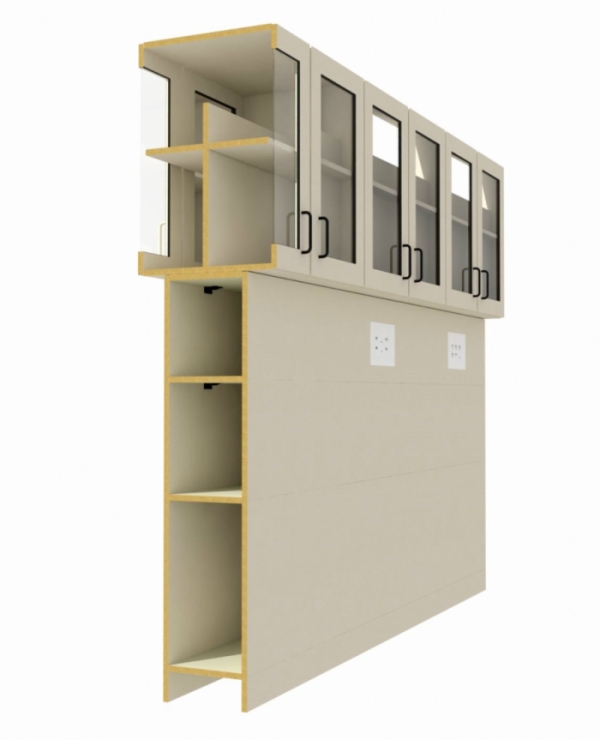
Thanks. Yes the door on this is the same as the panels. We can do HPL doors and drawer fronts if the customer wants it but they still will be PVC edge banded (like the panels). The clips are Keku clips as that chase is a service void. Used for med-gas and water supply and drains. I did a render showing a typical base unit and wall unit with hanging rail. I'll put those up after while.
@dermotcoll said:
Nice cut-away image Glenn. Do you make the door from melamine faced chipboard as well? Man that is tight budget stuff!
Is the base just used as a service void ? And what are the clips on the interior of the base? Click fittings? Many questions - very curious!
Really like the point of view and the detail being shown, very interesting. -
RE: A few lab cabinet images
@unknownuser said:
And the render engine you used???
Nice work Glenn.
Thanks Eric, that was the Vray demo.
-
A few lab cabinet images
Hi all, I thought I would finally share a few images. Here are a few sections of some lab cabinets we make here at work. Nothing too detailed just some images I made for a customer.
Modeled from AutoCAD output and edited in SU.
-
RE: SketchUP 8
I hear that a bit but honestly I have no issues with it. I open it up do my work and turn it off when I am finished. About the only time I see issues are when users don't have the correct hardware or if they just don't know what they are doing. Been using it for 15 years and there have been a release or 2 that had issues but they were some time ago.
To each their own I guess@thomthom said:
@unknownuser said:
I am sure that if AutoDesk would have bought them we would not have seen the free version of SU but on the plus side development might have taken off a bit more or maybe more refined, maybe.

I don't think AutoDesk would have been any good for SU. Of all the apps that cause the most grief here at the office, they all comes from AutoDesk. -
RE: SketchUP 8
I wonder this myself at times. While I still like SU and I am glad to have it I think that it might have been better 1st if @Last would have not "sold out" to Google or might have partnered with another company that understands 3D and design. I am sure that if AutoDesk would have bought them we would not have seen the free version of SU but on the plus side development might have taken off a bit more or maybe more refined, maybe.
@frv said:
I just read that Sketchup is still bigger than Revit, right behind 3ds Max.
http://www.cgarchitect.com/news/Reviews/Review070_1.aspLooking at these numbers I understand the disappointment about were Sketchip is going according to Google's stated strategy. Obviously a large portion of SU's userbase would love to stay on board a winning ship. One wonders truly how a more dedicated CAD company would have handled such succes in the business. A good chance SU would become the industry standard in architectural modeling. Many feel here that SU needs another, younger and more enthousiastic captain more like the original one to command the current SU team.
But at the moment SU is still a great tool and SU8 is even better. But looking at SU8, SU will slowly drop down the list knowing that it could have been moving up.
Francois -
RE: WinPad, Win7 OS, for SU?
Archos has one but I have not seen it yet in the "flesh".
http://www.archos.com/products/nb/archos_9/index.html?country=us&lang=en
Too bad it runs Win7 starter but it is cool looking. -
RE: Sketchup is broken
Well let me add myself to the list as well. I have also noticed this in the last few weeks. It's not every time I start SU but it is happening. I am on WinXP SP3, dual-core AMD based system with an nVidia GF8600GT card.
-
RE: Share your Digital Photography shots here
I live a bit North-West of High Point and we missed those. I hope your house was spared that mess.
@unknownuser said:
I've never experienced an earthquake but I've had my fair share of hurricanes and those are no fun. Here are a few more shots from yesterday..
-
RE: Ipad
Better cpu, graphics, SD slot, HDMI out and 2 cameras (1 facing you and one facing out). Not bad and $550 for a 32gb model. Might be a nice addition to my iPod touch (the kids love it BTW).
@rickgraham said:
Looks like HP just got in on the fray with the Slate. http://www.wired.com/gadgetlab/2010/04/hp-slate-details-leaked-550-keyboard-less-netbook/
With the Slate, I guess one could theoretically run SU since it is Windows based. I still like the iPad though personally.
Rick
-
RE: Castle Howard
This model needs to be the response that people get when they say that SU is not a professional tool! Excellent job.

-
RE: Which CAD program?
Well I put those in as most you buy Apple for the designer look also want to complete the look. I agree the Apple displays are overpriced, as much as the keyboards and mice but some like them.
Yes the skills make the design not the tool. The tool can assist in many parts but without the skills the tools mean nothing. I have played with HighDesign and think that if they continue to development that app they will will have a true winner. I await to see where it goes.
It seems we all get on sugar highs at times -
RE: Which CAD program?
@tfdesign said:
...I could buy both say PC8 and a Mac Mini for the price of a seat of ACAD LT!
Huh...
http://www.engsw.com/catalog/
PowerCADD 8 = $995 of course you will need Wild Tools so let's say = $1,205Apple mini = $599 + Apple 24" Display = $899 + Apple keyboard = $49 and Apple mouse =$49
$1,596http://www.amazon.com/Autodesk-057B1-05A001-P101A-AutoCAD-LT-2010/dp/B001UO8M8M/ref=sr_1_1?ie=UTF8&s=software&qid=1266345123&sr=8-1
AutoCAD LT 2010 = $1,080Just keeping things straight
I do agree to use whatever works. They all have pluses and minuses. More Acad users so more support (if you need it) and more jobs out there as well at times. PowerCADD makes great looking drawings, HighDesign can as well. To each there own.

-
RE: Texture scaling problem
@gaieus said:
Still it seems that the texture is scaled with that cabinet door. Are there two, separate texture images with the model? If not, try to right click on that component and "Scale definition". If it were a native SU model, this would fix the texture scaling issue.
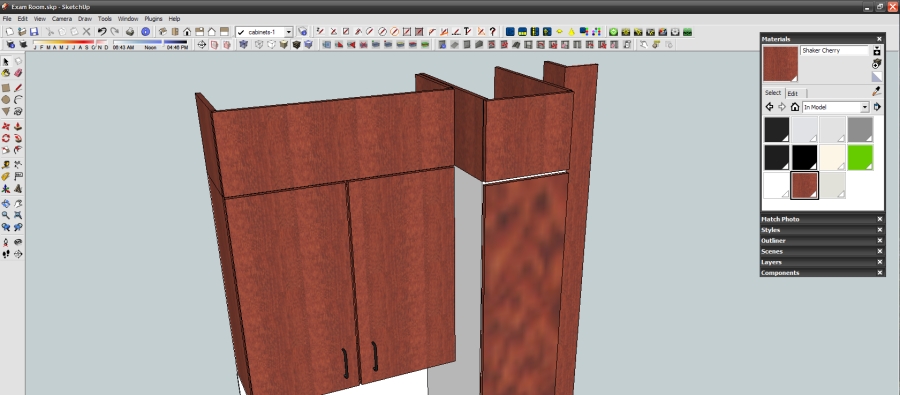
There was only one texture for the wood but I did right-click and make unique texture and scale that one so I found a work around just wanted to see if anyone else had seen this before.
Thanks -
RE: Texture scaling problem
No, they are all scaled the correct size. The tall cabinet is exactly what it should be. They were all correct in AutoCAD too. It's really weird.
-
Texture scaling problem
Hello all, I have an issue with textures not scaling correctly on cabinet blocks brought in from AutoCAD. In my picture you can see that I have some cabinets in my layout which I am applying textures too. Now the tall unit door seems to displaying my texture in a different scale. All units are components. Any ideas?
TIAGlenn
-
RE: Sifi odds and ends
Good looking stuff, although the ship sure does look like an original Cylon Raider. Nice work
-
RE: Progecad smart no longer free (?)
@linea said:
Glen
Bare in mind Progecad is for non-professional use and does not have even half the features that DoubleCAD has.
jon
Oh I agree, I've used them both and I like DoubleCAD better. Sure I had to learn the way it did certain things but if you need a free 2D dwg editor there is no better option IMHO. I did have an easier time with ProgeCAD to start with but saw what DoubleCAD had and it can be used commercially.