Jim helped me out with my bifold doors. Perhaps this will give you some insight to a solution for your control arm etc.
Oops, your profile's looking a bit empty! To help us tailor your experience, please fill in key details like your SketchUp version, skill level, operating system, and more. Update and save your info on your profile page today!
Urasik Extensions | Lots of new extensions to check out Learn More
G
Offline
Posts
-
RE: Newbie help with a suspension simulation?
-
RE: Trouble with basic solid-making, checking for solid"ness"
Select all the geometry, right click and create a group.
It will then be solid and entity info will show you volume
-
RE: Determine if edge would split face
Thanks guys - this gives me some good direction. I like Sam's strategy where he makes use of the raytest.
-
Determine if edge would split face
I start with hundreds of faces and hundreds of edges. The faces are in one group and the edges are in another group.
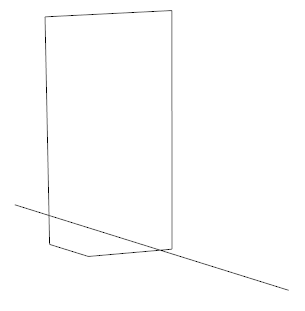
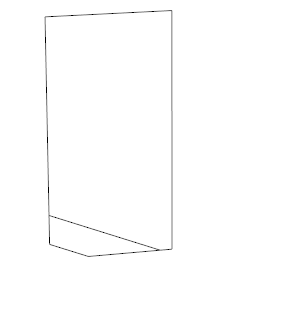
The first image shows 1 face and 1 edge where the edge is coplanar with face.
I want to end up with 2 faces just like the second image.I could get make a copy of the array of vertices that make up the face and then add the 2 points that make up the edge and then run fit_plane_to_points and check to see if the resultant plane is equal to the plane of the face.
If it passes then I would need to figure out how to calculate the 2 new vertices that are on the second image.
Any shortcuts or ideas on a better method? Is there a way to quickly throw out edges that aren't close?
-
RE: [Plugin] GKWare Cabinet Maker
I'm working on detecting change for each major area: cabs, ruls, materials and doors. When I detect change then I'll set the option to "Save".
The other choice is I can put three buttons on each of the main tabs. "Save", "Cancel" and "Delete"
I can also put the library name in a text box that you can change if you want - This would provide a "Save As" function.Any opinions?
-
RE: SketchUp 2016 is here....
Magnus
I always set disable_ui to true.
Some of my longer running scripts are still usually under a minute.
Regardless - inside the loop I do
Sketchup::set_status_text("Cabinet: #{count}", SB_PROMPT )If you don't have a loop that provides a predetermined level of activity then you can use a timer and have that timer update the status. Say every 10 to 30 seconds. The status could show elapsed time and some form of guess to how far you are through the script.
-
RE: [Plugin] GKWare Cabinet Maker
Version 1.0.23 ready for download now.
Tall cabinets are now available in face frame.
-
RE: [Plugin] GKWare Cabinet Maker
It would be automatic and the layer would be turned off by default.
The layer would show the outline of the cabinets and widths and depths no heights.
All the geometry for the cabinet 2D layer would be at floor level. -
RE: [Plugin] GKWare Cabinet Maker
I'm thinking of adding a dimension layer to cabmaker. It would be a plan view which would give you cabinet widths and depths for uppers and lowers.
In 3D view you would normally turn this layer off. But in overhead plan view you could turn off all layers except this new dimension layer.
Anyone interested?
-
RE: SU 8.0 - how to install .rbz plugins?
I believe that the maintenance release of SU8 was from Trimble and has a very different licensing agreement as does the original release from Google.
I myself decided not to go with Trimble's update.
-
RE: SU 8.0 - how to install .rbz plugins?
Rename the file from .rbz to .zip
decompress the files into the plugins folder. That is the same folder that you copy your .rb files to. -
RE: SketchUp 2016 is here....
SU 2016 is the best version since Trimble took over Sketchup. I'd been working with SU8 - now Su 2016
-
RE: Help with solid
You could break this down into sections and get each section to become a solid. Then put it back together.
Also it appears you could work on half the chair back and then mirror it and bring the 2 halves together. Might simplify the problem a bit.
-
RE: [Plugin] GKWare Cabinet Maker
Version 1.0.22 is ready for download from my website.
It will be in the plugin store shortly.The bad news is I did not finish face frames for tall cabinets. That will come out next week.
-
RE: [Plugin] GKWare Cabinet Maker
Kim - I've extended your trial another month.
With face frame construction I've disabled left and right fillers.
I've also extended kicks to line up with the amount the left and right stiles overhang the cabinet. -
RE: [Plugin] GKWare Cabinet Maker
I'm getting real close with face frame construction.
I've completed:
Standard, Sink, Angled, Returned, Angled Sink, Left Blind and Right Blind in Inset and Overlay flavors and in both partial and full frames.I've got the tall cabinet to finish off.
-
RE: Transform face to a known plane
Thanks Fredo,
Seems like there is always something new to learn !!
-
RE: Transform face to a known plane
The plane is rotated from the ground plane on all axis.
-
RE: Transform face to a known plane
Thanks guys - I've adjusted Caul's code and I can now get everything working the way I want.
-
RE: [Plugin] GKWare Cabinet Maker
Version 1.0.21 is ready for download. This version works with SU 2016 and El Capitan.
This is a patch version and does not include face frames.