Version 1.0.32 ready for download
Oops, your profile's looking a bit empty! To help us tailor your experience, please fill in key details like your SketchUp version, skill level, operating system, and more. Update and save your info on your profile page today!
Urasik Extensions | Lots of new extensions to check out Learn More
G
Offline
Posts
-
RE: Mac and Windows 'New Model' differences...
auto_create
Error: #<NameError: undefined local variable or methodsel' for main:Object> <main>:26:inwith_selection'
<main>:36:inauto_create' <main>:in<main>'
SketchUp:1:in `eval' -
RE: [Plugin] GKWare Cabinet Maker
Version 1.0.31 has a number of bugs all relating to Top Gap for frame less construction.
Version 1.0.32 addresses these issues and provides a solution.
- Fillers with frameless construction were too low when using Top Gap > 0. Fixed
- Upper cabinet insertion point with frameless construction was wrong when Top Gap > 0. Fixed
- Dividers overlapped Top Filler when Top Gap > 0. Fixed
- Top Filler wrong for Return and Angled cabinets. Fixed
-
RE: [Plugin] GKWare Cabinet Maker
Version 1.0.31 - Feb 10 2016
- Single pullout door and pullout created error. Fixed.
- Fixed bug with tall cabinets and frameless construction.
- Run filler to floor when notch is set to 0 for base cabinets.
- Fixed parts report. Sorting and Summarizing now working.
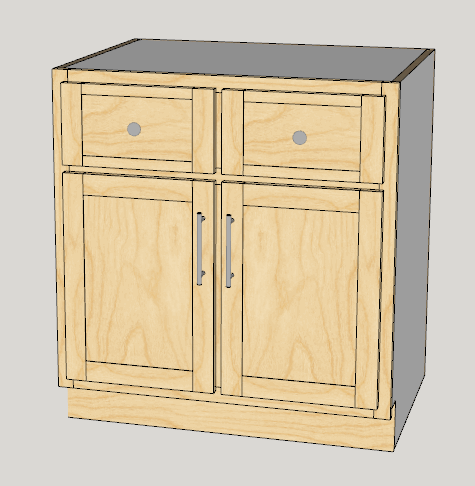
- Added side by side drawers for Standard and Sink Base cabinets (not angled).
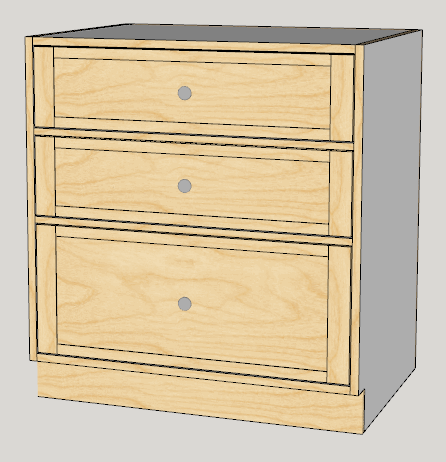
- Added auto size drawers. Works for Standard cabinets where there are at least 2 drawers and no doors. Works for Tall cabinets if there is at least 1 drawer.
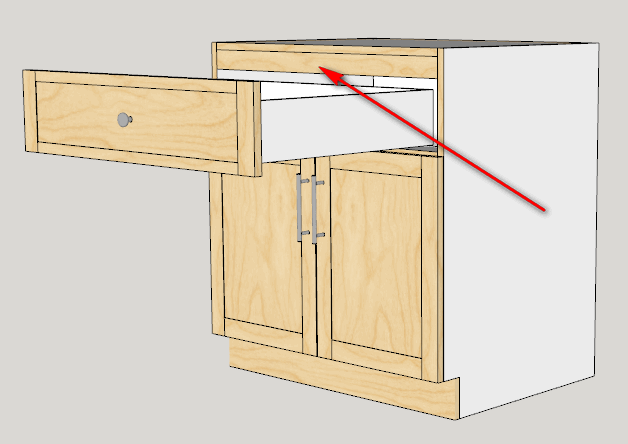
- Added Top Filler for frameless construction when Top Gap is increased to more than 1/2 the thickness of the top.
For faceframe construction you can now have side by side drawers for standard cabinets where there is at least 1 drawer (full frame) or exactly 1 drawer (partial frame). You can have 0, 1 or 2 doors.
For Drawer Banks and tall cabinets you can now ask Cab Maker to calculate the proper height of the bottom most drawer
Filler works for all cabinets. With sink cabinets the top filler takes precedence over the sink stretcher.
-
RE: Line length on circle scaled to ellipse is very wrong
Circle1 144s at 400 mm - scale by factor of 2
Circle2 288s at 400 mm - scale by factor of 2entity information reports ~5026.5 mm for both - I don't know where this number comes from
Then pushpull each ellipse into elliptical cylinder
Select arc and explode
entity information now reports ~3872.6 mm for Circle1
entity information now reports ~3875.3 mm for Circle2Elliptical Circumference calculates out at 3875.38
-
RE: [Plugin] GKWare Cabinet Maker
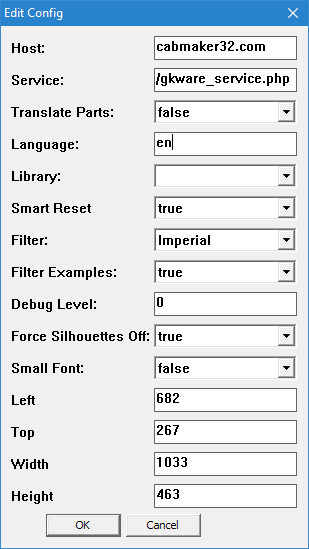
Set Filter to 1 of 4 values, 'None', 'Metric', 'Imperial', 'Both'
All template examples now start with the text 'metric_' or the text 'imperial_'
If you work in inches then filter out metric or vice versa.Filter Examples uses a text file called filters.txt for additional specific filtering.
-
RE: [Plugin] GKWare Cabinet Maker
Version 1.0.30 is now ready for download
- Updated Rules editor. Fields now automatically enable / disable based on "Overlay / Inset" and "Construction".
- Added Drawer Back Length Adjustment for drawer boxes. This corrects the parts listing when cabinet makers want to create dovetail drawers.
- Added Back Overhang for finished panels. You can use a negative value if you wish.
- Added Filters so that examples can be filtered out. From main menu run 'Cab Maker - Edit Config'
- Fixed problem with un-profiled door panels. They were always showing up as 6mm or 1/4". Cab Maker now honors panel thickness from the materials template.
-
RE: [Plugin] GKWare Cabinet Maker
I've been asked to consider a lease to own program and I would like to hear from people on how they feel about this.
For easy round numbers let's take a plugin that is 100 $
If the lease to own program is a one year program then the monthly lease would be 10 $
This means your total cost of ownership would be 120 $Any comments?
-
RE: [Plugin] GKWare Cabinet Maker
Bill,
All horizontal cabinet parts are first created vertical (so wood grain works and length is length for reports). Then the parts are moved and rotated into cabinet position.
The toe kick part that remained vertical means the cabinet create process quit at an error. In this case it is probably a nil reference because of the 0 thickness for the materials. Toe kicks are the last thing I create - so that is why the rest of the cabinet is complete - however the cabinet itself would stay at the origin and would fail to move and rotate into position.
Currently there is no way to create a cabinet with more than 2 side by side doors. To do so the permutations and combinations become staggering. To handle your 3 door example as a cabinet maker I always created 2 cabinets - 1 with 2 doors and 1 with 1 door. In my opinion the 1 extra side panel is very inexpensive as compared to all the extra labour to handle everything from design to all the logistics of that custom cabinet.
Finally - when I want to draw a custom cabinet I just create the parts from scratch and use the Door Maker to fit the drawers. However you can right click and explode the various parts - but it is probably more time consuming than creating a single cabinet from scratch.
-
RE: [Plugin] GKWare Cabinet Maker
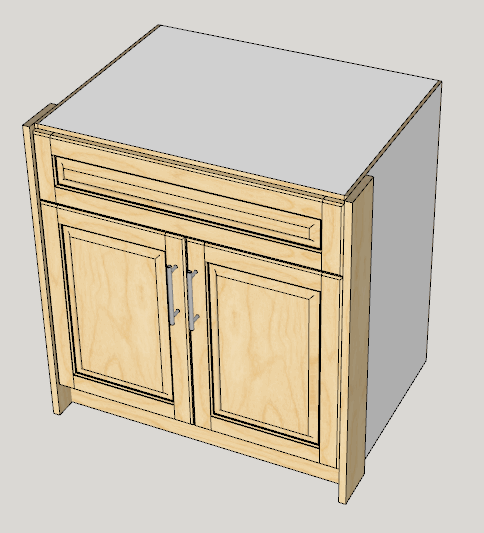
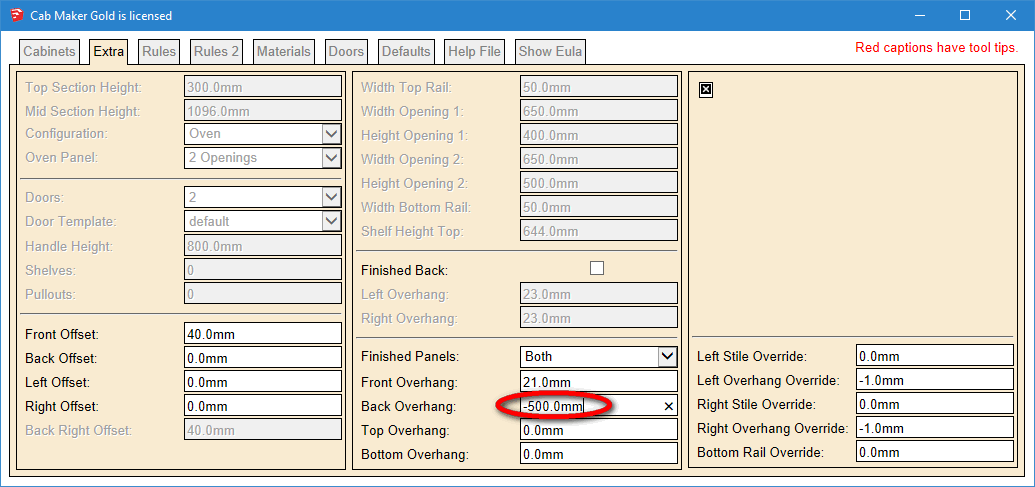
Here is another completed feature. You can now adjust the Back Overhang for a finished panel.
Set it to a negative value if you want a finished panel to work like a filler that comes out flush to the front of the drawer / doors.
-
RE: [Plugin] GKWare Cabinet Maker
Andrew,
One of my profs once said that "Software is never completed - it is simply left in various stages of abandonment"
Perhaps I'm wrong - but I would have thought that users are happy to see new features - especially when some users have asked for them.
I would have thought that users would be happy to see that a plugin author is committed to improving their software.
Incremental improvements are way less risky that large updates especially when the code is fresh on the authors mind. This software life cycle is called RAD (rapid application development) and is iterative in nature.
Do you think that this software approach is holding users back from adopting this plugin as their solution?
-
RE: [Plugin] GKWare Cabinet Maker
CabMaker provides a lot of example templates. This includes Cabinets, Rules, Materials and Doors.
There is a problem if users work with these templates and edit them to satisfy their own situations. The next time they update CabMaker then their changes are over written.
The solution is for users to "Save As" each template and give them their own names. Then their changes are preserved during updates.
Another issue is that I work mainly in metric but Cab Maker can also work in decimal inches or in fractional inches. I need a strategy that simplifies the user experience. Users shouldn't have to edit every value in these templates. They should only edit the values they want to change.
What I'm think about doing is providing a way for the user to easily filter out metric templates if they use inches or vice versa. Additionally - they should be able to turn on a filter to filter out my example templates. Users should be able to add additional template names to this file.
To that end - this is what I'm thinking.
- Provide metric and inch templates for cabinets, rules, materials and doors. I'm going to prepend the word metric or imperial to each template. This allows for easy filtering.
- Provide a text file containing the names of all example templates.
- Modify editor for Configurations - add a switch for templates - Display 'All', 'Metric', 'Imperial'
- Also add a switch to filter out examples.
What do you guys think?
-
RE: [Plugin] GKWare Cabinet Maker
I am adding 'Drawer Auto Size:' feature for drawer banks etc. If checked the Bottom drawer will auto size itself to fill the remaining space. This feature only works with Standard cabinets and is ignored when there are doors.
I am adding a 'Double Drawers:' feature where the top N drawers have 2 side by side drawers. This feature is only available for face frame construction.
-
RE: [Plugin] GKWare Cabinet Maker
Version 1.0.29 is now ready for download.
The documentation has now reached 105 pages.
-
RE: [Plugin] GKWare Cabinet Maker
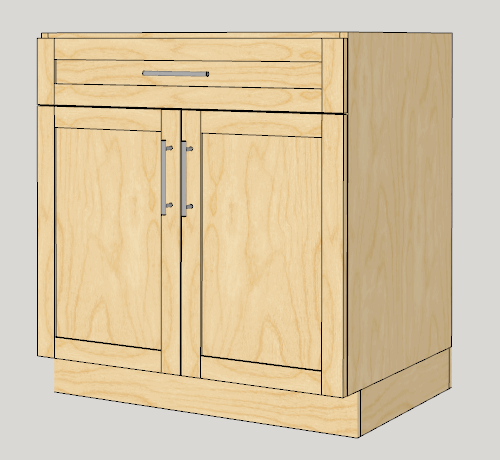
Here is a frameless overlay construction. Notice that you can now adjust the top gap.
Here I set the Door Gap to 3 mm and adjusted the Top Gap by 10 mm resulting in a 13 mm gap from the top edge of the drawer to the top of the cabinet.
-
RE: [Plugin] GKWare Cabinet Maker
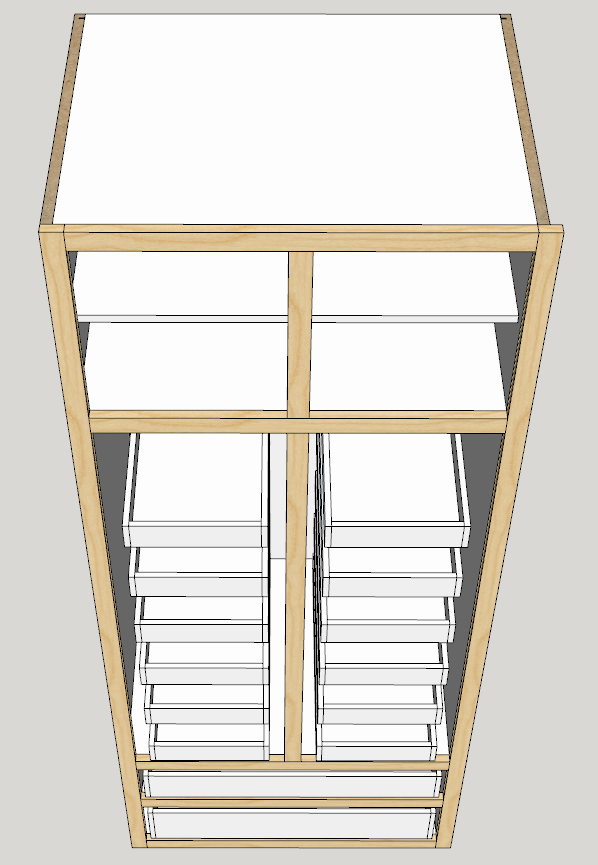
Here is a tall cabinet with full face frame construction and a split pantry with 6 pullouts per side.
Notice that the Left and Right Stile overhang can now be set independently.Also the drawer slide clearance here is 1" and the pullout slide clearance is 2 1/2". They can now be set independently.
-
RE: [Plugin] GKWare Cabinet Maker
I'm working on Version 1.0.29
- Updated documentation
- Modified first 4 dialog tabs with new arguments,
- Added Adjust Stretchers for frameless overlay construction. You can now move the stretchers up or down.
- Added Top Gaps for frameless overlay construction. You can now add some extra room between top of cabinet and top of door or drawer.
- Blind cabinets and Tall cabinets were creating a stretcher at the top of the cabinet. Fixed.
- Added Left and Right Overhang Overrides.
- Added Pullout Slide Adjust.
I just need to complete some more testing.
-
RE: [Plugin] GKWare Cabinet Maker
Version 1.0.28 is ready to download
- Update documentation.
- Fixed Side dado / rabbet for overlay top.
- Added graphic for Side dado / rabbet.
-
RE: [Plugin] GKWare Cabinet Maker
I missed updating version 1.0.27 with the graphic for side dado / rabbet.
I'm also needing to update the documentation to bring it up to date.I've had one user not understand that the drawer heights is actually drawer spacing. I will update the help file to explain this better.