sketchucation logo sketchucation
    • Login
    1. Home
    2. Garry K
    3. Posts
    Oops, your profile's looking a bit empty! To help us tailor your experience, please fill in key details like your SketchUp version, skill level, operating system, and more. Update and save your info on your profile page today!
    Urasik Extensions | Lots of new extensions to check out Learn More
    G
    Offline
    • Profile
    • Following 0
    • Followers 0
    • Topics 33
    • Posts 976
    • Groups 2

    Posts

    Recent Best Controversial
    • RE: [Plugin] GKWare Cabinet Maker

      What's happening is there is an error somewhere and the process is not completed.

      You can startup ruby console before you render the angled cabinet. It should show errors. Often this sort of thing happens when parameters have values that the plugin doesn't handle.

      Please email me the contents of the ruby console.
      http://cabmaker32.com/contact/

      posted in Plugins
      G
      Garry K
    • RE: [Plugin] GKWare Cabinet Maker

      Version 1.0.35 is now available from my web site.

      1. Added Drawer Handle Location to Defaults tab.
      2. Added 6 more reports which are the same as the original 6 but in your model's units.
      posted in Plugins
      G
      Garry K
    • RE: [Plugin] GKWare Cabinet Maker

      One of my users has made a suggestion that I group items together a bit better. Currently the first 2 tabs contain cabinet values and the 3'rd and 4'th tab contains rules.

      His suggestion means mixing cabinet values and rules. Up to now I have been against mixing as I think it causes confusion. However, having kick information on 2 tabs and frame information on 2 tabs also causes confusion.

      Batch editing currently ignores the first 2 tabs. When batch editing you can change rules, materials, or defaults and have the changes applied to an entire kitchen.

      What I have come up with is a way to identify rules by changing the color to read for the border of each rule.

      I would like user comments on these proposed changes. This mockup hasn't changed the organization of the rules but does show the borders as red even for a disabled control.
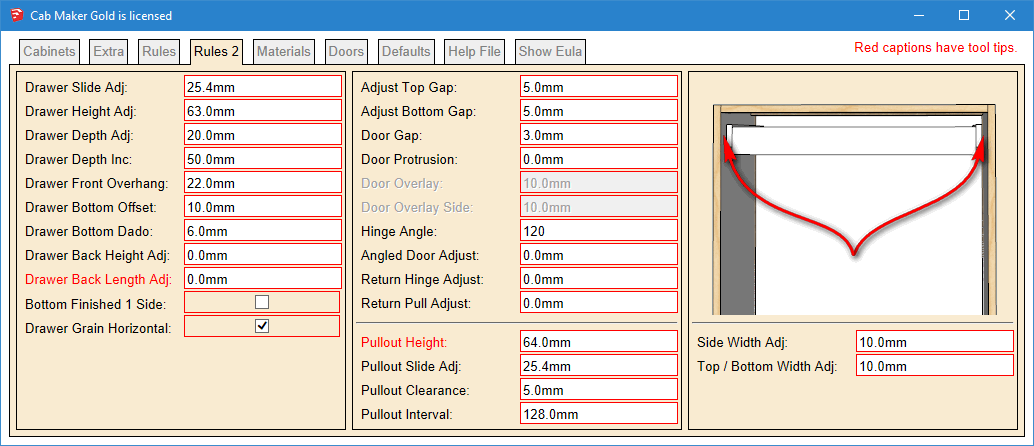
      rules red mockup.PNG

      Here is the proposed change for the rules tab
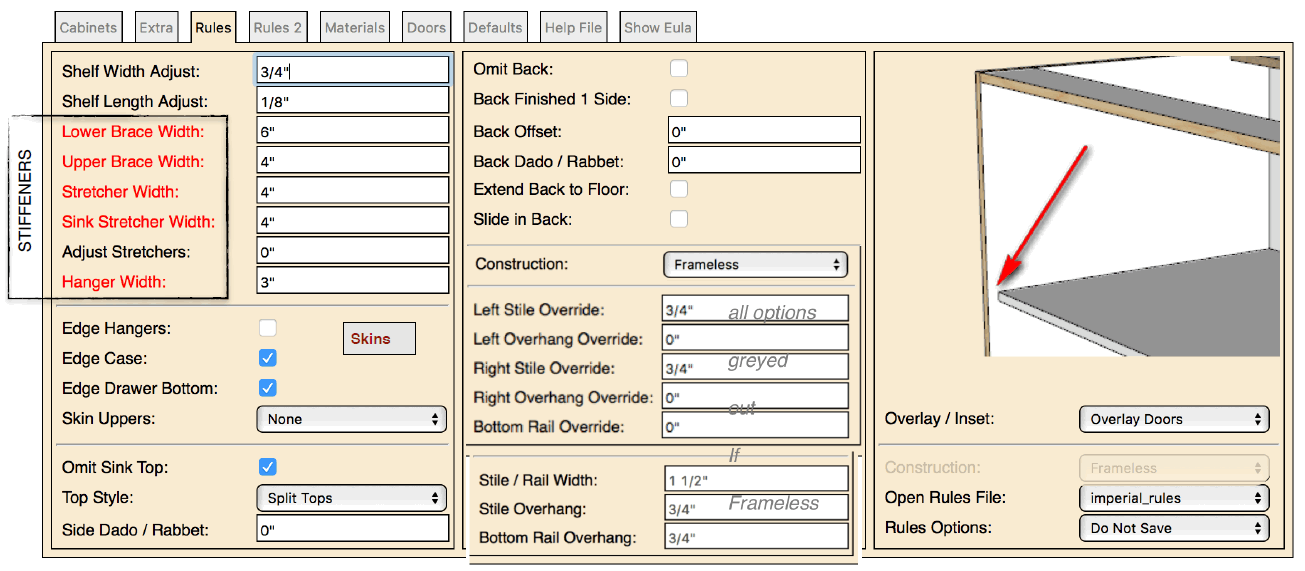
      rules mockup.PNG

      Here is the Extra tab and the proposed changes
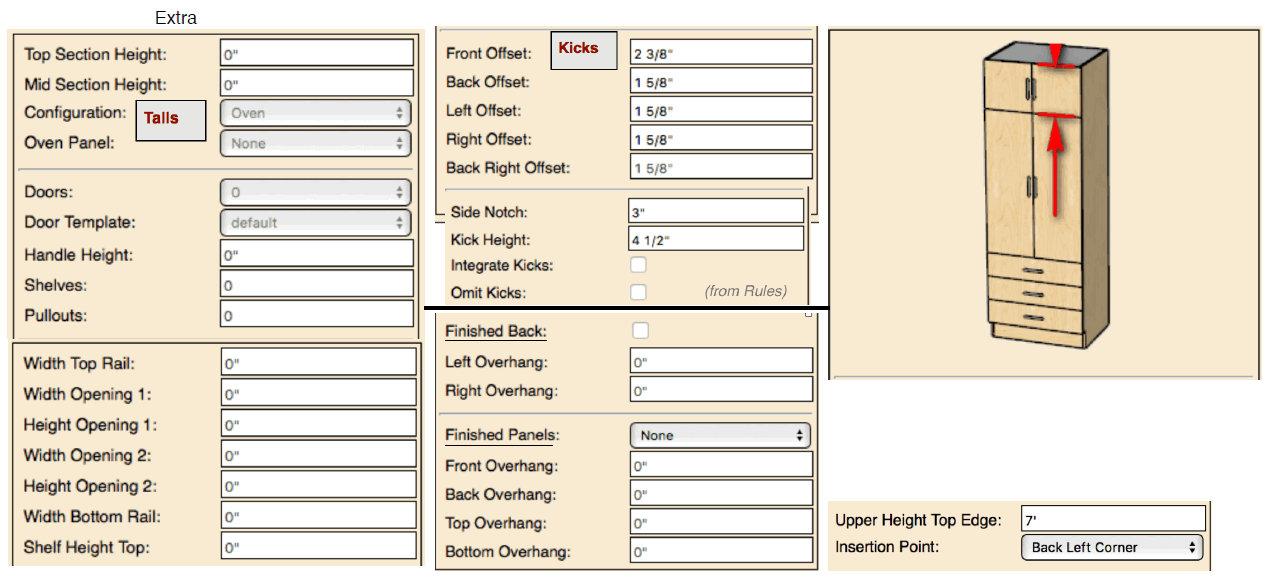
      Extra mockup.PNG

      posted in Plugins
      G
      Garry K
    • RE: [Plugin] GKWare Cabinet Maker

      The csv reports are now all in decimal inches. This is to simplify setting up Cut List plus and or Cutmaster. It is also to avoid the ~ that shows up where there isn't enough precision in model's units.

      I will look at creating a second set of reports that use the model's units.

      posted in Plugins
      G
      Garry K
    • RE: What Monitor is best for SU2016

      What graphics card are you using?

      posted in Hardware
      G
      Garry K
    • RE: [Plugin] GKWare Cabinet Maker

      Version 1.0.34 is ready for download from my web site.

      I fixed 2 bugs in this release.

      1. Finished panels were not working on the right side of cabinets.
      2. Solo (Pete) had a peculiar error that I tracked and fixed. To my knowledge only Pete's computer behaved this way - although other users may have experienced the same issue and simply choose not to report it. The work around shouldn't affect anyone else. I have tested this code on a number of different computers.
      posted in Plugins
      G
      Garry K
    • RE: [Plugin] GKWare Cabinet Maker

      I think Pete is correct.
      Andrew - I am slowly trying to narrow this down.

      The crazy part is that the old version used to work on Pete's computer - now it doesn't.
      Something has changed - just don't know what it is. What I mean is the old version no longer works.

      The other interesting thing is that no one else has reported this problem. That doesn't mean no one else has seen it - it just means no one has brought it to my attention.

      posted in Plugins
      G
      Garry K
    • RE: [Plugin] GKWare Cabinet Maker

      A user has found a bug and I've fixed it.

      I will put out version 1.0.34 with the fix late tomorrow or early the next day.

      The bug has to do with finished panels.

      posted in Plugins
      G
      Garry K
    • RE: [Plugin] GKWare Cabinet Maker

      For support users shoul contact me via my web site.
      http://cabmaker32.com/contact/

      This will get through to me almost immediately and no chance of going to trash.
      I will then answer as quickly as possible.

      posted in Plugins
      G
      Garry K
    • RE: [Plugin] GKWare Cabinet Maker

      Pete,

      I've sent you a PM with my email address. We can figure this out.

      Garry

      posted in Plugins
      G
      Garry K
    • RE: [Plugin] GKWare Cabinet Maker

      Just an assumption bug it looks like eval has been modified. Modifying built in objects is considered bad form.

      At this moment I suggest that you disable Plus Spec and try again and see what happens.

      posted in Plugins
      G
      Garry K
    • RE: [Plugin] GKWare Cabinet Maker

      Version 1.0.33 is now ready to download.

      1. Added width adjustment for cabinet sides and top / bottoms.
      2. Added bottom gap for frameless construction with overlay doors.
      3. Modified reports. Changed Solid to Dimensioned Lumber so that the report would work with Cut List Plus.
      posted in Plugins
      G
      Garry K
    • RE: [Plugin] GKWare Cabinet Maker

      Yes - you are filtering out Metric.
      This setting will show everything else.

      posted in Plugins
      G
      Garry K
    • RE: [Plugin] GKWare Cabinet Maker

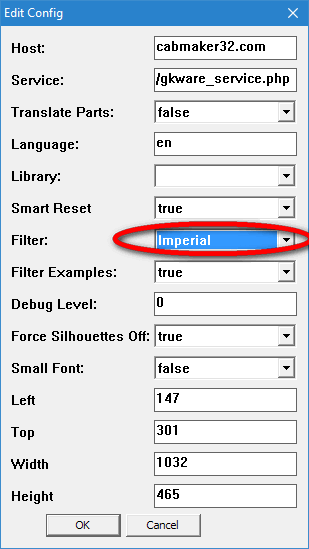
      From the main menu choose

      Extensions \ GKWare CabMaker \ Cab Maker - Edit Config

      Set Filter to Imperial to filter out Imperial
      OR - depending upon what you want
      Set Filter to Metric to filter out Metric

      Configuration Editor.PNG

      posted in Plugins
      G
      Garry K
    • RE: [Plugin] GKWare Cabinet Maker

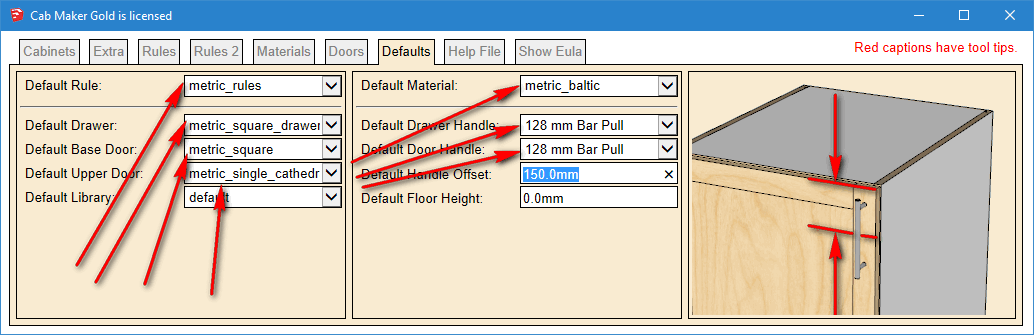
      Yes - Go to the defaults tab.
      That will show you what all the defaults are.

      I do save defaults settings with each model.

      defaults.png

      posted in Plugins
      G
      Garry K
    • RE: [Plugin] GKWare Cabinet Maker

      I'm thinking about adding a feature where you create a cabinet with create options:

      Create Options
      Drop down that has "Full Cabinet", "Door Fronts Only", "Door Fronts and Frames Only"

      posted in Plugins
      G
      Garry K
    • RE: [Plugin] GKWare Cabinet Maker

      Here is a video with cab maker and cut list pro integration.

      posted in Plugins
      G
      Garry K
    • RE: Mac and Windows 'New Model' differences...

      auto_create
      0.12499
      1

      I get a big red screen - that is all
      My default template is set to mm with a precision of 0.001

      posted in Developers' Forum
      G
      Garry K
    • RE: [Plugin] GKWare Cabinet Maker

      For some unknown reason Andrew hasn't picked up the PM that I sent him.

      Users can also contact me via my web site.
      http://cabmaker32.com/contact/

      I see these emails just as fast as if you emailed me directly. I also respond fairly quickly. After I respond you would have my email address and I will have yours.

      The last few releases are in response to a few users that have had some issues. They emailed me and I dug into the issues. Thanks to Scott, Bill, Grant and Piere.

      posted in Plugins
      G
      Garry K
    • RE: [Plugin] GKWare Cabinet Maker

      Andrew

      Not sure what's happening with your setup.
      Please email me with the email address I PM'd you with. We will get this working for you.

      In the meantime. If you would open the Ruby Console and then try - maybe there are some errors.
      Also - when you email me - please include your OS version and SU version.

      Garry

      posted in Plugins
      G
      Garry K
    • 1
    • 2
    • 20
    • 21
    • 22
    • 23
    • 24
    • 48
    • 49
    • 22 / 49