sketchucation logo sketchucation
    • Login
    Oops, your profile's looking a bit empty! To help us tailor your experience, please fill in key details like your SketchUp version, skill level, operating system, and more. Update and save your info on your profile page today!
    ⚠️ Important | Libfredo 15.6b introduces important bugfixes for Fredo's Extensions Update

    [Plugin] GKWare Cabinet Maker

    Scheduled Pinned Locked Moved Plugins
    625 Posts 67 Posters 430.9k Views 68 Watching
    Loading More Posts
    • Oldest to Newest
    • Newest to Oldest
    • Most Votes
    Reply
    • Reply as topic
    Log in to reply
    This topic has been deleted. Only users with topic management privileges can see it.
    • G Offline
      Garry K
      last edited by

      Version 1.0.31 has a number of bugs all relating to Top Gap for frame less construction.

      Version 1.0.32 addresses these issues and provides a solution.

      1. Fillers with frameless construction were too low when using Top Gap > 0. Fixed
      2. Upper cabinet insertion point with frameless construction was wrong when Top Gap > 0. Fixed
      3. Dividers overlapped Top Filler when Top Gap > 0. Fixed
      4. Top Filler wrong for Return and Angled cabinets. Fixed
      1 Reply Last reply Reply Quote 0
      • G Offline
        Garry K
        last edited by

        Version 1.0.32 ready for download

        1 Reply Last reply Reply Quote 0
        • utilerU Offline
          utiler
          last edited by

          Hi Garry, not sure what's going on here. I can't seem to get the plugin going....?
          When I click to start the second point ['select right front corner"] won't happen. Neither will it allow me to enter a length in the VCB.

          Any ideas?

          Just Curious...

          1 Reply Last reply Reply Quote 0
          • G Offline
            Garry K
            last edited by

            Andrew

            Not sure what's happening with your setup.
            Please email me with the email address I PM'd you with. We will get this working for you.

            In the meantime. If you would open the Ruby Console and then try - maybe there are some errors.
            Also - when you email me - please include your OS version and SU version.

            Garry

            1 Reply Last reply Reply Quote 0
            • G Offline
              Garry K
              last edited by

              For some unknown reason Andrew hasn't picked up the PM that I sent him.

              Users can also contact me via my web site.
              http://cabmaker32.com/contact/

              I see these emails just as fast as if you emailed me directly. I also respond fairly quickly. After I respond you would have my email address and I will have yours.

              The last few releases are in response to a few users that have had some issues. They emailed me and I dug into the issues. Thanks to Scott, Bill, Grant and Piere.

              1 Reply Last reply Reply Quote 0
              • utilerU Offline
                utiler
                last edited by

                Thanks Garry, all sorted now!

                Just Curious...

                1 Reply Last reply Reply Quote 0
                • G Offline
                  Garry K
                  last edited by

                  Here is a video with cab maker and cut list pro integration.

                  1 Reply Last reply Reply Quote 0
                  • G Offline
                    Garry K
                    last edited by

                    I'm thinking about adding a feature where you create a cabinet with create options:

                    Create Options
                    Drop down that has "Full Cabinet", "Door Fronts Only", "Door Fronts and Frames Only"

                    1 Reply Last reply Reply Quote 0
                    • utilerU Offline
                      utiler
                      last edited by

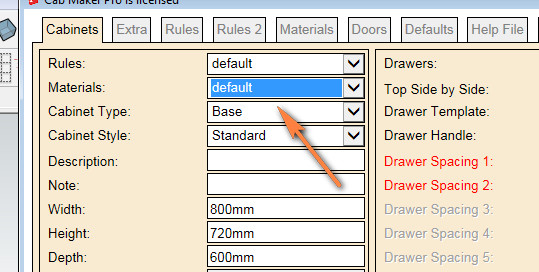
                      Hi Garry, is there a way for Cabmaker to identify material list as per what is in the current model?

                      2016-02-15_091501.jpg

                      Just Curious...

                      1 Reply Last reply Reply Quote 0
                      • G Offline
                        Garry K
                        last edited by

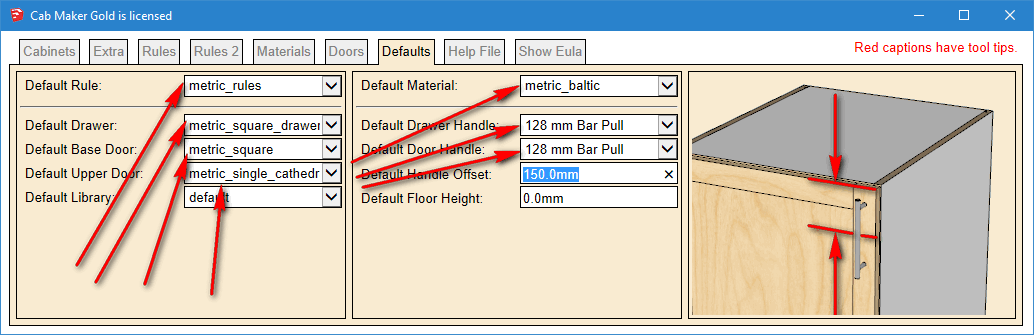
                        Yes - Go to the defaults tab.
                        That will show you what all the defaults are.

                        I do save defaults settings with each model.
                        defaults.png

                        1 Reply Last reply Reply Quote 0
                        • utilerU Offline
                          utiler
                          last edited by

                          Thanks but my defaults only show imperial_rules & imperial_rules_upper...?
                          How do I change it to metric?

                          Just Curious...

                          1 Reply Last reply Reply Quote 0
                          • G Offline
                            Garry K
                            last edited by

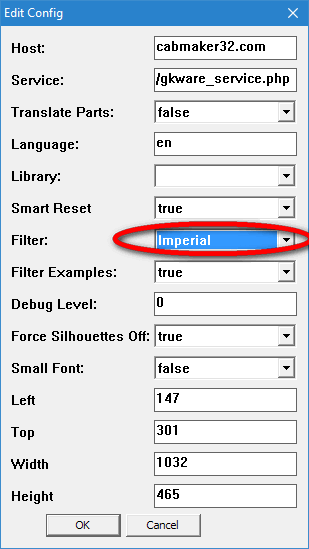
                            From the main menu choose

                            Extensions \ GKWare CabMaker \ Cab Maker - Edit Config

                            Set Filter to Imperial to filter out Imperial
                            OR - depending upon what you want
                            Set Filter to Metric to filter out Metric
                            Configuration Editor.PNG

                            1 Reply Last reply Reply Quote 0
                            • utilerU Offline
                              utiler
                              last edited by

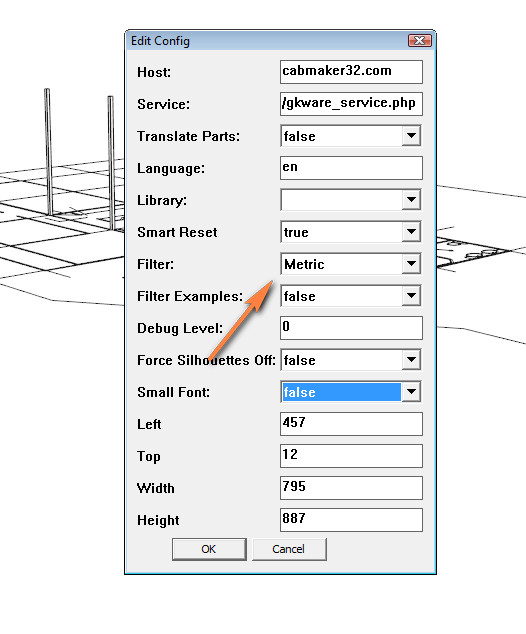
                              I have that set to metric but still the defaults show imperial....

                              2016-02-15_094932.jpg

                              Just Curious...

                              1 Reply Last reply Reply Quote 0
                              • G Offline
                                Garry K
                                last edited by

                                Yes - you are filtering out Metric.
                                This setting will show everything else.

                                1 Reply Last reply Reply Quote 0
                                • G Offline
                                  Garry K
                                  last edited by

                                  Version 1.0.33 is now ready to download.

                                  1. Added width adjustment for cabinet sides and top / bottoms.
                                  2. Added bottom gap for frameless construction with overlay doors.
                                  3. Modified reports. Changed Solid to Dimensioned Lumber so that the report would work with Cut List Plus.
                                  1 Reply Last reply Reply Quote 0
                                  • utilerU Offline
                                    utiler
                                    last edited by

                                    @garry k said:

                                    Yes - you are filtering out Metric.
                                    This setting will show everything else.

                                    Gotcha. Filtering is filtering out. A bit back to front but I understand now. thanks.

                                    Just Curious...

                                    1 Reply Last reply Reply Quote 0
                                    • soloS Offline
                                      solo
                                      last edited by

                                      Cabinet maker not working if you have Plusspec installed, I tried using it but it does not create any geometry or open any dialogs, I am assuming Plusspec is the cause as it started this behaviour after I installed the new version of Plusspec. However the Ruby console has this:

                                      Error; #<SyntaxError; (eval);1; syntax error, unexpected tIDENTIFIER, expecting end-of-input
                                      su"{dire">="olosp","wssa"drol">=evsa"sagil",snec>="ea",2l_...
                                                                   ^>
                                      c;/users/pete/appdata/roaming/sketchup/sketchup 2016/sketchup/plugins/gkware_cabmaker/utils_cabmaker.rbs;592;in `eval'
                                      c;/users/pete/appdata/roaming/sketchup/sketchup 2016/sketchup/plugins/gkware_cabmaker/utils_cabmaker.rbs;592;in `read_license'
                                      c;/users/pete/appdata/roaming/sketchup/sketchup 2016/sketchup/plugins/gkware_cabmaker/license_cabmaker.rbs;62;in `activate_license'
                                      c;/users/pete/appdata/roaming/sketchup/sketchup 2016/sketchup/plugins/gkware_cabmaker/cabmaker.rbs;240;in `activate'
                                      c;/users/pete/appdata/roaming/sketchup/sketchup 2016/sketchup/plugins/gkware_cabmaker/cabmaker.rbs;4523;in `select_tool'
                                      c;/users/pete/appdata/roaming/sketchup/sketchup 2016/sketchup/plugins/gkware_cabmaker/cabmaker.rbs;4523;in `block in <module;CabMaker>'
                                      SketchUp;1;in `call'


                                      http://www.solos-art.com

                                      If you see a toilet in your dreams do not use it.

                                      1 Reply Last reply Reply Quote 0
                                      • G Offline
                                        Garry K
                                        last edited by

                                        Just an assumption bug it looks like eval has been modified. Modifying built in objects is considered bad form.

                                        At this moment I suggest that you disable Plus Spec and try again and see what happens.

                                        1 Reply Last reply Reply Quote 0
                                        • soloS Offline
                                          solo
                                          last edited by

                                          I just tried Cabinet maker using SU 2014 which does not have Plusspec installed and I am getting same behaviour, must be another issue.

                                          http://www.solos-art.com

                                          If you see a toilet in your dreams do not use it.

                                          1 Reply Last reply Reply Quote 0
                                          • G Offline
                                            Garry K
                                            last edited by

                                            Pete,

                                            I've sent you a PM with my email address. We can figure this out.

                                            Garry

                                            1 Reply Last reply Reply Quote 0
                                            • 1
                                            • 2
                                            • 8
                                            • 9
                                            • 10
                                            • 11
                                            • 12
                                            • 31
                                            • 32
                                            • 10 / 32
                                            • First post
                                              Last post
                                            Buy SketchPlus
                                            Buy SUbD
                                            Buy WrapR
                                            Buy eBook
                                            Buy Modelur
                                            Buy Vertex Tools
                                            Buy SketchCuisine
                                            Buy FormFonts

                                            Advertisement

