This should be fixed with LibFredo6 v15.8a, just published.
Oops, your profile's looking a bit empty! To help us tailor your experience, please fill in key details like your SketchUp version, skill level, operating system, and more. Update and save your info on your profile page today!
Check out Febhouse | New extensions for Shadow Analysis in SketchUp Download
 F
Offline
F
Offline
Posts
-
RE: Scene animation with Animator
-
RE: [Plugin Library] LibFredo6 - v15.9b - 21 Apr 26
NEW RELEASE: LibFredo6 v15.8a - 09 Jan 26
LibFredo6 15.8a is a major release. It includes changes related to:
- Bug Fixing for Animator
- Evolutions for FredoSection v1.4a
Requirements: SU2017 and above
See plugin home page of LibFredo6 for Download of LibFredo6.
-
RE: [Plugin] FredoSection - v1.5c - 30 Jan 26
@FlorinAp
Thanks for signaling the problem which was inadvertedtly introduced with version v1.3b, only for the Section Box Outside. I have fxed it and will publish an update soon. It works fine for the Section Box Inside.Note that all plugins doing section box have to pile up a hierarchy of dummy groups to enclose the 6 section planes. However, there is no copy of the original geometry, but instance of it, so that any change in the section box mode is done on the original geometry. This is illustrated in the video:
At least this is how it works in FredoSection, and most likely in Curic SectionBox (I don't know for SJSectionBox).
-
RE: [Plugin Library] LibFredo6 - v15.9b - 21 Apr 26
NEW RELEASE: LibFredo6 v15.7b - 02 Jan 26
LibFredo6 15.7b is a major release. It includes changes related to:
- Bug Fixing and technical adjustments
Requirements: SU2017 and above
See plugin home page of LibFredo6 for Download of LibFredo6.
-
RE: Scene animation with Animator
Just create as many camera view as you like and place them along the timeline. Animator will interpolate the camera between them.
-
RE: Scene animation with Animator
Can you copy/paste the error message as text from the Ruby Console. The screenshot does not show the head of the error message.
Also, always use the positioner (4th toolbar icon) to record the initial position of objects, precisely in case there are issues.
-
RE: Scene animation with Animator
Scenes can be used in Animator for their camera. The interest versus setting the camera in Animator is that Animator will use the camera of the scene , which is controlled outside of Animator.
However, for tags (layers) and visibility of objects, you need to use Visual Effects.
-
RE: [Plugin] FredoSection - v1.5c - 30 Jan 26
NEW RELEASE: FredoSectiont v1.3b - 27 Dec 25
Requirements
- LibFredo6: v15.7a or above
- Sketchup version: SU2026 and above
FredoSection 1.3b is a maintenance release including:
- Adjustments for Section Boxes
Home Page of FredoSection for information and Download.
-
RE: [Plugin Library] LibFredo6 - v15.9b - 21 Apr 26
NEW RELEASE: LibFredo6 v15.7a - 26 Dec 25
LibFredo6 15.7a is a major release. It includes changes related to:
- New plugin: FredoSection v1.3a
- Other bug Fixing and technical adjustments
Requirements: SU2017 and above
See plugin home page of LibFredo6 for Download of LibFredo6.
-
[Plugin] FredoSection - v1.5c - 30 Jan 26
The information on FredoSection is maintained on the Plugin Home Page of FredoSection. This is also where you can download the RBZ file.
IMPORTANT: FredoSection is available for SU2026 and above.

- LibFredo6: v15.8a or above
- Sketchup version: SU2026 and above
- Platform: Windows and Mac OSX
- Usage: free till 01 April 2026 and then licensed

FredoSection provides several tools dedicated to section planes:
-
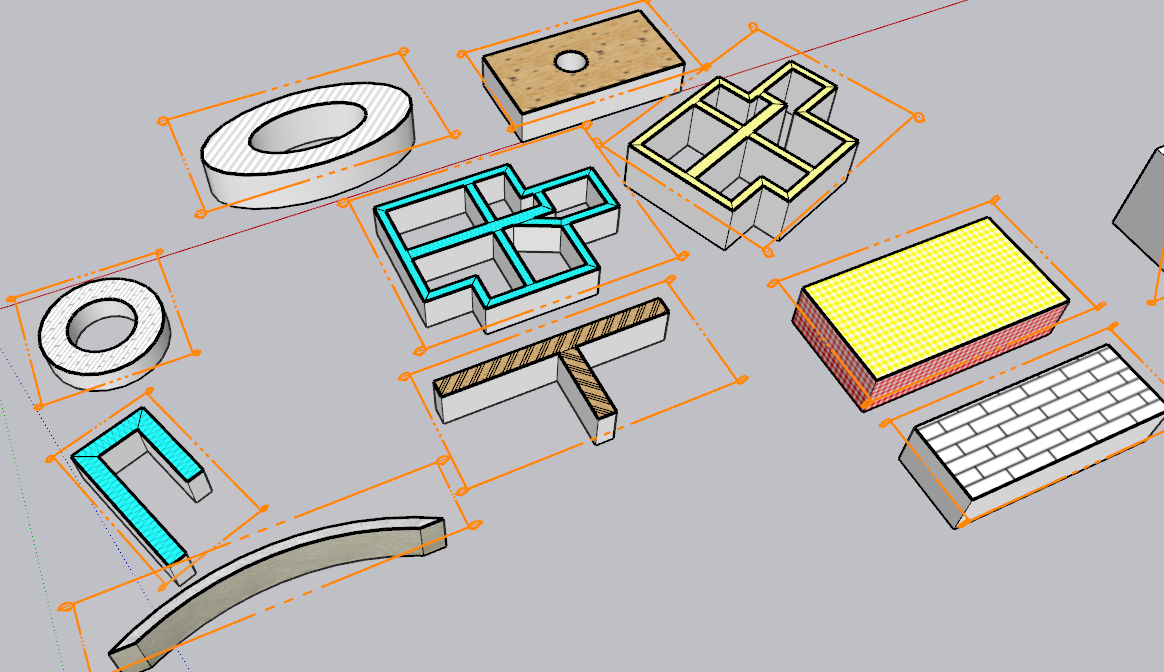
Generation of section cut faces with hatching patterns at scale for section planes which are active in scenes. Patterns can be assigned by Container and/or by Tag
-
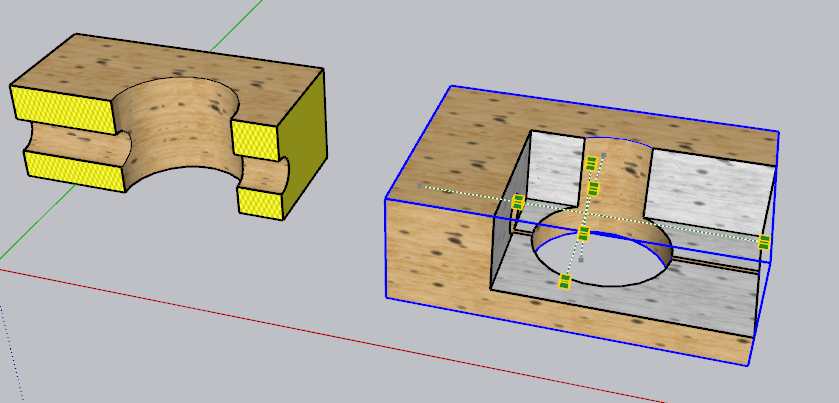
Section box: create a configurable set of section planes (inside box, outside box, custom section line) for a selection of geometry.
-
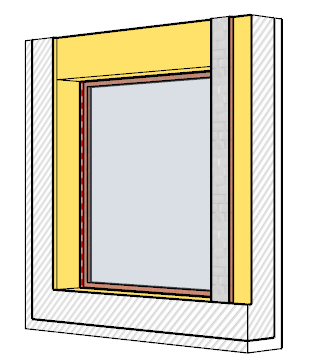
Door and window schedule: create a permanent companion model with selected views of doors and windows, which can then be mapped at scale in a Layout document. This will be released in a next version however.
-
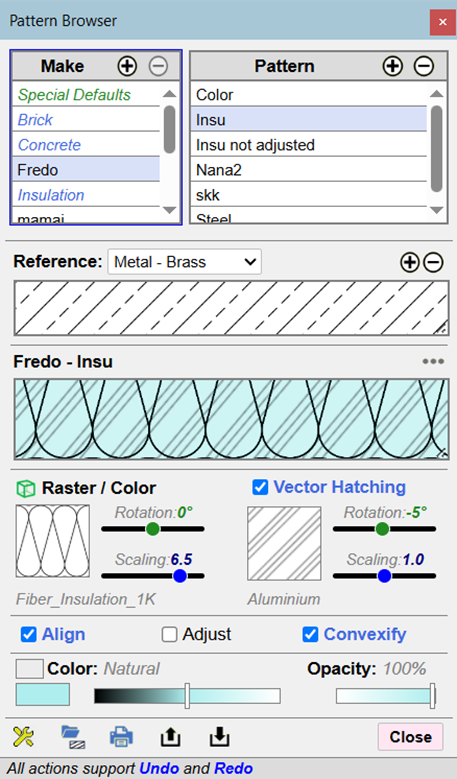
Pattern Manager: This tool is used to create / modify hatching patterns and assign them to groups and components to decorate their cut faces created by the other tools above. FredoSection comes with a set of built-in patterns, but you can create your own.
FredoSection is mainly oriented to support a workflow Sketchup + Layout. It only works on Scenes. The hatching patterns are scaled by scene, so that they always appear at the same size when printed on paper. This requires that you assign a paper scale to each scene processed.

Here is a short user manual for the generation of Cut Faces, the Pattern Editor and the Section Box.
FredoSection - User Manual - English - v1.4 - Jan 2026.pdf

I published a few videos to give an overview of the main tools:
Generation of Cut Faces: Overview
Pattern Editor: Overview
Pattern Modes: Overview
Section Box: Overview
Section Box: Modifying geometry
Video by The Sketchup Essentials on the cut face generation and pattern editor.
-
RE: [Plugin] Fredo Layport - v1.4a - 19 Dec 25
NEW RELEASE: Layport v1.4a - 19 Dec 25
Requirements:
- LibFredo6 15.6
Layport v1.4a is a maintenance release:
- Extension of validity
Home Page of Layport for information and Download.
-
RE: [Plugin] FredoConnect - v1.4a - 19 Dec 25
NEW RELEASE: FredoConnect v1.4a - 19 Dec 25
Requirements
- LibFredo6: v15.6a or above
- Sketchup version: SU2023 and above
FredoConnect 1.4a is a maintenance release including:
- Extension of validity
Home Page of FredoConnect for information and Download.
-
RE: [Plugin] FredoGuides - v2.9a - 19 Dec 25
NEW RELEASE: FredoGuides v2.9a - 19 Dec 25
Requirements
- LibFredo6: v15.6a
- Sketchup version: SU2017 and above
FredoGuides v2.9a is a release for extension of validity
**Home Page of FredoGuides** for information and Download.
-
RE: [Plugin] LayOps - v1.3a - 18 Dec 25 (Dual Dimensions in Layout)
NEW RELEASE: LayOps v1.3a - 18 Dec 25
Requirements:
- >= LibFredo6 15.6a
LayOps 1.3a is a release including:
- Extension of validity
Home Page of LayOps for information and Download.
-
RE: [Plugin] FredoBatch - v1.5a - 18 Dec 25
NEW RELEASE: FredoBatch v1.5a - 18 Dec 25
Requirements:
- LibFredo6 15.6a
FredoBatch v1.5a is a release including:
- Extension of validity
Home Page of FredoBatch for information and Download.
-
RE: [Plugin] Animator - v4.6a - 18 Dec 25
New Release: Animator - v4.6a - 18 Dec 25
Requirement: LibFredo6 v15.6
Animator 4.6a is a maintenance release for:
- Extension of validity
See plugin home page of Animator for Download of RBZ from the PluginStore.
See Main Post of the Animator thread for more information.
-
RE: [Plugin] MatSim (Material Simulation) - v1.7a - 17 Dec 25
NEW RELEASE: MatSim v1.7a - 17 Dec 25
Requirements
- LibFredo6: v15.6a or above
- Sketchup version: SU2017 and above
MatSim 1.7a includes changes for:
- Extension of validity
Home Page of MatSim for information and Download.
-
RE: [Plugin] FredoSketch - v1.7a - 17 Dec 25
NEW RELEASE: FredoSketch v1.7a - 17 Dec 25
Requirements:
- LibFredo6 15.6
FredoSketch v1.7a is a maintenance release:
- Extension of validity
Home Page of FredoSketch for information and Download.