sketchucation logo sketchucation
    • Login
    1. Home
    2. eneroth3
    3. Posts
    Oops, your profile's looking a bit empty! To help us tailor your experience, please fill in key details like your SketchUp version, skill level, operating system, and more. Update and save your info on your profile page today!
    โš ๏ธ Important | Libfredo 15.6b introduces important bugfixes for Fredo's Extensions Update
    Offline
    • Profile
    • Following 0
    • Followers 0
    • Topics 5
    • Posts 195
    • Groups 2

    Posts

    Recent Best Controversial
    • RE: [Plugin] Eneroth Railroad System (v 0.1.21)

      @unknownuser said:

      I don't find these texts...

      And new update linked!

      [attachment=1:6fu5hukj]<!-- ia1 -->train11.jpg<!-- ia1 -->[/attachment:6fu5hukj]

      I've said a long long time ago that those wouldn't be updated since it's a part of the content that may be user created, not a part of the system. That was one of the reason I said there probably wouldn't be translation support ๐Ÿ˜’ .

      Also after spending quite some time searching (thatI could have spend coding) it seems like the correct translation (the one consistent to how the word is used in this context) of Cancel is Annuler, not Abandonner. Please make sure the translation is correct. Otherwise it's more harm than help.

      Edit: the quote from page 4

      @eneroth3 said:

      The work of manually translating would be lost in some week or so. Unless the text strings are separated from the code there's not really any idea doing it. %(red)[However I'm not really sure of what to do since user created content (including track types shipped with the extension) would just be in the user's language unless the user translates it themselves to all languages.

      Randomly mixed languages is just annoying and one of the reasons I really hate it when websites and softwares tries to make Swedish translations.]

      posted in Plugins
      eneroth3E
      eneroth3
    • RE: [Plugin] Eneroth Railroad System (v 0.1.21)

      @unknownuser said:

      French Interface Updated ๐Ÿ˜„
      [attachment=1:u0nh033n]<!-- ia1 -->fr1.zip<!-- ia1 -->[/attachment:u0nh033n]

      I'll look at it! ๐Ÿ‘

      @unknownuser said:

      is missing Down menu "Type or track", "Type of Signal" ...
      I must refind the original file

      [attachment=1:u0nh033n]<!-- ia1 -->fr1.zip<!-- ia1 -->[/attachment:u0nh033n]

      What does that mean in English?

      posted in Plugins
      eneroth3E
      eneroth3
    • RE: [Plugin] Eneroth Railroad System (v 0.1.21)

      Btw, nice truck Dean!

      posted in Plugins
      eneroth3E
      eneroth3
    • RE: [Plugin] Eneroth Railroad System (v 0.1.21)

      Dean: There's no need to make those wheel rotate since they are completely round without anything else in them. Hide the hidden geometry and endpoints and no one will see the difference. I've only made the wheel with wheel spokes in my own rolling stocks rotate. ๐Ÿ˜‰

      @aerilius said:

      I remember there was the set_html issue (although it was reported not to happen anymore). Is that a possible cause?

      I think it's an error with javascript not being executed from dialog.load_modal. According to the screenshot some pages ago the content's isn't shown in the Add Track dialog. When the dialog is created the model selection should determine what tab is opened (if no track is selected user probably want to create one from scratch, if one is selected new tracks based on the selection will be suggested). According to the additional screenshots the other dialogs works fine.

      @unknownuser said:

      @unknownuser said:

      look inside your language file. set the punctuation mark at end of the phrase.

      Of all phrases ? There are no point in certain original phrases! ๐Ÿ˜ฒ

      Some should have a period, some a question mark, some a colon, some parenthesis, some have capital letters at the start of each word and 2 should even start with a lower case letter since it's within a sentence spanning several text entries. Look at the text in its context when translating and do as the original string is done.

      posted in Plugins
      eneroth3E
      eneroth3
    • RE: [Plugin] Eneroth Railroad System (v 0.1.21)

      @mwm5053 said:

      Downloaded new ver. and still get empty dialogue boxes.

      Odd ๐Ÿ˜ฒ . What OS version is it? Do you know if it's older or newer than Oxer's?

      posted in Plugins
      eneroth3E
      eneroth3
    • RE: [Plugin] Eneroth Railroad System (v 0.1.21)

      @deaneau said:

      @unknownuser said:

      Cool new version! โ˜€
      Let see if I will make better this time! ๐Ÿ˜„

      Translation of the text file multi language done! โ˜€
      Must be inserted on the dialog boxes for verification!
      (because French text is some bigger than English )
      Tomorrow will be made. ๐Ÿ˜„

      german language have longer words ๐Ÿ˜‰

      german language is ready

      dean

      It already supports Spanish which has short words but a lot of them so I think it'll work ๐Ÿ˜‰

      posted in Plugins
      eneroth3E
      eneroth3
    • RE: [Plugin] Eneroth Railroad System (v 0.1.21)

      Version 0.1.12 is now published! ๐Ÿ˜„

      The main new features are a better interface to save rolling stocks to library and support for translations (big thanks to Oxer for Spanish translation now shipped in the extension ๐Ÿ‘ ).

      Download

      save to library.png

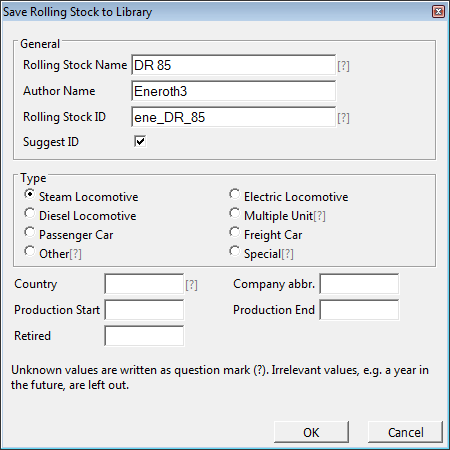
      The new interface for saving rolling stocks along with the improved documentation has made it easier to add rolling stocks to the library. Now rolling stocks can be saved from within any model instead of having to be alone. Images are also automatically generated now even if it's a bit buggy and a better image can be generated manually (more info in documentation). The new dialog for saving rolling stocks now suggests IDs for them so the user doesn't need to worry to much about that either.

      To save a rolling stocks to library, select it (after it's initialized) and run Ene_Railroad.ss_2_rs_library to open the dialog (graphical interface to open dialog is planned for a later version).

      The translation system allows for translated versions of all strings within the plugin itself. The documentation will however stay in English since it constantly changes.

      You can change between available languages in Plugins > Railroad > Change Language.

      To translate the plugin download the attached file, add the language name and your name at the top 2 lines. The syntax for the translation is "original string"="translated string". When adding the translation remember to look at the string in its context inside the plugin and be consistent with reoccurring terms such as track and rolling stock. Save the file as <language code>.l10n inside the folder "lang/" in the plugin's folder.

      If you want to I can include the translation in the next version ๐Ÿ˜„ .

      I hope to see pictures of people's own rolling stocks posted here now ๐Ÿ˜„ .


      template.txt

      posted in Plugins
      eneroth3E
      eneroth3
    • RE: Castle Gate Scene

      What filter did you apply in PS? I'd really like to do something similar with my own castle and use for paintings inside the castle itself ๐Ÿ˜„

      posted in Gallery
      eneroth3E
      eneroth3
    • RE: [Plugin] Eneroth Railroad System (v 0.1.21)

      @oxer said:

      I have created a Spanish Language File with all strings to translate. It's a .txt file that it includes the English string and the corresponding Spanish string:
      "English Text"="Spanish Text"
      The strings are organized by files i.e. main.rb, balise.rb, balise - index.html, ....
      I hope that this file can help you to give support to translate the plugin to all languages.

      [attachment=0:kyjytomg]<!-- ia0 -->Spanish Language.txt.zip<!-- ia0 -->[/attachment:kyjytomg]

      Thanks ๐Ÿ‘ . If I add a language system to the plugin I'll include this ๐Ÿ˜„

      posted in Plugins
      eneroth3E
      eneroth3
    • RE: [Plugin] Eneroth Railroad System (v 0.1.21)

      @unknownuser said:

      @unknownuser said:

      The path is still wrong.

      So it's still wrong also on the documentation, see the image above.
      I don't know what I must put! ๐Ÿ˜•

      It should say what it said before you changed it! ๐Ÿ˜ก

      @unknownuser said:

      @unknownuser said:

      There still seems to be no difference between the third and forth header level.

      I will see that I can make...

      There was already correct headers in the document. You only had to change the text inside the existing elements. ๐Ÿ˜ก

      @unknownuser said:

      @unknownuser said:

      There is still colored text where it shouldn't be.

      I can't with my sytem[sic] make the same than the colored arounded[sic] text ๐Ÿ˜•

      Then don't use that system. It was already correct. You only had to change the text. Not recreate the document from scratch. ๐Ÿ˜ก

      Also that doesn't even answer what I said. text is colored where it shouldn't be colored. You even changed it to different colors where there shouldn't be any colors in the first place. ๐Ÿ˜ก

      @unknownuser said:

      @unknownuser said:

      It's not near perfection.

      Perfection is not for this world! ๐Ÿ˜„

      You we're the one saying it was near perfection, thus bringing the term perfection into the conversation and now you say it shouldn't be perfect. ๐Ÿ˜ก

      @unknownuser said:

      @unknownuser said:

      It's not even decent.

      I have yet seen worse! ๐Ÿ˜„

      I've found so many errors it's embarrassing. And that's just about formatting, exact quotes and other things I as someone not speaking French can see. I have no idea what the grammar and spelling is like. I have no idea if the text says what it should say. It could just as well be a cupcake recipe. I don't know if you would even notice if it was a cupcake recipe since you don't seem to have understood the text in the first place when you translate text quoted from the context menu within the plugin.

      posted in Plugins
      eneroth3E
      eneroth3
    • RE: [Plugin] Eneroth Railroad System (v 0.1.21)

      @unknownuser said:

      Corrected - near the perfection! ๐Ÿ˜„

      No.

      The path is still wrong.

      There still seems to be no difference between the third and forth header level.

      There is still colored text where it shouldn't be.

      The colored text is now also bold which makes it even harder to read the document.

      The attributes for moving parts are sometimes bold, sometimes not.

      There are now missing line breaks at the balise page.

      It's not near perfection.

      It's not even decent.

      @unknownuser said:

      And about the curious "double pt2" railways on the above image?

      Those are the corresponding tracks to use on a double track railroad along with those called pt 1.

      posted in Plugins
      eneroth3E
      eneroth3
    • RE: [Plugin] Eneroth Railroad System (v 0.1.21)

      I've also noticed you randomly color color names in the text as if the user didn't know what colors look like. This is done at the Coupling Tool page and the red back lights on trains at the Create Rolling Stock page. In the real documentation colors were only used for model axes to better explain what color corresponds to what axis name. Coloring other text is just confusing since it may lead the user to think it has to do with the model axes. Also you didn't even color the text with the color it says but used cyan where it says blue on the Coupling Tool page.

      posted in Plugins
      eneroth3E
      eneroth3
    • RE: [Plugin] Eneroth Railroad System (v 0.1.21)

      @unknownuser said:

      "Change Texts" corrected ๐Ÿ˜„ But the French word was a synonym ๐Ÿ˜‰

      Did you even read the text when translating it? You can't refer to a menu item by another name than what it actually says in the plugin. Regarding the path I have no idea why you changed it. It was already correct so there is no reason to write something else than it already says.

      I still can't see any difference between the different headers such as "rotation" and "Les piรจces en mouvement". I don't know why you had to change this either because the document was already formatted. You only had to change the text. There are many many more formatting errors such as "text_Label" where "Label" should be italic to show it's a variable while "text_" is a constant. You didn't need to change this either because it was already correct.

      So far I've only looked at ONE page in the whole documentation but when I looked at the Balise page I noticed there are some random spaces in "m / s". It means meter divided by second and should not have spaces in it. It didn't have it before so I don't know why you added them. Also acceleration is not measured in "m/s2". It's measured in "m/s[sup:3o2e9utn]2[/sup:3o2e9utn]". It means meter divided by second squared - how much the velocity (m/s) changes per second ((m/s)/s). It was correct so there was no reason to change that either.

      posted in Plugins
      eneroth3E
      eneroth3
    • RE: [Plugin] Eneroth Railroad System (v 0.1.21)

      @unknownuser said:

      Some Titles corrections You are very strict! ๐Ÿ˜„

      As the page text is some long, reader has forgotten the level of reading and me too! ๐Ÿ˜„

      It's not about remembering but about understanding what text is under what header. "rotation" for instance is a sub header of "Les piรจces en mouvement" which is a sub header of "Dessin du Matรฉriel roulant". Without this relation the text loses it's meaning.

      I found some more errors. The path "r_stocks / " is wrong, there is no such folder. Also there is nothing called "Modifier les Textes" in the context menu of a rolling stock.

      posted in Plugins
      eneroth3E
      eneroth3
    • RE: [Plugin] Eneroth Railroad System (v 0.1.21)

      @deaneau said:

      i have try connect, too. however if i try to change the properties nothing happend in 2013.

      Doesn't it work to open track properties and change track type after the track is connected?

      posted in Plugins
      eneroth3E
      eneroth3
    • RE: [Plugin] Eneroth Railroad System (v 0.1.21)

      @unknownuser said:

      With new version 1.11 on 2014 (previous version was fine)

      Seems Connect Ends system from Selection between roads create rails! ๐Ÿ˜ฒ
      Does this normal ?

      And Add a Rolling Stock adds an image and not a volume! ๐Ÿ˜ฎ

      So far default track is always used to connect other tracks. I really have no idea about the image though. Have you been renaming files in the rolling stock folder? Does it happen with other rolling stocks?

      Edit: btw, the latest version is called 0.1.11, there will not be a 1.11[.someting] for a year or so.

      posted in Plugins
      eneroth3E
      eneroth3
    • RE: [Plugin] Eneroth Railroad System (v 0.1.21)

      @oxer said:

      Excuse for no reply before. All web dialogs work fine now on Mac 10.9.3 & SU2014, included "Insert Track".

      No worry about not replying earlier:). It's good that the web dialogs work but I don't understand why it didn't for
      mwm5053.

      @oxer said:

      One question, the Track Properties icon is off although you have selected a Track, you can to access to the Properties Track only by Contextual Menu.

      That's odd. Perhaps Mac doesn't run the Proc determining its state as often as Windows.

      @oxer said:

      To translate the web dialogs BGSketchup_Composants plugin have a file named Loacalization.rb that include all languages, I don't know the ruby code but perhaps this can be a solution to give support to translation.

      It's quite easy to just load strings in ruby from localized files but getting it into web dialogs that are saved as HTML documents is a bit tricker but there are solutions. However the names and description of track types would not b4e translated since that's custom often user created content.

      posted in Plugins
      eneroth3E
      eneroth3
    • RE: [Plugin] Eneroth Railroad System (v 0.1.21)

      @deaneau said:

      @eneroth3 said:

      If there is a translation it has to be 100% correct and not fool the user into problems with the plugin. However I don't see a very big need for it. Learning English, today's lingua franca, is a long term solution that is also very beneficial in other situations throughout life.

      translation is on part, the translator must understand the subject,too.
      i need only a translation, if the subject will be very difficult to understand.

      difficult for me is the way to setup the rolling stock like the flying scotman.

      dean

      That's also the part hardest to translate because if anything is not 100% perfect it will go wrong and not work. I might some day look into the docs and try to make it easier to understand with more images, perhaps even videos of certain steps. Perhaps there will even be a graphical interface in the distant future to initialize the moving parts more easily.

      posted in Plugins
      eneroth3E
      eneroth3
    • RE: [Plugin] Eneroth Railroad System (v 0.1.21)

      If there is a translation it has to be 100% correct and not fool the user into problems with the plugin. However I don't see a very big need for it. Learning English, today's lingua franca, is a long term solution that is also very beneficial in other situations throughout life.

      posted in Plugins
      eneroth3E
      eneroth3
    • RE: [Plugin] Eneroth Railroad System (v 0.1.21)

      @unknownuser said:

      Effectivelly I had changed some capitals ๐Ÿ˜„

      yes it's all the difficulty of translation!
      What translate or not! ๐Ÿ˜„

      So imagine in the Ruby code Text! ๐Ÿ˜„

      "radius" and all few little things corrected

      @unknownuser said:

      Also there are no headers in the text except for in a few random places so it's quite hard to see what text belongs to what.

      This is very mysterious for me!
      Have you an example of that ? Or a Copy screen ?

      "Les piรจces en mouvement" is a little bigegr than normal text and has the same color even though it is a second level header. "Toutes les piรจces mรฉcaniques" looks the same even though it's a third level header. "translation_circular" is also a third level header but it's white unlike all other text.

      posted in Plugins
      eneroth3E
      eneroth3
    • 1 / 1