sketchucation logo sketchucation
    • Login
    1. Home
    2. eneroth3
    3. Posts
    Oops, your profile's looking a bit empty! To help us tailor your experience, please fill in key details like your SketchUp version, skill level, operating system, and more. Update and save your info on your profile page today!
    ⚠️ Important | Libfredo 15.6b introduces important bugfixes for Fredo's Extensions Update
    Offline
    • Profile
    • Following 0
    • Followers 0
    • Topics 5
    • Posts 195
    • Groups 2

    Posts

    Recent Best Controversial
    • RE: [Plugin] Eneroth Railroad System (v 0.1.21)

      Dean:

      Do you have the specifications this model is drawn after? I'd like to know the width of where the catenary can be and the default height. Measurements of the catenary support structure would be very useful too. Also if there's a specific color used on these that color code would be useful for drawing own catenary.

      posted in Plugins
      eneroth3E
      eneroth3
    • RE: [Plugin] Eneroth Railroad System (v 0.1.21)

      @fionmacool said:

      Apologies if this has been already covered but I can't find a reference.
      How do I change the train direction? Both when placing the train and when the train has been placed already?

      To go backwards you set the speed to zero and the reverse button gets enabled in the drive dialog. To place it the other way around I think you should press tab. I'm currently at my frinds house and don't have Sketchup or the plugin installed here but the status bar text in add rolling stock tool should say what key to press.

      @deaneau said:

      about jPod is this a station or is this only a solar panele?

      i cant see elevators or escalators

      [attachment=1:3s1hozl4]<!-- ia1 -->_2014.08.02_04h49m09s_024_00922.jpg<!-- ia1 -->[/attachment:3s1hozl4]

      Link Preview Image
      JPods - Wikipedia

      favicon

      (en.wikipedia.org)

      looks nice.

      this could be design in a game too

      Google Search

      favicon

      (www.google.de)

      will be different colors of cars a different line?
      like this

      [attachment=0:3s1hozl4]<!-- ia0 -->_2014.08.02_05h19m08s_025_00923.jpg<!-- ia0 -->[/attachment:3s1hozl4]

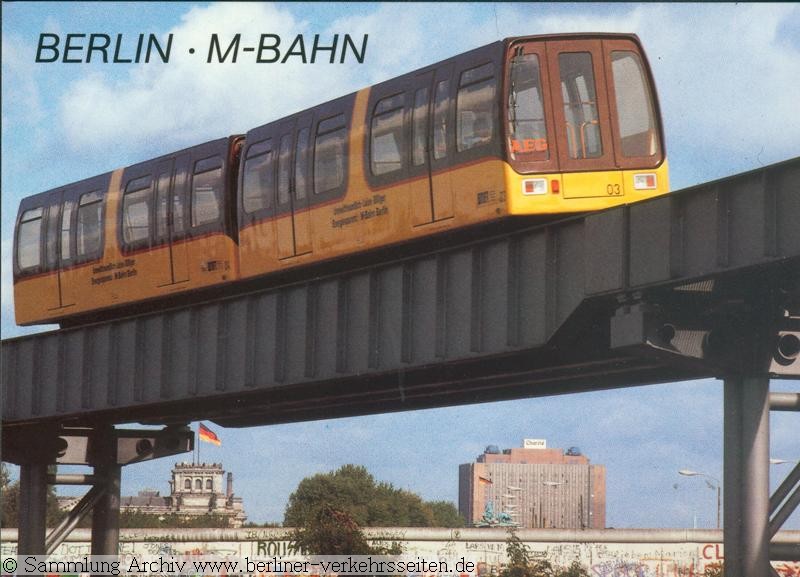
      do you know more about this system? ok elecrical (solar). in berlin we have had monorail

      M-Bahn - Die Magnetbahn Referenzstrecke in Berlin - Nahverkehrstechnologie Entwickelt in Berlin - www.berliner-verkehrsseiten.de

      favicon

      (www.berliner-verkehrsseiten.de)

      http://www.berliner-verkehrsseiten.de/m-bahn/M-Bahn-1988.jpg

      That's a solar panel. There wont be different lines. The pod goes all the way to the station you want it to go to.

      posted in Plugins
      eneroth3E
      eneroth3
    • RE: [Plugin] Eneroth Railroad System (v 0.1.21)

      Version 0.1.14 is out!
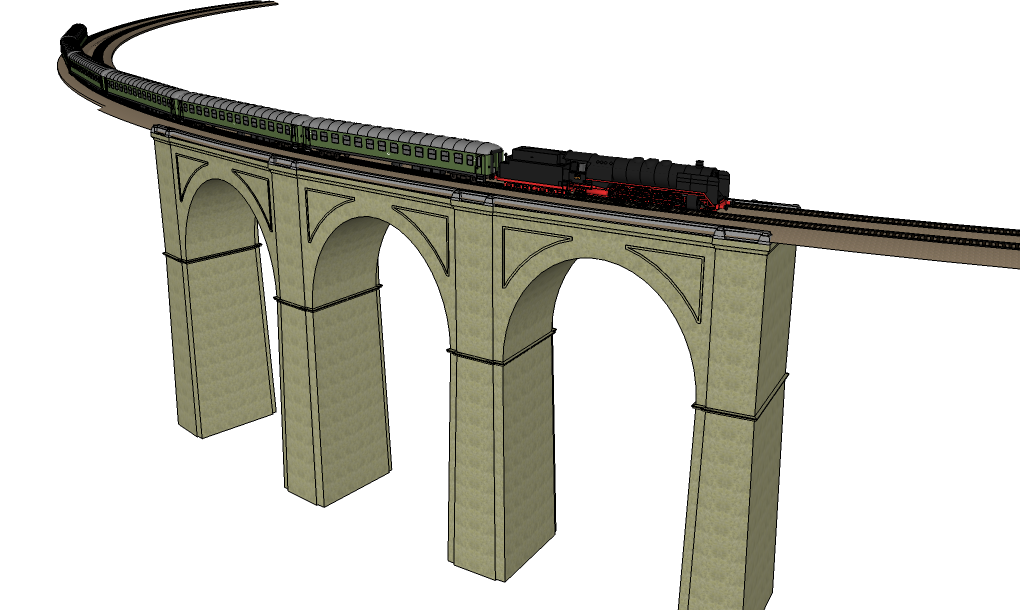
      structure.png

      There are a few new features. The biggest is probably that tracks has been split into the actual track and the structures to place along the track. this means that there are more combinations of tracks and structures but also that there can be several structures at the same place, e.g. a bridge and a platform alongside the track. Or a platform at each side.

      The old track types with structures built in are no longer shipped with the extension. You may want to remove these from the "Tracks/" subfolder in the plugin's folder before updating to get a cleaner track list. However that also prevents you from redrawing existing tracks of those types in the model unless you change the track type and add the structure separately.

      The signal system has also been updated and users can now create their own signals quite easily. There's also an option in Add Track tool and Track properties not to have any signals at all.

      Tracks with signals need to be fully redrawn to utilize the new signal system. This can be done manually by clicking them with the Track Position tool and go back (Esc or Enter) without changing their control points.

      Lastly the Track properties dialog now supports multiple tracks at once. This makes it a lot easier to change the track type of several tracks at once.

      There are also some bugfixes such as the Add Track tool now working in models with imperial units (stupid units using the same characters as are used as string delimiters -_- ).

      I'm now also sponsored by a company called JPods to help them visualize their product for customers. JPods are small rail vehicles carrying just a few passengers each all the way to the chosen station within the network without any need for interchange. All powered with solar panels.

      Download

      Example Model

      posted in Plugins
      eneroth3E
      eneroth3
    • RE: [Plugin] Eneroth Railroad System (v 0.1.21)

      You can draw the locomotive at any size but then only use it at that size. Duplicating the same rolling stocks for different scales really isn't the right way to go. Also the slider in the drive dialog would be wrong unless the plugin doesn't know the scale and can adapt to it. The same goes for arrows in the switch tool and add rolling stock tool. I think it's easiest to draw in full scale in Sketchup. After all a model railroad is also a model representing the real world (or at least an imaginary part of it) which is in full scale.

      posted in Plugins
      eneroth3E
      eneroth3
    • RE: [Plugin] Eneroth Railroad System (v 0.1.21)

      @deaneau said:

      @eneroth3
      ok

      @jonb42

      is simple:

      build your loco 1:1

      than

      draw a line 1435mm
      groop loco and line
      use the tape measure tool

      pick the first point of the line

      go to the second point and click

      enter your targed gauge in measurements (left below)

      this scale down the scene.

      if you only want scale down the loco and other object 1:1

      do this

      build your loco 1:1

      than

      draw a line 1435mm

      groop loco and line

      GROOP AGAIN

      go in the groop (double click)

      use the tape measure tool

      pick the first point of the line
      go to the second point and click
      enter your targed gauge in measurements (left below)
      be happy

      if you need pictures or movie let me now

      regards dean

      This cannot be done on rolling stocks that are already initialized such as those in the rolling stock library. The scale would be reset when driving. Also it won't work on tracks. Scaling tracks with the scale tool changes the path they are drawn to and is used when you for instance want to change the radius or the length. The track is then redrawn with the same guage as before.

      posted in Plugins
      eneroth3E
      eneroth3
    • RE: [Plugin] Eneroth Railroad System (v 0.1.21)

      @jonb42 said:

      Speaking of model railways I'd appreciate the option to choose scale when placing track / stock. Model railways are for the most part scale models and therefore you shouldn't have to do anything that different for them except scale... At least for me:)

      In specific I used to have model trains mostly of the Hornby 00 scale which is 1:76 according to Wikipedia though I also had a small set of 000 (1:152) and some O (1:43.5). For the animation I want to do I'd like to use something close to the 0 scale.

      Simple enough to scale it myself after creation of course however easier to route track through an existing model if it is already a scale that makes sense therein.

      • Jon

      I think it would be quite complicated to implement. There would need to be either scale inputs in all drawing tools or a new dialog for model info to definite in for the whole model. Also if the tools scale what they add the other models containing track types and rolling stock always needs to be at full scale which isn't user intuitive when the railroad model isn't. Lastly a few values have been hard coded into the plugin such as the height of the coupling symbol over the track in coupling tool.

      I think it would be easier to scale up the model railway and draw everything at full scale in SU. This also has the advantage that you don't need to rescale the whole model if you decide to have it in another scale in real life.

      @deaneau said:

      Hello Christina, hello ERS Fans (Eneroth Railroad System Fans)

      what do you think about an IdeaPool for ERS?

      my feeling is, that i overburden Christina with my ideas and wishes,
      now i have find out that some features doesnΒ΄t work in 0.1.13 .
      [---]

      I feel more burden by ideas to administrate everything 😲 . Why not just write it directly in this thread and not make it more complicated than that?

      posted in Plugins
      eneroth3E
      eneroth3
    • RE: [Plugin] Eneroth Railroad System (v 0.1.21)

      Since there isn't a word for an invisible, non-physical point that can make just about anything happen when a train passes it I chose the word that best describes it. I could have called it Invisible-wisard-that-can-only-stand-on-a-track-and-do-magic-once-hit-by-a-train but it makes less sense to the user. Since the feature was/is primarily used to control train speed I think the name suits it.

      My dad is a model railroader. Mostly MΓ€rklin H0 and Z.

      I've thought about implementing some sort of track library with different pre-defined tracks, e.g. for model railroads but there are other features that have higher priority now.

      posted in Plugins
      eneroth3E
      eneroth3
    • RE: [Plugin] Eneroth Railroad System (v 0.1.21)

      Dean,

      I have no idea what you got the things about bug fixes not working on different platforms, comparing files, uninstall, deactivate plugins and all that from. Everything indicated it was the same bug on both platform and I've found a fix for it that should work unless there are more separate bugs in the code.

      The balise is for now only a technical feature for running code and has nothing to do with the physical model. I chose that name because it best described something on the track that makes something happen when some train runs by it. I've thought about extending this feature to include something that is drawn to the model, either a signal or an actual balise, but that's for the future. In that case I also rename the feature "Balise/Signal" or something similar and it will still be possible to not show it at all because it doesn't make sense to have a balise on the track or a signal next to it that paints trains.

      The documentation has lots of examples that can be used in balises without being a programmer. Just copy and paste it. You can also read the balise code in the example model by double clicking on a balise with the balise tool open.

      posted in Plugins
      eneroth3E
      eneroth3
    • RE: [Plugin] Eneroth Railroad System (v 0.1.21)

      Found a fix!

      If you replace

      js << "document.getElementById('center_distance').value='#{@@center_distance.to_s}';"
      

      with

      js << "document.getElementById('center_distance').value=#{@@center_distance.to_s.inspect};"
      

      it should work. Also you don't need to do any of the things Dean said.

      Thanks for the help finding this πŸ˜„ πŸ˜„ !

      posted in Plugins
      eneroth3E
      eneroth3
    • RE: [Plugin] Eneroth Railroad System (v 0.1.21)

      I think I've found it. When the plugin tries to write the currently used parallel distance (4,5 m written in whatever unit Sketchup is set to) to the input field. The code cannot be executed if it contains a ' sign since that's also used as quotes to define where the string starts and ends.

      To the computer it becomes "this " is a quote" and it doesn't know how to read it. This also explains why my file works since it uses metric units that doesn't have the ' sign in them.

      posted in Plugins
      eneroth3E
      eneroth3
    • RE: [Plugin] Eneroth Railroad System (v 0.1.21)

      @jonb42 said:

      @eneroth3 said:

      Dean: Unless this specific bug occurs to any of those developers I don't know what they can do about it. I's probably something that is fixed really easily once it's found but it can only be found on a computer it occurs on.

      Jon: That's the right place πŸ‘ . Did you activate the add track tool after adding this code?

      On my macbook last night adding the "puts js" did absolutely nothing, as I mentioned in my last post.

      The plugin did work on my macbook when I used it with your example file, so it seems to be acting in the same way as the Window version.


      Now today I just tried adding the "puts js" on line 393 on my Win 7 computer and did get something to show on the console, see attached image.

      • Jon

      This is exactly what I need πŸ˜„ . Something in the javascript code in the console goes wrong at character 597 and it depends on the model file being open. I'll look in to it right away.

      Thanks!!

      posted in Plugins
      eneroth3E
      eneroth3
    • RE: [Plugin] Eneroth Railroad System (v 0.1.21)

      Dean: My names are both Julia and Christina but most people say Christina. And I don't understand what that image has to do with anything.

      posted in Plugins
      eneroth3E
      eneroth3
    • RE: [Plugin] Eneroth Railroad System (v 0.1.21)

      Dean: Unless this specific bug occurs to any of those developers I don't know what they can do about it. I's probably something that is fixed really easily once it's found but it can only be found on a computer it occurs on.

      Jon: That's the right place πŸ‘ . Did you activate the add track tool after adding this code?

      posted in Plugins
      eneroth3E
      eneroth3
    • RE: [Plugin] Eneroth Railroad System (v 0.1.21)

      Dean,

      These links are quite inspiring. I've actually drawn 2 structural gauges (European ones) as rolling stocks included in the plugin that can be used to test tracks.

      @deaneau said:

      all parts was build with original blueprints!!!

      Do you know any online resources for original drawings?

      posted in Plugins
      eneroth3E
      eneroth3
    • RE: [Plugin] Eneroth Railroad System (v 0.1.21)

      Jon,

      Sorry, I gave you the wrong line number because I've added more code above it in my local copy. The code needs to be on line 393 and without quotes:

      puts js
      

      I've never installed a plugin from the Pluginstore so I don't know if it puts the files in the wrong location, however if it does the plugin shouldn't open at all.

      It seems like something goes wrong when creating the javascript that is later executed in the web dialog so I'd like to know what code is executed (the variable named js). I really have no idea how this can work in my example model but not in new models. That is really odd.

      Thanks

      posted in Plugins
      eneroth3E
      eneroth3
    • RE: [Plugin] Eneroth Railroad System (v 0.1.21)

      @jonb42 said:

      I'm having the same problem. I use SU 2013 and 2014 and in neither of them can I place track in a new drawing. When I open your example drawing however I am able to place track - it is as if a library was not loading but perhaps is already loaded in the example drawing.

      Also in SU 2013 I get a script error - see attached photo. I'm using your latest version 1.13 I think dated the 9th of this month.

      thanks though for this awesome plugin! I am really impressed and can't wait to place a train track throughout some new building model I want to show off to a customer!

      Jon

      Hi Jon

      This sounds very similar to an error on Mac that's one user has reported but that didn't occur for others. Can you add this code "puts js" to line 376 in track_insert_tool.rb and post the text printed in the console?

      posted in Plugins
      eneroth3E
      eneroth3
    • RE: [Plugin] Eneroth Railroad System (v 0.1.21)

      Pascal: The animations look great and I really like the 0.95 ratio thing to make it smoother. It looks just as filmed with a real stadicam. I think this library could grow and be used for much more than the train simulator. I agree with Thomthom about putting it on Github for more people to work on, then I can also add a link to it from the documentation of my plugin πŸ‘ .

      @leolouie said:

      I have just downloaded the Railroad plugin, but there are no selections in the "Add Track" box. Is there a link to other components?

      That's really odd. What Sketchup version are you using? 2013+ is needed.

      posted in Plugins
      eneroth3E
      eneroth3
    • RE: [Plugin] Eneroth Railroad System (v 0.1.21)

      @box said:

      A fantastic plugin, but it does have something that bothers me. I like to use a limited number of toolbars and only open them up when I need them. Your toolbar, no matter which way you close it, will always reopen on startup unless you have actually disabled the plugin. Could you look at removing this behavior.

      The plugin should run toolbar.restore within a 0 timer t avoid some bug (apparently called 2902434) but for some reason my code uses .show instead 😲 . It'll be fixed for the next release but you can manually change it an line 1248 in main.rb now if you want to. I think this was the solution for a bug in SU 8 which doesn't support the plugin so it's probably not needed at all. πŸ˜•

      posted in Plugins
      eneroth3E
      eneroth3
    • RE: [Plugin] Eneroth Railroad System (v 0.1.21)

      I can hardly believe my eyes when seeing the video. It's really cool!

      I think I can add the settings for how to follow a rolling stock in the advanced animation settings. I don't want to clutter the context menu since it makes it a lot more time consuming to find in it when drawing.

      By 'Translate camera', do you mean moving the camera relative to the train but without rotating and by 'Rotate around selection' the current behavior?

      I can add a reference called session_data to the balises where user can store any data they like during a the Sketchup session.

      Btw, custom signals have been added for the next version:).

      posted in Plugins
      eneroth3E
      eneroth3
    • RE: [Plugin] Eneroth Railroad System (v 0.1.21)

      Pascal: I've updated the Add Track Tool to avoid the problems with the control vector pointing the wrong way. The Lego tracks should work after you've replaced the file in the plugin with the one attached πŸ˜„ .

      I've also been working on adding the new references in the balise code. last_run and last_train is really simple but I was wondering how you imagined the custom data. It's quite hard to save it between sessions if it contains other classes than what can be written as attributes (trains for instance). Is it enough to save the custom data within the session only?

      Btw: I really love the idea of making Lego trains πŸ˜„ πŸ˜„

      Edit: The scale of the arrows in the switch tool and height of the coupling points in the coupling tool are still adapted for trains at the scale 1:1. However it now all should function even if not visually pleasing at other scales.


      track_insert_tool.rb

      posted in Plugins
      eneroth3E
      eneroth3
    • 1
    • 2
    • 3
    • 4
    • 5
    • 6
    • 7
    • 8
    • 9
    • 10
    • 5 / 10